Storybook: Vue component Error: Failed to mount component
Describe the bug
Custom components imported to Storybook do not render, console error:
[Vue warn]: Failed to mount component: template or render function not defined.

found in

---> <Logo> at components/logo/Logo.vue
To Reproduce
Steps to reproduce the behavior:
- Create story of a custom component.
start-storybook -p 9001 -c .storybook- See error in console
Expected behavior
Component Renders correctly
Screenshots

System:
- OS: MacOS
- Device: Macbook Pro 2018
- Browser: chrome
- Framework: vue, nuxt
- Version: 5.0.11
node -vv12.3.1
Additional context
package.json
{
// ...
  "author": "Alvaro Saburido",
  "private": true,
  "scripts": {
    "dev": "nuxt",
    "build": "nuxt build",
    "start": "nuxt start",
    "generate": "nuxt generate",
    "lint": "eslint --ext .js,.vue --ignore-path .gitignore .",
    "precommit": "npm run lint",
    "test": "jest --verbose",
    "serve:static": "nuxt generate && serve ./dist",
    "storybook": "start-storybook -p 9001 -c .storybook"
  },
  "dependencies": {
    "@nuxtjs/pwa": "^2.6.0",
    "babel-plugin-dynamic-import-node": "^2.2.0",
    "cross-env": "^5.2.0",
    "nuxt": "^2.8.0",
    "nuxt-i18n": "^5.12.3",
    "save": "^2.4.0"
  },
  "devDependencies": {
    "@nuxtjs/eslint-config": "^0.0.1",
    "@nuxtjs/style-resources": "^0.1.2",
    "@storybook/addon-actions": "5.0.11",
    "@storybook/addon-centered": "5.0.11",
    "@storybook/addon-console": "^1.1.0",
    "@storybook/addon-options": "5.0.11",
    "@storybook/addon-storysource": "5.0.11",
    "@storybook/addon-viewport": "5.0.11",
    "@storybook/addons": "5.0.11",
    "@storybook/vue": "^5.0.11",
    "@vue/test-utils": "^1.0.0-beta.27",
    "babel-core": "7.0.0-bridge.0",
    "babel-eslint": "^10.0.1",
    "babel-jest": "^24.8.0",
    "babel-preset-vue": "^2.0.2",
    "eslint": "^5.16.0",
    "eslint-config-prettier": "^4.3.0",
    "eslint-config-standard": ">=12.0.0",
    "eslint-loader": "^2.1.2",
    "eslint-plugin-import": ">=2.17.3",
    "eslint-plugin-jest": ">=22.6.4",
    "eslint-plugin-node": ">=9.1.0",
    "eslint-plugin-nuxt": ">=0.4.3",
    "eslint-plugin-prettier": "^3.1.0",
    "eslint-plugin-promise": ">=4.1.1",
    "eslint-plugin-standard": ">=4.0.0",
    "eslint-plugin-vue": "^5.2.2",
    "jest": "^24.8.0",
    "node-sass": "^4.12.0",
    "nodemon": "^1.19.1",
    "prettier": "^1.17.1",
    "sass-loader": "^7.1.0",
    "storybook-readme": "^5.0.3",
    "vue-jest": "^3.0.4",
    "vue-loader": "^15.7.0"
  }
}
.sotybook/config.js
import { configure } from '@storybook/vue'
import { setOptions } from '@storybook/addon-options'
import Vue from 'vue'
import Vuex from 'vuex'

Vue.use(Vuex)

Vue.component('nuxt-link', {
  functional: true,
  render: function(createElement, context) {
    let allClass = {}
    let arrClass = context.data.staticClass
      ? context.data.staticClass.split(' ')
      : []
    arrClass.forEach(theClass => {
      allClass[theClass] = true
    })
    return createElement('a', { class: allClass }, context.children)
  }
})
Vue.component('no-ssr', {
  functional: true,
  render(_createElement, context) {
    return context.children
  }
})

setOptions({
  name: 'Arepa Ipsum',
  url: 'https://github.com/hunterliu1003/blog',
  addonPanelInRight: true
})

const req = require.context('../components', true, /stories\.js$/)

function loadStories() {
  req.keys().forEach(filename => req(filename))
}

configure(loadStories, module)
.storybook/webpack.config.js
const path = require('path');

module.exports = {
  module: {
    rules: [
      {
        test: /\.stories\.js?$/,
        loaders: [require.resolve('@storybook/addon-storysource/loader')],
        enforce: 'pre'
      },

      {
        test: /\.vue?$/,
        use: ['vue-loader', 'vue-style-loader']
      }
    ]
  },
  resolve: {
    alias: {
      '@': path.dirname(path.resolve(__dirname)),
      vue$: 'vue/dist/vue.common.js'
    }
  }
}
Logo.vue
<template>
  <h1 class="logo">
    <img src="~/assets/svg/icon.svg" alt="Arepa Ipsum Logo" />
  </h1>
</template>

<style scoped>
.logo {
  width: 256px;
  height: 256px;
}
</style>
⚠️UPDATE: after a lot of digging into it, the problem is when using vue-loader in the webpack.config.js together with storybook. I saw in other issues it's a pretty common problem reported before. Any known fix?
 alvarosaburido
All 19 comments
Hey @alvarosaburido,
believe we need one more file to be able to help you:
- Can you add the
.stories.jsfile you are loading?
 elevatebart
on 10 Jun 2019
elevatebart
on 10 Jun 2019
OK, my bad I just did not look at your screenshot hard enough.
I have your story.
Just as a rule of thumb, if you want to share code, it usually is better to share it with text ;)
Thank you for sharing.
elevatebart
on 10 Jun 2019
I believe you might be missing the VueLoader Plugin in your webpack config.
Can you tell me it it helps ?
elevatebart
on 11 Jun 2019
Hello @elevatebart thanks for helping me, I managed to fix it by separating vue-style-loader to it's own rule for scss and include: path.resolve(__dirname, 'components'), in the vue-loader rule, like this:
...
rules: [
{
test: /\.s?css$/,
use: [
'vue-style-loader',
'style-loader',
'css-loader',
'sass-loader',
{
loader: 'sass-resources-loader',
options: {
// Provide path to the file with resources
resources: './assets/styles/shared.scss',
/*
// Or array of paths
resources: ['./path/to/vars.scss', './path/to/mixins.scss'] */
},
},
],
include: path.resolve(__dirname, '../'),
},
{
test: /\.stories\.js?$/,
loaders: [require.resolve('@storybook/addon-storysource/loader')],
enforce: 'pre',
},
{
test: /\.vue?$/,
use: ['vue-loader'],
include: path.resolve(__dirname, 'components'),
},
...
],
},
}
Hi everyone! Seems like there hasn't been much going on in this issue lately. If there are still questions, comments, or bugs, please feel free to continue the discussion. Unfortunately, we don't have time to get to every issue. We are always open to contributions so please send us a pull request if you would like to help. Inactive issues will be closed after 30 days. Thanks!
![stale[bot] picture](https://avatars3.githubusercontent.com/in/1724?v=4&s=40) stale[bot]
on 2 Jul 2019
stale[bot]
on 2 Jul 2019
Try the following:
template: <logo />
You shouldn't be using upper case name of the components in templates. Closing this and if still not fixed, please reopen.
 pksunkara
on 2 Jul 2019
pksunkara
on 2 Jul 2019
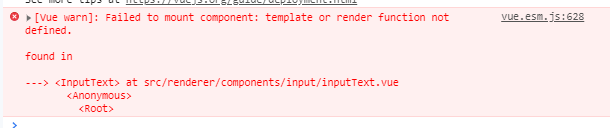
I am still facing the exact same issue.
 mittalyashu
on 25 Nov 2019
mittalyashu
on 25 Nov 2019
Hi, i'm still getting this issue within my storybook implementation. i've tried to lowercase the name within the template and not getting any joy.
Here's a link to a repo which is experiencing the issue: https://github.com/Pumba-Coder/nuxt-vuetify-storybook-global
 Pumba-Coder
on 5 Dec 2019
Pumba-Coder
on 5 Dec 2019
Is this able to be re-opened?
I have tried the resolutions above but haven't had any joy.
Pumba-Coder
on 13 Dec 2019
This is a configuration issue, not a casing nor loader's one.
The problem
Adding vue-loader to loaders array. Storybook (in this case, @storybook/vue) has its own preconfigured loaders array. Adding vue-loader to module.rules causes duplicated vue-loader rules, which does <source code> -> vue-loader -> vue-loader.
// like this
module.exports = {
  module: {
    rules: [
      {
        test: /\.vue$/,
        use: ['vue-loader', 'vue-loader']
      }
    ]
  }
}
So you should not add vue-loader without removing an existing one.
How to fix
1) Just remove the ~vue-loader~ rule for .vue file from your custom webpack config (.storybook/webpack.config.js). In many cases, you won't need to set it manually (@storybook/vue's default config does the job well).
// .storybook/webpack.config.js
module.exports = ({ config }) => {
  // config.module.rules.push({
  //   test: /\.vue$/,
  //   use: [{
  //     loader: 'vue-loader',
  //   }]
  // })

  return config
}
2) If you need to use vue-loader with non-default options, you can add it with removing default one.
// .storybook/webpack.config.js
module.exports = ({ config }) => {
  // Remove SB's default vue-loader
  config.module.rules = config.module.rules.filter(rule =>
    !(rule.test instanceof RegExp) || !rule.test.test('.vue')
  )

  config.module.rules.push({
    test: /\.vue$/,
    use: [
      {
        loader: 'vue-loader',
        options: { /* your options here */ }
      }
    ]
  })
}
 pocka
on 14 Dec 2019
pocka
on 14 Dec 2019
Thanks @pocka 🙏
 shilman
on 14 Dec 2019
shilman
on 14 Dec 2019
@pocka Cheers for taking the time to look into this issue, but i'm still seeing the same issue after trying both your solutions. Any other ideas,
Updated the source to show the 'vue-loader' remove from my custom webpack.config.
Pumba-Coder
on 14 Dec 2019
@Pumba-Coder Ah, my bad :scream: Updated "How to fix" section...
You need to remove the rule for .vue file itself, so try removing L56-L74!
pocka
on 14 Dec 2019
@pocka Get no joy from that, i need the sass-loader applied to the vue files otherwise i get a whole bunch of sass-errors.
Pumba-Coder
on 14 Dec 2019
@Pumba-Coder It's a sass-loader configuration issue.
Details (collapsed because this is an off-topic)
TL;DR
const path = require('path')
// const VueLoaderPlugin = require('vue-loader/lib/plugin')

// Export a function. Accept the base config as the only param.
module.exports = async ({ config, mode }) => {
  // `mode` has a value of 'DEVELOPMENT' or 'PRODUCTION'
  // You can change the configuration based on that.
  // 'PRODUCTION' is used when building the static version of storybook.

  // config.plugins.push(new VueLoaderPlugin())

  config.module.rules.push({
    test: /\.sass$/,
    use: [
      'vue-style-loader',
      'style-loader',
      'css-loader',
      {
        loader: 'sass-loader',
        // Requires sass-loader@^8.0.0
        options: {
          implementation: require('sass'),
          sassOptions: {
            fiber: require('fibers'),
            indentedSyntax: true // optional
          }
        }
      }
    ],
    include: path.resolve(__dirname, '../')
  })

  config.module.rules.push({
    test: /\.scss$/,
    use: [
      'vue-style-loader',
      'style-loader',
      'css-loader',
      {
        loader: 'sass-loader',
        // Requires sass-loader@^8.0.0
        options: {
          implementation: require('sass'),
          sassOptions: {
            fiber: require('fibers')
          }
        }
      }
    ],
    include: path.resolve(__dirname, '../')
  })

  config.module.rules.push({
    test: /\.css$/,
    sideEffects: true,
    use: ['style-loader']
  })

  config.module.rules.push({
    test: /\.css$/,
    use: [
      'vue-style-loader',
      { loader: 'css-loader', options: { sourceMap: true } }
    ]
  })

  config.resolve.alias['@'] = path.dirname(path.resolve(__dirname))

  // Return the altered config
  return config
}
Fixes
- Remove the rule for
.vue
- it parses
.vuefiles as CSS files, results in corrupted output - it does like this:
parseVueSFC(parseCSS('<template><button/></template>')
- it parses
- Remove
dataproperty from sass options
- it's not supported with sass-loader
- instead, write
@importstatement on each file (😱), setprependDataoption, or use sass-resource-loader
- disable
indentedSyntaxon the rule for.scssfiles
pocka
on 14 Dec 2019
Agreed with @Pumba-Coder. I can resolve the mounting error with @pocka's solution but then I get some errors with my scss for some reason, and I'm not particularly sure why
File was processed with these loaders:
 * ./node_modules/vue-loader/lib/index.js
You may need an additional loader to handle the result of these loaders.
|
|
> div[role="dialog"] {
|   &::v-deep {
Here's my webpack config
const path = require('path');

module.exports = async ({ config, mode }) => {
  config.module.rules = config.module.rules.filter(rule =>
    !rule.test.test('.vue')
  )
  config.module.rules.push({
      test: /\.vue$/,
      loader: require.resolve('vue-loader'),
      include: path.resolve(__dirname, '../src/'),
  });

  return config;
};
 martinmckenna
on 2 Jan 2020
martinmckenna
on 2 Jan 2020
@martinmckenna
You don't need to configure a rule for .vue files. Instead, you need to set sass-loader:
module.exports = async ({ config }) => {
  config.module.rules.push({
    test: /\.scss$/,
    use: ['style-loader', 'css-loader', 'sass-loader']
  })

  return config
}
https://vue-loader.vuejs.org/guide/pre-processors.html#sass
Or try @storybook/preset-scss.
pocka
on 3 Jan 2020
I posted in #7593, but I suppose it makes more sense to post my final webpack config here as well for anyone who's having similar issues:
From #7593 :
ok I got this working with the following config. Hoping this helps someone in the future. The difference between the sass and the scss rules are the semicolon at the end of the imported styles.scss file. One expects semicolons and one doesn't so combining them into 1 loader became impossible.
Frankly getting Storybook working with Vuetify is entirely too much trouble
const path = require('path');

module.exports = async ({ config }) => {

  function resolve(dir) {
    return path.join(__dirname, '..', dir);
  }

  /** removes existing scss rule */
  config.module.rules = config.module.rules.filter(rule =>
    !rule.test.test('.scss')
  )
  config.module.rules.push({
    test: /\.sass$/,
    use: [
      'vue-style-loader',
      'css-loader', {
        loader: 'sass-loader',
        options: {
          implementation: require('sass'),
          data: `
            @import '@/styles/styles.scss'
          `,
        }
      },
    ],
  }, {
    test: /\.scss$/,
    use: [
      'vue-style-loader',
      'css-loader', {
        loader: 'sass-loader',
        options: {
          implementation: require('sass'),
          data: `
            @import '@/styles/styles.scss';
          `,
        }
      },
    ],
  })

  config.resolve = {
    extensions: ['.js', '.vue', '.json'],
    alias: {
      vue$: 'vue/dist/vue.esm.js',
      '@': resolve('src'),
    },
  };

  return config;
};
vue-loader provides scoped styles functionality.
Without vue-loader, scoped styles no longer work, breaking the appearance of an application.
How can we get vue-loader with scoped styles working in this case?
 blowsie
on 11 Nov 2020
blowsie
on 11 Nov 2020
Related issues
 tomitrescak
·
3Comments
tomitrescak
·
3Comments
 alexanbj
·
3Comments
alexanbj
·
3Comments
 tirli
·
3Comments
tirli
·
3Comments
 sakulstra
·
3Comments
sakulstra
·
3Comments
 MrOrz
·
3Comments
MrOrz
·
3Comments
Most helpful comment
This is a configuration issue, not a casing nor loader's one.
The problem
Adding
vue-loaderto loaders array. Storybook (in this case,@storybook/vue) has its own preconfigured loaders array. Addingvue-loadertomodule.rulescauses duplicatedvue-loaderrules, which does<source code> -> vue-loader -> vue-loader.So you should not add
vue-loaderwithout removing an existing one.How to fix
1) Just remove the ~
vue-loader~ rule for.vuefile from your custom webpack config (.storybook/webpack.config.js). In many cases, you won't need to set it manually (@storybook/vue's default config does the job well).2) If you need to use
vue-loaderwith non-default options, you can add it with removing default one.