Storybook: Storybook/Theme logo looks incorrect in IE11
Describe the bug
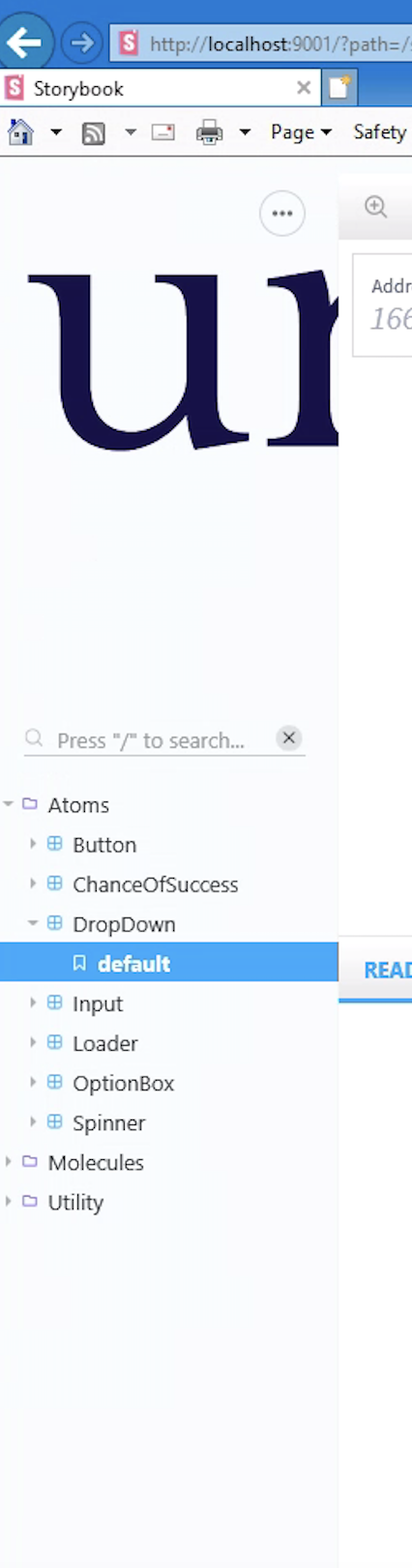
In Internet Explorer, the theme logo is not being properly containing which is causing a weird display bug.
To Reproduce
Steps to reproduce the behavior:
- Go to any page with IE11.
- You'll see the issue right away.
- Even more present on pages with custom themes.
Expected behavior
The logo should look correct.
Screenshots
Present on pages with and without custom screens, examples below;

Code snippets
Theme config looks like this, it's very basic. Issue is present on pages with and without a custom theme, seems to just be a CSS issue with how the logo is wrapped.
import {create} from '@storybook/theming';
import logo from 'logo.png';

// Configures Storybook theme.
// More info: https://storybook.js.org/docs/configurations/theming/
export default create({
  base: 'light',
  brandTitle: 'James Ives',
  brandUrl: 'https://jamesiv.es',
  brandImage: logo,
});
System:
- OS: Windows 10
- Device: Laptop
- Browser: Internet Explorer 11
- Framework: React
- Version: 5
 JamesIves
>All comments
@domyen @ndelangen Looks like this issue is solved now as I tested this on https://storybook-design-system.netlify.com/?path=/docs/design-system-badge--all and the logo appears to be working in IE11.

 jamesg1
on 23 Sep 2019
jamesg1
on 23 Sep 2019
❤3
Was this page helpful?
0 / 5 - 0 ratings
Related issues
 shilman
·
3Comments
shilman
·
3Comments
 xogeny
·
3Comments
xogeny
·
3Comments
 ZigGreen
·
3Comments
ZigGreen
·
3Comments
 wahengchang
·
3Comments
wahengchang
·
3Comments
 tirli
·
3Comments
tirli
·
3Comments
Most helpful comment
@domyen @ndelangen Looks like this issue is solved now as I tested this on https://storybook-design-system.netlify.com/?path=/docs/design-system-badge--all and the logo appears to be working in IE11.