Storybook: Viewport Addon: Border-box modifies iframe size
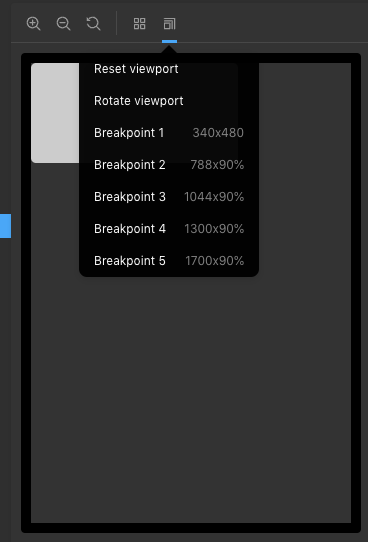
The border of #storybook-preview-iframe reduces the width and height of the document by 20px thanks to * { box-sizing: border-box; }.
This means that a viewport is not the size it says it is.
With the following viewport defined:
viewports: {
  bp1: {
    name: 'Breakpoint 1',
    styles: {
      width: '320px',
      height: '480px',
    },
  }
}
The iFrame document should be 320px by 460px, but instead it actually is 300px by 460px.

System:
- OS: MacOS
- Device: Macbook Pro 13" 2017
- Browser: Chrome
- Framework: react
- Addons: @storybook/addon-viewport
- Version: ^5.0.0
 jcousins-ynap
All 6 comments
As far as I know, this issue can only be mitigated by editing the addon source.
Using the following css fixes the issue:
#storybook-preview-iframe {
  box-sizing: content-box !important;
}
The use of important is to override any style attributes, but if this rule can be added via emotion, or the like, that is preferable.
 evolutionxbox
on 9 Mar 2019
evolutionxbox
on 9 Mar 2019
Wanna issue a PR?
 shilman
on 9 Mar 2019
shilman
on 9 Mar 2019
Honestly, not really.
However, now that I have much more free time today than I thought I'll give it a go.
evolutionxbox
on 9 Mar 2019
(btw, the account which posted the issue is my work github account)
evolutionxbox
on 9 Mar 2019
Yo-ho-ho!! I just released https://github.com/storybooks/storybook/releases/tag/v5.1.0-alpha.4 containing PR #5993 that references this issue. Upgrade today to try it out!
Because it's a pre-release you can find it on the @next NPM tag.
shilman
on 11 Mar 2019
Whoopee!! I just released https://github.com/storybooks/storybook/releases/tag/v5.0.2 containing PR #5993 that references this issue. Upgrade today to try it out!
shilman
on 17 Mar 2019
Related issues
 tlrobinson
·
3Comments
shilman
·
3Comments
tlrobinson
·
3Comments
shilman
·
3Comments
 rpersaud
·
3Comments
rpersaud
·
3Comments
 xogeny
·
3Comments
xogeny
·
3Comments
 dnlsandiego
·
3Comments
dnlsandiego
·
3Comments
Most helpful comment
Yo-ho-ho!! I just released https://github.com/storybooks/storybook/releases/tag/v5.1.0-alpha.4 containing PR #5993 that references this issue. Upgrade today to try it out!
Because it's a pre-release you can find it on the
@nextNPM tag.