Storybook: [addon-cssresources] Resource IDs are not displayed in panel
Describe the bug
Per documented behaviour, I expect to see the ID of each resource I have added in the addon panel interface. However, it prints a # without any name value for each stylesheet.
To Reproduce
- Add
cssresourcesoptions as documented:
addDecorator(
  withCssResources({
    cssresources: [
      {
        id: 'core-framework',
        code: '<link rel="stylesheet" type="text/css" href="/assets/css/main.min.css">',
        picked: true
      }
    ]
  })
);
- Click on 'CSSRESOURCES' addon panel.
- See no name/ID label and React
keyusage warning (see screenshot below).
Expected behavior
A clear and concise description of what you expected to happen.
Screenshots
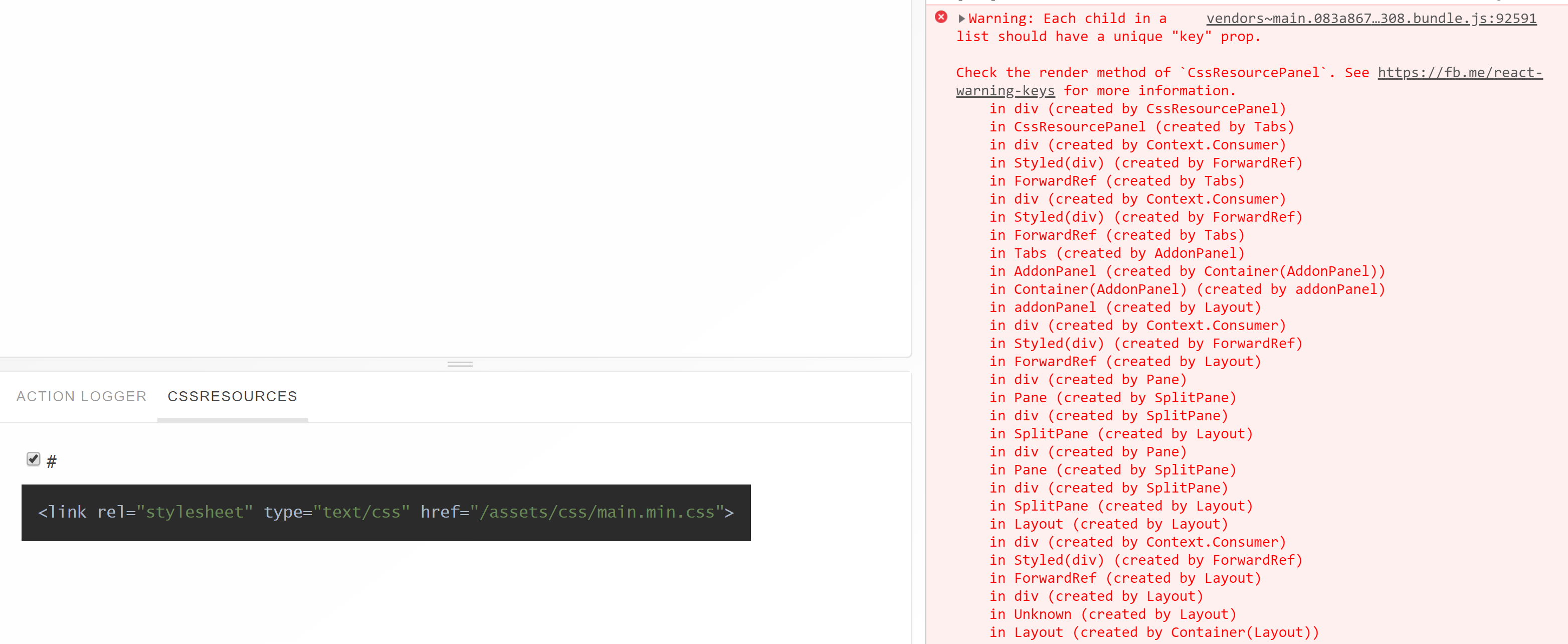
Code snippets
Error message (pre stack trace):
Warning: Each child in a list should have a unique "key" prop.

Check the render method of `CssResourcePanel`. See https://fb.me/react-warning-keys for more information.
System:
- OS: Served on Ubuntu 18.04 via WSL, viewed in browser on Windows 10
- Browser: Chrome
- Framework: vue
- Addons: cssresources 4.1.13
- Version: 4.1.12
 huntie
All 8 comments
cc @nm123github
 shilman
on 21 Feb 2019
shilman
on 21 Feb 2019
Is this issue still present in V5?
 ndelangen
on 25 Feb 2019
ndelangen
on 25 Feb 2019
same history with vue storybook installed with vue-cli-plugin-storybook, but i changed prop "id" to "name", and it works now. But have no idea why)
Working example:
cssresources: [{
name: bluetheme,
code: <style>body { background-color: lightblue; }</style>,
picked: true,
},
]
 Nejik
on 27 Feb 2019
Nejik
on 27 Feb 2019
@Nejik Same use case here with Vue, looks to just be a documentation blip then!
huntie
on 27 Feb 2019
@huntie @Nejik mind creating a small PR to fix the docs?
shilman
on 27 Feb 2019
It appears that the default branch on this repository (and therefore the docs) is simply ahead of the currently distributed version (4.1.13), and includes https://github.com/storybooks/storybook/commit/412cd179849fdc442206b93616d57faf30a0c0cd where id is used consistently and documented. Probably worth moving forward with that release, and having this issue as reference.
huntie
on 3 Mar 2019
@huntie There are a couple things going on here:
masterbranch is equivalent tolatestnpm tag (version 4.1.x currently)nextbranch is equivalent tonextnpm tag (version 5.0-rc.x currently)
If there is a breaking change in next we should document this in MIGRATION.md so that people who are upgrading from 4.x to 5.x can expect it and know how to fix it. Better yet, we deprecate the old behavior so that nothing breaks, and then remove it in 6.0. Can you let me know whether this is a breaking change?
shilman
on 3 Mar 2019
@shilman Understood. What I meant is that a user (like myself on this occasion) will commonly jump to a GitHub homepage for a project, ignore the default branch and essentially read the documentation there, which is ahead. On npm however, the correct state of README.md is present for the release and the documentation is correct.
A breaking change will therefore be introduced between 4.1.x and 5.0.0 :+1: I'll open the PR for MIGRATION.md soon. :wink:
huntie
on 4 Mar 2019
Related issues
 zvictor
·
3Comments
shilman
·
3Comments
zvictor
·
3Comments
shilman
·
3Comments
 miljan-aleksic
·
3Comments
miljan-aleksic
·
3Comments
 sakulstra
·
3Comments
sakulstra
·
3Comments
 Jonovono
·
3Comments
Jonovono
·
3Comments