Storybook: Failed to setup on a react native project
Describe the bug
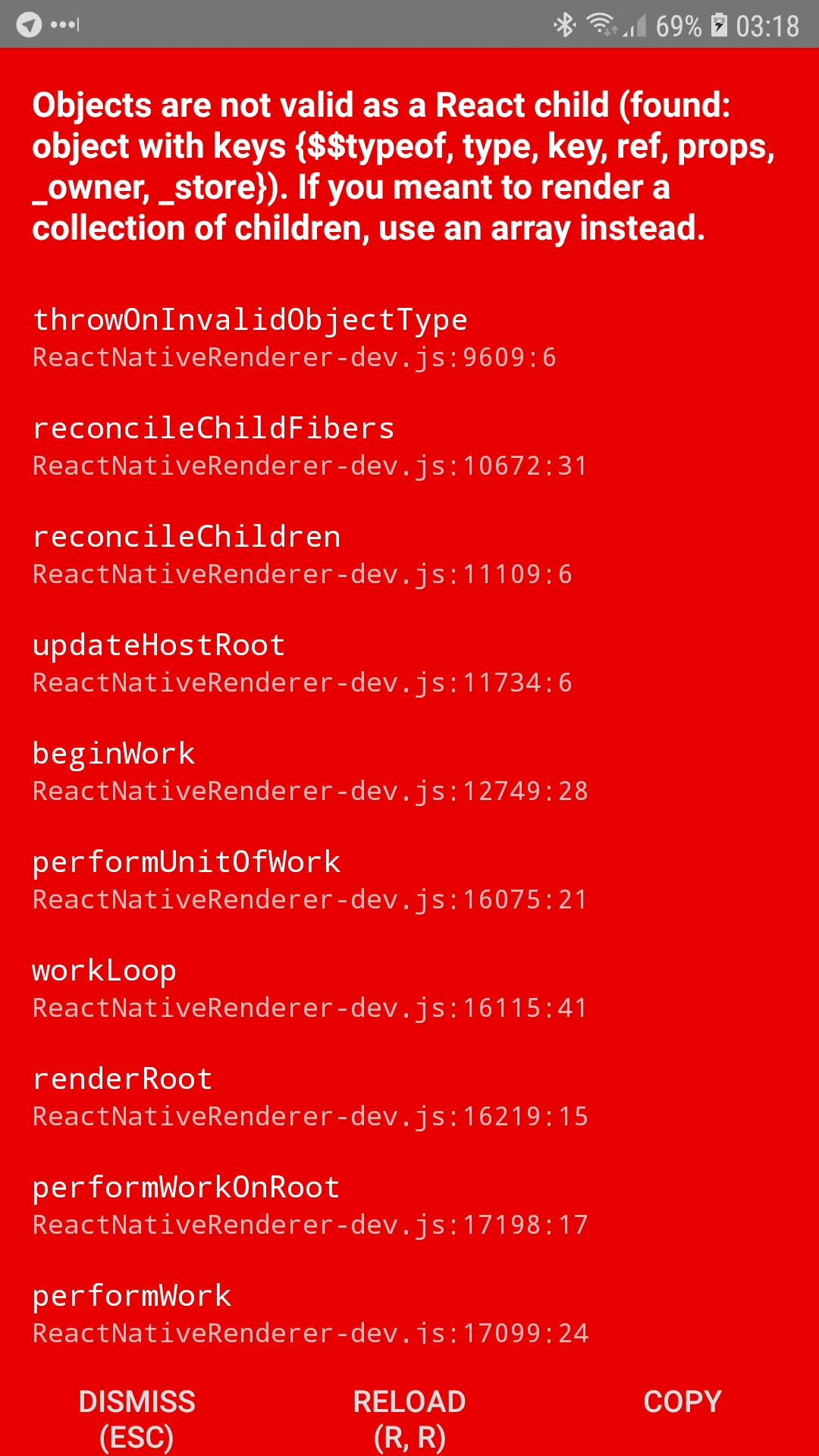
Following the instructions ( https://github.com/storybooks/storybook/tree/next/app/react-native ) i could not setup storybook on a react native project.
To Reproduce
Steps to reproduce the behavior:
- Create a new react native project
- cd to the project
- run npx -p @storybook/cli sb init
- Replace the content of App.js with export default from './storybook';
- Execute npm run storybook ( i could not pass this step without installing core-js ).
- Run the application on an android device: Execute react-native run-android
Expected behavior
The application should run without problems.
Screenshots
System:
- OS: macOS Mojave 10.14.2
- Device: MacBook Pro (13-inch, 2017)
- Framework: React Native 0.57.8
 Chakroun-Anas
All 12 comments
Having exactly the same issue over here.
 fjtrujy
on 23 Jan 2019
fjtrujy
on 23 Jan 2019
Having the same issue on Android specifically. I followed this guide for the on device UI. Frustratingly, it only happens when remote JS debugging is disabled. Works fine on iOS.
macOS Mojave 10.14.2
Android Emulator running 8.1 (API 27), but this happens on real hardware too.
react-native: 0.57.8
@storybook/react-native: 4.1.7
 gcaven
on 24 Jan 2019
gcaven
on 24 Jan 2019
Same issue.
Doesn't change outcome if running storybook server or not.
Also, I tried searching for this error and didn't find any issues until I manually went looking through recent issues.
For future searches, just wanted to include the title of the error to help -
Objects are not valid as a React child
 bhaskarmurthy
on 24 Jan 2019
bhaskarmurthy
on 24 Jan 2019
Here's how to solve it.
If you take a look at the output, you'll notice this error, right after the React object error
'Unhandled promise rejection', { [TypeError: undefined is not a function (evaluating '_iterator[typeof Symbol === "function" ? Symbol.iterator : "@@iterator"]()')]

This is happening because something inside storybook is iterating through Symbols, and the version of JSC shipping with android doesn't support it. This is why you don't see that error when debugging with Chrome, because Chrome does.
The best thing to do is to make a polyfill file (as explained here: https://github.com/facebook/react-native/issues/15902#issuecomment-375521246)
Make yourself a polyfill.js file with this. corejs is already in your dependencies, but you might want to explicitly add it to your package.json.
// symbol polyfills
global.Symbol = require("core-js/es6/symbol");
require("core-js/fn/symbol/iterator");

// collection fn polyfills
require("core-js/fn/map");
require("core-js/fn/set");
require("core-js/fn/array/find");
Then import that in your index.android.js file (or whatever your entrypoint is). Here's how I did it in my app:
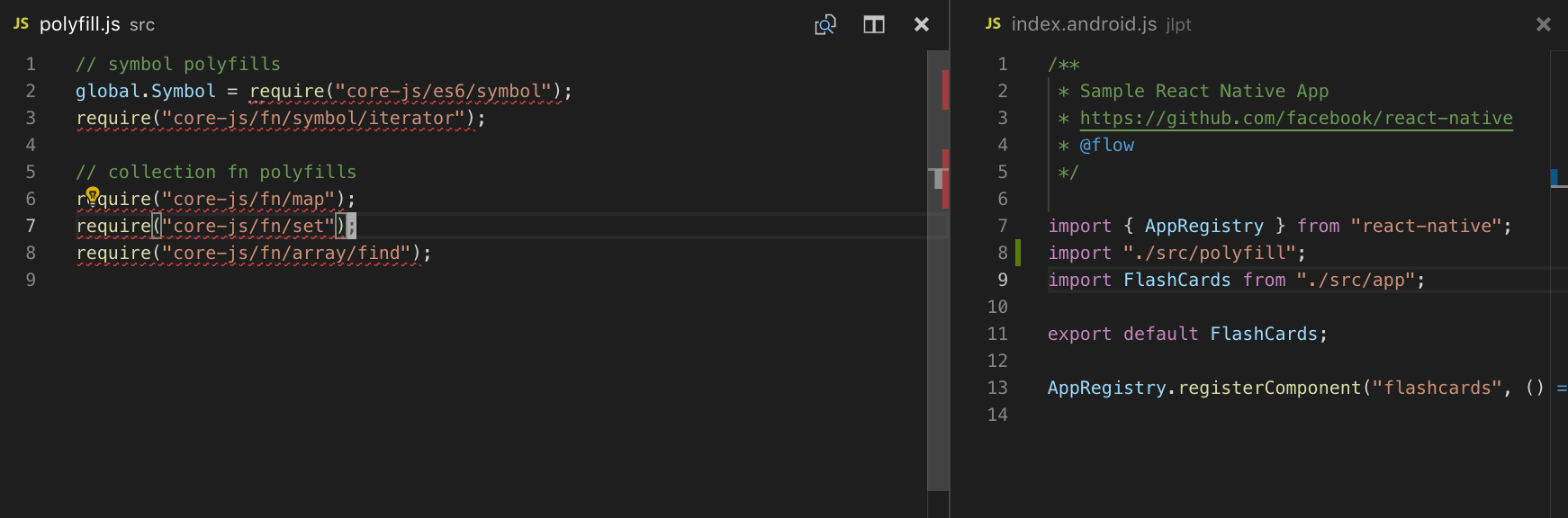
If you take a look at that thread, an alternative is to upgrade JSC on your android build. I'm currently too lazy to do that on my own project.
Note: I don't know if this is a perfect solution. It's kind of weird, but I commented out storybook, added this solution, and it worked. Adding this solution while still having storybook hooked up doesn't work. It's weird. Make sure you run yarn start --reset-cache
 dslounge
on 25 Jan 2019
dslounge
on 25 Jan 2019
Upgrading JSC on my Android build solved the issue for me, thanks @dslounge.
gcaven
on 28 Jan 2019
Hi everyone! Seems like there hasn't been much going on in this issue lately. If there are still questions, comments, or bugs, please feel free to continue the discussion. Unfortunately, we don't have time to get to every issue. We are always open to contributions so please send us a pull request if you would like to help. Inactive issues will be closed after 30 days. Thanks!
![stale[bot] picture](https://avatars3.githubusercontent.com/in/1724?v=4&s=40) stale[bot]
on 18 Feb 2019
stale[bot]
on 18 Feb 2019
cc @Gongreg
 shilman
on 19 Feb 2019
shilman
on 19 Feb 2019
@shilman, IIRC this is because of core-js version mismatch. React Native uses v1 while storybook expects v2. Do you have any suggestions for it?
 Gongreg
on 19 Feb 2019
Gongreg
on 19 Feb 2019
Then hopefully this will be fixed by #4942 -- adding it to the list
shilman
on 19 Feb 2019
Thank you @gcaven, the workaround is working perfectly.
Chakroun-Anas
on 22 Feb 2019
Hi everyone! Seems like there hasn't been much going on in this issue lately. If there are still questions, comments, or bugs, please feel free to continue the discussion. Unfortunately, we don't have time to get to every issue. We are always open to contributions so please send us a pull request if you would like to help. Inactive issues will be closed after 30 days. Thanks!
stale[bot]
on 15 Mar 2019
Ermahgerd!! I just released https://github.com/storybooks/storybook/releases/tag/v5.1.0-alpha.7 containing PR #4942 that references this issue. Upgrade today to try it out!
Because it's a pre-release you can find it on the @next NPM tag.
Closing this issue. Please re-open if you think there's still more to do.
shilman
on 16 Mar 2019
Related issues
 sakulstra
·
3Comments
sakulstra
·
3Comments
 tomitrescak
·
3Comments
tomitrescak
·
3Comments
 dnlsandiego
·
3Comments
dnlsandiego
·
3Comments
 alexanbj
·
3Comments
alexanbj
·
3Comments
 wahengchang
·
3Comments
wahengchang
·
3Comments
Most helpful comment
Here's how to solve it.
If you take a look at the output, you'll notice this error, right after the React object error
'Unhandled promise rejection', { [TypeError: undefined is not a function (evaluating '_iterator[typeof Symbol === "function" ? Symbol.iterator : "@@iterator"]()')]This is happening because something inside storybook is iterating through Symbols, and the version of JSC shipping with android doesn't support it. This is why you don't see that error when debugging with Chrome, because Chrome does.
The best thing to do is to make a polyfill file (as explained here: https://github.com/facebook/react-native/issues/15902#issuecomment-375521246)
Make yourself a
polyfill.jsfile with this. corejs is already in your dependencies, but you might want to explicitly add it to yourpackage.json.Then import that in your

index.android.jsfile (or whatever your entrypoint is). Here's how I did it in my app:If you take a look at that thread, an alternative is to upgrade JSC on your android build. I'm currently too lazy to do that on my own project.
Note: I don't know if this is a perfect solution. It's kind of weird, but I commented out storybook, added this solution, and it worked. Adding this solution while still having storybook hooked up doesn't work. It's weird. Make sure you run
yarn start --reset-cache