Storybook: Start storybook with limited (filtered) stories
Is your feature request related to a problem? Please describe.
Yes.
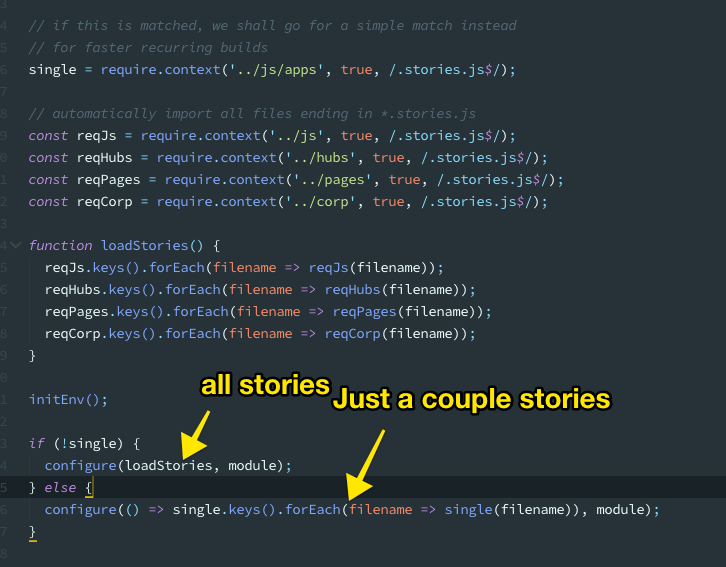
Having a lot of (complex) stories can make recurring updates painful since they can take a long, long time.
Describe the solution you'd like
Most of the times you only care for a subset of stories — if not just one.
How about passing an expression when starting storybook that will be used to filter out what stories load and work with?
For example:
- Before:
yarn storybook - After:
yarn storybook myapp
As I noticed this, this would bring huge gains in some cases in terms of DX and sanity.
Describe alternatives you've considered
None
Are you able to assist bring the feature to reality?
Well, I guess it's not hard.
You need to pass vars from cli to webpack and then from there to config file (DefinePlugin?).
Then, use the argument passed to either narrow down context or filter out the matched files.
Additional context
Check out attachment:
 phaistonian
All 11 comments
if loading time is a no issue, this could be done internally after reading all stories, the storystore could just filter over all stories (by kind and story)
 backbone87
on 21 Dec 2018
backbone87
on 21 Dec 2018
Yes, that's not an issue.
What is, however, is recurring updates.
phaistonian
on 21 Dec 2018
Hi everyone! Seems like there hasn't been much going on in this issue lately. If there are still questions, comments, or bugs, please feel free to continue the discussion. Unfortunately, we don't have time to get to every issue. We are always open to contributions so please send us a pull request if you would like to help. Inactive issues will be closed after 30 days. Thanks!
![stale[bot] picture](https://avatars3.githubusercontent.com/in/1724?v=4&s=40) stale[bot]
on 13 Jan 2019
stale[bot]
on 13 Jan 2019
Hey there, it's me again! I am going close this issue to help our maintainers focus on the current development roadmap instead. If the issue mentioned is still a concern, please open a new ticket and mention this old one. Cheers and thanks for using Storybook!
stale[bot]
on 12 Feb 2019
@phaistonian - did you ever get this sorted out?
 gearsandcode
on 27 Apr 2019
gearsandcode
on 27 Apr 2019
Missed this the first time. Great idea if somebody wants to pick it up!
 shilman
on 27 Apr 2019
shilman
on 27 Apr 2019
Automention: Hey @Keraito, you've been tagged! Can you give a hand here?
![github-actions[bot] picture](https://avatars2.githubusercontent.com/in/15368?v=4&s=40) github-actions[bot]
on 27 Apr 2019
github-actions[bot]
on 27 Apr 2019
Would it be sufficient to pass all arguments from the cli to the story loader?
For example
start-storybook -p 9010 -s public --filter someExpression
....
import { configure } from '@storybook/react';

configure((command)=>{
  console.log(command.p) // 9010
  console.log(command.filter) // someExpression
 ...
}, module)
 kohakukun
on 30 Apr 2019
kohakukun
on 30 Apr 2019
I got it to work like this . . .
config.ts
const req = require.context('../src', true, /.stories.tsx$/);

const loadStories = () => {
  let keys = req.keys();
  if (process.env.STORYBOOK_FILTER) {
    keys = keys.filter(key => key.includes(process.env.STORYBOOK_FILTER));
  }
  keys.forEach(req);
};

configure(loadStories, module);
package.json
...
"scripts": {
    ...
    "storybook": "startStorybook() { STORYBOOK_FILTER=\"$1\" start-storybook -p 4002 -c .storybook; }; startStorybook",
    ...
  },
...
cmd line
$ npm storybook my-story
 joshuatvernon
on 7 Apr 2020
joshuatvernon
on 7 Apr 2020
@joshuatvernon Thing is, this way the require.context has already done its thing, plus this is working - in terms of filtering - only for the non-CSF format.
I managed to do it in the webpack level - so it's irrelevant with the story format - in a rather ugly way that involves using ContextReplacementPlugin.
Here's the code block:
  // If we have passe an extra argument to `yarn storybook`, we shall take it and use to filter context
  if (process.env.npm_config_argv) {
    const argv = JSON.parse(process.env.npm_config_argv);

    if (argv && argv.original) {
      const filters = argv.original.slice(1);

      if (!filters.length) {
        console.log(
          '\n\nTip: You can try %s to filter for stories based on this filter\n\n',
          chalk.cyan.underline('yarn storybook input input2')
        );
      }

      const filter = filters[0];

      const isLimitingToPath = filter && filter[0] === '/';
      const shouldStrict = filter && filter[filter.length - 1] === '.';

      if (shouldStrict) {
        filter = filter.slice(0, -1);
      }

      if (filter && !isLimitingToPath) {
        const regString =
          filters.length === 1 ? filter : `(${filters.join('|')})`;

        console.log('\n🔍 Filtering stories by:', chalk.cyan(regString));

        // stories only
        const reg = shouldStrict
          ? new RegExp(`${regString}.stories.js$`, 'gi')
          : new RegExp(`${regString}.+?stories.js$`, 'gi');

        newConfig.plugins.push(
          new webpack.ContextReplacementPlugin(
            /\/(js|page|another_path)/,
            reg
          )
        );
      }
    }
  }
This way I can do:
yarn storybook story1 story 2

yarn storybook story.*?blue
You need to make sure the regexp passed to the ContextReplacementPlugin matches the paths where your stories are.
ps: the code is ugly, but you get the idea :)
phaistonian
on 7 Apr 2020
Hmm I tried to get this to work but haven't been able to. I'm using Typescript so it may be a bit different.
This is what I've got so far...
const webpack = require("webpack");

const createStyledComponentsTransformer = require('typescript-plugin-styled-components').default;
const styledComponentsTransformer = createStyledComponentsTransformer();

module.exports = ({ config }) => {
  let pattern;
  const argv = JSON.parse(process.env.npm_config_argv);
  if (argv && argv.original) {
    const filters = argv.original.slice(2, argv.original.length);
    if (!filters.length) {
      console.log('\n\nTip: You can try npm storybook story1 story2 to filter stories\n\n');
      pattern = /\.(ts|tsx)$/;
    } else {
      // https://regex101.com/r/GfOQ6b/1
      pattern = new RegExp(`.*(?<=(${filters.join('|')}).*stories.*|(?<!stories.*))(\.(ts|tsx)$)`);
      console.log(pattern);
    }
  } else {
    pattern = /\.(ts|tsx)$/;
  }

  config.plugins.push(
    new webpack.ContextReplacementPlugin(
      /\.(ts|tsx)$/,
      pattern
    )
  );

  config.module.rules.push({
    test: /\.(ts|tsx)$/,
    use: [
      {
        loader: require.resolve('awesome-typescript-loader'),
        options: {
          presets: [['react-app', { flow: false, typescript: true }]],
          configFileName: './.storybook/tsconfig.json',
          getCustomTransformers: () => ({ before: [styledComponentsTransformer] })
        }
      },
      {
        loader: require.resolve('react-docgen-typescript-loader')
      }
    ]
  });

  config.resolve.extensions.push('.ts', '.tsx');

  return config;
};
Related issues
 dnlsandiego
·
3Comments
dnlsandiego
·
3Comments
 ZigGreen
·
3Comments
shilman
·
3Comments
ZigGreen
·
3Comments
shilman
·
3Comments
 tlrobinson
·
3Comments
tlrobinson
·
3Comments
 Jonovono
·
3Comments
Jonovono
·
3Comments
Most helpful comment
Would it be sufficient to pass all arguments from the cli to the story loader?
For example
start-storybook -p 9010 -s public --filter someExpression....