Storybook: addon-info show Unknown component names
Describe the bug
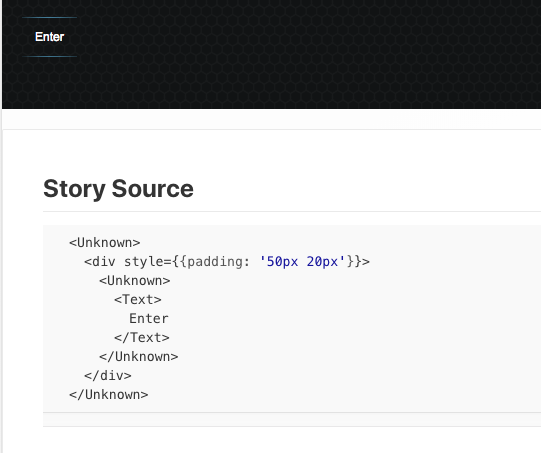
When i run build-storybook after upgrade from 4.0.8 to 4.1.0-alpha.8 addon-info show me in Story Source section code like this:
<Unknown>
  <Unknown>
    <Text>
      Enter
    </Text>
  </Unknown>
</Unknown>
Expected behavior
before upgrade code was like below
<Background>
  <Button>
    <Text>
      Enter
    </Text>
  </Button>
</Background>
and i use custom .storybook/.babelrc file with
plugin: "add-react-displayname"
System:
"@storybook/addon-info": "4.1.0-alpha.8",
"@storybook/addon-knobs": "4.1.0-alpha.8",
"@storybook/addon-options": "4.1.0-alpha.8",
"@storybook/cli": "4.1.0-alpha.8",
"@storybook/react": "4.1.0-alpha.8",
"react-scripts": "2.1.1",
 feonit
All 6 comments
Hi everyone! Seems like there hasn't been much going on in this issue lately. If there are still questions, comments, or bugs, please feel free to continue the discussion. Unfortunately, we don't have time to get to every issue. We are always open to contributions so please send us a pull request if you would like to help. Inactive issues will be closed after 30 days. Thanks!
![stale[bot] picture](https://avatars3.githubusercontent.com/in/1724?v=4&s=40) stale[bot]
on 19 Dec 2018
stale[bot]
on 19 Dec 2018
Please check later versions of Storybook, it was already fixed.
 igor-dv
on 29 Dec 2018
igor-dv
on 29 Dec 2018
I'm still able to reproduce this with version 5.0.3
 irvingv8
on 20 Mar 2019
irvingv8
on 20 Mar 2019
I also still have the issue on V5.0.3, but only on some components. I wasn't able to identify a common pattern between them so far.
 maeligg
on 20 Mar 2019
maeligg
on 20 Mar 2019
I just noticed that the issue arises when u define your components something like:
export default () => {}
but if you do something like:
const NamedComponent = () => {}
export default NamedComponent
it gets fixed
irvingv8
on 20 Mar 2019
@irvingv8 indeed, this fixed it for me too.
maeligg
on 21 Mar 2019
Related issues
 oriSomething
·
3Comments
oriSomething
·
3Comments
 arunoda
·
3Comments
arunoda
·
3Comments
 rpersaud
·
3Comments
rpersaud
·
3Comments
 wahengchang
·
3Comments
wahengchang
·
3Comments
 MrOrz
·
3Comments
MrOrz
·
3Comments