Storybook: node-logger v3.4.10 won't install as @storybook/react dependency
Bug or support request summary
When trying to install a react library with storybook on an existing project I'm getting an error in the console saying no matching version is found for @storybook/[email protected]. I've verified with multiple users.
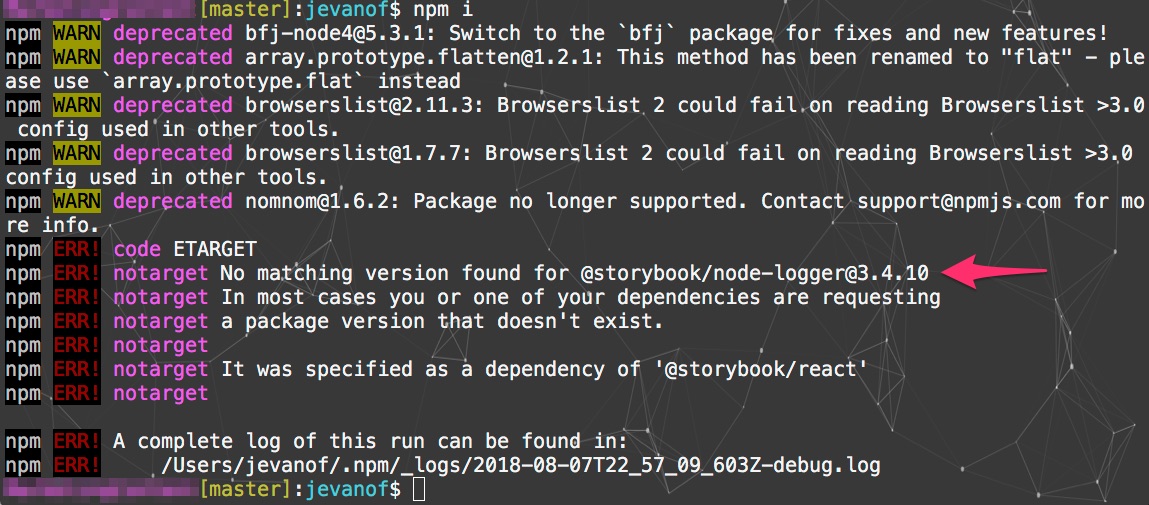
Node Version: 8.11
Steps to reproduce
- Make a new folder
- Run
npm i @storybook/react - See error output
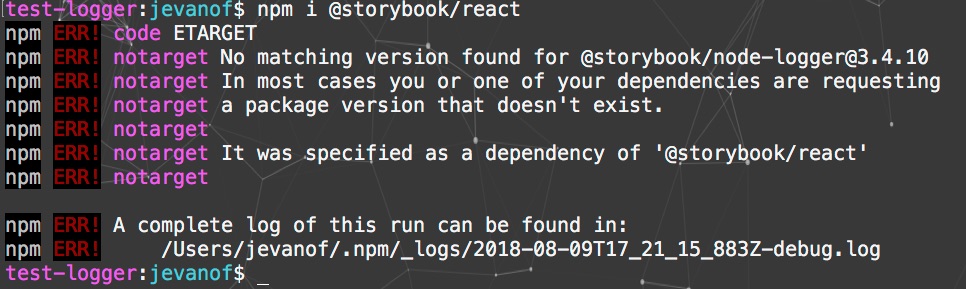
- Run
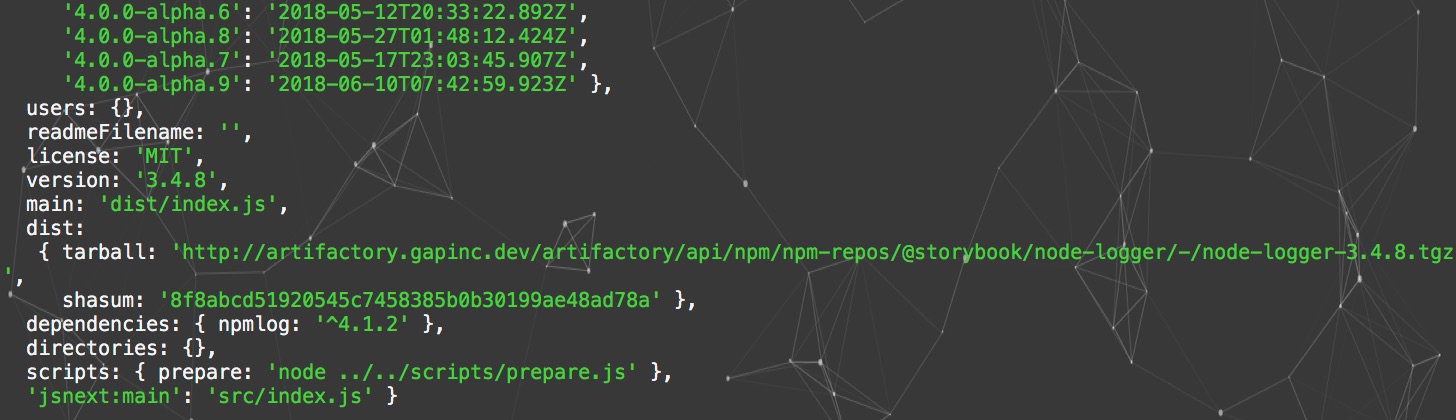
npm view @storybook/node-logger~ shows3.4.8
Please specify which version of Storybook and optionally any affected addons that you're running
- @storybook/react latest
- @storybook/[email protected]
Affected platforms
all
 johnevanofski
All 18 comments
Having this same issue - @johnevanofski have you been able to downgrade to a version that works? I'll need to remove storybook entirely if this doesn't get fixed soon.
edit: It seems like node-logger isn't installing at all, for any version.
error Couldn't find package "@storybook/node-logger@^3.3.0" required by "@storybook/[email protected]" on the "npm" registry.
info Visit https://yarnpkg.com/en/docs/cli/install for documentation about this command.
 tomlagier
on 10 Aug 2018
tomlagier
on 10 Aug 2018
@tomlagier right now I am able to downgrade versions .
# works -> installs @storybook/[email protected]
npm install @storybook/node-logger
# does not work -> error about node-logger 3.4.10
npm install @storybook/react
this is my output for yarn add @storybook/node-logger
yarn add @storybook/node-logger
yarn add v1.9.4
[1/5] 🔍  Validating package.json...
[2/5] 🔍  Resolving packages...
warning Resolution field "[email protected]" is incompatible with requested version "backbone@~1.0.0"
error An unexpected error occurred: "https://registry.yarnpkg.com/@storybook%2fnode-logger: User not found".
info If you think this is a bug, please open a bug report with the information provided in "/Users/tlagier/Projects/web-client/yarn-error.log".
info Visit https://yarnpkg.com/en/docs/cli/add for documentation about this command.
edit: and npm install @storybook/node-logger
npm ERR! Darwin 17.7.0
npm ERR! argv "/usr/local/bin/node" "/usr/local/bin/npm" "install" "@storybook/node-logger"
npm ERR! node v6.7.0
npm ERR! npm  v3.10.3
npm ERR! code E404

npm ERR! 404 User not found : @storybook/node-logger
npm ERR! 404
npm ERR! 404  '@storybook/node-logger' is not in the npm registry.
npm ERR! 404 You should bug the author to publish it (or use the name yourself!)
npm ERR! 404
npm ERR! 404 Note that you can also install from a
npm ERR! 404 tarball, folder, http url, or git url.

npm ERR! Please include the following file with any support request:
npm ERR!     /Users/tlagier/Projects/web-client/npm-debug.log
edit2: should note, this is after a yarn cache clear and rm -rf node_modules.
tomlagier
on 10 Aug 2018
Same issue.
Output of npm view @storybook/node-logger shows no 3.4.10 version, but the module's npm page shows 3.4.10 is the latest version
Is this a node-logger package/publishing issue?
```› npm view @storybook/node-logger
{ name: '@storybook/node-logger',
description: ' [
[](https://www.codefactor.io/re',
'dist-tags': { rc: '3.4.0-rc.4', alpha: '4.0.0-alpha.14', latest: '3.4.8' },
versions:
[ '3.3.0-alpha.5',
'3.3.0-alpha.6',
'3.3.0-rc.0',
'3.3.0-rc.1',
'3.3.0',
'3.3.1',
'3.3.2',
'3.3.3',
'3.3.4',
'3.3.5',
'3.3.6',
'3.3.7',
'3.3.8',
'3.3.9',
'3.3.10',
'3.3.11',
'3.3.12',
'3.3.13',
'3.3.14',
'3.3.15',
'3.4.0-alpha.0',
'3.4.0-alpha.1',
'3.4.0-alpha.2',
'3.4.0-alpha.3',
'3.4.0-alpha.4',
'3.4.0-alpha.5',
'3.4.0-alpha.6',
'3.4.0-alpha.7',
'3.4.0-alpha.8',
'3.4.0-alpha.9',
'3.4.0-rc.0',
'3.4.0-rc.1',
'3.4.0-rc.2',
'3.4.0-rc.3',
'3.4.0-rc.4',
'3.4.0',
'3.4.1',
'3.4.2',
'3.4.3',
'3.4.4',
'3.4.5',
'3.4.6',
'3.4.7',
'3.4.8',
'4.0.0-alpha.0',
'4.0.0-alpha.1',
'4.0.0-alpha.2',
'4.0.0-alpha.3',
'4.0.0-alpha.4',
'4.0.0-alpha.6',
'4.0.0-alpha.7',
'4.0.0-alpha.8',
'4.0.0-alpha.9',
'4.0.0-alpha.10',
'4.0.0-alpha.11',
'4.0.0-alpha.12',
'4.0.0-alpha.13',
'4.0.0-alpha.14' ],
users: {},
readmeFilename: '',
license: 'MIT',
version: '3.4.8',
main: 'dist/index.js',
dist:
{ tarball: 'https://artifactory.nike.com/artifactory/api/npm/npm-nike/@storybook/node-logger/-/node-logger-3.4.8.tgz',
shasum: '8f8abcd51920545c7458385b0b30199ae48ad78a' },
dependencies: { npmlog: '^4.1.2' },
directories: {},
scripts: { prepare: 'node ../../scripts/prepare.js' },
'jsnext:main': 'src/index.js' }
```
Edit
Short term (and inconvenient) solution is to remove all @storybook dependencies from package.json.
To continue development, I needed to install some other packages, but kept getting blocked by this no target issue.
 rkdavidson
on 11 Aug 2018
rkdavidson
on 11 Aug 2018
I had this issue when fetching the packages through artifactory, but not when going directly against the npm registry. There is a workaround available here: https://jfrog.com/knowledge-base/why-am-i-getting-404-for-some-npm-packages/
 emckay
on 13 Aug 2018
emckay
on 13 Aug 2018
We do use artifactory, but we're only using it as a local repo for some private packages (the above fix is for use as a remote proxy). I can confirm that the issue is with the _auth config set, but I'm at a loss as to how that's mangling the installation of scoped packages on the public repo. I've tried across a range of yarn versions, with a number of config setups and have had no luck at all.
tomlagier
on 13 Aug 2018
Thanks @emckay . We are using artifactory as well, so this is probably the issue.
johnevanofski
on 15 Aug 2018
@johnevanofski can you confirm that the work around posted by @emckay worked for you as well?
 mattc41190
on 27 Aug 2018
mattc41190
on 27 Aug 2018
The fix works when using Artifactory as cache for the remote repo npmjs
"Bypass HEAD Requests" did the trick
Thanks @emckay
 akae
on 28 Aug 2018
akae
on 28 Aug 2018
Same issue here. "@storybook/[email protected]" seems to be unavailable in "npm" registry. Anyone knows how to fix it?
error Couldn't find package "@storybook/[email protected]" required by "@storybook/[email protected]" on the "npm" registry.
info Visit https://yarnpkg.com/en/docs/cli/install for documentation about this command.
Error: Couldn't find package "@storybook/[email protected]" required by "@storybook/react@^3.4.10" on the "npm" registry.
    at MessageError.ExtendableBuiltin (C:\Program Files (x86)\Yarn\lib\cli.js:243:66)
    at new MessageError (C:\Program Files (x86)\Yarn\lib\cli.js:272:123)
    at PackageRequest.<anonymous> (C:\Program Files (x86)\Yarn\lib\cli.js:38986:17)
    at Generator.throw (<anonymous>)
    at step (C:\Program Files (x86)\Yarn\lib\cli.js:92:30)
    at C:\Program Files (x86)\Yarn\lib\cli.js:105:13
    at <anonymous>
    at process._tickCallback (internal/process/next_tick.js:188:7)
Error: Couldn't find package "@storybook/react-stubber@^1.0.0" required by "@storybook/react-komposer@^2.0.3" on the "npm" registry.
    at MessageError.ExtendableBuiltin (C:\Program Files (x86)\Yarn\lib\cli.js:243:66)
    at new MessageError (C:\Program Files (x86)\Yarn\lib\cli.js:272:123)
    at PackageRequest.<anonymous> (C:\Program Files (x86)\Yarn\lib\cli.js:38986:17)
    at Generator.throw (<anonymous>)
    at step (C:\Program Files (x86)\Yarn\lib\cli.js:92:30)
    at C:\Program Files (x86)\Yarn\lib\cli.js:105:13
    at <anonymous>
    at process._tickCallback (internal/process/next_tick.js:188:7)
 dontry
on 5 Sep 2018
dontry
on 5 Sep 2018
Hi everyone! Seems like there hasn't been much going on in this issue lately. If there are still questions, comments, or bugs, please feel free to continue the discussion. Unfortunately, we don't have time to get to every issue. We are always open to contributions so please send us a pull request if you would like to help. Inactive issues will be closed after 30 days. Thanks!
![stale[bot] picture](https://avatars3.githubusercontent.com/in/1724?v=4&s=40) stale[bot]
on 26 Sep 2018
stale[bot]
on 26 Sep 2018
Hey there, it's me again! I am going close this issue to help our maintainers focus on the current development roadmap instead. If the issue mentioned is still a concern, please open a new ticket and mention this old one. Cheers and thanks for using Storybook!
stale[bot]
on 27 Oct 2018
same issue here
any update?
 sarahmarciano
on 31 Oct 2018
sarahmarciano
on 31 Oct 2018
does this need to be re-opened?
 acao
on 7 Nov 2018
acao
on 7 Nov 2018
Don't see any issue with installing this dep. It could be momentary yarn/npm problem or a cache issue in your local registry (if you are using any)
 igor-dv
on 11 Nov 2018
igor-dv
on 11 Nov 2018
I'm running into a similar problem but it's for @storybook/react
# package.json
{
   ...
   "devDependencies": {
      "@storybook/react": "^4.0.9"
   }
   ...
}

$ yarn
yarn install v1.12.3
[1/4] 🔍  Resolving packages...
error Couldn't find package "@storybook/react" on the "npm" registry.
info Visit https://yarnpkg.com/en/docs/cli/install for documentation about this command.
 rupurt
on 28 Nov 2018
rupurt
on 28 Nov 2018
@rupurt do you have any corporate registry in your workplace?
igor-dv
on 29 Nov 2018
@igor-dv I think npm invalidated auth tokens which somehow affected downloading packages. I deleted my ~/.npmrc and it now works.
rupurt
on 29 Nov 2018
Related issues
 miljan-aleksic
·
3Comments
miljan-aleksic
·
3Comments
 dnlsandiego
·
3Comments
dnlsandiego
·
3Comments
 ZigGreen
·
3Comments
ZigGreen
·
3Comments
 tlrobinson
·
3Comments
tlrobinson
·
3Comments
 purplecones
·
3Comments
purplecones
·
3Comments
Most helpful comment
I had this issue when fetching the packages through artifactory, but not when going directly against the npm registry. There is a workaround available here: https://jfrog.com/knowledge-base/why-am-i-getting-404-for-some-npm-packages/