Storybook: Angular storybook render blank components
Issue details
Expected: rendering Angular components
Actual: rendering blank components
Steps to reproduce
I followed guide from https://storybook.js.org/basics/guide-angular/

Please specify which version of Storybook and optionally any affected addons that you're running
- storybook/angular : "^3.3.10"
- angular/core : "^5.2.0"
Screenshots / Screencast / Code Snippets (Optional)
```import {storiesOf} from '@storybook/angular';
import {HeadComponent} from '../src/app/head/head.component';
storiesOf('My Button', module).add('with some emoji', () => ({
component: HeadComponent,
props: {
text: '😀 😎 👍 💯'
}
})).add('with some emoji and action', () => ({
component: HeadComponent,
props: {
text: '😀 😎 👍 💯'
}
}));
```
or main repo
https://github.com/amorenew/travel-angular
 amorenew
All 15 comments
Can you please try v3.4.0-alpha.5. There were a few improvements in css/scss loading.
Also, you are providing a "text" prop to something that doesn't have a "text" prop, though I don't think it's the problem
 igor-dv
on 24 Jan 2018
igor-dv
on 24 Jan 2018
@igor-dv I changed SASS to SCSS and it got fix I don't know why
But I have a different problem now
the guide doesn't mention images or fonts handling
how could I add font and images to .storybook/webpack.config.js

I found this article about adding images to wepback however I don't know how to add to the same angular webpack code format
https://medium.com/a-beginners-guide-for-webpack-2/handling-images-e1a2a2c28f8d
my .storybook/webpackconfig.js
const genDefaultConfig = require('@storybook/angular/dist/server/config/defaults/webpack.config.js');

module.exports = (baseConfig, env) => {
  const config = genDefaultConfig(baseConfig, env);

  // Overwrite .css rule
  const cssRule = config.module.rules.find(rule => rule.test && rule.test.toString() === '/\\.css$/');
  if (cssRule) {
    cssRule.exclude = /\.component\.css$/;
  }

  // Add .scss rule
  config.module.rules.unshift({
    test: /\.scss$/,
    loaders: ['raw-loader', 'sass-loader'],
  });

  return config;
};
Storybook currently uses raw-loader to load html files for templateUrl. Let's try changing it to html-loader. Can you please override it via the full control mode?
igor-dv
on 24 Jan 2018
@igor-dv I add full control mode but the same result
or how I should add html-loader?

amorenew
on 24 Jan 2018
@amorenew
Is the assets dir listed in your .angular-cli.json ? Storybook serves only the listed files as static assets.
  "apps": [
    {
      "root": "src",
      "assets": [
        "assets",   // <- this
        "favicon.ico"
      ],
      :
    }
  ],
 Quramy
on 24 Jan 2018
Quramy
on 24 Jan 2018
@Quramy yes it is there
angular-cli here
https://github.com/amorenew/travel-angular/blob/master/.angular-cli.json
amorenew
on 24 Jan 2018
@Quramy wasn't it added to the v3.4.0-alpha.X ?
igor-dv
on 24 Jan 2018
I've added serving assets feature at v3.4.0-alpha.5 ( #2735 ).
Quramy
on 24 Jan 2018
@Quramy I will try v3.4.0-alpha.5 and I will report what happen
amorenew
on 24 Jan 2018
@amorenew I could fix this issue with your repo(https://github.com/amorenew/travel-angular) via the following steps:
git clone https://github.com/amorenew/travel-angular; cd travel-angular
yarn install
yarn add @storybook/[email protected] -D
rm .storybook/webpack.config.js # extending webpack config is no longer needed
yarn run storybook
Finally, we get the following story 😄
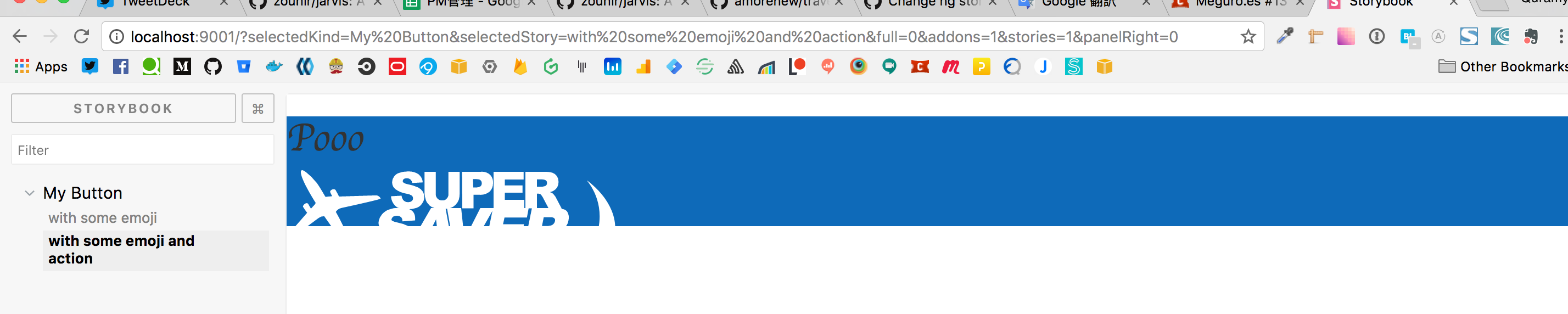
Please check this out!
Quramy
on 24 Jan 2018
Yeah it's working and fonts too
.storybook/webpack.config.j make problem removing it is better.
:sob: Thank you all @Quramy @igor-dv :smile_cat:
amorenew
on 24 Jan 2018
@Quramy one thing remaining I have a different font than the one displayed in storybook
any solution for this issue too?
Actual font on google fonts:
https://fonts.google.com/?query=Rancho
and the font in index.html
<link href="https://fonts.googleapis.com/css?family=Rancho" rel="stylesheet">
https://github.com/amorenew/travel-angular/blob/master/src/index.html
and the font in main styles.scss
body {
    font-family: 'Rancho', cursive;
}
https://github.com/amorenew/travel-angular/blob/master/src/styles.scss
amorenew
on 24 Jan 2018
@amorenew Have you tried custom head tag(https://storybook.js.org/configurations/add-custom-head-tags/) ?
I think adding a link tag to load the Ranco font on the custom header may help you.
Quramy
on 24 Jan 2018
@Quramy I checked your link and I used https://github.com/typekit/webfontloader
it loads on angular but not on storybook

in index.html
https://github.com/amorenew/travel-angular/blob/master/src/index.html
<script src="https://ajax.googleapis.com/ajax/libs/webfont/1.6.26/webfont.js"></script>
  <script>try {
      console.log("Start Google Font Loading");
      WebFont.load({
        google: {
          families: ['Rancho']
        }
      });
    } catch (error) {
      console.log("Google Font error");
      console.log(error);
    }
  </script>
@Quramy yes it is working now
I added preview-head.html in .storybook folder and it worked
Thank you
<!doctype html>
<html>
<head>
  <script src="https://ajax.googleapis.com/ajax/libs/webfont/1.6.26/webfont.js"></script>
  <script>try {
      console.log("Start Google Font Loading");

      WebFont.load({
        google: {
          families: ['Rancho']
        }
      });
    } catch (error) {
      console.log("Google Font error");
      console.log(error);
    }
  </script>
</head>
</html>
Related issues
 MrOrz
·
3Comments
MrOrz
·
3Comments
 shilman
·
3Comments
shilman
·
3Comments
 rpersaud
·
3Comments
rpersaud
·
3Comments
 sakulstra
·
3Comments
sakulstra
·
3Comments
 miljan-aleksic
·
3Comments
miljan-aleksic
·
3Comments
Most helpful comment
@amorenew Have you tried custom head tag(https://storybook.js.org/configurations/add-custom-head-tags/) ?
I think adding a link tag to load the Ranco font on the custom header may help you.