Storybook: Application x has not been registered
After running getstorybook and yarn run storybook im getting the following error:
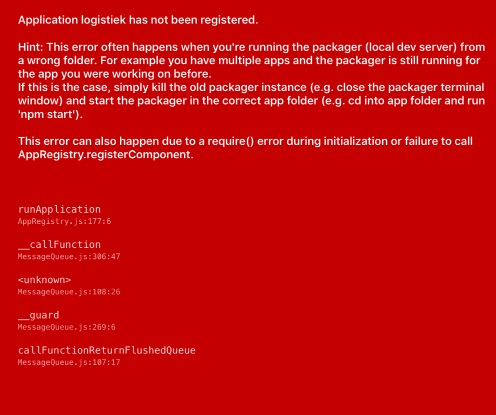
Tried so far
- Restarted mac fully so I 100% know there are no packer dev servers running
- Removing the node_modules folder and download the packages using yarn.
- Run the project from xcode instead of the terminal
Situation
These are de react versions I use:
    "react": "16.0.0-alpha.12",
    "react-native": "0.48.4",
Node : 8.5.0
 dstollie
All 6 comments
try react@16 and [email protected]. I think you also need an index.js file instead of the index.ios.js and index.android.js with the recent changes.
 danielduan
on 7 Nov 2017
danielduan
on 7 Nov 2017
@danielduan thanks for the tip. It now starts the app successfully but for some reason storybook wont start on the simulator. The app is just start as usual when using react-native start
The steps I follow:
yarn run storybook -- --reset-cache- go to http://localhost:7007/ (this page load succesfully)
react-native run-ios
The app does build and the packer does not give errors but the storybook is not loaded but the usual app
dstollie
on 9 Nov 2017
If you aren't running the CRNA version, you have to manually comment out your index.js or index.ios/android.js and paste in this:
import Storybook from './storybook';

export default Storybook;
Make sure the App.json has the same name and displayName as the index from ./storybook that you are importing.
danielduan
on 9 Nov 2017
Solved the issue! I had to make two changes
Renaming './storybook/index.ios.js' to './storybook/index.js' and removing './storybook/index.android.js'
The appKey of the app itself was 'Logistiek' whereas the appKey in 'storybook.js' was 'logistiek'. By renaming 'Logistiek' to 'logistiek' everything went OK. For people having the same issue the appKey is being set with the first argument of the 'registerComponent' method
AppRegistry.registerComponent('logistiek', () => StorybookUI);
I fixed using the following. (you can try in reverse order, one of these might work for you beforehand)
I'm on windows 10:
- closed all cmd windows including Node window. The android Emulator should be on.
- opened cmd and
cd(change directory) to my project folder.
2a.cd androidand thengradlew clean
2b.cd ..back to project folder
2c.npm install
2d.yarn install
2e.react-native run-android. This should run on emulator fail with cannot connect. - open new cmd window and
cdto project folder.
3a.npm run storybookcheck that runs ok by opening `localhost:7007' in the browser - in emulator click menu and then Reload. It should show the stories.
Note: If I run storybook in the separate window, before I run-android, I get the cannot connect to app or the not registered.
My package.json has this in the scripts tag:
"scripts": {
    "start": "node node_modules/react-native/local-cli/cli.js start",
    "test": "jest",
    "storybook": "storybook start -p 7007"
  },
My App.js looks like this:
import { YellowBox } from 'react-native';
import StorybookUI from './storybook';
import AppRedux from './AppRedux';

YellowBox.ignoreWarnings([
  'Warning: isMounted(...) is deprecated',
  'Module RCTImageLoader'
]);

// This will load StorybookUI on Dev and App in Release
module.exports = __DEV__ ? StorybookUI : AppRedux;
// module.exports = AppRedux;
 pashute
on 26 Jun 2018
pashute
on 26 Jun 2018
What worked for me was:
- Check the name property in app.json
- Copy that name and paste on moduleName:@"[NAME_COPIED_HERE]" in AppDelegate.m
stop all Metro Bundler's instances and run the app again.
 engtom
on 28 Oct 2019
engtom
on 28 Oct 2019
Related issues
 ilias-t
·
73Comments
ilias-t
·
73Comments
 ilyaulyanov
·
100Comments
ilyaulyanov
·
100Comments
 aericson
·
97Comments
aericson
·
97Comments
 enagy27
·
69Comments
enagy27
·
69Comments
 dmmarmol
·
57Comments
dmmarmol
·
57Comments
Most helpful comment
Solved the issue! I had to make two changes
Renaming './storybook/index.ios.js' to './storybook/index.js' and removing './storybook/index.android.js'
The appKey of the app itself was 'Logistiek' whereas the appKey in 'storybook.js' was 'logistiek'. By renaming 'Logistiek' to 'logistiek' everything went OK. For people having the same issue the appKey is being set with the first argument of the 'registerComponent' method