Storybook: v3.0.0-alpha.0 Proptype warnings on selectedKind and selectedStory
To reproduce
- Create-react-app
- Change config to dynamically load files ending in
.jsxunder../src/components/ - Add some basic components to test with (Button.js from static example)
Expected
- See components in storybook
- No warnings
Result
- Nothing showing up in storybook (stories prop is empty)
- 2 warnings in console
manager.bundle.js:811 Warning: Failed prop type: The prop `selectedKind` is marked as required in `Stories`, but its value is `undefined`.
    in Stories (created by LeftPanel)
    in LeftPanel (created by Container(LeftPanel))
    in Container(LeftPanel) (created by Layout)
    in div (created by Layout)
    in div (created by Layout)
    in div (created by Pane)
    in Pane (created by SplitPane)
    in div (created by SplitPane)
    in SplitPane (created by Layout)
    in div (created by Layout)
    in Layout (created by Container(Layout))
    in Container(Layout)
    in div
and
manager.bundle.js:811 Warning: Failed prop type: The prop `selectedStory` is marked as required in `Stories`, but its value is `null`.
    in Stories (created by LeftPanel)
    in LeftPanel (created by Container(LeftPanel))
    in Container(LeftPanel) (created by Layout)
    in div (created by Layout)
    in div (created by Layout)
    in div (created by Pane)
    in Pane (created by SplitPane)
    in div (created by SplitPane)
    in SplitPane (created by Layout)
    in div (created by Layout)
    in Layout (created by Container(Layout))
    in Container(Layout)
    in div
package
{
  "name": "components",
  "version": "0.1.0",
  "private": true,
  "dependencies": {
    "@kadira/storybook": "^2.35.3",
    "react": "^15.5.4",
    "react-dom": "^15.5.4"
  },
  "devDependencies": {
    "@storybook/react": "^2.21.0",
    "react-scripts": "0.9.5"
  },
  "scripts": {
    "start": "react-scripts start",
    "build": "react-scripts build",
    "test": "react-scripts test --env=jsdom",
    "eject": "react-scripts eject",
    "storybook": "start-storybook -p 9009 -s public",
    "build-storybook": "build-storybook -s public"
  }
}
Screenshot (logging webpack context)

 deadlocked247
All 18 comments
I am also seeing the same error (and another one) in our travis build:

 shilman
on 20 May 2017
shilman
on 20 May 2017
I'm getting the same error. Does anyone knows why? .-.
 willianribeiro
on 31 May 2017
willianribeiro
on 31 May 2017
Oh, my bad.
In my case it happened because I was loading files finished with .stories.js in config.js and my stories were finished with .stories.jsx. For this reason storybook didn't find any story and log the error
So I just set to load .stories.jsx and .stories.js and it's working now! For reference:
before:
'use strict'

import React from 'react';
import { configure } from '@kadira/storybook';

const req = require.context('../src', true, /\.stories\.js$/);

function loadStories () {
  req.keys().forEach((filename) => req(filename))
}

configure(loadStories, module);
after:
'use strict'

import React from 'react';
import { configure } from '@kadira/storybook';

const req = require.context('../src', true, /(\.stories\.js$)|(\.stories\.jsx$)/);

function loadStories () {
  req.keys().forEach((filename) => req(filename))
}

configure(loadStories, module);
Can this issue be closed then?
 danielduan
on 2 Jun 2017
danielduan
on 2 Jun 2017
Having the same issue although I'm using the .stories.js as my filename.
The config is identical to above with const req = require.context('../packages/', true, /\.stories\.js$/)
Files are under /packages/dirA/src/componentA/stories.js and /packages/dirB/src/componentB/stories.js
storybook version:"@storybook/react": "^3.1.7"
Let me know what else I can share or look into?
 artivilla
on 29 Jun 2017
artivilla
on 29 Jun 2017
@artivilla , looks like you have a wrong regex according to your convention. Try to change it to /stories\.js$/
(redundant \. in the beginning)
 igor-dv
on 29 Jun 2017
igor-dv
on 29 Jun 2017
@igor-dv that was the issue. Thank you!
artivilla
on 29 Jun 2017
I ran into this issue, it was a config problem as outlined above.
But it would be nice if the error message better described the problem. E.g. check for a "no stories found" condition and report that before failing with a deep internal error.
 gihrig
on 4 Aug 2017
gihrig
on 4 Aug 2017
@igor-dv I am still getting this on a fresh install of CRA + Storybook as soon as I use the dynamic loading of modules
I am using the convention of creating stories inside files named story.js
So right now my structure is:
- /src
|- /components
|-- /ComponentName
|--- story.js
My config.js looks like this:
/* eslint-disable import/no-extraneous-dependencies, import/no-unresolved, import/extensions */

import { configure } from "@storybook/react";

const req = require.context("../src/components", true, /story\.js$/);

function loadStories() {
  // require('../stories');
  req.keys().forEach(path => req(path));
}

configure(loadStories, module);
I reproduced this by simply doing a fresh CRA with version 1.3.3 and then npm install -D @storybook/cli then npx getstorybook
I know it's finding my story becuase I can see it rendering, but these same prop errors are all over the console.
I created a repo the demonstrates the error: https://github.com/duro/storybook-prop-errors
 duro
on 9 Aug 2017
duro
on 9 Aug 2017
On Aug 4, 2017 12:02 PM, "Glen Ihrig" notifications@github.com wrote:
I ran into this issue, it was a config problem as outlined above.
But it would be nice if the error message better described the problem.
E.g. check for a "no stories found" condition and report that before
failing with a deep internal error.
—
You are receiving this because you are subscribed to this thread.
Reply to this email directly, view it on GitHub
https://github.com/storybooks/storybook/issues/1059#issuecomment-320287155,
or mute the thread
https://github.com/notifications/unsubscribe-auth/AOXMGBQePlgnW9qF9pTzGqzvXcL5yUcGks5sU0CngaJpZM4NfUfN
.
 JasonCoal
on 9 Aug 2017
JasonCoal
on 9 Aug 2017
We're getting the same error here.
Our directory structure:
...
├── MyComponent
│   ├── constants
│   ├── stories
│   │   ├── myComponent.js
│   ├── styles
│   ├── tests
│   ├── utils
│   └── index.js
...
Our .storybook/config.js:
const components = require.context('../app/components', true, /stories\/.*\.js$/);
const scenes = require.context('../app/scenes/', true, /stories\/.*\.js$/);

function loadStories() {
  components.keys().forEach(components);
  scenes.keys().forEach(scenes);
}

configure(loadStories, module);
Surprisingly our stories are rendering correctly, it's just that we're facing this JS error in the console. Would be great to find a fix for that.
 mrtnpro
on 16 Aug 2017
mrtnpro
on 16 Aug 2017
Cant fix this too, config
import { configure, addDecorator } from '@storybook/react'
import centered from '@storybook/addon-centered'

import '~/__utils__/setup'

// settings
addDecorator(centered)

// load
const req = require.context('../', true, /stories\.jsx?$/)

function loadStories() {
  req.keys().forEach(filename => req(filename))
}

configure(loadStories, module)
I think @artivilla was mistaken and error is not resolved, because it occurs only on opening storybook in brand new tab, on reload it disappears
Reopen this issue please
 srghma
on 17 Aug 2017
srghma
on 17 Aug 2017
@crtvhd @BjornMelgaard does this still show up in 3.2.5?
 Hypnosphi
on 17 Aug 2017
Hypnosphi
on 17 Aug 2017
@Hypnosphi , no, works perfectly, thank you kind man)
srghma
on 17 Aug 2017
@Hypnosphi Yes, upgrading has solved our issue. Thanks for the quick fix :)
mrtnpro
on 18 Aug 2017
EDIT: Nevermind, managed to solve it by upgrading node-sass from 4.5.0 to 4.5.3. A classic case of upgrade and rebuild node-sass ¯_(ツ)_/¯
@Hypnosphi just seeing that unfortunately it broke our sass-loader. we seeing this error after the upgrade:
./node_modules/css-loader!./node_modules/sass-loader/lib/loader.js!./app/components/form/calendar/styles/calendar.scss
Module build failed: Error: ENOENT: no such file or directory, scandir '/Users/martin/Development/xxx/node_modules/node-sass/vendor'
in one of our components we're importing a SCSS file: import './styles/calendar.scss';
any idea why the sass-loader could suddenly fail?
mrtnpro
on 18 Aug 2017
I'm seeing this issue with storybook 3.4.10. Stories render as expected, but there are a lot of console errors:
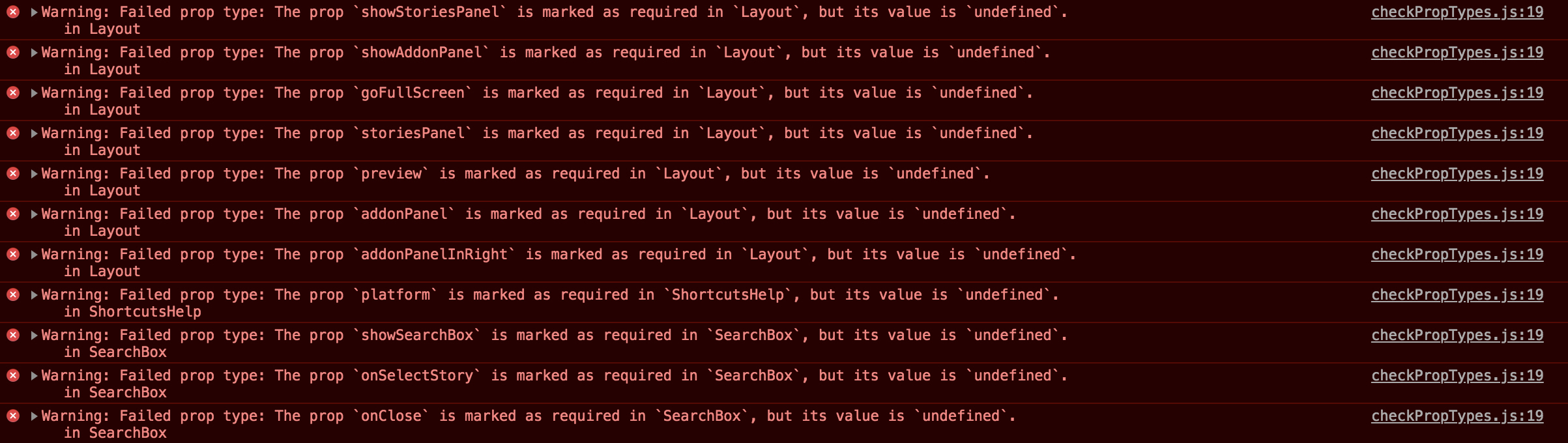
config.js
import { configure } from "@storybook/react";

const req = require.context("../src/components/", true, /stories\.js$/);

function loadStories() {
  req.keys().forEach(filename => req(filename));
}

configure(loadStories, module);
 kaitmore
on 6 Aug 2018
kaitmore
on 6 Aug 2018
Upgrading hoist-non-react-statics to 3.0.1 did the trick!
kaitmore
on 31 Aug 2018
Related issues
 alexanbj
·
3Comments
alexanbj
·
3Comments
 arunoda
·
3Comments
arunoda
·
3Comments
 Jonovono
·
3Comments
Jonovono
·
3Comments
 oriSomething
·
3Comments
oriSomething
·
3Comments
 miljan-aleksic
·
3Comments
miljan-aleksic
·
3Comments