Storybook-readme: Doesn't work with Storybook v5
I know it's super early as it's in alpha, but we really depend on this package and it's not compatible with the latest alpha releases.
Do you have plans to make this package support the new Storybook versions?
Thanks in advance!
 kristof0425
All 9 comments
I haven't tried it, so I don't know what the problem is. any info you can share would help.
There's an addon in the V5 core that supports markdown too btw.
 ndelangen
on 19 Jan 2019
ndelangen
on 19 Jan 2019
@kristof0425 yes, I always try to support all new storybook versions and even alphas as soon as possible :)
@ndelangen could you pleasse give the link with docs about core markdon support?
 tuchk4
on 19 Jan 2019
tuchk4
on 19 Jan 2019
@ndelangen I forgot to add the error description.
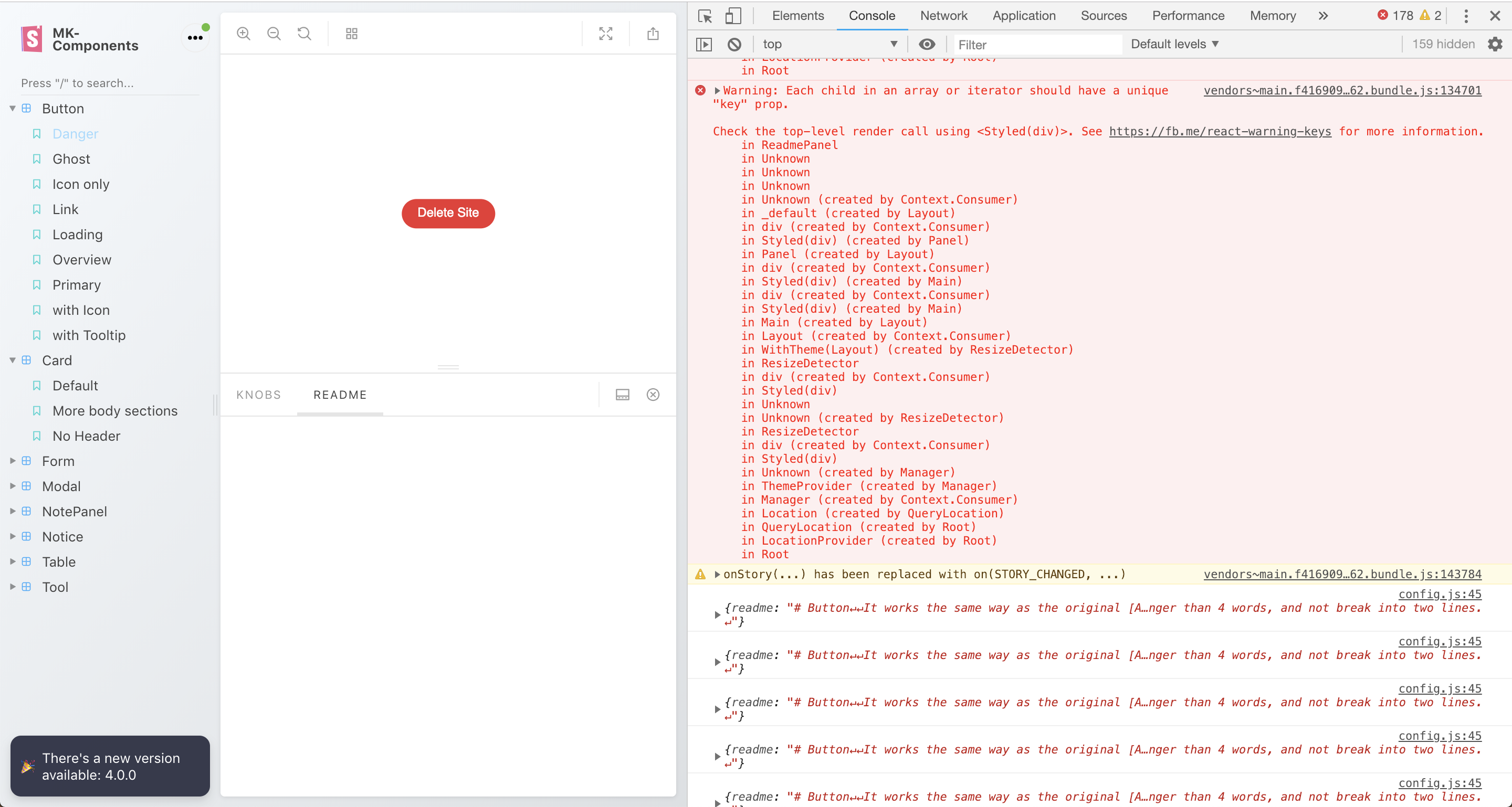
The problem is with withReadme hoc. It doesn't render anything in its panel.
This is my Storybook config:
import React from 'react'
import path from 'path'

import { ThemeDecorator } from './decorators/index'
import {
  configure,
  storiesOf,
  getStorybook,
  addDecorator,
} from '@storybook/react'
import { withKnobs } from '@storybook/addon-knobs/react'
import { withReadme } from 'storybook-readme'
import { withOptions } from '@storybook/addon-options'

const getPackageName = filePath =>
  path
    .dirname(filePath)
    .split(path.sep)
    .reverse()[1]

const req = require.context(
  '../../../components',
  true,
  /^((?!node_modules).)*\.example\.js$/
)

const readMeReq = require.context(
  '../../../components',
  true,
  /^((?!node_modules).)*\README\.md$/
)

addDecorator(
  withOptions({
    name: 'MK-Components',
  })
)

configure(() => {
  req.keys().forEach(pathToExample => {
    const { name, Example, options = {} } = req(pathToExample)
    const packageName = getPackageName(pathToExample)
    const readmePath = readMeReq.keys().find(rm => rm.includes(packageName))
    const readme = readMeReq(readmePath)
    console.log({readme})
    storiesOf(packageName, module)
      .addDecorator(withKnobs)
      .addDecorator(withReadme(readme))
      .addDecorator(withOptions(options))
      .addDecorator(ThemeDecorator)
      .add(name, () => <Example />, { options })
  })
}, module)

export { getStorybook }
You can see that I'm logging out the readmes and they are printed to the console just fine. Though the readme addon's panel in the DOM is empty.
This is what the console says, however I haven't found anything useful in it:
cc @tuchk4
Let me know if I can help you in any other way!
kristof0425
on 19 Jan 2019
Still very much a needed change. We also depend on READMEs. I will maybe have time to look into this on the weekend.
 Rolandisimo
on 19 Feb 2019
Rolandisimo
on 19 Feb 2019
Hi there!
Now that storybook v5 is in RC I decided to give it a go and I'm facing the same issue. Using .addDecorator(withReadme(readme)) gives me a blank panel.
I dug a bit in the code and compared it to @storybook/addon-knobs to have an idea. I found that the onStory property of the api object passed when registering the component is noted as deprecated.
Comparing to addon-knobs, the api object is passed instead of just the onStory property.
On componentDidMount they are registering the events differently
The issue that I found with reacting to onStory is that the kind value passed is not consistent. On mount the value is the name of the story defined in your story file when using storiesOf('My Story', …) but on change the value is the formated id. My Story will become my-story.
The match cannot be done in docManager.js hence no readme is found to be displayed.
I hope this will help you fixing the issue. I cannot do it myself unfortunately, I'm not proficient enough in react to do that 😅
 enwin
on 19 Feb 2019
enwin
on 19 Feb 2019
@enwin thanks for the digging. Definitely helps.
Rolandisimo
on 19 Feb 2019
It doesn't render anything too.
 EnjoyChan
on 14 Mar 2019
EnjoyChan
on 14 Mar 2019
everything will work after releasing #118
Right now released alpha [email protected]
Note that right now there are __breaking changes at alpha version__. I wrote about here https://github.com/tuchk4/storybook-readme/issues/118#issuecomment-472684902
tuchk4
on 14 Mar 2019
Close this issue
Any discussions here https://github.com/tuchk4/storybook-readme/pull/118
tuchk4
on 14 Mar 2019
Related issues
 jayknott
·
6Comments
jayknott
·
6Comments
 LukyVj
·
5Comments
LukyVj
·
5Comments
 deehuey
·
3Comments
deehuey
·
3Comments
 silentHoo
·
6Comments
silentHoo
·
6Comments
 mktrue
·
3Comments
mktrue
·
3Comments
Most helpful comment
Hi there!
Now that storybook v5 is in RC I decided to give it a go and I'm facing the same issue. Using
.addDecorator(withReadme(readme))gives me a blank panel.I dug a bit in the code and compared it to
@storybook/addon-knobsto have an idea. I found that theonStoryproperty of theapiobject passed when registering the component is noted as deprecated.Comparing to
addon-knobs, theapiobject is passed instead of just theonStoryproperty.What the component does now
What
addon-knobsis doingOn
componentDidMountthey are registering the events differentlyThe issue that I found with reacting to
onStoryis that thekindvalue passed is not consistent. On mount the value is the name of the story defined in your story file when usingstoriesOf('My Story', …)but on change the value is the formated id.My Storywill becomemy-story.The match cannot be done in
docManager.jshence no readme is found to be displayed.I hope this will help you fixing the issue. I cannot do it myself unfortunately, I'm not proficient enough in react to do that 😅