I'm submitting a...
[ ] Regression (a behavior that used to work and stopped working in a new release)
[x] Bug report
[ ] Performance issue
[ ] Feature request
[ ] Documentation issue or request
[ ] Support request => https://github.com/ngxs/store/blob/master/CONTRIBUTING.md
[ ] Other... Please describe:
Current behavior
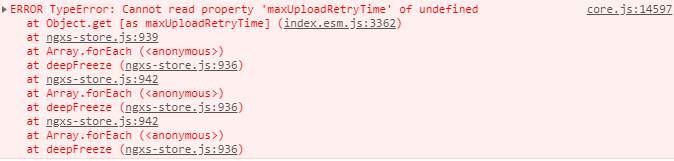
It's not a clear bug, but if I activate the developmentMode in NgxsModule.forRoot, I get errors outside of Ngxs. Is this normal? What does developmentMode do?
I am using the firebase js sdk, too, so for example this issue is related to them too. So it's more a question what exactly developmentMode is doing.
Expected behavior
Minimal reproduction of the problem with instructions
What is the motivation / use case for changing the behavior?
Environment
Libs:
- @angular/core version: 7.1.3
- @ngxs/store version: 3.3.3


Browser:
- [ ] Chrome (desktop) version XX
- [ ] Chrome (Android) version XX
- [ ] Chrome (iOS) version XX
- [ ] Firefox version XX
- [ ] Safari (desktop) version XX
- [ ] Safari (iOS) version XX
- [ ] IE version XX
- [ ] Edge version XX

For Tooling issues:
- Node version: XX
- Platform:

Others:
 paulstelzer
All 5 comments
developmentMode activates deep freeze of the state properties, in order to avoid mutation.
Do you store firebase SDK's objects inside your state?
Please provide a reproduction using https://stackblitz.com/fork/ngxs-simple, and maybe we could help.
 eranshmil
on 17 Dec 2018
eranshmil
on 17 Dec 2018
When you enable developmentMode NGXS freezes any object that you put into the state to ensure that you do not mutate the state. Part of the paradigm is that you only store immutable plain old javascript objects in your State and that you honour the immutability when you do updates.
If you mutate the objects on your State then the change detection and selectors will not function correctly.
developmentMode is designed to identify these types of issues where the fundamental paradigm is not being followed.
 markwhitfeld
on 17 Dec 2018
markwhitfeld
on 17 Dec 2018
Thanks for the answers :)
paulstelzer
on 18 Dec 2018
@eranshmil Your assumption was right. I saved the firebase.User inside the store. I removed this and all errors are gone away.
paulstelzer
on 18 Dec 2018
Yeah, we will hopefully add some other useful devlopmentMode detections in future that would warn you if you put objects that derive from classes in your store.
markwhitfeld
on 18 Dec 2018
Related issues
 am4apps
·
4Comments
am4apps
·
4Comments
 garthmason
·
5Comments
garthmason
·
5Comments
 rweng
·
5Comments
rweng
·
5Comments
 piernik
·
5Comments
piernik
·
5Comments
 malfusion
·
4Comments
malfusion
·
4Comments
Most helpful comment
@eranshmil Your assumption was right. I saved the firebase.User inside the store. I removed this and all errors are gone away.