Hi
Can you please verify if there is a build issue in the STL when using C++20 modules?
I have attached a very simple repro consisting of virtually no user code and only files of 5 or 6 lines. To test the code,
Create a temporary folder and create files in it from the file sections given below, so you you have:
chessapp.cpp, chess.cpp, chess.hpp, libchess.ixx and mkchessapp.bat.Run mkchessapp.bat. The code should compile with VS 16.8 preview 3.1.
If it works, it creates and runs chessapp.exe. There will be no output from the exe. Failure is if chessapp.exe doesn't build.
The start case should be that it does build.Uncomment the inclusion of
<filesystem>in chessapp.cpp, then run mkchessapp.bat again.
It does not build for me.
Question: should it build?
If it should build, then I suggest there is a bug in STL or the compiler.
It seems uncommenting filesystem causes fstream to produce build errors with modules.
Question: With <filesystem> un-commented out, moving fstream above the import libchess; statement and run mkchessapp.bat again causes things to builds again. I import modules from within include files, so putting modules last isn't a viable solution?
I get the same issues when using a VS/ms-build project.
What do you think?
PS, Trying to import a module that contains a unique_ptr that uses a partially defined class also breaks modules / Visual Studio with a C1117 error, perhaps this should be a warning?. The file defining the class fully and then importing the module seems to get into problems and can't import the module. Modifying my test case above to demonstrate this issue wouldn't be hard.
Files follow:
// FILE: chessapp.cpp ----------
#include <string_view>

// Question 1: Why does uncommenting out filesystem cause compile errors?
//#include <filesystem>
import libchess;
// Question 2: with filesystem uncommented out, why does moving the fstream include below to above the import libchess; statement, fix the build?
#include <fstream>

int main()
{
    std::ofstream ofs;
    std::ifstream ifs;
    f();
    f2();
}

// chess.cpp ----------
module;
module libchess;
void f()
{
}
void f2()
{
}
// FILE: chess.hpp ----------
#ifndef CHESS_HPP
#define CHESS_HPP
#include <string_view>
void f();
#endif // CHESS_HPP

// FILE: libchess.ixx ----------
module;
export module libchess;
export import <chess.hpp>;
export void f2();

// FILE: mkhessapp.bat ----------
del chess.hpp.obj chess.hpp.ifc chess.obj libchess.ifc libchess.ifc.obj libchess.lib chessapp.obj chessapp.exe

set cflags=/nologo /EHsc /std:c++latest /FS /Zc:preprocessor /permissive- /experimental:newLambdaProcessor /showResolvedHeader /experimental:module

cl /exportHeader "<chess.hpp>" %cflags% /Fo"chess.hpp.obj" /ifcOutput "chess.hpp.ifc" /I"."
cl "libchess.ixx" /interface /c %cflags% /ifcOutput "libchess.ifc" /Fo"libchess.ifc.obj" /I"." /headerUnit chess.hpp=chess.hpp.ifc
cl "chess.cpp" /c %cflags% /Fo"chess.obj" /I"." /reference "libchess.ifc" /headerUnit chess.hpp=chess.hpp.ifc
lib /out:"libchess.lib" "libchess.ifc.obj" "chess.obj" "chess.hpp.obj"
cl "chessapp.cpp" %cflags% /Fo"chessapp.obj" /Fe"chessapp.exe" /reference libchess.ifc /headerUnit chess.hpp=chess.hpp.ifc /link libchess.lib

chessapp.exe
 gmcode
All 9 comments
Could you fix formatting? Or duplicate your code on godbolt? https://gcc.godbolt.org/
 fsb4000
on 25 Sep 2020
fsb4000
on 25 Sep 2020
What's wrong with the formatting? It looks fine to me. What's stopping you simply cutting and paste the sections marked into files as named and run the batch job. It's not much to ask given I've cut the original issue right down to size.
gmcode
on 25 Sep 2020
// Question 1: Why does uncommenting out filesystem cause compile errors?
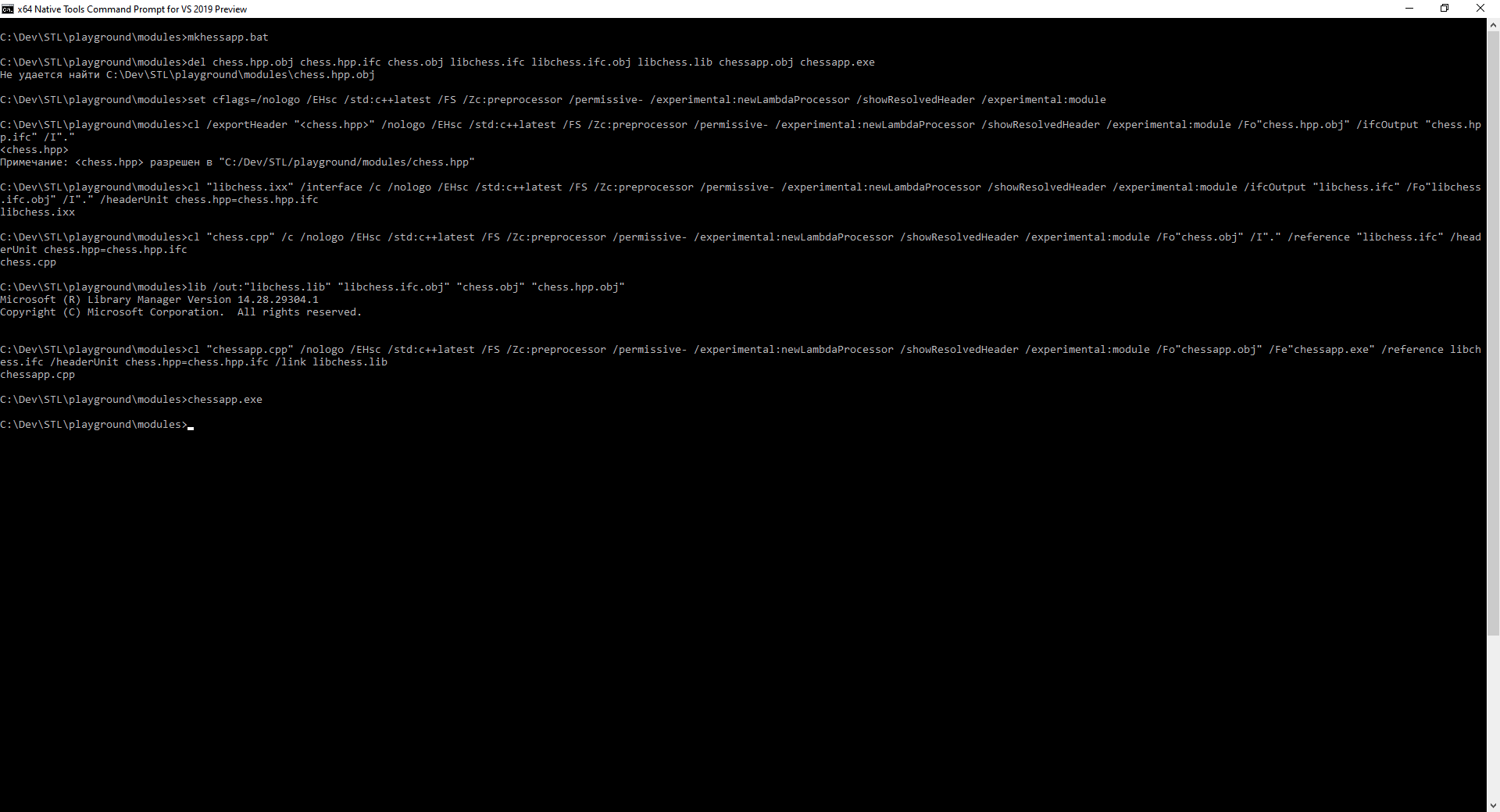
Works for me. Can't reproduce.
chessapp.cpp: https://gcc.godbolt.org/z/f7ThGz
libchess.ixx: https://gcc.godbolt.org/z/YE1GYq
chess.hpp: https://gcc.godbolt.org/z/oc9YM4
chess.cpp: https://gcc.godbolt.org/z/e7cbzx
mkhessapp.bat: https://gcc.godbolt.org/z/zf4obj
C:\Dev\STL\playground\modules>mkhessapp.bat

C:\Dev\STL\playground\modules>del chess.hpp.obj chess.hpp.ifc chess.obj libchess.ifc libchess.ifc.obj libchess.lib chessapp.obj chessapp.exe
Не удается найти C:\Dev\STL\playground\modules\chess.hpp.obj

C:\Dev\STL\playground\modules>set cflags=/nologo /EHsc /std:c++latest /FS /Zc:preprocessor /permissive- /experimental:newLambdaProcessor /showResolvedHeader /experimental:module

C:\Dev\STL\playground\modules>cl /exportHeader "<chess.hpp>" /nologo /EHsc /std:c++latest /FS /Zc:preprocessor /permissive- /experimental:newLambdaProcessor /showResolvedHeader /experimental:module /Fo"chess.hpp.obj" /ifcOutput "chess.hpp.ifc" /I"."
<chess.hpp>
Примечание: <chess.hpp> разрешен в "C:/Dev/STL/playground/modules/chess.hpp"

C:\Dev\STL\playground\modules>cl "libchess.ixx" /interface /c /nologo /EHsc /std:c++latest /FS /Zc:preprocessor /permissive- /experimental:newLambdaProcessor /showResolvedHeader /experimental:module /ifcOutput "libchess.ifc" /Fo"libchess.ifc.obj" /I"." /headerUnit chess.hpp=chess.hpp.ifc
libchess.ixx

C:\Dev\STL\playground\modules>cl "chess.cpp" /c /nologo /EHsc /std:c++latest /FS /Zc:preprocessor /permissive- /experimental:newLambdaProcessor /showResolvedHeader /experimental:module /Fo"chess.obj" /I"." /reference "libchess.ifc" /headerUnit chess.hpp=chess.hpp.ifc
chess.cpp

C:\Dev\STL\playground\modules>lib /out:"libchess.lib" "libchess.ifc.obj" "chess.obj" "chess.hpp.obj"
Microsoft (R) Library Manager Version 14.28.29304.1
Copyright (C) Microsoft Corporation.  All rights reserved.


C:\Dev\STL\playground\modules>cl "chessapp.cpp" /nologo /EHsc /std:c++latest /FS /Zc:preprocessor /permissive- /experimental:newLambdaProcessor /showResolvedHeader /experimental:module /Fo"chessapp.obj" /Fe"chessapp.exe" /reference libchess.ifc /headerUnit chess.hpp=chess.hpp.ifc /link libchess.lib
chessapp.cpp

C:\Dev\STL\playground\modules>chessapp.exe

C:\Dev\STL\playground\modules>
fsb4000
on 25 Sep 2020
What's wrong with the formatting?
Your code isn't formatted as code (either indent by 4 spaces or put ``before and after) and e.g. something like
include instead of #include <fstream> which you probably wrote
 MikeGitb
on 25 Sep 2020
MikeGitb
on 25 Sep 2020
chessapp.cpp should look like this, with fstream after the import, using angle brackets.
Then you will see the error.
include string_view
include filesystem
import libchess;
include fstream
gmcode
on 25 Sep 2020
Whats so hard about formatting your example code correctly, so that other people can just copy/paste the code instead of manually fixing it? Just put three back ticks (```) before and after the code block.
@fsb4000 Already said, he can't reproduce it and one possible reason (albeit an unlikely one) might be that he accidentially fixed
an actual bug in your example while comopensating for the rendering issues.
MikeGitb
on 25 Sep 2020
@MikeGitb if I change chessapp.cpp like @gmcode said:
#include <string_view>
#include <filesystem>
import libchess;
#include <fstream>

int main()
{
    std::ofstream ofs;
    std::ifstream ifs;
    f();
    f2();
}
then I get the error: https://pastebin.com/c5P7HTkR
But I am not a modules expert, so I don't know if we are allowed to write #include after import
Intuition says no, but I haven't found anything in the standard yet: http://www.open-std.org/jtc1/sc22/wg21/docs/papers/2019/p1103r3.pdf
here https://docs.microsoft.com/en-us/cpp/cpp/import-export-module?view=vs-2019, I found:
Use an import declaration to make a module's names visible in your program.
The import declaration must appear after the module declaration and after any #include directives,
but before any declarations in the file.
but it is for named module...
fsb4000
on 25 Sep 2020
@fsb4000 is correct, you must group all header includes before the first import.
https://docs.microsoft.com/en-us/cpp/cpp/modules-cpp?view=vs-2019#modules-and-header-files
 miscco
on 25 Sep 2020
miscco
on 25 Sep 2020
Thanks @fsb4000, @MikeGitb, @miscco - as the documentation is clear, I will resolve this issue as invalid.
@gmcode - thanks for reporting this. I edited your issue to use triple backticks for the code, and single backticks around <filesystem>. Please use this formatting for any issues submitted in the future.
 StephanTLavavej
on 26 Sep 2020
StephanTLavavej
on 26 Sep 2020
Related issues
 ohhmm
·
32Comments
StephanTLavavej
·
10Comments
ohhmm
·
32Comments
StephanTLavavej
·
10Comments
 AlexGuteniev
·
17Comments
fsb4000
·
11Comments
ohhmm
·
16Comments
AlexGuteniev
·
17Comments
fsb4000
·
11Comments
ohhmm
·
16Comments