Stimulus: `connect` not picking up initial values of input elements (browser 'back' button)
Hi there!
We stumbled upon unexpected behavior when using connect.
Scenario:
- We have a page with radio buttons
- The user selects a radio button
- The user submits the form
- The user uses the
backbutton in her browser - Stimulus'
connectdoes not recognize the selected radio button
GIF of the behavior:


Stimulus controller
export default class extends Controller {
  static targets = ["buttons"]

  initialize() {
    console.group('initialize')
    console.log('target', this.buttonsTarget)
    console.log('selected radio button', this.buttonsTarget.querySelector(":scope input:checked"))
    console.groupEnd()
  }

  connect() {
    console.group('connect')
    console.log('target', this.buttonsTarget)
    console.log('selected radio button', this.buttonsTarget.querySelector(":scope input:checked"))
    console.groupEnd()

    let self = this
    setTimeout(function() {
      console.group('connect with timeout')
      console.log('target', self.buttonsTarget)
      console.log('selected radio button', self.buttonsTarget.querySelector(":scope input:checked"))
      console.groupEnd()
    }, 1)
  }

  loadEvent() {
    console.group('load@window')
    console.log('target', this.buttonsTarget)
    console.log('selected radio button', this.buttonsTarget.querySelector(":scope input:checked"))
    console.groupEnd()
  }
}
View
<%= form_tag '/examples' do %>
  <div data-controller="radios" data-target="radios.buttons" data-action="load@window->radios#loadEvent">
    <div><%= radio_button_tag 'radios', 'a' %> a</div>
    <div><%= radio_button_tag 'radios', 'b' %> b</div>
  </div>

  <%= submit_tag %>
<% end %>
A demo Rails project is available on https://github.com/phylor/stimulus-connect-back-button.
Expected behavior:
The code below should evaluate to the selected radio button. It is null instead.
connect() {
  this.buttonsTarget.querySelector(":scope input:checked")
}
Workaround:
Use setTimeout within connect:
let self = this
setTimeout(function() {
  self.buttonsTarget.querySelector(":scope input:checked")
}, 1)
Browsers:
- Chrome/qutebrowser: unexpected behavior,
setTimeoutworkaround required - Firefox: seems to work as expected, even in
initializethe selected radio button is found
I have to admit that I managed to get the expected behavior in Chrome as well. But really really seldom. Could be a race condition?
Questions
- Is this just a bug in Chrome?
- Is there something Stimulus could do to remedy the workaround?
- Is there an entire different solution for this problem?
 phylor
All 10 comments
I'm encountering the same problem with input of type text with "back" and "next" browser buttons.
It is very frustrating to have to put setTimeout calls to fix that.
Is this project abandoned ?
Thanks for your feedback.
 nflorentin
on 4 Nov 2020
nflorentin
on 4 Nov 2020
Hi @phylor and @nflorentin,
No, Stimulus is not abandoned so much as "in-between releases". If you're looking for more timely assistance, I am compelled to point you towards the very active and supportive community that hangs out in #stimulus on the StimulusReflex Discord, which just crossed the 700-member threshold.
I've cloned your project and I'm going to offer some feedback and advice on various things that jumped out at me. That said, at the time of me posting this, for all of my changes and refactoring, I am currently forced to admit that the behaviour you're describing (not seeing the checked property during the initial connect method) seems to be real and I am... well, I'm about 3-4 hours deep into this and I'm stumped and frustrated. However, I do have a fork that has my current changes and hopefully you can get some good insight from it in terms of writing idiomatic Stimulus.
https://github.com/leastbad/stimulus-connect-back-button
First, this issue doesn't mention Turbolinks, which is likely central to unraveling why things aren't behaving as you expect. Stimulus and Turbolinks are designed to work very well together, but you need to adjust how you approach certain kinds of things. Specifically, it helps to understand not just when connect is called, but what prompts a controller to reconnect. Also, you should check to see if the events you're seeing are being generated while Turbolinks is showing a preview of cached content. This is a frequent source of confusion for people who are new to the framework, as it can seem as though connect is being called twice for no reason.
As an aside, I see that your controllers folder is nested under your app/javascript/packs folder. This is not correct - it should live in app/javascript alongside packs and channels.
I recommend that you make this your application.js pack:
import Turbolinks from 'turbolinks'
import Rails from '@rails/ujs'
import * as ActiveStorage from '@rails/activestorage'
import 'controllers'
import 'channels'

const images = require.context('../images', true)
// const imagePath = name => images(name, true)

Rails.start()
Turbolinks.start()
ActiveStorage.start()
and then you create an app/javascript/controllers/index.js:
import { Application } from 'stimulus'
import { definitionsFromContext } from 'stimulus/webpack-helpers'

const application = Application.start()
const context = require.context('controllers', true, /_controller\.js$/)

application.load(definitionsFromContext(context))
You'll get further if you use Rails' form_with helper to generate forms that submit via Rails UJS, which you have installed but are not using. Note that form_with generates remote forms by default. You might want to look into using my Optimism gem with Rails remote forms for validation.
Generally speaking, you should not be using the window:load event in modern JS, and definitely not with Turbolinks. The reason for this is that load only fires once when the first page is finished rendering. When you're using Turbolinks, navigation does not trigger page loads and so there is no load event being called. Your task is to think beyond the page load and start thinking in terms of DOM connect events, which can happen during navigation or when content is inserted into your DOM via Ajax or websockets, for example. I wrote at length about why this is necessary in my essay, "Mutation-First Development".
You do not need to put a data-target attribute on the container DIV in your new.html.erb because inside the controller, you can access that DOM element as this.element.
If you're ever assigning something that is immuable, you'll save future you a lot of pain if you use const instead of lets on line 19 of radios_controller.js.
You don't need to stash the controller instance (this) in self if you convert your anonymous function to an arrow function using the setTimeout(() => {}) syntax. Also, the 2nd parameter to setTimeout is actually optional and will create a similar outcome to passing 1.
setTimeout(() => console.log('cool', this))
The intention of targets is for you to put them on the targets eg.
  <div data-controller="radios">
    <div><%= radio_button_tag 'radios', 'a', false, data: {target: "radios.buttons"} %> a</div>
    <div><%= radio_button_tag 'radios', 'b', false, data: {target: "radios.buttons"} %> b</div>
  </div>
This would let you access the buttons as a collection:
this.buttonsTargets.find(button => button.checked)
In terms of where this landed for us (yes, I brought in air support and we're all stumped) we've figured out that Firefox and Safari make use of a "bfcache" which appears to store frozen versions of page states, and when it's un-frozen, the page is exactly the way it was when it was frozen... which is apparently why the connect and initialize don't seem to fire on Firefox when you hit the back button:
https://developer.mozilla.org/en-US/docs/Archive/Misc_top_level/Working_with_BFCache
https://developer.mozilla.org/en-US/docs/Mozilla/Firefox/Releases/1.5/Using_Firefox_1.5_caching
https://github.com/vercel/next.js/issues/3065#issuecomment-416390035
https://github.com/turbolinks/turbolinks/issues/574
So this isn't just weird behaviour that only we see, but a subtle issue that impacts how the web behaves, fundamentally different depending on which browser you're using. Honestly, it's a massive headache.
In the meantime... as much as it pains me to say, your best bet is probably to wrap problematic operations in a setTimeout with no 2nd argument and passing an arrow function, as I demonstrated above. I agree that you shouldn't have to, and frankly I'm more than a little disturbed that it seems you have to... but here we are. I'm still actively chasing this down and will update if I learn anything.
I just whipped up a fix that bolts on two additional new lifecycle methods to your Stimulus controllers, pageLoad and pageHide:
window.addEventListener('pageshow', event => {
  application.controllers.forEach(controller => {
    if (typeof controller.pageShow === 'function') {
      controller.pageShow(event.persisted)
    }
  })
})
window.addEventListener('pagehide', () => {
  application.controllers.forEach(controller => {
    if (typeof controller.pageHide === 'function') {
      controller.pageHide()
    }
  })
})
Put the above code into your app/javascript/controllers/index.js.
Note that I am passing a boolean value into pageShow which tells you if you're looking at a "persisted" page, in case you want to handle that differently.
I've updated my fork with this solution working. Here's the final version of radios_controller.js:
import { Controller } from 'stimulus'

export default class extends Controller {
  static targets = ['buttons']

  pageShow () {
    console.log(this.buttonsTargets.find(button => button.checked))
  }
}
 leastbad
on 5 Nov 2020
leastbad
on 5 Nov 2020
@leastbad Thank you for your detailed answer. I now understand better the taking and ending of the problem.
I apologize for my first message which was a bit rude.
I am a huge fan of your work and am using Stimulus in every project I'm developing. Thank you very much for your hard work on it!
nflorentin
on 5 Nov 2020
@nflorentin no worries, friend! Sadly, you would not be the first person to ask if this project was abandoned when it's actually more popular than ever. :)
leastbad
on 5 Nov 2020
Wow, thank you for your effort and code review, @leastbad!
First, this issue doesn't mention Turbolinks, which is likely central to unraveling why things aren't behaving as you expect. Stimulus and Turbolinks are designed to work very well together, but you need to adjust how you approach certain kinds of things. Specifically, it helps to understand not just when
connectis called, but what prompts a controller to reconnect. Also, you should check to see if the events you're seeing are being generated while Turbolinks is showing a preview of cached content. This is a frequent source of confusion for people who are new to the framework, as it can seem as thoughconnectis being called twice for no reason.
Thank you for the hints! Unfortunately, the problem persists without Turbolinks. We are not using Turbolinks in the original application where we discovered the problem. Sorry for including it in the example app (it's a Rails default).
[ move controller and adapt application.js ]
Totally! The wrong location of the controllers directory was an oversight in the example app 🙁
You'll get further if you use Rails' form_with helper to generate forms that submit via Rails UJS, which you have installed but are not using. Note that
form_withgenerates remote forms by default. You might want to look into using my Optimism gem with Rails remote forms for validation.
I can't follow you. How would a remote form help? Is it just that a user doesn't need to use the back button, because we would replace the Rails form with new content through Rails UJS?
Generally speaking, you should not be using the
window:loadevent in modern JS, and definitely not with Turbolinks. The reason for this is thatloadonly fires once when the first page is finished rendering. When you're using Turbolinks, navigation does not trigger page loads and so there is no load event being called. Your task is to think beyond the page load and start thinking in terms of DOMconnectevents, which can happen during navigation or when content is inserted into your DOM via Ajax or websockets, for example. I wrote at length about why this is necessary in my essay, "Mutation-First Development".
Agreed. I wasn't aware of window:pageshow, which would be more appropriate than using window:load. Note that I didn't plan to use the window:load for actual behavior. I was merely interested whether the target would be found in that case.
In Chromium I observe the following:
window:loaddoes not find the selected radio button.window:pageshowfinds the selected radio button.
You do not need to put a
data-targetattribute on the container DIV in yournew.html.erbbecause inside the controller, you can access that DOM element asthis.element.
Right, good catch!
If you're ever assigning something that is immuable, you'll save future you a lot of pain if you use
constinstead ofletson line 19 ofradios_controller.js.You don't need to stash the controller instance (
this) inselfif you convert your anonymous function to an arrow function using thesetTimeout(() => {})syntax. Also, the 2nd parameter tosetTimeoutis actually optional and will create a similar outcome to passing1.
Totally valid simplifications, thank you.
The intention of targets is for you to put them _on the targets_ eg.
  <div data-controller="radios">
    <div><%= radio_button_tag 'radios', 'a', false, data: {target: "radios.buttons"} %> a</div>
    <div><%= radio_button_tag 'radios', 'b', false, data: {target: "radios.buttons"} %> b</div>
  </div>
This would let you access the
buttonsas a collection:this.buttonsTargets.find(button => button.checked)
Oh, I assumed that targets need to be unique. Although the behavior is documented. Thanks for the hint!
In terms of where this landed for us (yes, I brought in air support and we're all stumped) we've figured out that Firefox and Safari make use of a "bfcache" which appears to store frozen versions of page states, and when it's un-frozen, the page is exactly the way it was when it was frozen... which is apparently why the
connectandinitializedon't seem to fire on Firefox when you hit the back button:
I'm totally confused by that claim. For me, the original problem cannot be reproduced in Firefox. When hitting the back button in Firefox, all Stimulus methods are called correctly and the selected radio button is found (even without setTimeout).
The problem only persists in Chrome for me. It does call all Stimulus methods correctly, but does not find the selected radio button (it is only found when setTimeout is used).
[ proposed solution using pageshow ]
Thank you! That coincides with my tests of today, that window:load still does not work, but window:pageshow does.
If I understand you correctly, we should therefore be using pageShow instead of connect whenever we have code within connect which might lead to the discussed problem.
Would it be possible that Stimulus waits to call connect until after window#onpageshow is called? (Please bear with me, it's probably a stupid idea).
phylor
on 5 Nov 2020
Hey @phylor!
A lot of my comment was 1. pure code review and 2. written chronologically before I had verified the behaviour you were concerned about.
We haven't yet had the pleasure of working together, so I have no idea of your relative experience; it can be hard to tell from a sample app what is quick and what might not be known. So for example, me suggesting that Turbolinks is frequently the source of confusion and that you should use form_with and remote forms is pure code review in service of (eventually) figuring out the problem you were having.
Yes, remote forms tend to play better with minimizing page refresh operations and Turbolinks in general. For what it's worth, you should be using Turbolinks if you can! Your users will thank you. :)
The main takeaway, which ultimately prompted me to suggest bolting on pageShow and pageHide to your controllers, is that Stimulus simply can't accurately read the checked property of an input element until after the page has been painted. And on Firefox, hitting the "back" button doesn't appear to run connect at all! Making the use of pageShow very important for certain actions. This is related to when you can obtain the post-CSS dimensions of image elements, too; sometimes you need everything to be on the canvas before you can reason about the whole painting.
I'm not a daily or even regular Firefox user, although my friends are. I was quite shocked to learn of how the bfcache was impacting the behaviour of Stimulus wrt the back button. Even though I think I understand why it's happening (because Firefox and Safari are "un-freezing" the state of a page which was frozen, including all variables and timers) I am actually pretty upset that the behaviour is so different from Chrome. It doesn't make sense to me that code written in Stimulus behaves so differently between browsers and nobody has made a bigger fuss. It's one of those "wait, am I crazy or is this a huge problem" moments.
That you aren't seeing the behaviour in Firefox just adds to my concern. FWIW, I'm running FF 82 on Windows 10.
As for whether it's possible... I wish I had that kind of insight or influence, friend! I tweeted about this "situation" last night hoping that some experts or the people who make Stimulus would have insight to share. The Stimulus library folks are on Twitter but not particularly visible; we have to be able to address our own issues.
Going forward, I know that I'll be dropping my pageShow/pageHide enabler into my index.js so that I can beat this problem when it arises. You could also create your own window:pageshow handler in your connect if you don't want to enable it for your whole application.
I'd be curious for you to try out my fork and see if the back button calls connect in Firefox on your machine with my adaptation of your code.
leastbad
on 5 Nov 2020
@leastbad Thanks again for your insights on the subject!
On Mac Os, I'm running Firefox 82 and the connect is called on back/next buttons, that should not happen if I understand well that you said.
I remembered that long time ago when I started to use Turbolinks 5 that I was having problem and decided to put <meta name="turbolinks-cache-control" content="no-cache"> in all of my projects. So I obviously changed the behaviour of Turbolinks with that meta.
I thought that removing that meta would enable me to observe the same behaviour (ie Firefox not calling connect on back/next buttons) but that is not the case. On my machine Firefox is calling the connect function correctly.
I'm using Turbolinks 5.2.1 and stimulus 1.1.1.
Hope it helps.
nflorentin
on 6 Nov 2020
I confirm that I am unable to reproduce @leastbad behavior on Firefox where for me it works as expected.
Only in chrome I see such behavior. I read quite a few posts about an ongoing bug in Chrome with the state of the checked button after hitting back. Some recommended adding autocomplete="off" to the form. From my experiment it completely clears the form when hitting back (not sure this is what we want at the end).
I tried wrapping the code in a simple Promise to read the value in the next microtask but it doesn't work neither
Promise.resolve().then( () => {
  console.log(this.buttonsTarget.querySelector(":scope input:checked"));
}
Stimulus being built on top of the MutationObserver API it looks like the MutationObserver fires on Chrome before Chrome fully update the state of checkboxes. I found this article that talks about the differences between browser but not specifically about the checkboxes https://jakearchibald.com/2015/tasks-microtasks-queues-and-schedules/
 adrienpoly
on 6 Nov 2020
adrienpoly
on 6 Nov 2020
Hey @adrienpoly, I'm perplexed by what I'm seeing in Firefox. I've recorded a video in Incognito mode to make sure no plugins were modifying the behaviour:
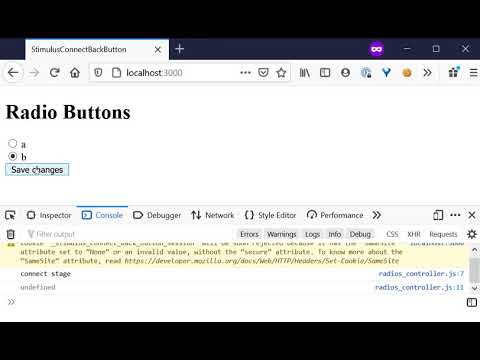
I also pushed my latest test case to Github: https://github.com/leastbad/stimulus-connect-back-button
If I'm the only one seeing it, amazing... not going to keep me up at night. But based on what I've read about bfcache, and the posts in other communities having similar issues, I'm still concerned.
leastbad
on 6 Nov 2020
I created a library to provide a forms bfcache solution for Turbolinks.
 tleish
on 24 Nov 2020
tleish
on 24 Nov 2020
Related issues
 merwok
·
4Comments
merwok
·
4Comments
 JanaDeppe
·
4Comments
JanaDeppe
·
4Comments
 thiagomajesk
·
4Comments
thiagomajesk
·
4Comments
 chocnut
·
4Comments
chocnut
·
4Comments
 saneef
·
4Comments
saneef
·
4Comments
Most helpful comment
I created a library to provide a forms bfcache solution for Turbolinks.
https://github.com/tleish/turbolinks-bfcache-form