When I connected 2 devices(simulator), the default group is Common group. I want move them from Common group, so it can be added to other group and to use the set schedule function.
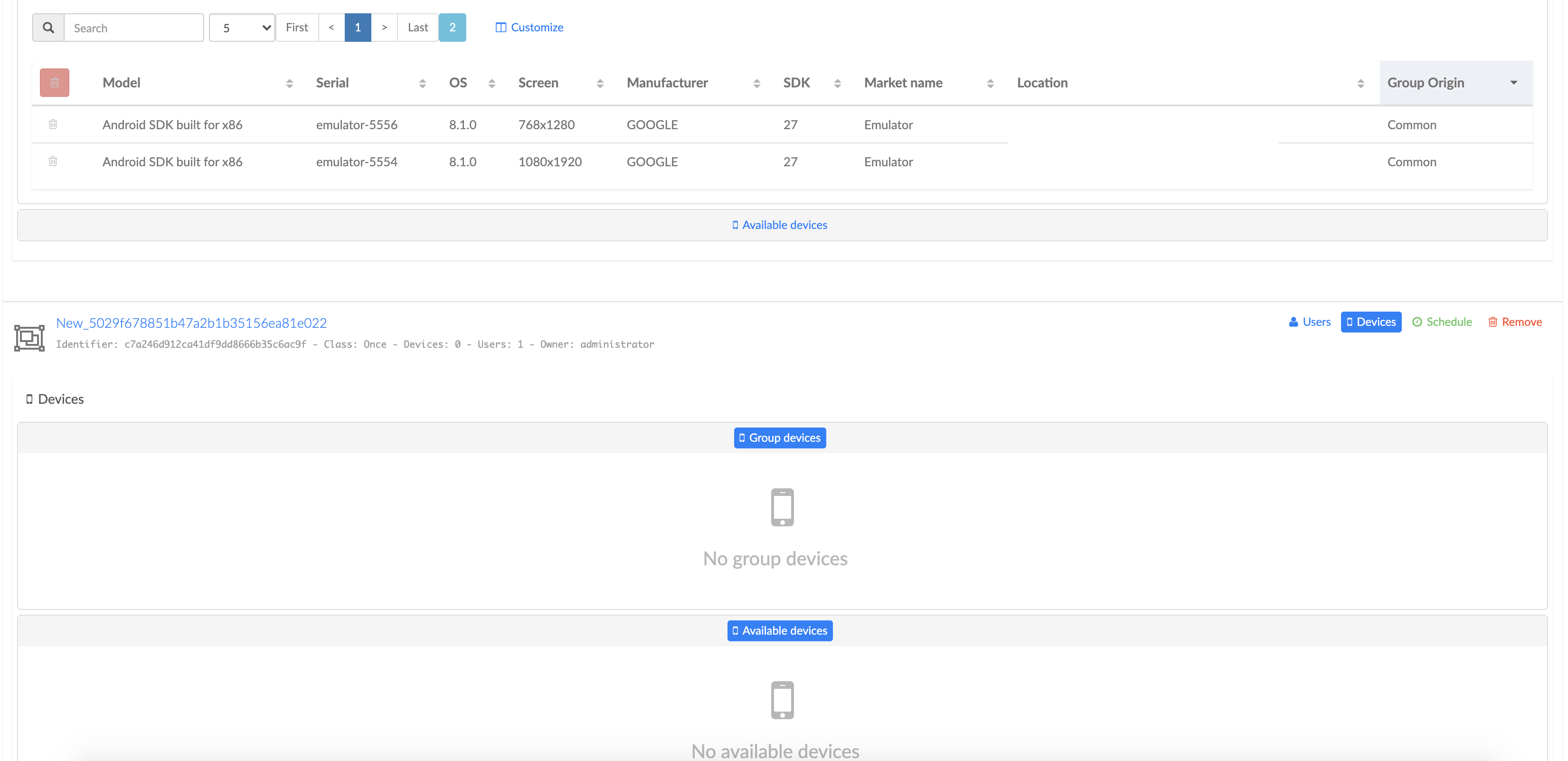
But can't delete it, see the picture, how to do it?

 luoxi001713
All 5 comments
Issue-Label Bot is automatically applying the label bug to this issue, with a confidence of 0.56. Please mark this comment with :thumbsup: or :thumbsdown: to give our bot feedback!
Links: app homepage, dashboard and code for this bot.
![issue-label-bot[bot] picture](https://avatars.githubusercontent.com/in/27079?v=4&s=40) issue-label-bot[bot]
on 2 Jul 2020
issue-label-bot[bot]
on 2 Jul 2020
Open the second (not Common) group and then add devices to it.

 koral--
on 2 Jul 2020
koral--
on 2 Jul 2020
Open the second (not Common) group and then add devices to it.
@koral--
I opened another, but there is no available devices, see the whole screen.
luoxi001713
on 2 Jul 2020
@luoxi001713 ,
@koral-- is right, you have to create (i.e. as admin role) a bookable group (i.e. partitioning action) and not a transient group (i.e. onceclass) as shown in your picture, after what you will be able to add devices to this bookablegroup, and once it is done you will be able to make a reservation using your oncegroup or another transient group.
All that is explained in detail in the documentation provided on Group feature (i.e. doc/GroupFeature.pdf), in particular at section 5 where a full example is done, so I recommended you to read it carefully before to play with the Group feature.
 denis99999
on 2 Jul 2020
denis99999
on 2 Jul 2020
@luoxi001713 ,
@koral-- is right, you have to create (i.e. as admin role) abookablegroup (i.e. partitioning action) and not a transient group (i.e.onceclass) as shown in your picture, after what you will be able to add devices to thisbookablegroup, and once it is done you will be able to make a reservation using youroncegroup or another transient group.
All that is explained in detail in the documentation provided on Group feature (i.e.doc/GroupFeature.pdf), in particular at section 5 where a full example is done, so I recommended you to read it carefully before to play with the Group feature.
Thanks @denis99999, it works now.
luoxi001713
on 3 Jul 2020
Related issues
 WillyRL
·
8Comments
WillyRL
·
8Comments
 lgleasain
·
7Comments
lgleasain
·
7Comments
 0x88l
·
4Comments
0x88l
·
4Comments
 armdev
·
5Comments
armdev
·
5Comments
 jc5055
·
6Comments
jc5055
·
6Comments