Stf: Can not input any app password on VIVO NEX S
What is the issue or idea you have?
may be the VIVO rom take some restriction on app password input when the device being remote controll, for security.
Does it only happen on a specific device? Please run adb devices -l and paste the corresponding row.
c1d4888f device usb:342966272X product:PD1805 model:vivo_NEX_S device:PD1805 transport_id:9
Please provide the steps to reproduce the issue.
firstly, the device connect on stf, and then start QQ(a IM app made by Tencent) app
then go to login page and input password
PS1: not only happend on qq, both on other app
PS2:on the same time, other device can input app password normally.(such as pixel)
What is the expected behavior?
can input app password normally
Do you see errors or warnings in the stf local output? If so, please paste them or the full log here.
have not run the stf local
Please run stf doctor and paste the output here.
2018-12-21T07:50:13.600Z INF/cli:doctor 84568 [] OS Arch: x64
2018-12-21T07:50:13.603Z INF/cli:doctor 84568 [] OS Platform: darwin
2018-12-21T07:50:13.604Z INF/cli:doctor 84568 [] OS Platform: 17.5.0
2018-12-21T07:50:13.605Z INF/cli:doctor 84568 [] Using Node 6.9.1
2018-12-21T07:50:13.755Z INF/cli:doctor 84568 [] Using ZeroMQ 4.2.3
2018-12-21T07:50:13.802Z INF/cli:doctor 84568 [] Using ADB 1.0.40
2018-12-21T07:50:14.436Z INF/cli:doctor 84568 [] Using GraphicsMagick 1.3.23
2018-12-21T07:50:14.666Z INF/cli:doctor 84568 [] Using ProtoBuf 2.6.1
2018-12-21T07:50:14.670Z ERR/cli:doctor 84568 [] ProtoBuf is currently 2.6.1 but needs to be >= 3
2018-12-21T07:50:16.911Z INF/cli:doctor 84568 [] Using RethinkDB 2.3.2
 ElesG
ElesG
All 2 comments
Maybe you can turn off the Security option in Settings.
I've tried in vivo z1.
 Zoe1808
on 25 Dec 2018
Zoe1808
on 25 Dec 2018
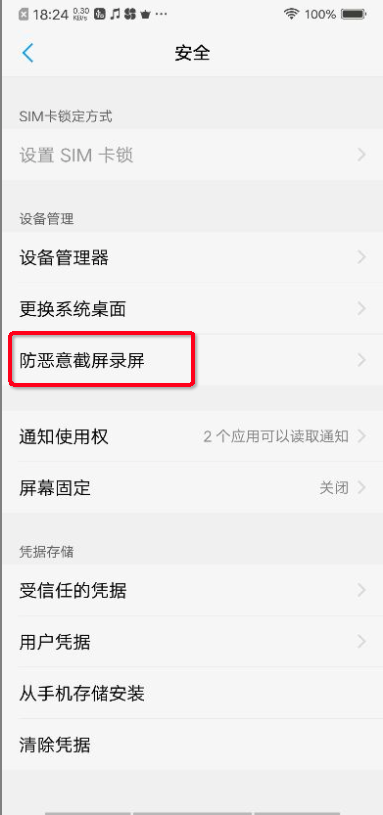
Thanks! The settings item is Settings->More Settings-> Security -> Screen Capture Protection, turn the Screen Capture Protection Off.
中文设置路径是:设置->更多设置-> 安全->防恶意截屏录屏,关闭这个防恶意截屏录屏的开关。
ElesG
on 25 Dec 2018
Related issues
 luisxiaomai
·
8Comments
luisxiaomai
·
8Comments
 gunta
·
4Comments
gunta
·
4Comments
 gounthar
·
7Comments
gounthar
·
7Comments
 PariKdm
·
4Comments
PariKdm
·
4Comments
 0x88l
·
4Comments
0x88l
·
4Comments
Most helpful comment
Maybe you can turn off the Security option in Settings.
I've tried in vivo z1.