Stf: LDAP Authentication issue while logining in STF
Hi all,
I hava started stf using ldap mode, then i input valid account and wrong password and click "log in" button for one or many times, then the stf stopped. the log shows below:
2018-05-24T08:30:59.978Z WRN/auth-ldap 17993 [::ffff:127.0.0.1] Authentication failure for "qixian.zhou"
events.js:183
throw er; // Unhandled 'error' event
^
ConnectionError: 2__ldap://$mycompanyldapurl closed
at /usr/local/tuyang/stf/stf-master/node_modules/[email protected]@ldapjs/lib/client/client.js:1277:17
at Array.forEach (
at Client._onClose (/usr/local/tuyang/stf/stf-master/node_modules/[email protected]@ldapjs/lib/client/client.js:1272:19)
at Object.onceWrapper (events.js:315:30)
at emitOne (events.js:116:13)
at Socket.emit (events.js:211:7)
at TCP._handle.close [as _onclose] (net.js:557:12)
2018-05-24T08:30:59.999Z FTL/cli:local 17954 [] Child process had an error ExitError: Exit code "1"
at ChildProcess.
at emitTwo (events.js:126:13)
at ChildProcess.emit (events.js:214:7)
at Process.ChildProcess._handle.onexit (internal/child_process.js:198:12)
2018-05-24T08:31:00.009Z INF/cli:local 17954 [
2018-05-24T08:31:00.019Z INF/util:lifecycle 17966 [app001] Winding down for graceful exit
2018-05-24T08:31:00.031Z INF/util:lifecycle 17967 [dev001] Winding down for graceful exit
2018-05-24T08:31:00.044Z INF/util:lifecycle 17972 [proc001] Winding down for graceful exit
2018-05-24T08:31:00.052Z INF/util:lifecycle 17977 [proc002] Winding down for graceful exit
2018-05-24T08:31:00.062Z WRN/db 17977 [proc002] Connection closed
2018-05-24T08:31:00.065Z INF/util:lifecycle 17978 [reaper001] Winding down for graceful exit
2018-05-24T08:31:00.073Z INF/util:lifecycle 17987 [] Winding down for graceful exit
2018-05-24T08:31:00.073Z INF/util:lifecycle 17994 [] Winding down for graceful exit
2018-05-24T08:31:00.073Z INF/util:lifecycle 18000 [] Winding down for graceful exit
2018-05-24T08:31:00.073Z INF/util:lifecycle 18015 [] Winding down for graceful exit
2018-05-24T08:31:00.135Z WRN/db 17978 [reaper001] Connection closed
2018-05-24T08:31:00.092Z WRN/db 17972 [proc001] Connection closed
2018-05-24T08:31:00.157Z WRN/db 18015 [] Connection closed
2018-05-24T08:31:00.161Z WRN/db 17994 [] Connection closed
2018-05-24T08:31:00.162Z WRN/db 18000 [*] Connection closed
Please help me
Thanks
SeaYang
 SeaYang
All 9 comments
+1
 nateby
on 6 Jun 2018
nateby
on 6 Jun 2018
@SeaYang and @nateby Hello :) .. Did you fix this issue? I am having the same problem.
 artigomc
on 15 Jun 2019
artigomc
on 15 Jun 2019
@SeaYang and @nateby Hello :) .. Did you fix this issue? I am having the same problem.
No, I did not fixed the problem, but I reimplement the login method by ldap. you can learn a npm module named ldapjs, it can help you to implement ldap by nodejs. if you want to learn more details, you can give your QQ or wechat if you are chinese
SeaYang
on 15 Jun 2019
@SeaYang I created a WeChat account, my ID is "artigomc" add me there when you have any chance. I appreciate your help. A thousand thanks
artigomc
on 15 Jun 2019
@SeaYang my WeChat account was blocked because I am not from China. Can you please add me in the app Whatsapp? My phone number is +5511989466899, you just need to add my phone number in your contact list and I will appear in the Whatsapp.
artigomc
on 16 Jun 2019
@SeaYang my WeChat account was blocked because I am not from China. Can you please add me in the app Whatsapp? My phone number is +5511989466899, you just need to add my phone number in your contact list and I will appear in the Whatsapp.
sorry to tell you that whatsapp was forbidden in China, we chinese can not use all Apps from facebook, so can you give your outlook email address? I will tell you what I did to solve the ldap problems
SeaYang
on 17 Jun 2019
@SeaYang my WeChat account was blocked because I am not from China. Can you please add me in the app Whatsapp? My phone number is +5511989466899, you just need to add my phone number in your contact list and I will appear in the Whatsapp.
Hey, artigomc, first I will give you a demo to understand how to validate a ldap user, finally I will tell you how to use it in STF. now let's begin.
step1:Create a directory named ldap, then run "npm init" in it (I assume you have installed nodejs), and let every option default
step2:run "npm install ldapjs", you may meet a error that you should add python.exe to your env variable, I believe you can handle this
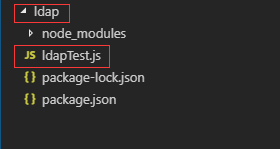
step3:Create a file named ldapTest.js, now the dir tree looks like below
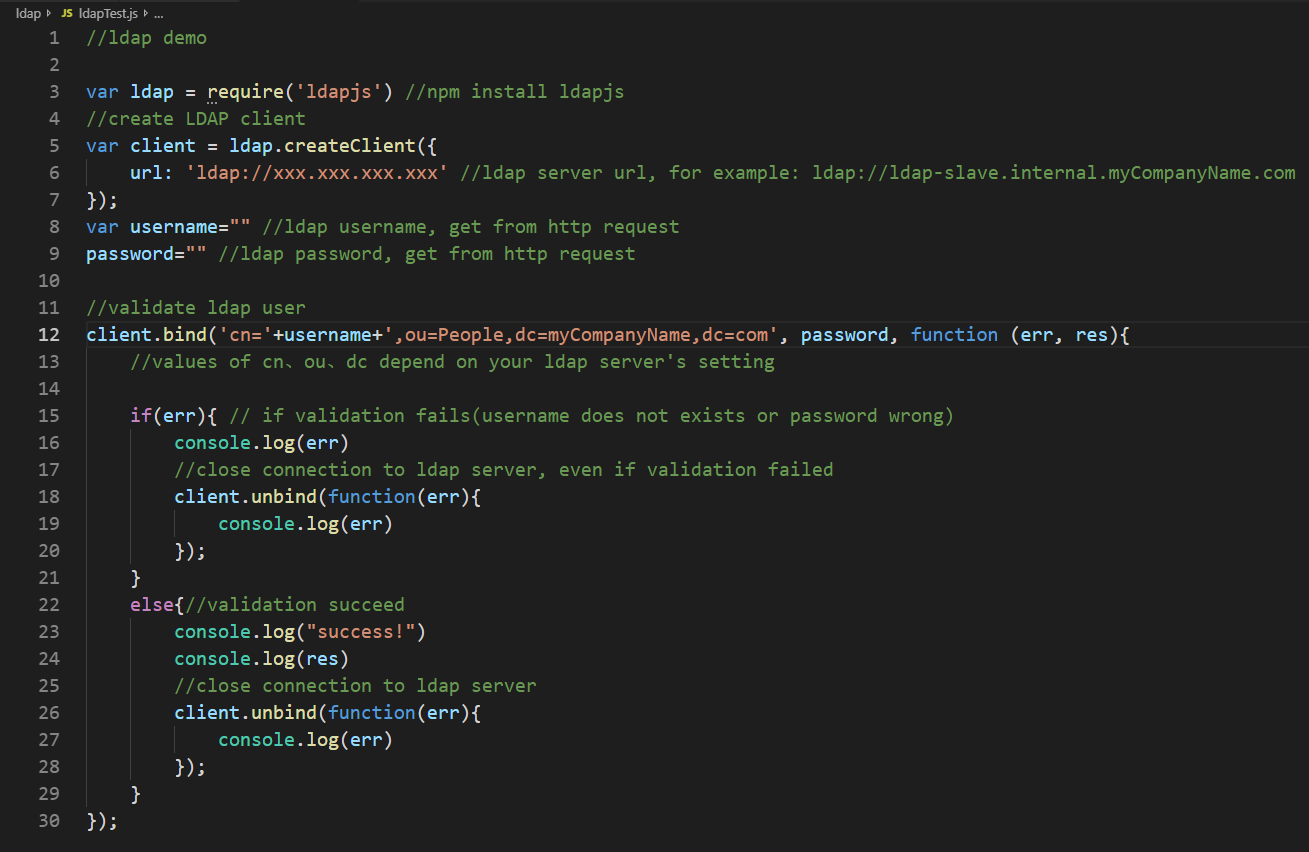
step4: code in ldapTest.js is below, I comment in some lines
//ldap demo
var ldap = require('ldapjs') //npm install ldapjs
//create LDAP client
var client = ldap.createClient({
url: 'ldap://xxx.xxx.xxx.xxx' //ldap server url, for example: ldap://ldap-slave.internal.myCompanyName.com
});
var username="" //ldap username, get from http request
password="" //ldap password, get from http request
//validate ldap user
client.bind('cn='+username+',ou=People,dc=myCompanyName,dc=com', password, function (err, res){ //values of cn、ou、dc depend on your ldap server's setting
if(err){ // if validation fails(username does not exists or password wrong)
    console.log(err)
    //close connection to ldap server, even if validation failed
    client.unbind(function(err){
        console.log(err)
    });
}
else{//validation succeed
    console.log("success!")
    console.log(res)
    //close connection to ldap server
    client.unbind(function(err){
        console.log(err)
    });
}
});
to make you view code more comfortable, the picture of the code is below
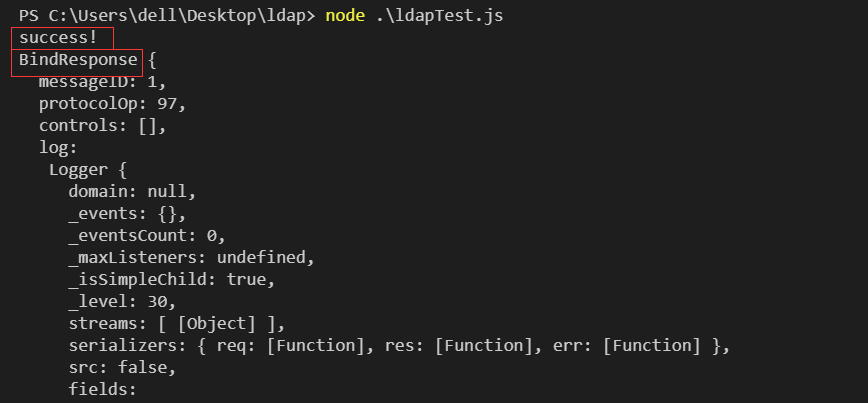
step5 run "node ldapTest.js", give correct username and password, you will see results like
give wrong username or password, you will see error messages
If you followed steps above and all is successful, now I tell you how to use it in STF
step1: there is maily one file to modify, its path is "stf-master/lib/units/auth/mock.js"
step2: you should modify code in below

then you implement ldap login in mock.js, core code looks like below

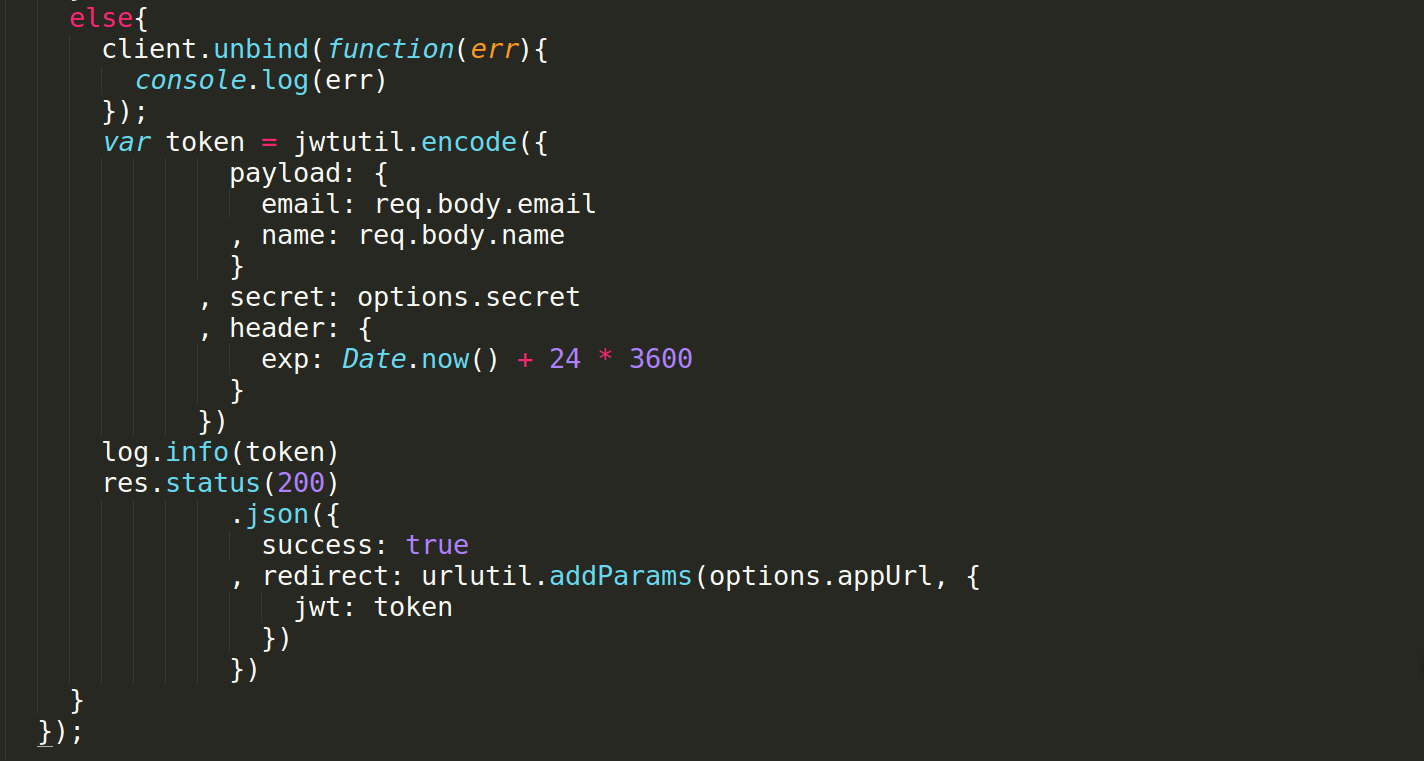
you may have to modify files in frontend part which located in "stf-master/res/auth/mock", but I have forgot how to modify it, and I believe you can handle this, good luck!!
SeaYang
on 17 Jun 2019
@SeaYang my email is Ramon.[email protected] yesterday night I did the configuration via stf LDAP, I will perform some changes and share the configuration in the community 😊.
I really appreciate your attention on this matter and for share your setup, I will read it and will reply in jy environment.
A thousand thanks.
artigomc
on 17 Jun 2019
@SeaYang my email is Ramon.[email protected] yesterday night I did the configuration via stf LDAP, I will perform some changes and share the configuration in the community 😊.
I really appreciate your attention on this matter and for share your setup, I will read it and will reply in jy environment.
A thousand thanks.
you are welcome! the modification is not difficult, if you can run the demo successfully then you are closer to solve the problem. Looking forward to your good news!
SeaYang
on 17 Jun 2019
Related issues
 0x88l
·
4Comments
0x88l
·
4Comments
 vovinio
·
5Comments
vovinio
·
5Comments
 jc5055
·
6Comments
jc5055
·
6Comments
 ghost
·
7Comments
ghost
·
7Comments
 Sunraych
·
4Comments
Sunraych
·
4Comments
Most helpful comment
step1:Create a directory named ldap, then run "npm init" in it (I assume you have installed nodejs), and let every option default
step2:run "npm install ldapjs", you may meet a error that you should add python.exe to your env variable, I believe you can handle this
step3:Create a file named ldapTest.js, now the dir tree looks like below

step4: code in ldapTest.js is below, I comment in some lines
//ldap demo
var ldap = require('ldapjs') //npm install ldapjs
//create LDAP client
var client = ldap.createClient({
url: 'ldap://xxx.xxx.xxx.xxx' //ldap server url, for example: ldap://ldap-slave.internal.myCompanyName.com
});
var username="" //ldap username, get from http request
password="" //ldap password, get from http request
//validate ldap user
client.bind('cn='+username+',ou=People,dc=myCompanyName,dc=com', password, function (err, res){ //values of cn、ou、dc depend on your ldap server's setting
});

to make you view code more comfortable, the picture of the code is below
step5 run "node ldapTest.js", give correct username and password, you will see results like

give wrong username or password, you will see error messages
If you followed steps above and all is successful, now I tell you how to use it in STF
step1: there is maily one file to modify, its path is "stf-master/lib/units/auth/mock.js"
step2: you should modify code in below

then you implement ldap login in mock.js, core code looks like below

you may have to modify files in frontend part which located in "stf-master/res/auth/mock", but I have forgot how to modify it, and I believe you can handle this, good luck!!