Awesome, inspiring stuff.
TLDR; is iOS support on your roadmap?
I've been tinkering around with a solution that works on iOS devices (or simulators). The approach streams snapshots over websockets to a canvas and forwards user-generated mouse/keyboard events to Appium which replays them against a device. For a stand alone solution, with a single device, it works.
next up on the roadmap:
- improve performance of image capture
- support multicasting of a device
- support streaming multiple concurrent devices (i.e. one per browser tab)
- polish the code (env variables and such)
- approval w/ stakeholders to release as open source
I understand its hard to comment on a solution you haven't seen. Before I get too much further down this proof-of-concept, I wanted to solicit feedback Are there any plans to support iOS in STF? Have you already been down this path and abandoned it?
proof of concept approach
image capture
To capture images, I've evaluated:
- using
libimobiledevicewhich uses devloper disk image to capture on the device to achieve 5-10 fps. Unfortunatly these are large files (3MB TIFFs), that are begging to be pre-processed into a PNG. - using QuickTime's screen mirroring; and screenshoting that (on the host) which allows ~25 fps, but won't scale beyond the first device.
- forking xrecord to implement a QT mirroing solution that output jpegs (and would allow multiple devices)
devices
Testing against a physical device is desirable however without jailbreaking the device there are some limitations (lockscreen, home button).
The iOS simulator was able to produce highest framerates, and the closest experience to what STF provides for Android, but there is a nagging feeling it's not going to scale or meet the requirements (e.g. managed in MDM, recgnoize an internal cert chain)
Shortcomings
- Appium is limited to the underlying device automation implementation. On iOS it is UIATarget
- UIATarget has an api to send the application to the background for a duration. Appium wants to launch an application on startup. On a physical device this means there's no interacting with Home Screen, system properties without jailbreaking the device and getting creative. For simulators, there may be a way to mimic, but would need to figure out how to support concurrent simulators.
- perceptable lag (~1-2 seconds) on keyboard events propagating back to the device. A short (100ms) buffer for keyboard events may help, but special keys like Delete make it interesting
- Duplication of inventory in Selenium Grid and STF. We've got a node module that watches USB for new device connections, starts an Appium server and registeres it with a Selenium grid, but we need to federate that back into STF for discovery
 kwv
kwv
All 277 comments
Hi,
Thanks for the awesome work. We would like to have iOS support, yes. However we currently do not have the resources to develop it by ourselves, but if someone provides a reasonably functional version I may be able to port the rest of the functionality. I would be very interested in seeing what you've got so far.
Btw you mentioned you were hoping to perhaps compress TIFF frames into PNG. I think PNG is a lost cause for screen capture purposes as the compression is very very slow compared to JPG. JPG (w/ libjpeg-turbo) is the fastest method we've found so far, but over time we're planning on moving away from JPG frames to transferring raw x264 frames instead. As long as the device supports hardware encoding, this method should yield the highest FPS.
 sorccu
on 27 Aug 2015
sorccu
on 27 Aug 2015
I'm still working on this. The code's in much better shape, and the stakeholders are listening.
Thanks for the tip on TIFF to JPG. It shaved 100ms off the image processing.
kwv
on 3 Sep 2015
Great, really looking forward to this :)
sorccu
on 3 Sep 2015
Amazing.
For capturing images, I get that you are using com.apple.mobile.screenshotr which firsts captures a TIFF frame and then you have to convert it to JPEG; which will not get you the max frame-rate.
Since iOS 8 there is com.apple.cmio.iOSScreenCaptureAssistant which gives you an encoded video stream. If you are able to get the stream (you _may_ have to do some reverse-engineering) and then somehow forward that to the browser, you'll probably get the highest FPS.
On the Browser side then you could try to do any necessary processing and show it by using Media Source Extensions or WebRTC.
If you need any help in getting the approval of stakeholders, just let them know that we can add the name of your company in the credits as a big contributor on http://openstf.io, if that is the case just let us know ;)
 gunta
on 3 Sep 2015
gunta
on 3 Sep 2015
@kwv any update on this? :)
gunta
on 9 Oct 2015
The effort stalled. Stakeholders haven't said no, but they've shifted priorities.
I'm able to sample stills from a video stream, but it's drinking from a firehose. I was refactoring the image acquisition code to send the results back over a WebSocket (rather than diskIO), when I bumped into a hard limit of one device at a time https://github.com/WPO-Foundation/xrecord/issues/1
kwv
on 9 Oct 2015
Thanks for such amazing work ;)
 leandromoreira
on 2 Feb 2016
leandromoreira
on 2 Feb 2016
Hi ,
Can you please share your solution?
We want to test it out for iOS devices?
 PattabhiramaPandit
on 19 Mar 2016
PattabhiramaPandit
on 19 Mar 2016
If anyone has a SD solution available please share the same. We are in dire need of getting this on iOS.
PattabhiramaPandit
on 19 Mar 2016
Ooppsss!... I meant iOS.. Not SD
PattabhiramaPandit
on 19 Mar 2016
If you feel like you need an iOS implementation faster, consider posting a bounty on this issue (see badge below). If the bounty gets large enough, perhaps we or someone else will take a look at it.
sorccu
on 20 Mar 2016
Dear Sorccu, you mentioned to me that you would give me the exact quote for developing the iOS Support. Can you please give me as soon as possible?
Regards
Pattabhi
PattabhiramaPandit
on 24 Mar 2016
@sorccu @kwv it might be worth checking this out https://github.com/phonegap/ios-deploy and https://github.com/phonegap/ios-sim for building and deploying iOS apps to device and simulators. I know STF does not currently support iOS but it would be nice to deploy apps via the web browser. The tool also supports lldb which is useful for out putting console logs.
 Ashraf-Ali-aa
on 13 May 2016
Ashraf-Ali-aa
on 13 May 2016
Curious to the original proposed solution that got stalled, as well as any other potential solutions. How far can you scale device support (or even simulator support)?
From what I encountered, unless I'm mistaken, just toying with Appium and physical iOS devices, there seemed to be a single device limitation per instance of XCode on Mac OS. Therefore, to reliably scale to more iOS devices (to work in parallel), one has to deploy 2 virtual machines (the max licensed amount allowed by Apple, on the physical Mac host) running Mac OS with the same XCode and Appium setup, etc. In that setup, assign a specific iOS device per VM via USB port/device allocation in the VM software, and the remaining (last) device to the physical Mac. Each instance (physical Mac, VMs) have their own XCode and Appium to control the device. So there's a max device limit of 3 iOS devices per Mac machine (using the VMs). This doesn't scale as well compared to Android, as more Mac machines would be needed to scale higher.
 daluu
on 7 Jun 2016
daluu
on 7 Jun 2016
@daluu
XCode supports testing multiple real devices using UIAutomator since v6.3.2
https://github.com/appium/appium/issues/273#issuecomment-110145744
 vbanthia
on 7 Jun 2016
vbanthia
on 7 Jun 2016
this might be useful for video recording https://github.com/isonic1/flick
Ashraf-Ali-aa
on 14 Jun 2016
@Ashraf-Ali-aa This tools about iOS recording is using capture pictures and combine them to video file. maybe not fitted for stf.
 codeskyblue
on 14 Jun 2016
codeskyblue
on 14 Jun 2016
@codeskyblue it works also on Android, should be able to be used without problems
gunta
on 14 Jun 2016
Since stf got minicap, combine the image stream into video is a better way in my view.
codeskyblue
on 14 Jun 2016
Well its for different use cases afaik, at least currently.
gunta
on 14 Jun 2016
@gunta I have a question, how to know ios orientation from command line.
codeskyblue
on 14 Jun 2016
facebook have implemented an extension of xcuitest that allows remote interactions with ios devices and appium has adopted the code.
https://github.com/facebook/WebDriverAgent
https://github.com/appium/appium-xcuitest-driver
related links:
https://github.com/facebook/FBSimulatorControl
https://github.com/rsms/peertalk
Ashraf-Ali-aa
on 15 Jun 2016
I think that's probably the reason why no one has contributed a solution
yet. It takes a huge amount of developer time and there are clearly
financial benefits for end users. In other words it would be a viable
product. Not many are willing to give that away for free.
On Tuesday, 21 June 2016, Naresh Jain [email protected] wrote:
any update on iOS support?
If anyone has a iOS solution available for OpenSTF please share, that will
help my company to reduce cost on devices.—
You are receiving this because you were mentioned.
Reply to this email directly, view it on GitHub
https://github.com/openstf/stf/issues/64#issuecomment-227408518, or mute
the thread
https://github.com/notifications/unsubscribe/AAB-_bzGMKCJOp7_YKDQZARghu4O20xWks5qN8WwgaJpZM4FyyUk
.
sorccu
on 21 Jun 2016
@daluu I never made it past the scaling limitation.
I started down the path of spinning up VMs for each tethered device, but I started to recognize the difference between being a trailblazer and stumbling around in the woods. Defining a repeatable approach was going to be challenging, let alone coming up with a solution that would fit back into STF.
@Ashraf-Ali-aa Capturing video and sending the stream back to a browser was a problem. @codeskyblue is right, it is easier to use images over a websocket to fake a stream. Munging the QT frames into a websocket was next, but that required stronger opinions on the architecture. (Does the app collecting the screen pipe directly to the browser or through a middle agent? If its direct, what supports discovery, or starts the app?) I wanted to leverage a lot of STF's architecture decisions for this, but the approach had already diverged.
I wonder how the commercial products work, if they use an app installed on the device which functions similar to minicap. Rather than pulling from the host machine (like the approach outlined above), push from the device itself (using private APIs?). In the near term FBSimulatorControl looks very interesting.
If nothing else, it just re-enforces that @sorccu and @gunta are doing amazing work.
kwv
on 21 Jun 2016
Hello guys! Like @kwv i'm trying find a way to screencast the ios screen, i am currently try apply this code from @isonic1, this one https://github.com/isonic1/flick, to make a minicap for IOS. if you guys have some advise to me please tell me.
 HelderVSousa
on 5 Jul 2016
HelderVSousa
on 5 Jul 2016
@NareshJain91 I am dividing the problem, first i want identify the device and set it visible in stf, next i want make the screencast from ios devices! that is my main work, for now, but we want keep going until get full functionality presented in the android.
So far i am fighting to detect iphone and make screencast.Now with flick i am capable to detect the udid for all devices and take screenshots in all ios devices. I will try this path to make a solution.
HelderVSousa
on 6 Jul 2016
@HelderVSousa Sure, if you need my assistance anywhere please let me know. Till now i am able to capture ScreenShots and video from iOS Devices, also i can get how many devices are connected and their UDID. But major problem i am stuck is how to give command from browser/System to iPhone, if it resolves i will be able to implement rest things, for that i have also raised the question to Developer apple forum, but most of have replied that apple do not allow it.
If you find something to give commend from mac to iOS, let me know.
Thanks
 NareshJain91
on 6 Jul 2016
NareshJain91
on 6 Jul 2016
They probably meant that Apple wouldn't allow you to publish an app that does that. However, you should be able to use private APIs to your heart's content if you never publish your app in the App Store.
sorccu
on 6 Jul 2016
@HelderVSousa you can use https://github.com/phonegap/ios-deploy to detect connected iOS devices
Ashraf-Ali-aa
on 13 Jul 2016
@Ashraf-Ali-aa thanks for the tip, for now my work is fully focused on detect and screen capture ios, my recent research and tests show me the flick can be the tool i am looking for, i will create minicapIOS based on approach in minicap. But in future i will check it to see if i can use to control the ios.
HelderVSousa
on 14 Jul 2016
@HelderVSousa I came across this tool https://github.com/sanekgusev/SGASScreenRecorder but it seems it does not work for iOS 9.
Ashraf-Ali-aa
on 30 Jul 2016
@HelderVSousa check this out https://www.macstories.net/ios/vidyo-a-screen-recorder-for-ios/
Ashraf-Ali-aa
on 15 Aug 2016
Hello people i have made some progress however this is not working like i want, now i am using libimobiledivice api to take screenshots and pass that screenshots over socket's to browser, but unfortunately i only can get 4 a 5 frames a second, that is not perfect but is a start, if someone know a lib that take screenshots faster than libimobiledevice, pls share to see what i can make improvements.
HelderVSousa
on 30 Aug 2016
@HelderVSousa with https://github.com/WPO-Foundation/xrecord higher FPS is possible, but it's using QuickTime as a bridge.
kwv
on 30 Aug 2016
@HelderVSousa I found out that use idevicescreenshot(tools from libimobiledevice) take 0.7s, how did you make 4,5 fps.
Actually 4,5 fps is enough for the remote control. Touch swipe... basic operations can use https://github.com/facebook/WebDriverAgent (this is so far I know.)
codeskyblue
on 10 Oct 2016
Note that on iOS the home screen is quite slow for some reason. You can capture screenshots faster in some other views (e.g. Safari). I can confirm that around 4-5 FPS is possible with this very basic method.
sorccu
on 10 Oct 2016
So, its possible get this WebDriverAgent and integrate with STF?
 luizlohn
on 5 Nov 2016
luizlohn
on 5 Nov 2016
Should we use libimobiledivice api or WebDriverAgent to take screenshots and pass it to browser?
or do we have another better solution, please share.
 nhanvpt102
on 7 Nov 2016
nhanvpt102
on 7 Nov 2016
WDA screenshots suck, don't bother. It stops capturing during any animation or significant activity.
sorccu
on 7 Nov 2016
Thanks very much for quick respond.
If so, we should use QuickTime ("https://github.com/WPO-Foundation/xrecord") or libimobiledivice api (HelderVSousa's comment, 4 a 5 frames a second), right ?
I'm still seeking a best solution for iOS. If you have any idea, please share.
nhanvpt102
on 7 Nov 2016
AirPlay is another way. very quickly, just do not known how to do it.
codeskyblue
on 7 Nov 2016
I want to share a working prototype https://github.com/nwlunatic/ios-minicap.
Any futher ideas/issues/pull requests are welcome.
 nwlunatic
on 16 Nov 2016
nwlunatic
on 16 Nov 2016
looks like the only missing stuff is ios-minitouch
codeskyblue
on 17 Nov 2016
Well, I hope someone also will come up with some server/client solution for macOS to solve remote usb connection problem. Like usbip, or any other solutions for remote accesing usb. Or i've missed something? ) This will probably require to write some kind of virtual usb device and kext. And solve a lot of other possible usb problems )
nwlunatic
on 17 Nov 2016
Above repo has been transferred to the OpenSTF org. here:
https://github.com/openstf/ios-minicap
gunta
on 17 Nov 2016
does this work with more then one device per host?
 aluedeke
on 17 Nov 2016
aluedeke
on 17 Nov 2016
I believe so, but it's untested as we're improving things. Anyway it's still very much a prototype with bugs and all. It will take time to polish it. Let's not start asking too much. You can help by testing it yourself and reporting the results.
sorccu
on 17 Nov 2016
I tested multiple devices, it seems not working. It just kept showing usage text whenever I plug 2 iOS devices. One device is good so far. I see that we use CoreMediaIO to enable DAL. That may not work with multiple devices.
 crashbell
on 18 Nov 2016
crashbell
on 18 Nov 2016
For ios-minitouch, Is it possible with IOKit framework?
nhanvpt102
on 18 Nov 2016
or should we use UIKit.framework ?
refer to "https://github.com/johnno1962/Remote/blob/master/Classes/RemoteCapture.h"
--> (void)processEvents
nhanvpt102
on 18 Nov 2016
My understanding is that for touch events, Remote simply adds code to the app you build. I'm not sure if it can send events to any app / system.
sorccu
on 18 Nov 2016
We need to send touch events from Mac OS to USB connected iOS devices.
"http://stackoverflow.com/questions/35339953/send-touch-events-from-mac-osx-application-to-usb-connected-iphone" confirmed that they implemented this feature in their VNC Server but can't share the source code :)
nhanvpt102
on 18 Nov 2016
On iOS6 & 7, can use IOHIDEvents (IOKit.Framework) to send touches/swipes/buttons from MAC OS to iOS devices. Not sure if IOHIDEvents (IOKit.Framework) is still supported on iOS 10.
nhanvpt102
on 18 Nov 2016
Could we not use appium/WebDriverAgent to send the touch events commands to the device since it was designed to run automation tests
Ashraf-Ali-aa
on 19 Nov 2016
No, it's super, super slow. And unreliable. Can take 5-15s for an event to
register.
On Sun, 20 Nov 2016 at 1:58 Ashraf Ali [email protected] wrote:
Could we not use appium/WebDriverAgent to send the touch events commands
to the device since it was designed to run automation tests—
You are receiving this because you commented.
Reply to this email directly, view it on GitHub
https://github.com/openstf/stf/issues/64#issuecomment-261725275, or mute
the thread
https://github.com/notifications/unsubscribe-auth/AAB-_cUX0EvPxfYueY8qY9IySPOqVx8sks5q_yqhgaJpZM4FyyUk
.
sorccu
on 19 Nov 2016
@sorccu I am not sure if that is true these days, especially with the release of this library from Facebook: https://github.com/facebook/WebDriverAgent
 tk8817
on 17 Jan 2017
tk8817
on 17 Jan 2017
Facebook isn't omnipotent. We've been using WDA for touch events internally
and it's the worst. Latency of touch and key events is easily several
seconds, sometimes even tens of seconds. To be fair, I believe most of the
issues are due to XCUITest rather WDA itself.
It's also extremely unreliable and can often go into a weird state that you
can only recover from by rebooting the device.
In short: it works, but is a nightmare to work with. We will never
integrate it with STF in its current state. If the situation improves we'll
think again.
On Wed, Jan 18, 2017 at 6:14 Justin Watts notifications@github.com wrote:
@sorccu https://github.com/sorccu I am not sure if that is true these
days, especially with the release of this library from Facebook:
https://github.com/facebook/WebDriverAgent—
You are receiving this because you were mentioned.Reply to this email directly, view it on GitHub
https://github.com/openstf/stf/issues/64#issuecomment-273301639, or mute
the thread
https://github.com/notifications/unsubscribe-auth/AAB-_frCNEyp0a5oT4XQGHhuXXbQepERks5rTS9OgaJpZM4FyyUk
.
sorccu
on 18 Jan 2017
We also use it internally, but have found it to be quite snappy and stable. Are you pushing events over Wifi or USB?
tk8817
on 18 Jan 2017
USB. If you'd like to help, feel free to make a sample app to demonstrate
the responsiveness. Based on my personal experience with WDA I really don't
think it's possible to make it work well with real time control, but would
be happy to be proven wrong.
On Wed, Jan 18, 2017 at 23:41 Justin Watts notifications@github.com wrote:
We also use it internally, but have found it to be quite snappy and
stable. Are you pushing events over Wifi or USB?—
You are receiving this because you were mentioned.
Reply to this email directly, view it on GitHub
https://github.com/openstf/stf/issues/64#issuecomment-273492592, or mute
the thread
https://github.com/notifications/unsubscribe-auth/AAB-_Zw2a3JOGxN6Cxj22l7UJAT5o5Blks5rTiSqgaJpZM4FyyUk
.
sorccu
on 19 Jan 2017
I suffered the same problem. Can't wait to see that WDA was improved. @tk8817 Please notice that it's about the touch and key. For the rest, WDA works well to me.
crashbell
on 19 Jan 2017
Hi. You're doing great job guys! Now for iOS, besides screen capturing there are other problems to solve, like app deployment (install/uninstall) on the device, right? Do anyone of you guys have a solution for that?
With Android the OpenSTF is so convenient with the instant drag and drop feature, how would this look like in case of iOS? Since xcode isn't really an option for device farms, I've tried libraries like libimobiledevice, fastlane, cfgutil, SSH+ipainstaller etc, with partial success only. In the other hand, Cydia Impactor's drag-n-drop interface is quite comfy, takes care of resigning and all, it cannot be automatized for larger-scale usage. Do any of you guys have experience on this? I'm happy to contribute in this btw.
 jayzsolt
on 19 Jan 2017
jayzsolt
on 19 Jan 2017
@apprayadmin check out https://github.com/phonegap/ios-sim and https://github.com/phonegap/ios-deploy
Ashraf-Ali-aa
on 19 Jan 2017
this would be useful for ios minicap https://github.com/andrealufino/Luminous
Ashraf-Ali-aa
on 26 Jan 2017
It looks like someone has figured out how to do it the STF way with ios devices ... https://kobiton.com/
 martinwoit
on 31 Jan 2017
martinwoit
on 31 Jan 2017
Yeah, there are many paid and/or closed source offerings out there.
On Tue, Jan 31, 2017 at 5:01 PM, Martin Woit notifications@github.com
wrote:
It looks like someone has figured out how to do it the STF way with ios
devices ... https://kobiton.com/—
You are receiving this because you were mentioned.
Reply to this email directly, view it on GitHub
https://github.com/openstf/stf/issues/64#issuecomment-276298403, or mute
the thread
https://github.com/notifications/unsubscribe-auth/AAB-_Y_EcwlFsMwv_HA_ogxlbXC5ErWqks5rXupjgaJpZM4FyyUk
.
sorccu
on 31 Jan 2017
That's great! Do you think you'd be able to share your example's source code?
sorccu
on 28 Feb 2017
I've also been looking into reading data from the USB endpoint iOSScreenCapture opens. I've been able to capture some raw data from it, but haven't had time to figure out the format yet. I suspect it's deceptively simple, though. Do you know what the output format is?
The only downside of doing the capture that way is that the device menu bar switches to a static view when the endpoint is open. For example, time is always "9:41" and other icons are hidden.
sorccu
on 28 Feb 2017
@sorccu any updates on this ?
 saikrishna321
on 28 Mar 2017
saikrishna321
on 28 Mar 2017
No. This isn't a paid product, please try to learn to respect people's free
time.
On Tue, Mar 28, 2017 at 18:23 Sai Krishna notifications@github.com wrote:
@sorccu https://github.com/sorccu any updates on this ?
—
You are receiving this because you were mentioned.
Reply to this email directly, view it on GitHub
https://github.com/openstf/stf/issues/64#issuecomment-289713329, or mute
the thread
https://github.com/notifications/unsubscribe-auth/AAB-_VV-IhJUC20TS8NPWNKNwsmij_vuks5rqNGGgaJpZM4FyyUk
.
sorccu
on 28 Mar 2017
Sorry for these douchebags, we love to use openstf at my workplace and we really respect your work.
 ch4053n61n3
on 25 Apr 2017
ch4053n61n3
on 25 Apr 2017
I spend some time looking at how you could implement minitouch in recent iOS versions. The gist of it is: you can't, but I think you can get close.
VNC servers on iOS 5 and below use IOHIDEvents but that route is now closed for iOS apps.
The only way that I know of to inject touch events in an iOS device is via Xcode UI Test, the same framework the Facebook WebDriverAgent and Appium build upon.
Any XCUITest application interacts with a service call testmanagerd which does use IOHIDEvents to synthesize touches.
The communication between the XCUITest and testmanagerd (and eventualy IOHIDEvents) runs via the XCTestManager_ManagerInterface interface.
You can send touch events via the _XCT_performTouchGesture method.
There are limitations, though. You are required to send the _entire_ gesture (from touch down to touch up) before it is performed. That means you can't implement a real-time touch mirroring protocol on top of it. For example, for a long touch or a swipe operation, you would first need to let the user perform the swipe before you can replay the swipe. Some UI clients solve this problem by "drawing" the gesture on the screen before it is replayed; but there will always be a lag.
That said, _XCT_performTouchGesture executes nearly instantly; there are definitive no second-long delays. I think the delays @sorccu has seen in WDA stem from the fact that WDA contains a lot of synchronisation points where WDA will wait for, for example, transitions and animations to stop before executing any operation.
Long story short, if you can get creative and can account for the fact that you can only replay a gesture on the device after the user has performed the entire gesture, you can use WDA to build a fairly decent remote control solution on top of it.
 qmfrederik
on 19 Aug 2017
qmfrederik
on 19 Aug 2017
Hello everyone! Any news about iOS support? iOS 11 introduced screenshare option. Maybe this'll help.
 glolsh
on 27 Sep 2017
glolsh
on 27 Sep 2017
I don’t think anyone is actively working on it right now. Comtributions are welcome :)
sorccu
on 27 Sep 2017
@sorccu nobody including your team? I suppose this has least priority than ability to connect emulated devices to stf. That's bad. I can't find any solutions to create own iOS-device farm.
glolsh
on 27 Sep 2017
People tend to think that relatively popular open source projects have some magic behind them that somehow produces funding to the team, but that’s rarely the case. As we have no business model, “the team” quite literally makes nothing from it, aside from the occasional donation. All the time we spend on the project is free, unpaid labor, that is directly out of our own leisure time. We even buy our own devices with our own money. Considering that, don’t you think you’re being a bit unfair?
sorccu
on 27 Sep 2017
@sorccu I'm just asking, no offence. You already made very powerful tool, no doubt. I know that I'm in no position to demand something from opensource project. About funding - I thought that you have some sponsorship from Headspin.
About priorities - It was a question about feature roadmap.
glolsh
on 27 Sep 2017
@glolsh if you scroll up a few messages you'll see someone recommended http://kobiton.com - I've heard they provide on-prem android and ios device farm options as well, it's not free though. Wish I could figure out how they did fluent screen capturing with iPhones... :)
jayzsolt
on 27 Sep 2017
@sorccu hi, if you come up with business model, plans and roadmap, i'm pretty sure you'll have more contribution than just a few bug ticket posters. Many of open source software succeeded that way, and your tool is awesome, why not making it even better? :)
jayzsolt
on 27 Sep 2017
@apprayadmin thank you! Also I agree with you about "plans". If I (and other people too, I think) would be sure that this functionality is going to be implemented, I would donate some money.
upd: these guys in kobition allow only testing and autotesting, no way to develop there.
glolsh
on 27 Sep 2017
Agree with glolsh. I think this certainly deserve funding. I will talk to my organization about this.
PattabhiramaPandit
on 27 Sep 2017
Team,
I just want to give one heads up here. Currently I am using Macaca App inspector for object identification in IOS. The XCTestWD agent installed in the device can emulate real device screen, right now atleast we can give an option in OpenSTF to show the connected device screen. But the problem is we cannot control the device, if we have that device control option it will be great for us to continue in IOS also in Open STF. Just check through, and it may be helpful for us.
Regarding Funding,
Will talk to my Company also. Lets rock this.
 rdhandapani88
on 2 Oct 2017
rdhandapani88
on 2 Oct 2017
@rdhandapani88 this method has been talked before metioned as WDA
codeskyblue
on 2 Oct 2017
here is an interesting project https://github.com/kishikawakatsumi/ScreenRecorder
Ashraf-Ali-aa
on 4 Oct 2017
Looks like it can be used for showing display, not for controlling it.
glolsh
on 9 Oct 2017
https://github.com/manishPatwari/WebDriverAgent We have tried to improve upon the WebDriverAgent provided by Facebook.
Enhancements:
- We have created a node server which would be able to connect to several web and device clients through web sockets.
- Web sockets in mobile clients have introduced two way communication and improved the speed significantly
- The screenshots of the devices are being casted in the background thread from mobile clients for optimisation towards unblocking of the actions
- Added the functionality of supporting multiple devices (both simulator and real ones) with a lock enabled when a device is being used
_NOTE_: This is a POC from our side and still requires more work. You would be more than welcome to contribute towards making this even better.
Special thanks to @shubhankaryash for contributing in this
 manishPatwari
on 12 Jan 2018
manishPatwari
on 12 Jan 2018
@manishPatwari
Great work! Very impressive the performance improvements that you made upon the Facebook's WebDriverAgent.
 guadaran
on 12 Jan 2018
guadaran
on 12 Jan 2018
can u provide some gif videos? recommended using LiceCap
codeskyblue
on 13 Jan 2018
@codeskyblue We have recorded the video : https://www.youtube.com/watch?v=bGJAKXdfrgM
manishPatwari
on 13 Jan 2018
@manishPatwari
Just Awesome! Thank you so much! I was able to launch on some Simulator but not able on real ones.
I got no device connected with real ones even the build and test OK.
If there is no devices, run the WebDriverAgentRunner testRunnerSocket
Could you possibly tell a little more about this?
I'm sorry for asking here because there is no place on the forked project to ask about that!
 TuHuynhVan
on 15 Jan 2018
TuHuynhVan
on 15 Jan 2018
@manishPatwari
The root cause (as I saw from the log) is the socket is not connected for the real ones but not sure which one triggered that...
TuHuynhVan
on 15 Jan 2018
@manishPatwari allow Issue creation on your repo please.
glolsh
on 15 Jan 2018
@TuHuynhVan You have to update the Socket path in this file : https://github.com/manishPatwari/WebDriverAgent/blob/master/WebDriverAgentLib/Routing/FBWebSocket.m ,
Replace "localhost" with the ip address where Node server is running.
manishPatwari
on 15 Jan 2018
Guys thanks for your hard work but can you please take this discussion to your repo :)
sorccu
on 15 Jan 2018
@glolsh I have enabled issue creation and also created reference issue in my repo .
https://github.com/manishPatwari/WebDriverAgent/issues/1
manishPatwari
on 15 Jan 2018
@sorccu we were trying to do so:)
glolsh
on 15 Jan 2018
Team,
Entire World is waiting for this precious solution for iOS with OpenSTF. STF team can consider manishPatwari's webdriver agent implementation of mirroring and accessing connected IOs devices. I know you guys are busy with other stuff's. But to make openSTF more power ful with IOs, we all should be united. Team need to tell, what they want actually ? what is blocking. Regards.
rdhandapani88
on 20 Apr 2018
I'm still working on this. The code's in much better shape, and the stakeholders are listening.
Thanks for the tip on TIFF to JPG. It shaved 100ms off the image processing.
Hi kwv, awesome work!
Are you willing to share the image processing code implemented with fast ios screenshot?
 JamesChungZLL
on 19 Dec 2018
JamesChungZLL
on 19 Dec 2018
The Appium WebDriverAgent has evolved significantly since this work was started (over 3 years ago!). In particular, you probably want to look at:
- The MJPEG endpoint they have added. On recent iOS devices you can get a very high framerate (> 10 fps)
- They have implemented the actions API which gives you the ability to simulate multitouch gestures at a reasonable speed.
Not the same as minicap + minitouch on Android but much closer.
qmfrederik
on 19 Dec 2018
We've released Docker images of xcuitrunner, a commercial tool which allows you to start the WebDriverAgent on iOS devices, even from Linux hosts. http://docs.quamotion.mobi/quamotion4appium/xcuitrunner-docker/ has some rough documentation on how you could use it.
I think it kind of gives you all the building blocks you need to extend OpenSTF to iOS, if you wanted to:
- Runs on Linux
- Screenshots and touch events (reasonably high performance) via the WebDriverAgent
- libimobiledevice provides device management (push applications,...)
I'm just wondering, if someone wanted to integrate this into OpenSTF, how would that work? I assume we'd need some kind of middleware (I believe OpenSTF mainly uses gRPC?)? How would we register it & what APIs would that middleware need to expose?
qmfrederik
on 28 Feb 2019
Does anybody make a step to support IOS in STF?
 histronger
on 4 Jun 2019
histronger
on 4 Jun 2019
Not that I know of. We've refined our solution a bit and came up with a Linux Docker container which can host Appium for iOS, and expose a VNC server as well.
We could probably take it a step further but I'd need to understand a bit better what APIs we need to expose for this to work (see my previous comment).
qmfrederik
on 4 Jun 2019
Not that I know of. We've refined our solution a bit and came up with a Linux Docker container which can host Appium for iOS, and expose a VNC server as well.
We could probably take it a step further but I'd need to understand a bit better what APIs we need to expose for this to work (see my previous comment).
Thanks for your reply! Yes, I tried your product recently and it works! However, I‘m seeking for a opensource solution.
histronger
on 4 Jun 2019
@histronger I think we almost complete iOS support but our architecture and our code is quite different comparing to OpenSTF as we choose Golang to implement our backend. Anyway, you could find a workable solution for iOS remote-control in @codeskyblue 's openATX project.
 thinkhy
on 4 Jun 2019
thinkhy
on 4 Jun 2019
@histronger I think we almost complete iOS support but our architecture and our code is quite different comparing to OpenSTF as we choose Golang to implement our backend. Anyway, you could find a workable solution for iOS remote-control in @codeskyblue 's openATX project.
Thanks for your help! I tried the openATX and it works! However the speed for iOS devices is not satisfying comparing with openSTF. And do you guys have a plan to improve it?
histronger
on 7 Jun 2019
@histronger I have no plan to improve it, because it is enough for me, and this speed seems very stable.
codeskyblue
on 10 Jun 2019
@codeskyblue I see openATX supports both Android and iOS, is there any documentation on deploying it via dockers like we have for STF
 sudhalucky
on 10 Jun 2019
sudhalucky
on 10 Jun 2019
@sorccu
Can you pls confirm if we can use stf for Managing iOS devices ?
 aboubdal
on 12 Jun 2019
aboubdal
on 12 Jun 2019
If iOS support is ever added, surely it will should be easy to find? If it’s not mentioned in the README our our website, I think the answer is pretty clear.
sorccu
on 12 Jun 2019
If iOS support is ever added, surely it will should be easy to find? If it’s not mentioned in the README our our website, I think the answer is pretty clear.
ok thanks Sorccu
aboubdal
on 12 Jun 2019
@sorccu
Any plans to open source your ios-minitouch solution which supports multiple device in near future.
 kenavvim
on 12 Jun 2019
kenavvim
on 12 Jun 2019
Nope.
sorccu
on 12 Jun 2019
https://github.com/mrx1203/stf this fork can support iOS device,you can read the iOS README file to know how to deploy
 mrx1203
on 22 Jun 2019
mrx1203
on 22 Jun 2019
@sorccu
Any plans to open source your ios-minitouch solution which supports multiple device in near future.
the functionality of WDA or XCUnitTest is enough for remote-control
thinkhy
on 22 Jun 2019
https://github.com/mrx1203/stf this fork can support iOS device,you can read the iOS README file to know how to deploy
@mrx1203 great work! I've reviewed your code, seems good but still have place to improve. Suggest to submit a PR and add @sorccu to review your iOS solution.
thinkhy
on 22 Jun 2019
If iOS support is ever added, surely it will should be easy to find? If it’s not mentioned in the README our our website, I think the answer is pretty clear.
From my experience, iOS support is not so hard to implement,it's NOT as difficult as we thought before, so I think contributors from community should have ability to work out a workable solution.
thinkhy
on 22 Jun 2019
https://github.com/mrx1203/stf this fork can support iOS device,you can read the iOS README file to know how to deploy
Hi! Thanks for your work. I tried to install by IOs readme, but get fatal error:
Cannot find module '../../../../../util/ipareader'
2019-06-26T05:59:10.903Z FTL/cli:local 93899 [*] Child process had an error ExitError: Exit code "1"
at ChildProcess.
at emitTwo (events.js:126:13)
at ChildProcess.emit (events.js:214:7)
at Process.ChildProcess._handle.onexit (internal/child_process.js:198:12)
 aikuznetsov
on 26 Jun 2019
aikuznetsov
on 26 Jun 2019
https://github.com/mrx1203/stf this fork can support iOS device,you can read the iOS README file to know how to deploy
Hi! Thanks for your work. I tried to install by IOs readme, but get fatal error:
Cannot find module '../../../../../util/ipareader'
2019-06-26T05:59:10.903Z FTL/cli:local 93899 [*] Child process had an error ExitError: Exit code "1"
at ChildProcess. (/usr/local/lib/node_modules/stf/lib/util/procutil.js:49:23)
at emitTwo (events.js:126:13)
at ChildProcess.emit (events.js:214:7)
at Process.ChildProcess._handle.onexit (internal/child_process.js:198:12)
can you copy the file lib/util/ipareader.js? copy it to the folder lib/util, and try again
mrx1203
on 26 Jun 2019
I copied and retried it again. Unfortunately, the same result.
Maybe It related with this issue:
/usr/local/lib/node_modules/stf/lib/cli storage-plugin-apk
Options:
-h, --help Show help. [boolean]
-V, --version Show version. [boolean]
--port, -p The port to bind to. [number] [default: 7100]
--storage-url, -r URL to the storage unit. [string] [required]
--cache-dir The location where to cache APK files.
[string] [default: "/var/folders/1x/qpqzwgv52k52tz1g96cmg4m47pytzz/T"]
Each option can be be overwritten with an environment variable by converting the
option to uppercase, replacing dashes with underscores and prefixing it with
STF_STORAGE_PLUGIN_APK_ (e.g. STF_STORAGE_PLUGIN_APK_CACHE_DIR).
Cannot find module '../../../../../util/ipareader'
aikuznetsov
on 26 Jun 2019
@mrx1203 I'm running your fork and it seems like I've got everything installed, I can take screenshots and use idevicedebug etc.
I copied the WebDriverAgent to stf/bin and i just run ./stf local, i don't get any errors but i do get this warning, got any idea what i'm doing wrong?
The ios devices do show up as 'disconnected' and 'preparing' in the web portal.
2019-08-09T05:57:18.276Z WRN/ios-device:plugins:data 21668 [0bbc5953c752dcaa1e5be1fb56e702d8d0f12d60] Unable to find device data { serial: '0bbc5953c752dcaa1e5be1fb56e702d8d0f12d60',
platform: 'iOS',
manufacturer: 'Apple',
operator: '',
model: 'iPhone 5s',
version: '12.1.4',
abi: 'arm64',
sdk: '',
display:
{ id: 0,
width: 640,
height: 1136,
rotation: 0,
xdpi: 0,
ydpi: 0,
fps: 60,
density: 1,
secure: false,
url: 'ws://127.0.0.1:6100',
size: 0 },
phone: { imei: '', imsi: '', phoneNumber: '', iccid: '', network: '' },
product: 'Apple',
cpuPlatform: '',
openGLESVersion: '' }
null
 oddgames-david
on 9 Aug 2019
oddgames-david
on 9 Aug 2019
@oddgames-david ignore that warning,it's No effect。Check if the WebDriverAgent configuration is correct。 check the stf log if there are any other errors. and what's your command to start ios-provider?
mrx1203
on 9 Aug 2019
@mrx1203 There are no errors and android devices are working perfectly.
I take it i'm supposed to run both processes from your repo? Not one from the original and the provider from yours?
./stf local --public-ip 192.168.40.128
and
./stf ios-provider --name "DD-OSX" --connect-sub tcp://192.168.40.128:7114 \
    --connect-push tcp://192.168.40.128:7116 --storage-url http://192.168.40.128 \
    --public-ip 192.168.40.128 --heartbeat-interval 20000 \
    --wda-path /farm/stf/bin/WebDriverAgent/ --wda-port 8100
First command is continuously showing this info:
2019-08-09T07:12:30.388Z INF/ios-device:plugins:wdaProxy 40132 [233052b506e7222b35f3017da052c21a0718e00f] start WDA with params:build-for-testing,test-without-building,-project,/farm/stf/bin/WebDriverAgent/WebDriverAgent.xcodeproj,-scheme,WebDriverAgentRunner,-destination,id=233052b506e7222b35f3017da052c21a0718e00f,platform=iOS,-configuration,Debug,IPHONEOS_DEPLOYMENT_TARGET=10.2
2019-08-09T07:12:33.027Z INF/ios-provider 40079 [*] Providing 0 of 3 device(s); waiting for "233052b506e7222b35f3017da052c21a0718e00f", "c160c136f16343a2db1acb8b9cb56f5f965d103f", "0bbc5953c752dcaa1e5be1fb56e702d8d0f12d60"
2019-08-09T07:12:36.332Z INF/ios-device:plugins:wdaProxy 40429 [0bbc5953c752dcaa1e5be1fb56e702d8d0f12d60] start WDA with params:build-for-testing,test-without-building,-project,/farm/stf/bin/WebDriverAgent/WebDriverAgent.xcodeproj,-scheme,WebDriverAgentRunner,-destination,id=0bbc5953c752dcaa1e5be1fb56e702d8d0f12d60,platform=iOS,-configuration,Debug,IPHONEOS_DEPLOYMENT_TARGET=10.2
2019-08-09T07:12:39.400Z INF/ios-device:plugins:wdaProxy 40132 [233052b506e7222b35f3017da052c21a0718e00f] start WDA with params:build-for-testing,test-without-building,-project,/farm/stf/bin/WebDriverAgent/WebDriverAgent.xcodeproj,-scheme,WebDriverAgentRunner,-destination,id=233052b506e7222b35f3017da052c21a0718e00f,platform=iOS,-configuration,Debug,IPHONEOS_DEPLOYMENT_TARGET=10.2
2019-08-09T07:12:43.033Z INF/ios-provider 40079 [*] Providing 0 of 3 device(s); waiting for "233052b506e7222b35f3017da052c21a0718e00f", "c160c136f16343a2db1acb8b9cb56f5f965d103f", "0bbc5953c752dcaa1e5be1fb56e702d8d0f12d60"
Second command looks like this
2019-08-09T07:16:06.564Z INF/ios-provider 43179 [*] Receiving input from "tcp://192.168.40.128:7114"
2019-08-09T07:16:16.566Z INF/ios-provider 43179 [*] Found device "233052b506e7222b35f3017da052c21a0718e00f" (device)
2019-08-09T07:16:26.575Z INF/ios-provider 43179 [*] Providing all 0 of 1 device(s); ignoring "233052b506e7222b35f3017da052c21a0718e00f"
2019-08-09T07:16:26.744Z INF/ios-provider 43179 [*] Found device "c160c136f16343a2db1acb8b9cb56f5f965d103f" (device)
2019-08-09T07:16:36.746Z INF/ios-provider 43179 [*] Providing all 0 of 2 device(s); ignoring "233052b506e7222b35f3017da052c21a0718e00f", "c160c136f16343a2db1acb8b9cb56f5f965d103f"
2019-08-09T07:16:36.912Z INF/ios-provider 43179 [*] Found device "0bbc5953c752dcaa1e5be1fb56e702d8d0f12d60" (device)
2019-08-09T07:16:46.914Z INF/ios-provider 43179 [*] Providing all 0 of 3 device(s); ignoring "233052b506e7222b35f3017da052c21a0718e00f", "c160c136f16343a2db1acb8b9cb56f5f965d103f",
@oddgames-david suggest you use my fork to test the environment,if the ios device work success,then you can just run the ios-provider .
The ios device needs to wait until WebDriverAgent starts successfully before changing the status to use.
First ,update the code from my fork ,Xcodebuild does not support compiling the same project at the same time,I did the processing.
Second ,Check if WebDriverAgent can be successfully started by xcode 。
then killall iproxy & killall xcodebuild from terminal,and rerun ./stf local --public-ip 192.168.40.128
mrx1203
on 9 Aug 2019
@mrx1203 Looks like I have to fix the build error in the WebDriverAgent project first
Undefined symbol: _OBJC_CLASS_$_XCEventGenerator
Is this just a matter of using an older xcode?
oddgames-david
on 9 Aug 2019
@oddgames-david YES, The new version of xcode removed some private apis。https://github.com/facebookarchive/WebDriverAgent/issues/1093#issuecomment-481623523
or You must use the following version of xcode10.2 (not including xcode10.2)
mrx1203
on 9 Aug 2019
@mrx1203 thanks for all your help.
I was able to get up and running, iPhone 5, iPhone 5S and iPhone 6S Plus.
Commands i used to get it going:
# Install Xcode 10.0
# Install Xcode 10.2

# Follow: to replace XCTest.framework with an older version:  https://github.com/facebookarchive/WebDriverAgent/issues/1093#issuecomment-481623523

sudo nano ~/.bash_profile

# Add line
# export PATH="/Applications/Xcode.app/Contents/Developer:$PATH"

/usr/bin/ruby -e "$(curl -fsSL https://raw.githubusercontent.com/Homebrew/install/master/install)"

brew install usbmuxd
brew install libimobiledevice --HEAD
brew install ideviceinstaller
brew install carthage
brew install socat
brew install graphicsmagick zeromq protobuf yasm pkg-config

mkdir /farm

cd /farm

git clone https://github.com/mrx1203/stf.git stf_mrx1203

cd stf_mrx1203/bin

git clone https://github.com/mrx1203/WebDriverAgent.git WebDriverAgent


# You'll get an error with the next command but it doesn't seem to affect it
# Error: Cannot find module 'eslint-config-appium'

./Scripts/bootstrap.sh

# Open /farm/stf_mrx1203/bin/WebDriverAgent/WebDriverAgent.xcodeproj

# Turn on automatically manage signing and choose your team
# Select WebDriverAgentRunner scheme
# Build
# Test (so it pushes the WebDriverAgent app to your device)
# Do this for all your devices (I think the server is supposed to do it
# but I was not able to get that to work)

cd ..

./stf local --public-ip x.x.x.x

# Wait a few minutes for everything to start working
@oddgames-david A little confused。you mean everything is ok,you can use device from web portal,right?
mrx1203
on 9 Aug 2019
@mrx1203 Yes, I am able to use devices from the web portal.
oddgames-david
on 9 Aug 2019
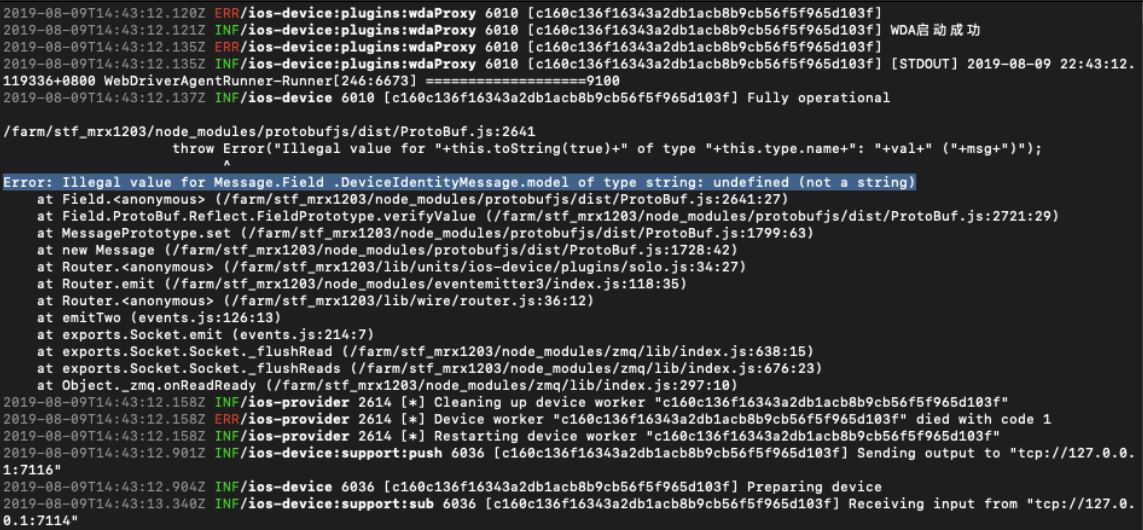
@mrx1203 I added logging to the xcodebuild process to try track down why the iPhone 5 wont work and this is what it prints out.
Got any clues on what is wrong with it?
oddgames-david
on 9 Aug 2019
@oddgames-david add the iPhone 5 model to DeviceType in the file stf/lib/units/ios-device/support/TypeToModel.js
mrx1203
on 10 Aug 2019
@mrx1203 that's got me a bit further. I've had 3 errors that come up randomly on all the devices and i just solve it by removing the webdriveragent and rebooting the device with this code.
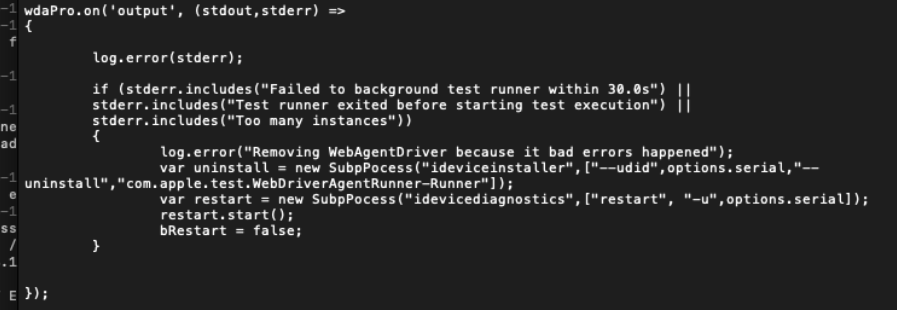
Now i'm getting this error for the iPhone 5
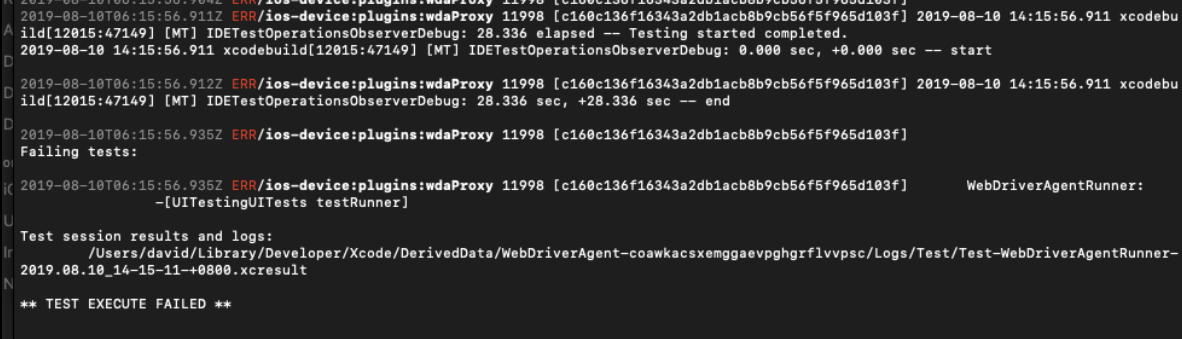
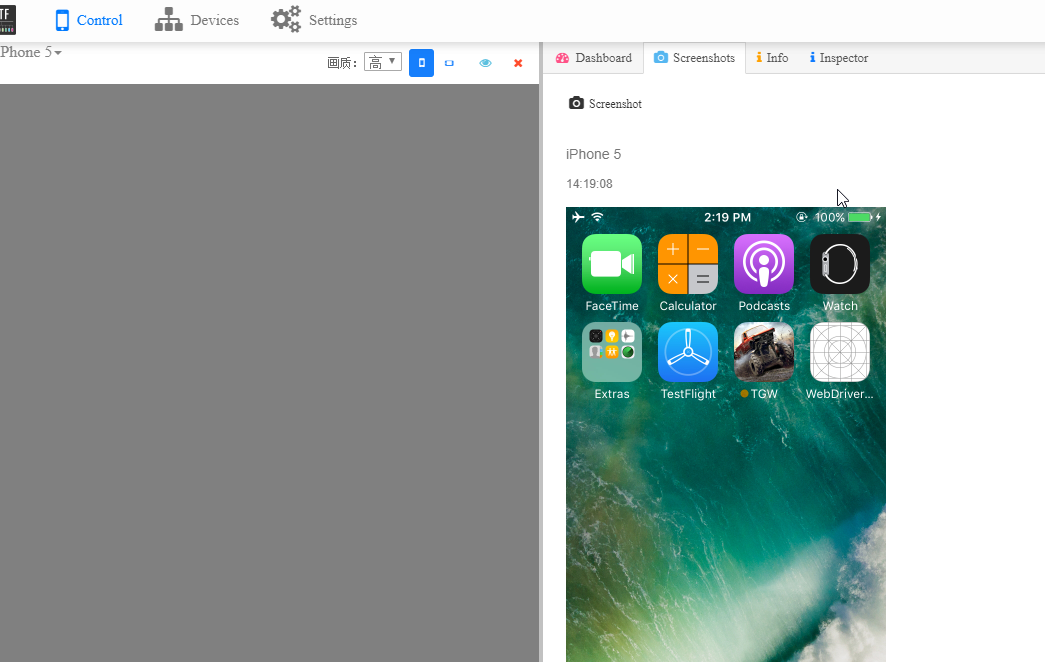
But the device is showing in the web ui and i can use the web ui to take screenshots and see info
oddgames-david
on 10 Aug 2019
@oddgames-david did you trust the certificate on the device? i think it‘s no need to reboot the device,just restart the webdriveragent is enough.
take Screenshot is via idevicescreenshot,Not dependent on webdriveragent
mrx1203
on 12 Aug 2019
Hi @mrx1203,
What OS did you use for the IOS support? I'm stuck installing 'brew install carthage" on Ubuntu, it complains about xcrun: not found
regards
 man4567890
on 22 Aug 2019
man4567890
on 22 Aug 2019
@man4567890 I used OSX Mojave with these commands: https://github.com/oddgames-david/stf/blob/master/README.md
oddgames-david
on 22 Aug 2019
Thanks so much @oddgames-david, so I guess there is no way to install IOS support on Centos/Ubuntu?
man4567890
on 22 Aug 2019
@man4567890 no you cant but... https://techsviewer.com/install-macos-mojave-vmware-windows/
oddgames-david
on 22 Aug 2019
Thanks so much @oddgames-david, I will try the Windows port
man4567890
on 23 Aug 2019
Hi @oddgames-david , I think I have a problem with this part
Install Xcode 10.0
Install Xcode 10.2
Follow: to replace XCTest.framework with an older version: https://github.com/facebookarchive/WebDriverAgent/issues/1093#issuecomment-481623523
Just exactly do I do this please, I have Xcode 10.0 and Xcode 10.3 on the Mac, but I do not understand the method described in github comment, could you please provide me with some instructions?
man4567890
on 26 Aug 2019
This is way difficult to get working, I'm stuck at this now
`2019-08-27T07:33:50.589Z INF/ios-device:plugins:display 21196 [14FEB66E-A2F1-43BF-A4C4-26F10A867B2E] Reading display info
Detected file type 'PNG' from extension
Wrote screenshot to: 14FEB66E-A2F1-43BF-A4C4-26F10A867B2E.png
2019-08-27T07:33:51.366Z INF/ios-device:support:push 21206 [5D46CD9A-7DD9-4A91-9BA0-D8B46042D11C] Sending output to "tcp://127.0.0.1:7116"
2019-08-27T07:33:51.373Z INF/ios-device 21206 [5D46CD9A-7DD9-4A91-9BA0-D8B46042D11C] Preparing device
2019-08-27T07:33:51.378Z INF/ios-device:plugins:identity 21196 [14FEB66E-A2F1-43BF-A4C4-26F10A867B2E] Solving identity
2019-08-27T07:33:51.887Z FTL/ios-device 21196 [14FEB66E-A2F1-43BF-A4C4-26F10A867B2E] Setup had an error TypeError: Cannot read property 'sdk' of null
at Object.getDeviceInfo (/Users/esawyja/farm/stf_oddgames/lib/units/ios-device/support/deviceinfo.js:56:28)
at solve (/Users/esawyja/farm/stf_oddgames/lib/units/ios-device/plugins/util/identity.js:13:33)
at /Users/esawyja/farm/stf_oddgames/lib/units/ios-device/plugins/util/identity.js:18:12
at SerialSyrup.ParallelSyrup.invoke (/Users/esawyja/farm/stf_oddgames/node_modules/stf-syrup/lib/parallel.js:54:24)
at /Users/esawyja/farm/stf_oddgames/node_modules/stf-syrup/lib/serial.js:43:33
at tryCatch1 (/Users/esawyja/farm/stf_oddgames/node_modules/stf-syrup/node_modules/bluebird/js/main/util.js:63:19)
at Promise$_callHandler [as _callHandler] (/Users/esawyja/farm/stf_oddgames/node_modules/stf-syrup/node_modules/bluebird/js/main/promise.js:708:13)
at Promise$_settlePromiseFromHandler [as _settlePromiseFromHandler] (/Users/esawyja/farm/stf_oddgames/node_modules/stf-syrup/node_modules/bluebird/js/main/promise.js:724:18)
at Promise$_settlePromiseAt [as _settlePromiseAt] (/Users/esawyja/farm/stf_oddgames/node_modules/stf-syrup/node_modules/bluebird/js/main/promise.js:896:14)
at Promise$_fulfillPromises [as _fulfillPromises] (/Users/esawyja/farm/stf_oddgames/node_modules/stf-syrup/node_modules/bluebird/js/main/promise.js:1041:14)
at Async$_consumeFunctionBuffer [as _consumeFunctionBuffer] (/Users/esawyja/farm/stf_oddgames/node_modules/stf-syrup/node_modules/bluebird/js/main/async.js:74:12)
at Async$consumeFunctionBuffer (/Users/esawyja/farm/stf_oddgames/node_modules/stf-syrup/node_modules/bluebird/js/main/async.js:37:14)
at _combinedTickCallback (internal/process/next_tick.js:132:7)
at process._tickCallback (internal/process/next_tick.js:181:9)
2019-08-27T07:33:51.889Z FTL/util:lifecycle 21196 [14FEB66E-A2F1-43BF-A4C4-26F10A867B2E] Shutting down due to fatal error
2019-08-27T07:33:51.908Z INF/ios-provider 21067 [] Cleaning up device worker "14FEB66E-A2F1-43BF-A4C4-26F10A867B2E"
2019-08-27T07:33:51.908Z ERR/ios-provider 21067 [] Device worker "14FEB66E-A2F1-43BF-A4C4-26F10A867B2E" died with code 1
2019-08-27T07:33:51.909Z INF/ios-provider 21067 [] Restarting device worker "14FEB66E-A2F1-43BF-A4C4-26F10A867B2E"
2019-08-27T07:33:52.436Z INF/ios-device:support:sub 21206 [5D46CD9A-7DD9-4A91-9BA0-D8B46042D11C] Receiving input from "tcp://127.0.0.1:7114"
2019-08-27T07:33:52.439Z INF/ios-device:support:sub 21206 [5D46CD9A-7DD9-4A91-9BA0-D8B46042D11C] Subscribing to permanent channel "ALL"
2019-08-27T07:33:52.446Z INF/ios-device:plugins:display 21206 [5D46CD9A-7DD9-4A91-9BA0-D8B46042D11C] Reading display info
2019-08-27T07:33:52.740Z ERR/ios-device:plugins:wdaProxy 21086 [1af8ad8fa6055b3e4dbe751cb62b4d8c443c56dd] * TEST BUILD FAILED *
2019-08-27T07:33:52.770Z ERR/ios-device:plugins:wdaProxy 21086 [1af8ad8fa6055b3e4dbe751cb62b4d8c443c56dd] 2019-08-27 09:33:52.770 xcodebuild[21199:165590] [MT] IDETestOperationsObserverDebug: (5EA96D28-2358-4035-875E-AEA7E749EB67) Beginning test session WebDriverAgentRunner-5EA96D28-2358-4035-875E-AEA7E749EB67 at 2019-08-27 09:33:52.769 with Xcode 10A255 on target 📱
deviceSerialNumber: F2LLL8C4FL01
identifier: 1af8ad8fa6055b3e4dbe751cb62b4d8c443c56dd
deviceClass: iPhone
deviceName: User’s iPhone
deviceIdentifier: 1af8ad8fa6055b3e4dbe751cb62b4d8c443c56dd
productVersion: 10.3.3
buildVersion: 14G60
deviceSoftwareVersion: 10.3.3 (14G60)
deviceArchitecture: armv7s
deviceTotalCapacity: 12945276928
deviceAvailableCapacity: 10973360128
deviceIsTransient: NO
ignored: NO
deviceIsBusy: NO
deviceIsPaired: YES
deviceIsActivated: YES
deviceActivationState: Activated
isPasscodeLocked: NO
deviceType:
supportedDeviceFamilies: (
1
)
applications: (null)
provisioningProfiles: (null)
hasInternalSupport: NO
isSupportedOS: YES
developerDiskMountError: (null)
(null)
bootArgs: (null)
connected: yes
isWirelessEnabled: no
connectionType: direct
hostname: (null)
bonjourServiceName: f0:c1:f1:13:20:ef@fe80::f2c1:f1ff:fe13:20ef._apple-mobdev2._tcp.local.
} (10.3.3 (14G60))
2019-08-27T07:33:52.815Z ERR/ios-device:plugins:wdaProxy 21086 [1af8ad8fa6055b3e4dbe751cb62b4d8c443c56dd] 2019-08-27 09:33:52.814 xcodebuild[21199:165590] Error Domain=NSCocoaErrorDomain Code=260 "The file “WebDriverAgentRunner-Runner.app” couldn’t be opened because there is no such file." UserInfo={NSFilePath=/Users/esawyja/Library/Developer/Xcode/DerivedData/WebDriverAgent-cukegpnnodsbdhddcunfklzyxrbd/Build/Products/Debug-iphoneos/WebDriverAgentRunner-Runner.app, NSUnderlyingError=0x7ffb75c0f1b0 {Error Domain=NSPOSIXErrorDomain Code=2 "No such file or directory"}}
2019-08-27T07:33:52.815Z ERR/ios-device:plugins:wdaProxy 21086 [1af8ad8fa6055b3e4dbe751cb62b4d8c443c56dd] 2019-08-27 09:33:52.815 xcodebuild[21199:165590] Error Domain=IDETestOperationsObserverErrorDomain Code=4 "The file “WebDriverAgentRunner-Runner.app” couldn’t be opened because there is no such file." UserInfo={NSLocalizedDescription=The file “WebDriverAgentRunner-Runner.app” couldn’t be opened because there is no such file., NSLocalizedRecoverySuggestion=If you believe this error represents a bug, please attach the result bundle at /Users/esawyja/Library/Developer/Xcode/DerivedData/WebDriverAgent-cukegpnnodsbdhddcunfklzyxrbd/Logs/Test/Test-WebDriverAgentRunner-2019.08.27_09-33-52-+0200.xcresult}
2019-08-27T07:33:52.831Z ERR/ios-device:plugins:wdaProxy 21086 [1af8ad8fa6055b3e4dbe751cb62b4d8c443c56dd]
Testing failed:
2019-08-27T07:33:52.832Z ERR/ios-device:plugins:wdaProxy 21086 [1af8ad8fa6055b3e4dbe751cb62b4d8c443c56dd] No profiles for 'com.huya.test.WebDriverAgentRunner.15' were found: Xcode couldn't find any iOS App Development provisioning profiles matching 'com.huya.test.WebDriverAgentRunner.15'. Automatic signing is disabled and unable to generate a profile. To enable automatic signing, pass -allowProvisioningUpdates to xcodebuild. (in target 'WebDriverAgentRunner')
WebDriverAgentRunner-Runner.app encountered an error (The file “WebDriverAgentRunner-Runner.app” couldn’t be opened because there is no such file.)
* TEST EXECUTE FAILED *
`
man4567890
on 27 Aug 2019
@man4567890 are you making sure you are setting up automatic provisioning profile management
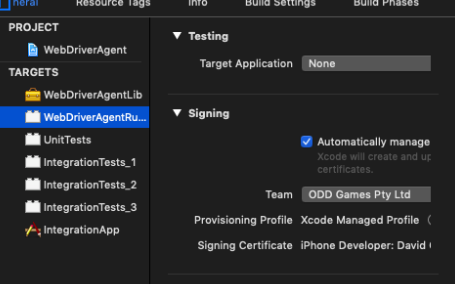
oddgames-david
on 27 Aug 2019
@oddgames-david Thanks for looking at my problem, I do not know a lot about IOS, sorry, I get this
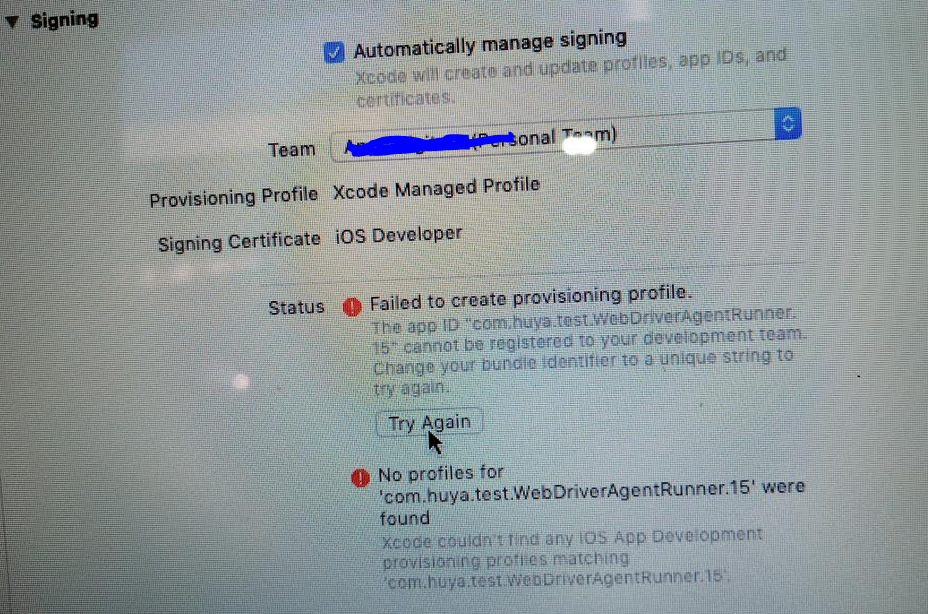
On the WebDriverAgentLib with the little suitcase next to it, on the Provisioning Profile I get None required, but with the WebDriverAgentRunner, I get the paste above, Do I need a Apple Developer account, the one used above has expired and if I register a new one, it will cost US99, Do I need that?
man4567890
on 27 Aug 2019
@man4567890 I think you do need a dev account, i've never tried without it
oddgames-david
on 27 Aug 2019
Thanks so much @oddgames-david , let me pay them
man4567890
on 27 Aug 2019
@man4567890 you can use the personal account,but it has expired date. above your paste,you must change the bundle identifier to a unique on the "Build Settings"。
mrx1203
on 27 Aug 2019
I'm so sorry guys, please help me with this, @mrx1203 is this where I change the bundle identifier? I changed it to 123xxxx
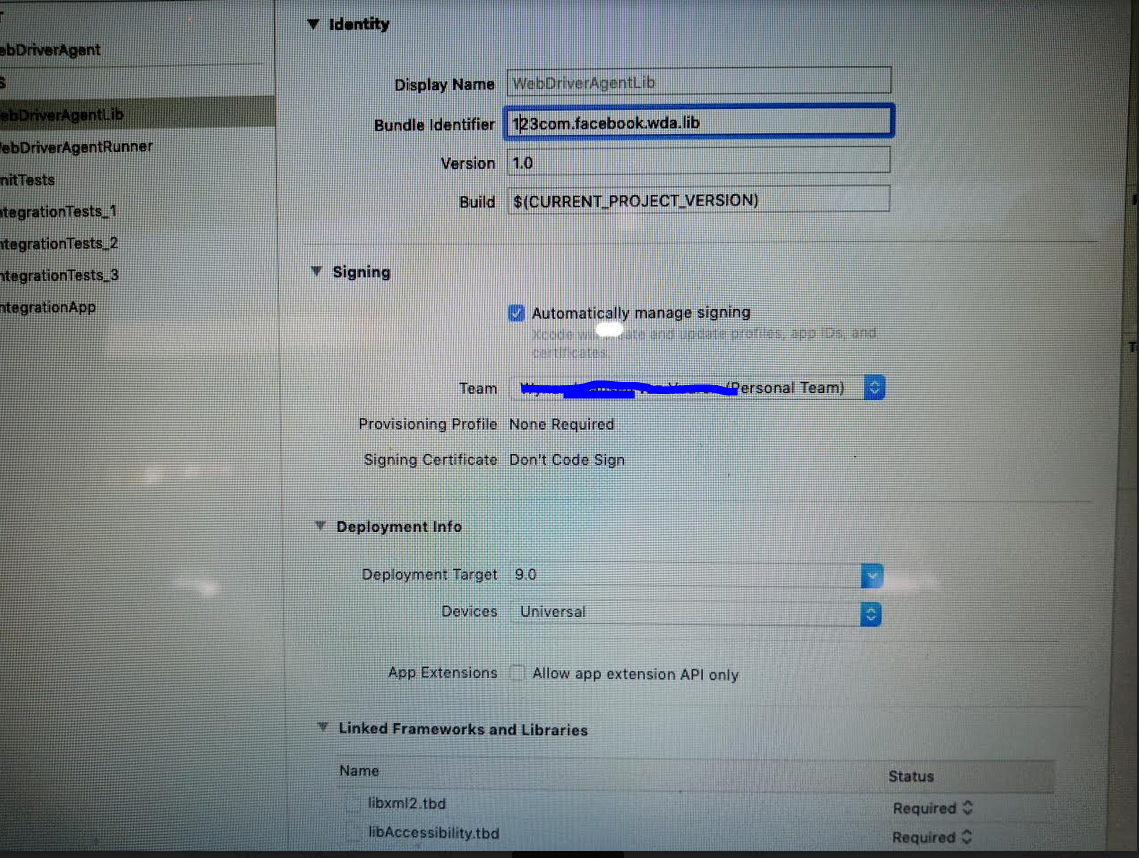
and is this where I build?
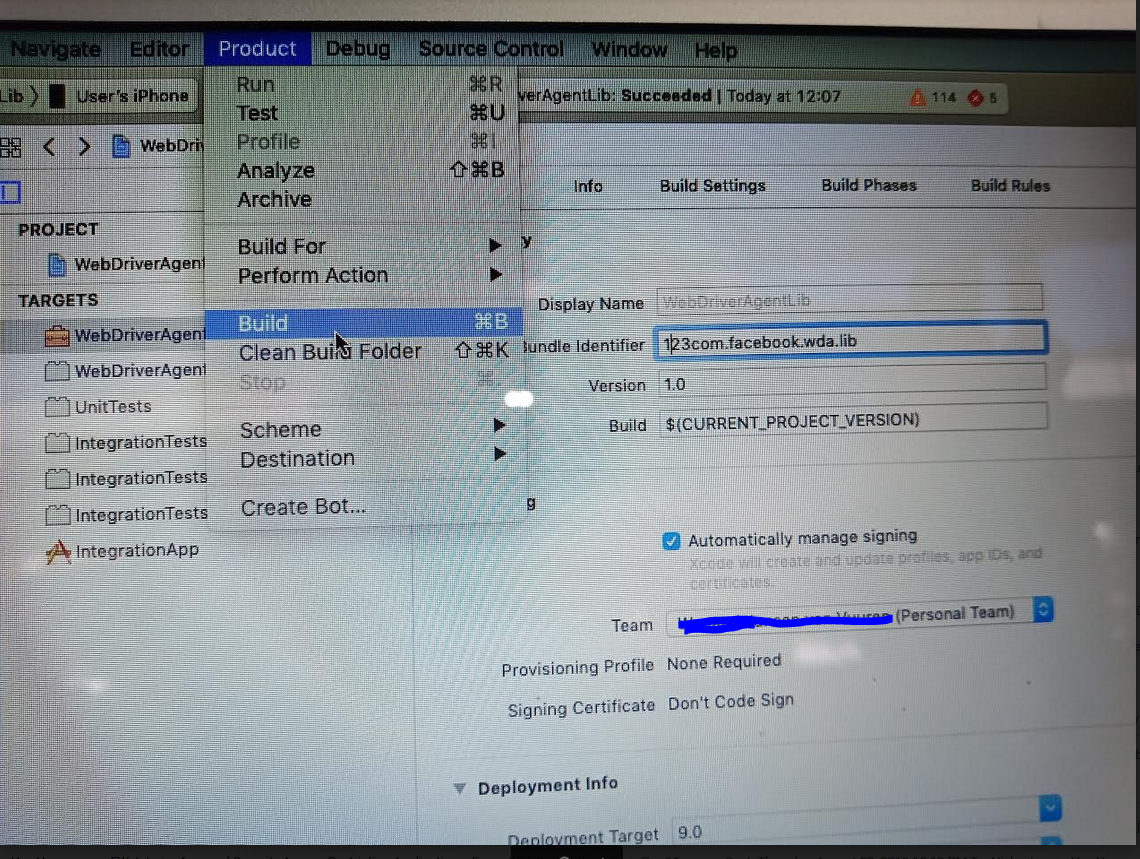
And is this where I do the test? the build succeeded
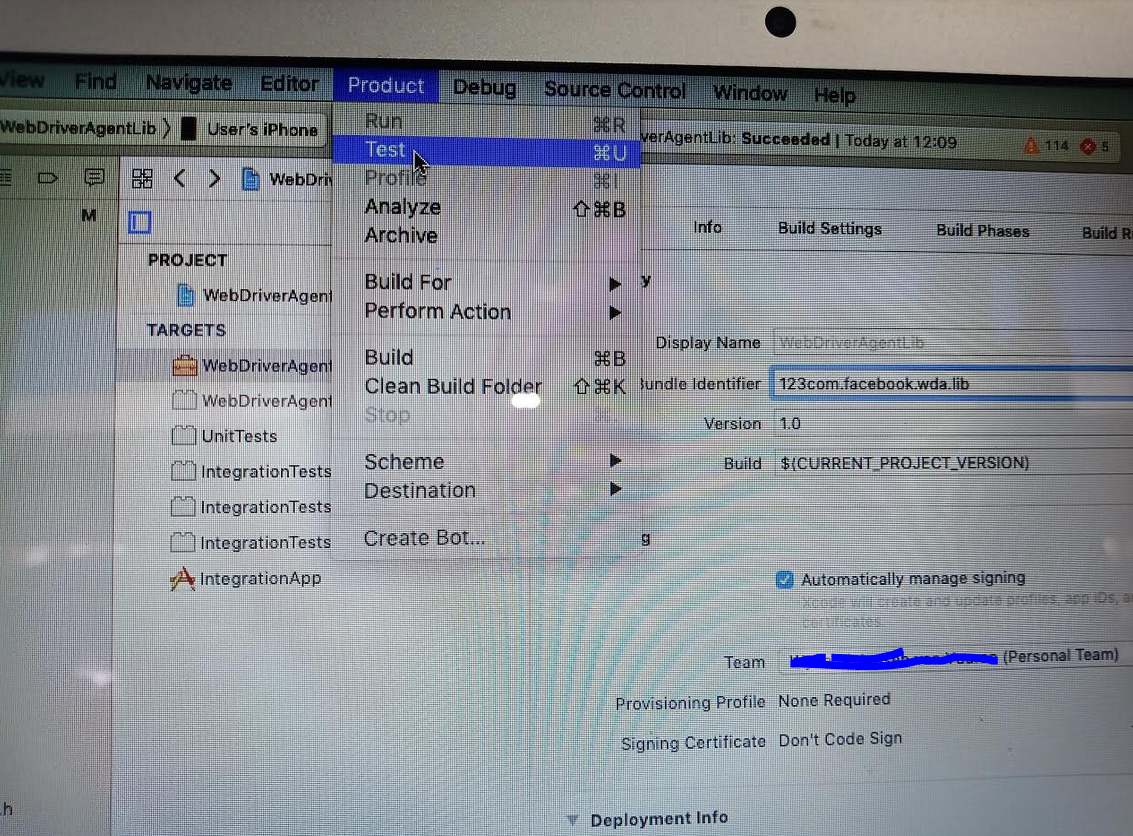
When I do, I get this, am I right in thinking that the app must be placed on the phone now?
And does the test do that?
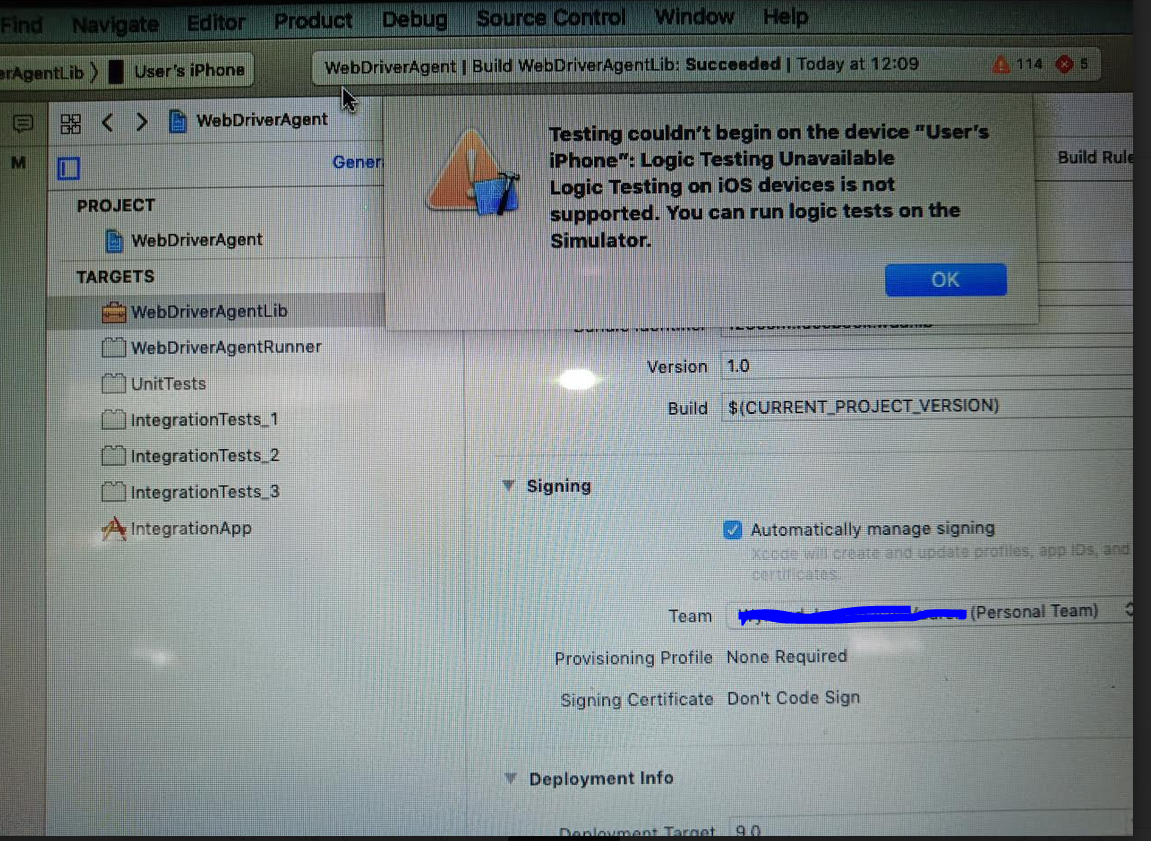
man4567890
on 27 Aug 2019
@man4567890 https://testerhome.com/topics/7220 follow this to setup
mrx1203
on 27 Aug 2019
Thank so much @mrx1203, I think the build was placed on the phone, but now I'm getting
2019-08-27T11:16:43.932Z INF/ios-device:support:push 35555 [1af8ad8fa6055b3e4dbe751cb62b4d8c443c56dd] Sending output to "tcp://127.0.0.1:7116"
2019-08-27T11:16:43.936Z INF/ios-device 35555 [1af8ad8fa6055b3e4dbe751cb62b4d8c443c56dd] Preparing device
2019-08-27T11:16:44.618Z INF/ios-device:support:sub 35555 [1af8ad8fa6055b3e4dbe751cb62b4d8c443c56dd] Receiving input from "tcp://127.0.0.1:7114"
2019-08-27T11:16:44.620Z INF/ios-device:support:sub 35555 [1af8ad8fa6055b3e4dbe751cb62b4d8c443c56dd] Subscribing to permanent channel "*ALL"
2019-08-27T11:16:44.624Z INF/ios-device:plugins:display 35555 [1af8ad8fa6055b3e4dbe751cb62b4d8c443c56dd] Reading display info
2019-08-27T11:16:44.773Z FTL/ios-device 35555 [1af8ad8fa6055b3e4dbe751cb62b4d8c443c56dd] Setup had an error Error: Command failed: idevicescreenshot -u 1af8ad8fa6055b3e4dbe751cb62b4d8c443c56dd 1af8ad8fa6055b3e4dbe751cb62b4d8c443c56dd.png
    at checkExecSyncError (child_process.js:607:13)
    at execSync (child_process.js:647:13)
    at Object.getDisplay (/Users/esawyja/farm/stf_oddgames/lib/units/ios-device/support/deviceinfo.js:33:18)
    at readInfo (/Users/esawyja/farm/stf_oddgames/lib/units/ios-device/plugins/util/display.js:36:25)
    at /Users/esawyja/farm/stf_oddgames/lib/units/ios-device/plugins/util/display.js:46:12
    at SerialSyrup.ParallelSyrup.invoke (/Users/esawyja/farm/stf_oddgames/node_modules/stf-syrup/lib/parallel.js:54:24)
    at /Users/esawyja/farm/stf_oddgames/node_modules/stf-syrup/lib/serial.js:43:33
    at tryCatch1 (/Users/esawyja/farm/stf_oddgames/node_modules/stf-syrup/node_modules/bluebird/js/main/util.js:63:19)
    at Promise$_callHandler [as _callHandler] (/Users/esawyja/farm/stf_oddgames/node_modules/stf-syrup/node_modules/bluebird/js/main/promise.js:708:13)
    at Promise$_settlePromiseFromHandler [as _settlePromiseFromHandler] (/Users/esawyja/farm/stf_oddgames/node_modules/stf-syrup/node_modules/bluebird/js/main/promise.js:724:18)
    at Promise$_settlePromiseAt [as _settlePromiseAt] (/Users/esawyja/farm/stf_oddgames/node_modules/stf-syrup/node_modules/bluebird/js/main/promise.js:896:14)
    at Promise$_fulfillPromises [as _fulfillPromises] (/Users/esawyja/farm/stf_oddgames/node_modules/stf-syrup/node_modules/bluebird/js/main/promise.js:1041:14)
    at Async$_consumeFunctionBuffer [as _consumeFunctionBuffer] (/Users/esawyja/farm/stf_oddgames/node_modules/stf-syrup/node_modules/bluebird/js/main/async.js:74:12)
    at Async$consumeFunctionBuffer (/Users/esawyja/farm/stf_oddgames/node_modules/stf-syrup/node_modules/bluebird/js/main/async.js:37:14)
    at _combinedTickCallback (internal/process/next_tick.js:132:7)
    at process._tickCallback (internal/process/next_tick.js:181:9)
2019-08-27T11:16:44.775Z FTL/util:lifecycle 35555 [1af8ad8fa6055b3e4dbe751cb62b4d8c443c56dd] Shutting down due to fatal error
2019-08-27T11:16:44.784Z INF/ios-provider 34393 [*] Cleaning up device worker "1af8ad8fa6055b3e4dbe751cb62b4d8c443c56dd"
2019-08-27T11:16:44.784Z ERR/ios-provider 34393 [*] Device worker "1af8ad8fa6055b3e4dbe751cb62b4d8c443c56dd" died with code 1
2019-08-27T11:16:44.784Z INF/ios-provider 34393 [*] Restarting device worker "1af8ad8fa6055b3e4dbe751cb62b4d8c443c56dd"
2019-08-27T11:16:45.666Z INF/ios-device:support:push 35557 [1af8ad8fa6055b3e4dbe751cb62b4d8c443c56dd] Sending output to "tcp://127.0.0.1:7116"
2019-08-27T11:16:45.670Z INF/ios-device 35557 [1af8ad8fa6055b3e4dbe751cb62b4d8c443c56dd] Preparing device
2019-08-27T11:16:46.355Z INF/ios-device:support:sub 35557 [1af8ad8fa6055b3e4dbe751cb62b4d8c443c56dd] Receiving input from "tcp://127.0.0.1:7114"
2019-08-27T11:16:46.357Z INF/ios-device:support:sub 35557 [1af8ad8fa6055b3e4dbe751cb62b4d8c443c56dd] Subscribing to permanent channel "*ALL"
2019-08-27T11:16:46.361Z INF/ios-device:plugins:display 35557 [1af8ad8fa6055b3e4dbe751cb62b4d8c443c56dd] Reading display info
2019-08-27T11:16:46.507Z FTL/ios-device 35557 [1af8ad8fa6055b3e4dbe751cb62b4d8c443c56dd] Setup had an error Error: Command failed: idevicescreenshot -u 1af8ad8fa6055b3e4dbe751cb62b4d8c443c56dd 1af8ad8fa6055b3e4dbe751cb62b4d8c443c56dd.png
    at checkExecSyncError (child_process.js:607:13)
    at execSync (child_process.js:647:13)
    at Object.getDisplay (/Users/esawyja/farm/stf_oddgames/lib/units/ios-device/support/deviceinfo.js:33:18)
    at readInfo (/Users/esawyja/farm/stf_oddgames/lib/units/ios-device/plugins/util/display.js:36:25)
    at /Users/esawyja/farm/stf_oddgames/lib/units/ios-device/plugins/util/display.js:46:12
Any idea on that please?
man4567890
on 27 Aug 2019
@man4567890 run this command idevicescreenshot -u 1af8ad8fa6055b3e4dbe751cb62b4d8c443c56dd 1af8ad8fa6055b3e4dbe751cb62b4d8c443c56dd.png in the terminal, and search solution for the error
mrx1203
on 27 Aug 2019
That seems to be ok?
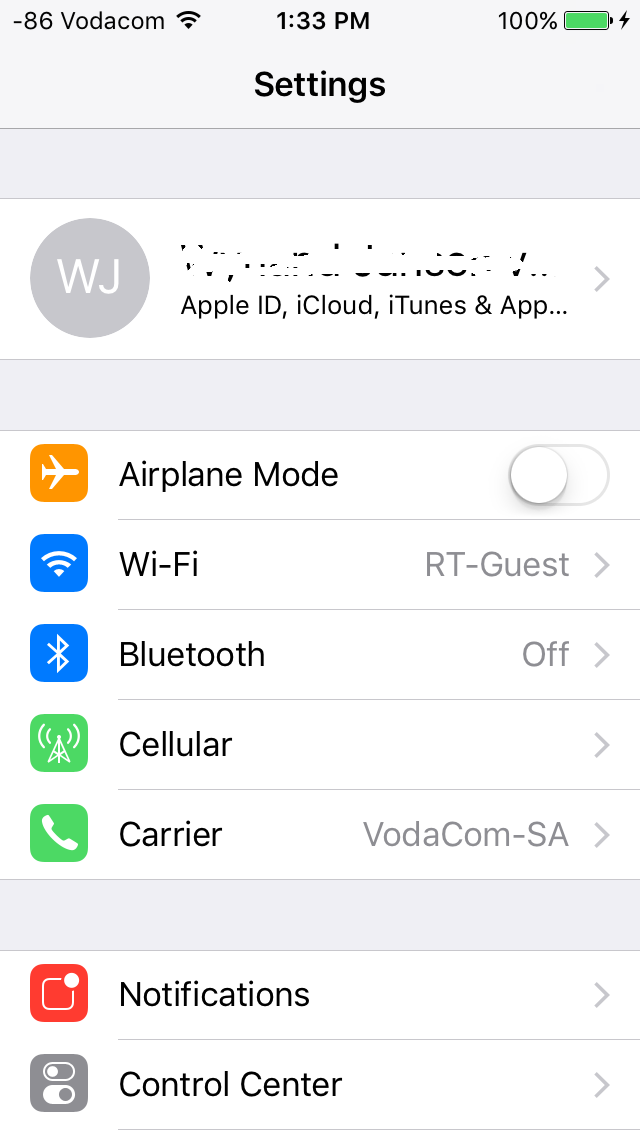
When I click USE on STF, the phone locks itself and asks for my PIN number, sorry for all the questions!
man4567890
on 27 Aug 2019
Tried @mrx1203 solution and everything works great. I'm able to run an iPhone 8 iOS 12.4.
However the look&feel (eg radiobuttons) does not look like the original stf. is this correct?
Thanks guys!
 cairolifc
on 27 Aug 2019
cairolifc
on 27 Aug 2019
Could it be that my iPhone is to old, I'm using a iPhone5-c
2019-08-27T12:48:32.346Z FTL/ios-device 53386 [5D46CD9A-7DD9-4A91-9BA0-D8B46042D11C] Setup had an error TypeError: Cannot read property 'sdk' of null
at Object.getDeviceInfo (/Users/esawyja/farm/stf_oddgames/lib/units/ios-device/support/deviceinfo.js:56:28)
at solve (/Users/esawyja/farm/stf_oddgames/lib/units/ios-device/plugins/util/identity.js:13:33)
at /Users/esawyja/farm/stf_oddgames/lib/units/ios-device/plugins/util/identity.js:18:12
at SerialSyrup.ParallelSyrup.invoke (/Users/esawyja/farm/stf_oddgames/node_modules/stf-syrup/lib/parallel.js:54:24)
at /Users/esawyja/farm/stf_oddgames/node_modules/stf-syrup/lib/serial.js:43:33
at tryCatch1 (/Users/esawyja/farm/stf_oddgames/node_modules/stf-syrup/node_modules/bluebird/js/main/util.js:63:19)
at Promise$_callHandler [as _callHandler] (/Users/esawyja/farm/stf_oddgames/node_modules/stf-syrup/node_modules/bluebird/js/main/promise.js:708:13)
at Promise$_settlePromiseFromHandler [as _settlePromiseFromHandler] (/Users/esawyja/farm/stf_oddgames/node_modules/stf-syrup/node_modules/bluebird/js/main/promise.js:724:18)
at Promise$_settlePromiseAt [as _settlePromiseAt] (/Users/esawyja/farm/stf_oddgames/node_modules/stf-syrup/node_modules/bluebird/js/main/promise.js:896:14)
at Promise$_fulfillPromises [as _fulfillPromises] (/Users/esawyja/farm/stf_oddgames/node_modules/stf-syrup/node_modules/bluebird/js/main/promise.js:1041:14)
at Async$_consumeFunctionBuffer [as _consumeFunctionBuffer] (/Users/esawyja/farm/stf_oddgames/node_modules/stf-syrup/node_modules/bluebird/js/main/async.js:74:12)
at Async$consumeFunctionBuffer (/Users/esawyja/farm/stf_oddgames/node_modules/stf-syrup/node_modules/bluebird/js/main/async.js:37:14)
at _combinedTickCallback (internal/process/next_tick.js:132:7)
at process._tickCallback (internal/process/next_tick.js:181:9)
2019-08-27T12:48:32.348Z FTL/util:lifecycle 53386 [5D46CD9A-7DD9-4A91-9BA0-D8B46042D11C] Shutting down due to fatal error
2019-08-27T12:48:32.363Z INF/ios-provider 50127 [*] Cleaning up device worker "5D46CD9A-7DD9-4A91-9BA0-D8B46042D11C"
The Android part was definitely easier
man4567890
on 27 Aug 2019
@cairolifc yes, i modified the web page style。if you don't like this ,you can start the original stf server, and on mac, just start the stf ios-provider to join the server
mrx1203
on 28 Aug 2019
Hi All,
Reinstalled from scratch using https://github.com/mrx1203/stf, everything seems to be working, after the app build, I could get the status from the phone
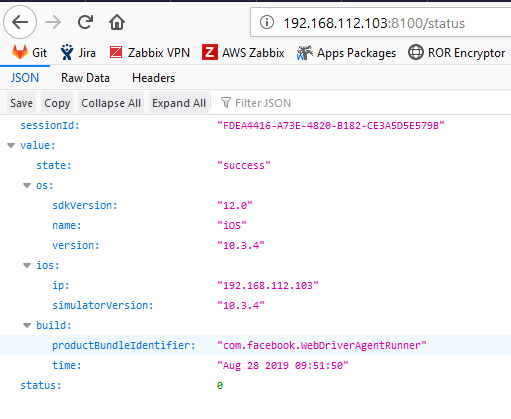
But the devices just stays in preparing
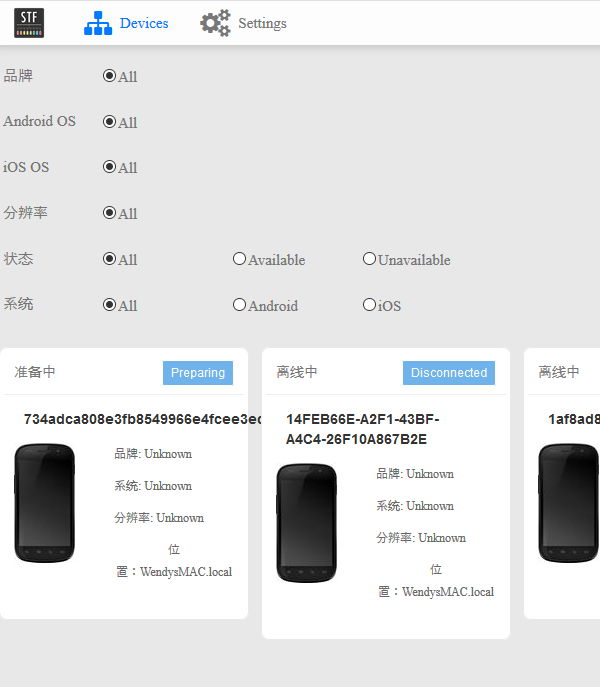
WendysMAC:bin esawyja$  ./stf local --public-ip 192.168.112.101
2019-08-28T07:57:52.506Z INF/util:procutil 53726 [*] Forking "/Users/esawyja/stf_ios/stf/lib/cli migrate"
2019-08-28T07:57:52.828Z INF/db 53727 [*] Connecting to 127.0.0.1:28015
2019-08-28T07:57:52.846Z INF/db:setup 53727 [*] Database "stf" already exists
2019-08-28T07:57:52.852Z INF/db:setup 53727 [*] Table "users" already exists
2019-08-28T07:57:52.852Z INF/db:setup 53727 [*] Table "accessTokens" already exists
2019-08-28T07:57:52.852Z INF/db:setup 53727 [*] Table "vncauth" already exists
2019-08-28T07:57:52.853Z INF/db:setup 53727 [*] Table "devices" already exists
2019-08-28T07:57:52.853Z INF/db:setup 53727 [*] Table "logs" already exists
2019-08-28T07:57:52.863Z INF/db:setup 53727 [*] Index "users"."adbKeys" already exists
2019-08-28T07:57:52.863Z INF/db:setup 53727 [*] Index "accessTokens"."email" already exists
2019-08-28T07:57:52.863Z INF/db:setup 53727 [*] Index "vncauth"."response" already exists
2019-08-28T07:57:52.863Z INF/db:setup 53727 [*] Index "vncauth"."responsePerDevice" already exists
2019-08-28T07:57:52.863Z INF/db:setup 53727 [*] Waiting for index "users"."adbKeys"
2019-08-28T07:57:52.864Z INF/db:setup 53727 [*] Waiting for index "accessTokens"."email"
2019-08-28T07:57:52.864Z INF/db:setup 53727 [*] Waiting for index "vncauth"."response"
2019-08-28T07:57:52.865Z INF/db:setup 53727 [*] Waiting for index "vncauth"."responsePerDevice"
2019-08-28T07:57:52.868Z INF/db:setup 53727 [*] Index "devices"."owner" already exists
2019-08-28T07:57:52.868Z INF/db:setup 53727 [*] Index "devices"."present" already exists
2019-08-28T07:57:52.868Z INF/db:setup 53727 [*] Index "devices"."providerChannel" already exists
2019-08-28T07:57:52.868Z INF/db:setup 53727 [*] Waiting for index "devices"."owner"
.....
   [34] ../res/bower_components/font-lato-2-subset/font/LatoLatinLight-Regular.woff 83 bytes {1} {3} {5} [built]
   [35] ../res/bower_components/font-lato-2-subset/font/LatoLatin-Regular.woff 83 bytes {1} {3} {5} [built]
   [36] ../res/bower_components/font-lato-2-subset/font/LatoLatin-Bold.woff 83 bytes {1} {3} {5} [built]
 [1076] ../res/auth/mock/scripts/signin/index.js 276 bytes {5} [built]
 [1077] ../res/auth/mock/scripts/signin/signin.css 950 bytes {5} [built]
 [1078] ../~/css-loader!../res/auth/mock/scripts/signin/signin.css 1.82 kB {5} [built]
 [1079] ../res/auth/mock/scripts/signin/signin.pug 1.91 kB {5} [built]
 [1080] ../res/auth/mock/scripts/signin/signin-controller.js 871 bytes {5} [built]
chunk    {6} entry/commons.entry.js (entry/commons.entry.js) 0 bytes [rendered]
2019-08-28T07:58:37.012Z INF/middleware:webpack 53753 [*] Bundle is now valid
2019-08-28T07:58:37.015Z INF/webpack:config 53753 [*] Build progress 100% (complete)
2019-08-28T07:58:38.805Z INF/ios-provider 53751 [*] Providing 0 of 1 device(s); waiting for "734adca808e3fb8549966e4fcee3edcd27668120"
2019-08-28T07:58:48.809Z INF/ios-provider 53751 [*] Providing 0 of 1 device(s); waiting for "734adca808e3fb8549966e4fcee3edcd27668120"
2019-08-28T07:58:58.815Z INF/ios-provider 53751 [*] Providing 0 of 1 device(s); waiting for "734adca808e3fb8549966e4fcee3edcd27668120"
2019-08-28T07:59:18.821Z INF/ios-provider 53751 [*] Providing 0 of 1 device(s); waiting for "734adca808e3fb8549966e4fcee3edcd27668120"
2019-08-28T07:59:21.746Z INF/ios-device:plugins:wdaProxy 53775 [734adca808e3fb8549966e4fcee3edcd27668120] start WDA with params:build-for-testing,test-without-building,-project,/Users/esawyja/stf_ios/stf/bin/WebDriverAgent/WebDriverAgent.xcodeproj,-scheme,WebDriverAgentRunner,-destination,id=734adca808e3fb8549966e4fcee3edcd27668120,platform=iOS,-configuration,Debug,IPHONEOS_DEPLOYMENT_TARGET=10.2
2019-08-28T07:59:28.828Z INF/ios-provider 53751 [*] Providing 0 of 1 device(s); waiting for "734adca808e3fb8549966e4fcee3edcd27668120"
2019-08-28T07:59:38.836Z INF/ios-provider 53751 [*] Providing 0 of 1 device(s); waiting for "734adca808e3fb8549966e4fcee3edcd27668120"
2019-08-28T07:59:43.709Z INF/ios-device:plugins:wdaProxy 53775 [734adca808e3fb8549966e4fcee3edcd27668120] start WDA with params:build-for-testing,test-without-building,-project,/Users/esawyja/stf_ios/stf/bin/WebDriverAgent/WebDriverAgent.xcodeproj,-scheme,WebDriverAgentRunner,-destination,id=734adca808e3fb8549966e4fcee3edcd27668120,platform=iOS,-configuration,Debug,IPHONEOS_DEPLOYMENT_TARGET=10.2
2019-08-28T07:59:48.839Z INF/ios-provider 53751 [*] Providing 0 of 1 device(s); waiting for "734adca808e3fb8549966e4fcee3edcd27668120"
2019-08-28T07:59:53.941Z INF/ios-device:plugins:wdaProxy 53775 [734adca808e3fb8549966e4fcee3edcd27668120] start WDA with params:build-for-testing,test-without-building,-project,/Users/esawyja/stf_ios/stf/bin/WebDriverAgent/WebDriverAgent.xcodeproj,-scheme,WebDriverAgentRunner,-destination,id=734adca808e3fb8549966e4fcee3edcd27668120,platform=iOS,-configuration,Debug,IPHONEOS_DEPLOYMENT_TARGET=10.2
2019-08-28T07:59:58.845Z INF/ios-provider 53751 [*] Providing 0 of 1 device(s); waiting for "734adca808e3fb8549966e4fcee3edcd27668120"
I can see the device as well with ideviceinfo -s
WendysMAC:~ esawyja$ ideviceinfo -s
BasebandCertId: 3255536192
BasebandKeyHashInformation:
 AKeyStatus: 2
 SKeyHash: 7MQEUyvzG4gjjZc7KsNNAVTS8g4=
 SKeyStatus: 0
BasebandSerialNumber: C+2d+g==
BasebandVersion: 11.80.00
BoardId: 2
BuildVersion: 14G61
ChipID: 35152
DeviceClass: iPhone
DeviceColor: white
DeviceName: Iphone2
DieID: 2245115295360244192
HardwareModel: N42AP
HasSiDP: true
PartitionType:
ProductName: iPhone OS
ProductType: iPhone5,2
ProductVersion: 10.3.4
ProductionSOC: true
ProtocolVersion: 2
TelephonyCapability: true
UniqueChipID: 4171421785419
UniqueDeviceID: 734adca808e3fb8549966e4fcee3edcd27668120
WiFiAddress: c0:63:94:3d:a4:44
WendysMAC:~ esawyja$
Does anyone have ANY advice for me please, I do not know what to do anymore...
man4567890
on 28 Aug 2019
@man4567890 run the command idevice_id -l on the terminal, Is there a few identical udid? by the way,when you run the stf,please stop the WDA from XCode
mrx1203
on 28 Aug 2019
hi @mrx1203 I just see one
WendysMAC:~ esawyja$ idevice_id -l
734adca808e3fb8549966e4fcee3edcd27668120
WendysMAC:~ esawyja$
When you say stop WDA from XCode, are you saying I must just close XCode? or how do I stop it?
man4567890
on 28 Aug 2019
@man4567890 just stop the WDA test 。now, try this command on the terminal xcodebuild build-for-testing test-without-building -project /Users/esawyja/stf_ios/stf/bin/WebDriverAgent/WebDriverAgent.xcodeproj -scheme WebDriverAgentRunner -destination id=734adca808e3fb8549966e4fcee3edcd27668120 platform=iOS -configuration Debug IPHONEOS_DEPLOYMENT_TARGET=10.2
mrx1203
on 28 Aug 2019
@mrx1203 , I stopped Xcode, quit the program, stopped stf and ran the command
`WendysMAC:~ esawyja$ xcodebuild build-for-testing test-without-building -project /Users/esawyja/stf_ios/stf/bin/WebDriverAgent/WebDriverAgent.xcodeproj -scheme WebDriverAgentRunner -destination id=734adca808e3fb8549966e4fcee3edcd27668120 platform=iOS -configuration Debug IPHONEOS_DEPLOYMENT_TARGET=10.2
2019-08-28 10:44:43.247 xcodebuild[3203:34301] [MT] DVTSDK: Warning: SDK path collision for path '
2019-08-28 10:44:43.248 xcodebuild[3203:34301] [MT] DVTSDK: Warning: SDK path collision for path '
2019-08-28 10:44:43.249 xcodebuild[3203:34301] [MT] DVTSDK: Warning: SDK path collision for path '
2019-08-28 10:44:43.250 xcodebuild[3203:34301] [MT] DVTSDK: Warning: SDK path collision for path '
2019-08-28 10:44:43.251 xcodebuild[3203:34301] [MT] DVTSDK: Warning: SDK path collision for path '
2019-08-28 10:44:43.252 xcodebuild[3203:34301] [MT] DVTSDK: Warning: SDK path collision for path '
Build settings from command line:
IPHONEOS_DEPLOYMENT_TARGET = 10.2
platform = iOS
note: Using new build system
note: Planning build
note: Constructing build description
CreateBuildDirectory /Users/esawyja/Library/Developer/Xcode/DerivedData/WebDriverAgent-dsugwppmngockofvpptchhwpfktb/Build/Intermediates.noindex (in target: WebDriverAgentRunner)
cd /Users/esawyja/stf_ios/stf/bin/WebDriverAgent
builtin-create-build-directory /Users/esawyja/Library/Developer/Xcode/DerivedData/WebDriverAgent-dsugwppmngockofvpptchhwpfktb/Build/Intermediates.noindex
CreateBuildDirectory /Users/esawyja/Library/Developer/Xcode/DerivedData/WebDriverAgent-dsugwppmngockofvpptchhwpfktb/Build/Products (in target: WebDriverAgentRunner)
cd /Users/esawyja/stf_ios/stf/bin/WebDriverAgent
builtin-create-build-directory /Users/esawyja/Library/Developer/Xcode/DerivedData/WebDriverAgent-dsugwppmngockofvpptchhwpfktb/Build/Products
CodeSign /Users/esawyja/Library/Developer/Xcode/DerivedData/WebDriverAgent-dsugwppmngockofvpptchhwpfktb/Build/Products/Debug-iphoneos/WebDriverAgentRunner-Runner.app/PlugIns/WebDriverAgentRunner.xctest/Frameworks/WebDriverAgentLib.framework (in target: WebDriverAgentRunner)
cd /Users/esawyja/stf_ios/stf/bin/WebDriverAgent
export CODESIGN_ALLOCATE=/Applications/Xcode.app/Contents/Developer/Toolchains/XcodeDefault.xctoolchain/usr/bin/codesign_allocate
--preserve-metadata=identifier,entitlements,flags --timestamp=none /Users/esawyja/Library/Developer/Xcode/DerivedData/WebDriverAgent-dsugwppmngockofvpptchhwpfktb/Build/Products/Debug-iphoneos/WebDriverAgentRunner-Runner.app/PlugIns/WebDriverAgentRunner.xctest/Frameworks/WebDriverAgentLib.framework
/Users/esawyja/Library/Developer/Xcode/DerivedData/WebDriverAgent-dsugwppmngockofvpptchhwpfktb/Build/Products/Debug-iphoneos/WebDriverAgentRunner-Runner.app/PlugIns/WebDriverAgentRunner.xctest/Frameworks/WebDriverAgentLib.framework: errSecInternalComponent
Command CodeSign failed with a nonzero exit code
* TEST BUILD FAILED *
The following build commands failed:
CodeSign /Users/esawyja/Library/Developer/Xcode/DerivedData/WebDriverAgent-dsugwppmngockofvpptchhwpfktb/Build/Products/Debug-iphoneos/WebDriverAgentRunner-Runner.app/PlugIns/WebDriverAgentRunner.xctest/Frameworks/WebDriverAgentLib.framework
(1 failure)
Testing started on 'Iphone2'
2019-08-28 10:44:46.246 xcodebuild[3203:34377] IDETestOperationsObserverDebug: Writing diagnostic log for test session to:
/Users/esawyja/Library/Developer/Xcode/DerivedData/WebDriverAgent-dsugwppmngockofvpptchhwpfktb/Logs/Test/Test-WebDriverAgentRunner-2019.08.28_10-44-45-+0200.xcresult/2_Test/Diagnostics/WebDriverAgentRunner-0B6F68F9-A67B-468C-B72B-83552F0FB99C/WebDriverAgentRunner-D29D2A77-DB63-485C-BC92-92BEBC22394E/Session-WebDriverAgentRunner-2019-08-28_104446-MhruHa.log
2019-08-28 10:44:46.247 xcodebuild[3203:34301] [MT] IDETestOperationsObserverDebug: (BFA11C7B-7A1C-4D12-B3F0-01D9703BC069) Beginning test session WebDriverAgentRunner-BFA11C7B-7A1C-4D12-B3F0-01D9703BC069 at 2019-08-28 10:44:46.246 with Xcode 10A255 on target 📱
deviceSerialNumber: F2PKPXUSDTWF
identifier: 734adca808e3fb8549966e4fcee3edcd27668120
deviceClass: iPhone
deviceName: Iphone2
deviceIdentifier: 734adca808e3fb8549966e4fcee3edcd27668120
productVersion: 10.3.4
buildVersion: 14G61
deviceSoftwareVersion: 10.3.4 (14G61)
deviceArchitecture: armv7s
deviceTotalCapacity: 13081653248
deviceAvailableCapacity: 10746290176
deviceIsTransient: NO
ignored: NO
deviceIsBusy: NO
deviceIsPaired: YES
deviceIsActivated: YES
deviceActivationState: Activated
isPasscodeLocked: NO
deviceType:
supportedDeviceFamilies: (
1
)
applications: (null)
provisioningProfiles: (null)
hasInternalSupport: NO
isSupportedOS: YES
developerDiskMountError: (null)
(null)
bootArgs: (null)
connected: yes
isWirelessEnabled: no
connectionType: direct
hostname: (null)
bonjourServiceName: c0:63:94:3d:a4:44@fe80::c263:94ff:fe3d:a444._apple-mobdev2._tcp.local.
} (10.3.4 (14G61))
MDMCreateDeltaDirectory:1920 calling MDMDirectoryDiff with:
state->old_bundle: /var/folders/fz/q_p1hy6d2fs9n7mrymnpy07h0000gn/C/com.apple.DeveloperTools/All/Xcode/EmbeddedAppDeltas/5072d12401681c07d19017c6eceafd3c/734adca808e3fb8549966e4fcee3edcd27668120/WebDriverAgentRunner-Runner.app
state->new_bundle: /Users/esawyja/Library/Developer/Xcode/DerivedData/WebDriverAgent-dsugwppmngockofvpptchhwpfktb/Build/Products/Debug-iphoneos/WebDriverAgentRunner-Runner.app
state->dst_bundle: /var/folders/fz/q_p1hy6d2fs9n7mrymnpy07h0000gn/C/com.apple.DeveloperTools/All/Xcode/EmbeddedAppDeltas/WebDriverAgentRunner-Runner.app.5oZ77J/WebDriverAgentRunner-Runner.app_sparse.ipa/Payload//WebDriverAgentRunner-Runner.app, binaryDiff flag: FALSE
dst_ipa: /var/folders/fz/q_p1hy6d2fs9n7mrymnpy07h0000gn/C/com.apple.DeveloperTools/All/Xcode/EmbeddedAppDeltas/WebDriverAgentRunner-Runner.app.5oZ77J/WebDriverAgentRunner-Runner.app_sparse.ipa
MDMDirectoryDiff_block_invoke:1473 calling writeDictToFile with: /var/folders/fz/q_p1hy6d2fs9n7mrymnpy07h0000gn/C/com.apple.DeveloperTools/All/Xcode/EmbeddedAppDeltas/WebDriverAgentRunner-Runner.app.5oZ77J/WebDriverAgentRunner-Runner.app_sparse.ipa/ManifestCache.plist
writeDictToFile:1278 ==== Successfully wrote Manifest cache to /var/folders/fz/q_p1hy6d2fs9n7mrymnpy07h0000gn/C/com.apple.DeveloperTools/All/Xcode/EmbeddedAppDeltas/WebDriverAgentRunner-Runner.app.5oZ77J/WebDriverAgentRunner-Runner.app_sparse.ipa/ManifestCache.plist
2019-08-28 10:44:55.708063+0200 WebDriverAgentRunner-Runner[202:3997] Running tests...
2019-08-28 10:44:55.779370+0200 WebDriverAgentRunner-Runner[202:3997] The bundle “WebDriverAgentRunner” couldn’t be loaded because it is damaged or missing necessary resources. Try reinstalling the bundle.
2019-08-28 10:44:55.779612+0200 WebDriverAgentRunner-Runner[202:3997] (dlopen_preflight(/var/containers/Bundle/Application/A9658B13-1F71-443E-8522-E02A31F4A270/WebDriverAgentRunner-Runner.app/PlugIns/WebDriverAgentRunner.xctest/WebDriverAgentRunner): no suitable image found. Did find:
/var/containers/Bundle/Application/A9658B13-1F71-443E-8522-E02A31F4A270/WebDriverAgentRunner-Runner.app/PlugIns/WebDriverAgentRunner.xctest/WebDriverAgentRunner: required code signature missing for '/var/containers/Bundle/Application/A9658B13-1F71-443E-8522-E02A31F4A270/WebDriverAgentRunner-Runner.app/PlugIns/WebDriverAgentRunner.xctest/WebDriverAgentRunner'
/private/var/containers/Bundle/Application/A9658B13-1F71-443E-8522-E02A31F4A270/WebDriverAgentRunner-Runner.app/PlugIns/WebDriverAgentRunner.xctest/WebDriverAgentRunner: required code signature missing for '/private/var/containers/Bundle/Application/A9658B13-1F71-443E-8522-E02A31F4A270/WebDriverAgentRunner-Runner.app/PlugIns/WebDriverAgentRunner.xctest/WebDriverAgentRunner'
)
2019-08-28 10:45:02.801 xcodebuild[3203:34301] [MT] IDETestOperationsObserverDebug: 16.579 elapsed -- Testing started completed.
2019-08-28 10:45:02.801 xcodebuild[3203:34301] [MT] IDETestOperationsObserverDebug: 0.000 sec, +0.000 sec -- start
2019-08-28 10:45:02.802 xcodebuild[3203:34301] [MT] IDETestOperationsObserverDebug: 16.579 sec, +16.579 sec -- end
2019-08-28 10:45:02.803 xcodebuild[3203:34301] Error Domain=IDETestOperationsObserverErrorDomain Code=6 "Early unexpected exit, operation never finished bootstrapping - no restart will be attempted" UserInfo={NSLocalizedDescription=Early unexpected exit, operation never finished bootstrapping - no restart will be attempted, NSUnderlyingError=0x7f9cac73abb0 {Error Domain=IDETestOperationsObserverErrorDomain Code=5 "Test runner exited before starting test execution." UserInfo={NSLocalizedDescription=Test runner exited before starting test execution., NSLocalizedRecoverySuggestion=If you believe this error represents a bug, please attach the result bundle at /Users/esawyja/Library/Developer/Xcode/DerivedData/WebDriverAgent-dsugwppmngockofvpptchhwpfktb/Logs/Test/Test-WebDriverAgentRunner-2019.08.28_10-44-45-+0200.xcresult}}}
Testing failed:
Command CodeSign failed with a nonzero exit code
WebDriverAgentRunner-Runner.app (202) encountered an error (Early unexpected exit, operation never finished bootstrapping - no restart will be attempted. Underlying error: Test runner exited before starting test execution.)
* TEST EXECUTE FAILED *
WendysMAC:~ esawyja$`
man4567890
on 28 Aug 2019
@man4567890 this is the problem,you must resolve it。
mrx1203
on 28 Aug 2019
@mrx1203 , thanks so much, I will get a valid certificate, thanks so much for all the help!!
man4567890
on 28 Aug 2019
@mrx1203 , sorry for bugging you again, I have now a valid certificate and recompile WebDriverAgentRunner, but it seems to go in a loop, this is what I get from STF, any suggestions please, before I throw this MAC out the window :-)
`2019-08-28T12:25:39.774Z INF/ios-provider 27070 [] Providing 0 of 1 device(s); waiting for "1af8ad8fa6055b3e4dbe751cb62b4d8c443c56dd"
2019-08-28T12:25:49.775Z INF/ios-provider 27070 [] Providing 0 of 1 device(s); waiting for "1af8ad8fa6055b3e4dbe751cb62b4d8c443c56dd"
2019-08-28T12:25:54.608Z ERR/ios-device:plugins:wdaProxy 27225 [1af8ad8fa6055b3e4dbe751cb62b4d8c443c56dd] 2019-08-28 14:25:54.608 xcodebuild[27246:151376] Error Domain=IDETestOperationsObserverErrorDomain Code=6 "Early unexpected exit, operation never finished bootstrapping - no restart will be attempted" UserInfo={NSLocalizedDescription=Early unexpected exit, operation never finished bootstrapping - no restart will be attempted, NSUnderlyingError=0x7fb9e6822710 {Error Domain=IDETestOperationsObserverErrorDomain Code=5 "Test runner exited before starting test execution." UserInfo={NSLocalizedDescription=Test runner exited before starting test execution., NSLocalizedRecoverySuggestion=If you believe this error represents a bug, please attach the result bundle at /Users/esawyja/Library/Developer/Xcode/DerivedData/WebDriverAgent-cukegpnnodsbdhddcunfklzyxrbd/Logs/Test/Test-WebDriverAgentRunner-2019.08.28_14-25-29-+0200.xcresult}}}
2019-08-28T12:25:54.610Z WRN/ios-device:plugins:wdaProxy 27225 [1af8ad8fa6055b3e4dbe751cb62b4d8c443c56dd] Uninstalling WebDriverAgentRunner and restarting wda due to previous error.
2019-08-28T12:25:54.618Z INF/ios-device:plugins:wdaProxy 27225 [1af8ad8fa6055b3e4dbe751cb62b4d8c443c56dd] start WDA with params:build-for-testing,test-without-building,-project,/Users/esawyja/farm/stf_oddgames/bin/WebDriverAgent/WebDriverAgent.xcodeproj,-scheme,WebDriverAgentRunner,-destination,id=1af8ad8fa6055b3e4dbe751cb62b4d8c443c56dd,platform=iOS,-configuration,Debug,IPHONEOS_DEPLOYMENT_TARGET=10.2
2019-08-28T12:25:54.625Z ERR/ios-device:plugins:wdaProxy 27225 [1af8ad8fa6055b3e4dbe751cb62b4d8c443c56dd]
Testing failed:
2019-08-28T12:25:54.626Z ERR/ios-device:plugins:wdaProxy 27225 [1af8ad8fa6055b3e4dbe751cb62b4d8c443c56dd] Command CodeSign failed with a nonzero exit code
WebDriverAgentRunner-Runner.app (209) encountered an error (Early unexpected exit, operation never finished bootstrapping - no restart will be attempted. Underlying error: Test runner exited before starting test execution.)
* TEST EXECUTE FAILED *
2019-08-28T12:25:54.627Z WRN/ios-device:plugins:wdaProxy 27225 [1af8ad8fa6055b3e4dbe751cb62b4d8c443c56dd] Uninstalling WebDriverAgentRunner and restarting wda due to previous error.
2019-08-28T12:25:54.636Z INF/ios-device:plugins:wdaProxy 27225 [1af8ad8fa6055b3e4dbe751cb62b4d8c443c56dd] start WDA with params:build-for-testing,test-without-building,-project,/Users/esawyja/farm/stf_oddgames/bin/WebDriverAgent/WebDriverAgent.xcodeproj,-scheme,WebDriverAgentRunner,-destination,id=1af8ad8fa6055b3e4dbe751cb62b4d8c443c56dd,platform=iOS,-configuration,Debug,IPHONEOS_DEPLOYMENT_TARGET=10.2
2019-08-28T12:25:54.648Z INF/ios-device:plugins:wdaProxy 27225 [1af8ad8fa6055b3e4dbe751cb62b4d8c443c56dd] start WDA with params:build-for-testing,test-without-building,-project,/Users/esawyja/farm/stf_oddgames/bin/WebDriverAgent/WebDriverAgent.xcodeproj,-scheme,WebDriverAgentRunner,-destination,id=1af8ad8fa6055b3e4dbe751cb62b4d8c443c56dd,platform=iOS,-configuration,Debug,IPHONEOS_DEPLOYMENT_TARGET=10.2
2019-08-28T12:25:59.777Z INF/ios-provider 27070 [] Providing 0 of 1 device(s); waiting for "1af8ad8fa6055b3e4dbe751cb62b4d8c443c56dd"
2019-08-28T12:26:00.563Z ERR/ios-device:plugins:wdaProxy 27225 [1af8ad8fa6055b3e4dbe751cb62b4d8c443c56dd] * TEST BUILD FAILED **
2019-08-28T12:26:00.621Z ERR/ios-device:plugins:wdaProxy 27225 [1af8ad8fa6055b3e4dbe751cb62b4d8c443c56dd] 2019-08-28 14:26:00.618 xcodebuild[27270:151677] [MT] IDETestOperationsObserverDebug: (DC0A2D1F-BA66-4005-8771-E1C36FF29F6A) Beginning test session WebDriverAgentRunner-DC0A2D1F-BA66-4005-8771-E1C36FF29F6A at 2019-08-28 14:26:00.618 with Xcode 10A255 on target 📱
deviceSerialNumber: F2LLL8C4FL01
identifier: 1af8ad8fa6055b3e4dbe751cb62b4d8c443c56dd
deviceClass: iPhone
deviceName: User’s iPhone
deviceIdentifier: 1af8ad8fa6055b3e4dbe751cb62b4d8c443c56dd
productVersion: 10.3.3
buildVersion: 14G60
deviceSoftwareVersion: 10.3.3 (14G60)
deviceArchitecture: armv7s
deviceTotalCapacity: 12945276928
deviceAvailableCapacity: 10867752960
deviceIsTransient: NO
ignored: NO
deviceIsBusy: NO
deviceIsPaired: YES
deviceIsActivated: YES
deviceActivationState: Activated
isPasscodeLocked: NO
deviceType:
supportedDeviceFamilies: (
1
)
applications: (null)
provisioningProfiles: (null)
hasInternalSupport: NO
isSupportedOS: YES
developerDiskMountError: (null)
(null)
bootArgs: (null)
connected: yes
isWirelessEnabled: no
connectionType: direct
hostname: (null)
bonjourServiceName: f0:c1:f1:13:20:ef@fe80::f2c1:f1ff:fe13:20ef._apple-mobdev2._tcp.local.
} (10.3.3 (14G60))
2019-08-28T12:26:00.745Z ERR/ios-device:plugins:wdaProxy 27225 [1af8ad8fa6055b3e4dbe751cb62b4d8c443c56dd] * TEST BUILD FAILED *
2019-08-28T12:26:00.762Z ERR/ios-device:plugins:wdaProxy 27225 [1af8ad8fa6055b3e4dbe751cb62b4d8c443c56dd] * TEST BUILD FAILED *
2019-08-28T12:26:00.763Z ERR/ios-device:plugins:wdaProxy 27225 [1af8ad8fa6055b3e4dbe751cb62b4d8c443c56dd]
The following build commands failed:
CodeSign /Users/esawyja/Library/Developer/Xcode/DerivedData/WebDriverAgent-cukegpnnodsbdhddcunfklzyxrbd/Build/Products/Debug-iphoneos/WebDriverAgentRunner-Runner.app/PlugIns/WebDriverAgentRunner.xctest/Frameworks/WebDriverAgentLib.framework
(1 failure)
2019-08-28T12:26:00.796Z ERR/ios-device:plugins:wdaProxy 27225 [1af8ad8fa6055b3e4dbe751cb62b4d8c443c56dd] 2019-08-28 14:26:00.796 xcodebuild[27272:151684] [MT] IDETestOperationsObserverDebug: (2101C38D-DE3F-4912-9B39-949B72CA461D) Beginning test session WebDriverAgentRunner-2101C38D-DE3F-4912-9B39-949B72CA461D at 2019-08-28 14:26:00.795 with Xcode 10A255 on target 📱
deviceSerialNumber: F2LLL8C4FL01
identifier: 1af8ad8fa6055b3e4dbe751cb62b4d8c443c56dd
deviceClass: iPhone
deviceName: User’s iPhone
deviceIdentifier: 1af8ad8fa6055b3e4dbe751cb62b4d8c443c56dd
productVersion: 10.3.3
buildVersion: 14G60
deviceSoftwareVersion: 10.3.3 (14G60)
deviceArchitecture: armv7s
deviceTotalCapacity: 12945276928
deviceAvailableCapacity: 10867752960
deviceIsTransient: NO
ignored: NO
deviceIsBusy: NO
deviceIsPaired: YES
deviceIsActivated: YES
deviceActivationState: Activated
isPasscodeLocked: NO
deviceType:
supportedDeviceFamilies: (
1
)
applications: (null)
provisioningProfiles: (null)
hasInternalSupport: NO
isSupportedOS: YES
developerDiskMountError: (null)
(null)
bootArgs: (null)
connected: yes
isWirelessEnabled: no
connectionType: direct
hostname: (null)
bonjourServiceName: f0:c1:f1:13:20:ef@fe80::f2c1:f1ff:fe13:20ef._apple-mobdev2._tcp.local.
} (10.3.3 (14G60))
2019-08-28T12:26:00.806Z ERR/ios-device:plugins:wdaProxy 27225 [1af8ad8fa6055b3e4dbe751cb62b4d8c443c56dd] 2019-08-28 14:26:00.806 xcodebuild[27273:151685] [MT] IDETestOperationsObserverDebug: (C64B609F-1EAD-4321-981D-0BEEDFAFE6BE) Beginning test session WebDriverAgentRunner-C64B609F-1EAD-4321-981D-0BEEDFAFE6BE at 2019-08-28 14:26:00.805 with Xcode 10A255 on target 📱
deviceSerialNumber: F2LLL8C4FL01
identifier: 1af8ad8fa6055b3e4dbe751cb62b4d8c443c56dd
deviceClass: iPhone
deviceName: User’s iPhone
deviceIdentifier: 1af8ad8fa6055b3e4dbe751cb62b4d8c443c56dd
productVersion: 10.3.3
buildVersion: 14G60
deviceSoftwareVersion: 10.3.3 (14G60)
deviceArchitecture: armv7s
deviceTotalCapacity: 12945276928
deviceAvailableCapacity: 10867757056
deviceIsTransient: NO
ignored: NO
deviceIsBusy: NO
deviceIsPaired: YES
deviceIsActivated: YES
deviceActivationState: Activated
isPasscodeLocked: NO
deviceType:
supportedDeviceFamilies: (
1
)
applications: (null)
provisioningProfiles: (null)
hasInternalSupport: NO
isSupportedOS: YES
developerDiskMountError: (null)
(null)
bootArgs: (null)
connected: yes
isWirelessEnabled: no
connectionType: direct
hostname: (null)
bonjourServiceName: f0:c1:f1:13:20:ef@fe80::f2c1:f1ff:fe13:20ef._apple-mobdev2._tcp.local.
} (10.3.3 (14G60))
2019-08-28T12:26:08.417Z ERR/ios-device:plugins:wdaProxy 27225 [1af8ad8fa6055b3e4dbe751cb62b4d8c443c56dd] 2019-08-28 14:26:08.417 xcodebuild[27270:151847] iPhoneConnect: 📱
NSLocalizedDescription = "App installation failed";
NSLocalizedFailureReason = "An unknown error has occurred.";
NSLocalizedRecoverySuggestion = "An unknown error has occurred.";
"com.apple.dtdevicekit.stacktrace" = (
0 DTDeviceKitBase 0x000000010ee94221 DTDKCreateNSError + 113
1 DTDeviceKitBase 0x000000010ee94a69 DTDK_AMDErrorToNSError + 1139
2 DTDeviceKitBase 0x000000010eed6c8f __90-[DTDKMobileDeviceToken installApplicationBundleAtPath:withOptions:andError:withCallback:]_block_invoke + 158
3 DVTFoundation 0x0000000104a42513 DVTInvokeWithStrongOwnership + 73
4 DTDeviceKitBase 0x000000010eed69bd -[DTDKMobileDeviceToken installApplicationBundleAtPath:withOptions:andError:withCallback:] + 1432
5 IDEiOSSupportCore 0x000000010c5bd8a3 __118-[DVTiOSDevice(DVTiPhoneApplicationInstallation) processAppInstallSet:appUninstallSet:installOptions:completionBlock:]_block_invoke.342 + 4116
6 DVTFoundation 0x0000000104b7871e __DVTDispatchAsync_block_invoke + 801
7 libdispatch.dylib 0x00007fff7df485f8 _dispatch_call_block_and_release + 12
8 libdispatch.dylib 0x00007fff7df4963d _dispatch_client_callout + 8
9 libdispatch.dylib 0x00007fff7df4f8e0 _dispatch_lane_serial_drain + 602
10 libdispatch.dylib 0x00007fff7df50396 _dispatch_lane_invoke + 385
11 libdispatch.dylib 0x00007fff7df586ed _dispatch_workloop_worker_thread + 598
12 libsystem_pthread.dylib 0x00007fff7e189611 _pthread_wqthread + 421
13 libsystem_pthread.dylib 0x00007fff7e1893fd start_wqthread + 13
);
}
2019-08-28T12:26:09.781Z INF/ios-provider 27070 [*] Providing 0 of 1 device(s); waiting for "1af8ad8fa6055b3e4dbe751cb62b4d8c443c56dd"
2019-08-28T12:26:10.713Z ERR/ios-device:plugins:wdaProxy 27225 [1af8ad8fa6055b3e4dbe751cb62b4d8c443c56dd] 2019-08-28 14:26:10.712 xcodebuild[27270:151848] iPhoneConnect: 📱
0 DTDeviceKitBase 0x000000010ee94221 DTDKCreateNSError + 113
1 DTDeviceKitBase 0x000000010ee94a69 DTDK_AMDErrorToNSError + 1139
2 DTDeviceKitBase 0x000000010eed6c8f __90-[DTDKMobileDeviceToken installApplicationBundleAtPath:withOptions:andError:withCallback:]_block_invoke + 158
3 DVTFoundation 0x0000000104a42513 DVTInvokeWithStrongOwnership + 73
4 DTDeviceKitBase 0x000000010eed69bd -[DTDKMobileDeviceToken installApplicationBundleAtPath:withOptions:andError:withCallback:] + 1432
5 IDEiOSSupportCore 0x000000010c5bd8a3 __118-[DVTiOSDevice(DVTiPhoneApplicationInstallation) processAppInstallSet:appUninstallSet:installOptions:completionBlock:]_block_invoke.342 + 4116
6 DVTFoundation 0x0000000104b7871e __DVTDispatchAsync_block_invoke + 801
7 libdispatch.dylib 0x00007fff7df485f8 _dispatch_call_block_and_release + 12
8 libdispatch.dylib 0x00007fff7df4963d _dispatch_client_callout + 8
9 libdispatch.dylib 0x00007fff7df4f8e0 _dispatch_lane_serial_drain + 602
10 libdispatch.dylib 0x00007fff7df50396 _dispatch_lane_invoke + 385
11 libdispatch.dylib 0x00007fff7df586ed _dispatch_workloop_worker_thread + 598
12 libsystem_pthread.dylib 0x00007fff7e189611 _pthread_wqthread + 421
13 libsystem_pthread.dylib 0x00007fff7e1893fd start_wqthread + 13
), NSLocalizedRecoverySuggestion=An unknown error has occurred., NSLocalizedFailureReason=An unknown error has occurred.}
2019-08-28T12:26:10.720Z ERR/ios-device:plugins:wdaProxy 27225 [1af8ad8fa6055b3e4dbe751cb62b4d8c443c56dd] 2019-08-28 14:26:10.719 xcodebuild[27270:151677] Error Domain=com.apple.dtdevicekit Code=-402620415 "App installation failed" UserInfo={NSLocalizedDescription=App installation failed, com.apple.dtdevicekit.stacktrace=(
0 DTDeviceKitBase 0x000000010ee94221 DTDKCreateNSError + 113
1 DTDeviceKitBase 0x000000010ee94a69 DTDK_AMDErrorToNSError + 1139
2 DTDeviceKitBase 0x000000010eed6c8f __90-[DTDKMobileDeviceToken installApplicationBundleAtPath:withOptions:andError:withCallback:]_block_invoke + 158
3 DVTFoundation 0x0000000104a42513 DVTInvokeWithStrongOwnership + 73
4 DTDeviceKitBase 0x000000010eed69bd -[DTDKMobileDeviceToken installApplicationBundleAtPath:withOptions:andError:withCallback:] + 1432
5 IDEiOSSupportCore 0x000000010c5bd8a3 __118-[DVTiOSDevice(DVTiPhoneApplicationInstallation) processAppInstallSet:appUninstallSet:installOptions:completionBlock:]_block_invoke.342 + 4116
6 DVTFoundation 0x0000000104b7871e __DVTDispatchAsync_block_invoke + 801
7 libdispatch.dylib 0x00007fff7df485f8 _dispatch_call_block_and_release + 12
8 libdispatch.dylib 0x00007fff7df4963d _dispatch_client_callout + 8
9 libdispatch.dylib 0x00007fff7df4f8e0 _dispatch_lane_serial_drain + 602
10 libdispatch.dylib 0x00007fff7df50396 _dispatch_lane_invoke + 385
11 libdispatch.dylib 0x00007fff7df586ed _dispatch_workloop_worker_thread + 598
12 libsystem_pthread.dylib 0x00007fff7e189611 _pthread_wqthread + 421
13 libsystem_pthread.dylib 0x00007fff7e1893fd start_wqthread + 13
), NSLocalizedRecoverySuggestion=An unknown error has occurred., NSLocalizedFailureReason=An unknown error has occurred.}
2019-08-28T12:26:10.721Z ERR/ios-device:plugins:wdaProxy 27225 [1af8ad8fa6055b3e4dbe751cb62b4d8c443c56dd] 2019-08-28 14:26:10.720 xcodebuild[27270:151677] Error Domain=IDETestOperationsObserverErrorDomain Code=4 "An unknown error has occurred." UserInfo={NSLocalizedDescription=An unknown error has occurred., NSLocalizedRecoverySuggestion=If you believe this error represents a bug, please attach the result bundle at /Users/esawyja/Library/Developer/Xcode/DerivedData/WebDriverAgent-cukegpnnodsbdhddcunfklzyxrbd/Logs/Test/Test-WebDriverAgentRunner-2019.08.28_14-25-59-+0200.xcresult}
2019-08-28T12:26:10.739Z ERR/ios-device:plugins:wdaProxy 27225 [1af8ad8fa6055b3e4dbe751cb62b4d8c443c56dd]
Testing failed:
2019-08-28T12:26:10.741Z ERR/ios-device:plugins:wdaProxy 27225 [1af8ad8fa6055b3e4dbe751cb62b4d8c443c56dd] unable to attach DB: error: accessing build database "/Users/esawyja/Library/Developer/Xcode/DerivedData/WebDriverAgent-cukegpnnodsbdhddcunfklzyxrbd/Build/Intermediates.noindex/XCBuildData/build.db": database is locked Possibly there are two concurrent builds running in the same filesystem location.
WebDriverAgentRunner-Runner.app encountered an error (An unknown error has occurred.)
* TEST EXECUTE FAILED *
2019-08-28T12:26:10.756Z INF/ios-device:plugins:wdaProxy 27225 [1af8ad8fa6055b3e4dbe751cb62b4d8c443c56dd] start WDA with params:build-for-testing,test-without-building,-project,/Users/esawyja/farm/stf_oddgames/bin/WebDriverAgent/WebDriverAgent.xcodeproj,-scheme,WebDriverAgentRunner,-destination,id=1af8ad8fa6055b3e4dbe751cb62b4d8c443c56dd,platform=iOS,-configuration,Debug,IPHONEOS_DEPLOYMENT_TARGET=10.2
^C2019-08-28T12:26:12.308Z INF/cli:local 27062 [] Received SIGINT, waiting for processes to terminate
2019-08-28T12:26:12.315Z INF/util:lifecycle 27074 [] Winding down for graceful exit
2019-08-28T12:26:12.315Z INF/util:lifecycle 27073 [] Winding down for graceful exit
2019-08-28T12:26:12.316Z INF/util:lifecycle 27072 [] Winding down for graceful exit
2019-08-28T12:26:12.317Z INF/util:lifecycle 27070 [] Winding down for graceful exit
2019-08-28T12:26:12.318Z INF/util:lifecycle 27071 [] Winding down for graceful exit
2019-08-28T12:26:12.318Z INF/auth-mock 27071 [] Waiting for client connections to end
2019-08-28T12:26:12.319Z INF/ios-provider 27070 [] Cleaning up device worker "1af8ad8fa6055b3e4dbe751cb62b4d8c443c56dd"
2019-08-28T12:26:12.319Z INF/2019-08-28T12:26:12.319Z INF/util:lifecycle 27225 [1af8ad8fa6055b3e4dbe751cb62b4d8c443c56dd] Winding down for graceful exit
[1mios-provider 27070 [] Gracefully killing device worker "1af8ad8fa6055b3e4dbe751cb62b4d8c443c56dd"
2019-08-28T12:26:12.320Z INF/util:lifecycle 27068 [reaper001] Winding down for graceful exit
2019-08-28T12:26:12.320Z INF/util:lifecycle 27069 [] Winding down for graceful exit
2019-08-28T12:26:12.320Z INF/util:lifecycle 27067 [proc002] Winding down for graceful exit
2019-08-28T12:26:12.324Z INF/ios-device:plugins:screen:stream 27225 [1af8ad8fa6055b3e4dbe751cb62b4d8c443c56dd] Requesting frame producer to stop
2019-08-28T12:26:12.320Z INF/util:lifecycle 27066 [proc001] Winding down for graceful exit
2019-08-28T12:26:12.320Z INF/util:lifecycle 27065 [dev001] Winding down for gr2019-08-28T12:26:12.332Z WRN/db 27073 [] Connection closed
aceful exit
2019-08-28T12:26:12.320Z INF/util:lifecycle 27064 [app001] Winding down for graceful exit
2019-08-28T12:26:12.334Z WRN/db 27074 [] Connection closed
2019-08-28T12:26:12.339Z WRN/db 27068 [reaper001] Connection closed
2019-08-28T12:26:12.346Z WRN/db 27067 [proc002] Connection closed
2019-08-28T12:26:12.347Z WRN/db 27066 [proc001] Connection closed
2019-08-28T12:26:12.379Z INF/ios-provider 27070 [] Device worker "1af8ad8fa6055b3e4dbe751cb62b4d8c443c56dd" has retired
2019-08-28T12:26:12.398Z WRN/db 27072 [] Connection closed
WendysMAC:bin esawyja$
`
man4567890
on 28 Aug 2019
@man4567890 the WDA is still can not start, it will try to restart the WDA until successful。so you must resovle the problem of xcodebuild Testing fail. The device status becomes available only if WDA is successfully started.
mrx1203
on 28 Aug 2019
Thanks @mrx1203 , last question, which Xcode must I use, I have 10.0 installed, I do not understand what is meant by this post, could you explain to me please
Follow: to replace XCTest.framework with an older version: facebookarchive/WebDriverAgent#1093 (comment)
man4567890
on 28 Aug 2019
@man4567890 because apple removed some private api which i used to control the device above xcode version of 10.1. so you must replace XCTest.framework with an older version if your xcode version is newer than 10.1. No matter which version of xcode you use, make sure libimobiledevice and usbmuxd work properly.
mrx1203
on 28 Aug 2019
Thanks @mrx1203 , I have uninstalled and reinstalled libimobiledevice, usbmuxd, and all the others, but still getting this failure,
`MDMDirectoryDiff_block_invoke:1473 calling writeDictToFile with: /var/folders/fz/q_p1hy6d2fs9n7mrymnpy07h0000gn/C/com.apple.DeveloperTools/All/Xcode/EmbeddedAppDeltas/WebDriverAgentRunner-Runner.app.9YNv3q/WebDriverAgentRunner-Runner.app_sparse.ipa/ManifestCache.plist
writeDictToFile:1278 ==== Successfully wrote Manifest cache to /var/folders/fz/q_p1hy6d2fs9n7mrymnpy07h0000gn/C/com.apple.DeveloperTools/All/Xcode/EmbeddedAppDeltas/WebDriverAgentRunner-Runner.app.9YNv3q/WebDriverAgentRunner-Runner.app_sparse.ipa/ManifestCache.plist
2019-08-29 14:37:28.767578+0200 WebDriverAgentRunner-Runner[226:8026] Running tests...
2019-08-29 14:37:28.816176+0200 WebDriverAgentRunner-Runner[226:8026] The bundle “WebDriverAgentRunner” couldn’t be loaded because it is damaged or missing necessary resources. Try reinstalling the bundle.
2019-08-29 14:37:28.816368+0200 WebDriverAgentRunner-Runner[226:8026] (dlopen_preflight(/var/containers/Bundle/Application/41F01738-CD40-4362-AB04-0958B7BD232B/WebDriverAgentRunner-Runner.app/PlugIns/WebDriverAgentRunner.xctest/WebDriverAgentRunner): no suitable image found. Did find:
/var/containers/Bundle/Application/41F01738-CD40-4362-AB04-0958B7BD232B/WebDriverAgentRunner-Runner.app/PlugIns/WebDriverAgentRunner.xctest/WebDriverAgentRunner: required code signature missing for '/var/containers/Bundle/Application/41F01738-CD40-4362-AB04-0958B7BD232B/WebDriverAgentRunner-Runner.app/PlugIns/WebDriverAgentRunner.xctest/WebDriverAgentRunner'
/private/var/containers/Bundle/Application/41F01738-CD40-4362-AB04-0958B7BD232B/WebDriverAgentRunner-Runner.app/PlugIns/WebDriverAgentRunner.xctest/WebDriverAgentRunner: required code signature missing for '/private/var/containers/Bundle/Application/41F01738-CD40-4362-AB04-0958B7BD232B/WebDriverAgentRunner-Runner.app/PlugIns/WebDriverAgentRunner.xctest/WebDriverAgentRunner'
)
2019-08-29 14:37:35.831 xcodebuild[8538:66214] [MT] IDETestOperationsObserverDebug: 16.641 elapsed -- Testing started completed.
2019-08-29 14:37:35.831 xcodebuild[8538:66214] [MT] IDETestOperationsObserverDebug: 0.000 sec, +0.000 sec -- start
2019-08-29 14:37:35.831 xcodebuild[8538:66214] [MT] IDETestOperationsObserverDebug: 16.641 sec, +16.641 sec -- end
2019-08-29 14:37:35.832 xcodebuild[8538:66214] Error Domain=IDETestOperationsObserverErrorDomain Code=6 "Early unexpected exit, operation never finished bootstrapping - no restart will be attempted" UserInfo={NSLocalizedDescription=Early unexpected exit, operation never finished bootstrapping - no restart will be attempted, NSUnderlyingError=0x7fadf5118f40 {Error Domain=IDETestOperationsObserverErrorDomain Code=5 "Test runner exited before starting test execution." UserInfo={NSLocalizedDescription=Test runner exited before starting test execution., NSLocalizedRecoverySuggestion=If you believe this error represents a bug, please attach the result bundle at /Users/esawyja/Library/Developer/Xcode/DerivedData/WebDriverAgent-cukegpnnodsbdhddcunfklzyxrbd/Logs/Test/Test-WebDriverAgentRunner-2019.08.29_14-37-17-+0200.xcresult}}}
Testing failed:
Command CodeSign failed with a nonzero exit code
WebDriverAgentRunner-Runner.app (226) encountered an error (Early unexpected exit, operation never finished bootstrapping - no restart will be attempted. (Underlying error: Test runner exited before starting test execution.))
* TEST EXECUTE FAILED *
WendysMAC:bin esawyja$
`
I'm not sure if this is the failure 'The bundle “WebDriverAgentRunner” couldn’t be loaded because it is damaged or missing necessary resources. Try reinstalling the bundle.' or this part '/var/containers/Bundle/Application/41F01738-CD40-4362-AB04-0958B7BD232B/WebDriverAgentRunner-Runner.app/PlugIns/WebDriverAgentRunner.xctest/WebDriverAgentRunner: required code signature missing for '/var/containers/Bundle/Application/41F01738-CD40-4362-AB04-0958B7BD232B/WebDriverAgentRunner-Runner.app/PlugIns/WebDriverAgentRunner.xctest/WebDriverAgentRunner'
On my Xcode, if I highlight WebDriverAgentLib in Targets, my provisioning profile says None required and my signing certificate says Don't Code sign. On the others in target like WebDriverAgentRunner, there is a provisioning Profile : Xcode Managed Profile and there is a valid Signing certificate
When I do the bootstrap, I get this and from what you have said before, the error can be ignored?
`WendysMAC:WebDriverAgent esawyja$ ./Scripts/bootstrap.sh
Fetching dependencies
Building Inspector
Creating bundle directory...
Fetching Inspector dependencies...
npm WARN [email protected] requires a peer of react@^15.6.2 but none is installed. You must install peer dependencies yourself.
npm WARN [email protected] No repository field.
audited 2652 packages in 6.949s
found 20 vulnerabilities (6 low, 13 high, 1 critical)
run npm audit fix to fix them, or npm audit for details
Validating Inspector
Cannot find module 'eslint-config-appium'
Referenced from: /Users/esawyja/farm/stf_oddgames/bin/WebDriverAgent/.eslintrc
Error: Cannot find module 'eslint-config-appium'
Referenced from: /Users/esawyja/farm/stf_oddgames/bin/WebDriverAgent/.eslintrc
at ModuleResolver.resolve (/Users/esawyja/farm/stf_oddgames/bin/WebDriverAgent/Inspector/node_modules/eslint/lib/util/module-resolver.js:74:19)
at resolve (/Users/esawyja/farm/stf_oddgames/bin/WebDriverAgent/Inspector/node_modules/eslint/lib/config/config-file.js:515:25)
at load (/Users/esawyja/farm/stf_oddgames/bin/WebDriverAgent/Inspector/node_modules/eslint/lib/config/config-file.js:532:26)
at configExtends.reduceRight (/Users/esawyja/farm/stf_oddgames/bin/WebDriverAgent/Inspector/node_modules/eslint/lib/config/config-file.js:424:36)
at Array.reduceRight (
at applyExtends (/Users/esawyja/farm/stf_oddgames/bin/WebDriverAgent/Inspector/node_modules/eslint/lib/config/config-file.js:408:28)
at Object.load (/Users/esawyja/farm/stf_oddgames/bin/WebDriverAgent/Inspector/node_modules/eslint/lib/config/config-file.js:566:22)
at loadConfig (/Users/esawyja/farm/stf_oddgames/bin/WebDriverAgent/Inspector/node_modules/eslint/lib/config.js:63:33)
at getLocalConfig (/Users/esawyja/farm/stf_oddgames/bin/WebDriverAgent/Inspector/node_modules/eslint/lib/config.js:130:29)
at Config.getConfig (/Users/esawyja/farm/stf_oddgames/bin/WebDriverAgent/Inspector/node_modules/eslint/lib/config.js:260:26)
WendysMAC:WebDriverAgent esawyja$ `
I really do not know what I'm doing wrong, any suggestions please
man4567890
on 29 Aug 2019
hi @mrx1203 and @oddgames-david , I've send this command now
WendysMAC:bin esawyja$ xcodebuild build-for-testing test-without-building -project /Users/esawyja/farm/stf_mrx1203/bin/WebDriverAgent/WebDriverAgent.xcodeproj -scheme WebDriverAgentRunner -destination id=1af8ad8fa6055b3e4dbe751cb62b4d8c443c56dd platform=iOS -configuration Debug IPHONEOS_DEPLOYMENT_TARGET=10.2
and it ended up waiting here
Testing started on 'iPhone'
2019-08-30 09:38:20.025 xcodebuild[64777:210473]  IDETestOperationsObserverDebug: Writing diagnostic log for test session to:
/Users/esawyja/Library/Developer/Xcode/DerivedData/WebDriverAgent-fxckvtnkawoscogmozedctbhvdep/Logs/Test/Test-WebDriverAgentRunner-2019.08.30_09-37-55-+0200.xcresult/2_Test/Diagnostics/WebDriverAgentRunner-1C1B4BA2-B2A5-4632-AB97-9CFA6855D907/WebDriverAgentRunner-607E4163-8CD2-49C5-A76F-D404A8E5C94A/Session-WebDriverAgentRunner-2019-08-30_093820-e4HfZE.log
2019-08-30 09:38:20.026 xcodebuild[64777:210423] [MT] IDETestOperationsObserverDebug: (6F6B8244-2749-47E2-A10D-F5F426C583D7) Beginning test session WebDriverAgentRunner-6F6B8244-2749-47E2-A10D-F5F426C583D7 at 2019-08-30 09:38:20.025 with Xcode 10B61 on target 📱<DVTiOSDevice (0x7ffb0d475980), iPhone, iPhone, 10.3.3 (14G60), 1af8ad8fa6055b3e4dbe751cb62b4d8c443c56dd> {
        deviceSerialNumber:         F2LLL8C4FL01
        identifier:                 1af8ad8fa6055b3e4dbe751cb62b4d8c443c56dd
        deviceClass:                iPhone
        deviceName:                 iPhone
        deviceIdentifier:           1af8ad8fa6055b3e4dbe751cb62b4d8c443c56dd
        productVersion:             10.3.3
        buildVersion:               14G60
        deviceSoftwareVersion:      10.3.3 (14G60)
        deviceArchitecture:         armv7s
        deviceTotalCapacity:        12945276928
        deviceAvailableCapacity:    11069308928
        deviceIsTransient:          NO
        ignored:                    NO
        deviceIsBusy:               NO
        deviceIsPaired:             YES
        deviceIsActivated:          YES
        deviceActivationState:      Activated
        isPasscodeLocked:           NO
        deviceType:                 <DVTDeviceType:0x7ffb0c68ba30 Xcode.DeviceType.iPhone>
        supportedDeviceFamilies:    (
    1
)
        applications:              (null)
        provisioningProfiles:      (null)
        hasInternalSupport:        NO
        isSupportedOS:             YES
        developerDiskMountError:   (null)
(null)
    bootArgs:                  (null)
        connected:                 yes
        isWirelessEnabled:         no
        connectionType:            direct
        hostname:                  (null)
        bonjourServiceName:        f0:c1:f1:13:20:ef@fe80::f2c1:f1ff:fe13:20ef._apple-mobdev2._tcp.local.
        } (10.3.3 (14G60))
writeDictToFile:1278 ==== Successfully wrote Manifest cache to /var/folders/fz/q_p1hy6d2fs9n7mrymnpy07h0000gn/C/com.apple.DeveloperTools/All/Xcode/EmbeddedAppDeltas/f50caa9782efc11540e46a3e06dcda80/1af8ad8fa6055b3e4dbe751cb62b4d8c443c56dd/ManifestCache.plist
2019-08-30 09:38:36.493004+0200 WebDriverAgentRunner-Runner[206:4195] Running tests...
objc[206]: Class GCDAsyncSocketPreBuffer is implemented in both /private/var/containers/Bundle/Application/5E68C304-C77B-4A75-B52A-2C5AF46FBF1C/WebDriverAgentRunner-Runner.app/PlugIns/WebDriverAgentRunner.xctest/Frameworks/CocoaAsyncSocket.framework/CocoaAsyncSocket (0x25e5684) and /private/var/containers/Bundle/Application/5E68C304-C77B-4A75-B52A-2C5AF46FBF1C/WebDriverAgentRunner-Runner.app/PlugIns/WebDriverAgentRunner.xctest/Frameworks/RoutingHTTPServer.framework/RoutingHTTPServer (0x2562a60). One of the two will be used. Which one is undefined.
objc[206]: Class GCDAsyncReadPacket is implemented in both /private/var/containers/Bundle/Application/5E68C304-C77B-4A75-B52A-2C5AF46FBF1C/WebDriverAgentRunner-Runner.app/PlugIns/WebDriverAgentRunner.xctest/Frameworks/CocoaAsyncSocket.framework/CocoaAsyncSocket (0x25e56ac) and /private/var/containers/Bundle/Application/5E68C304-C77B-4A75-B52A-2C5AF46FBF1C/WebDriverAgentRunner-Runner.app/PlugIns/WebDriverAgentRunner.xctest/Frameworks/RoutingHTTPServer.framework/RoutingHTTPServer (0x2562a88). One of the two will be used. Which one is undefined.
objc[206]: Class GCDAsyncWritePacket is implemented in both /private/var/containers/Bundle/Application/5E68C304-C77B-4A75-B52A-2C5AF46FBF1C/WebDriverAgentRunner-Runner.app/PlugIns/WebDriverAgentRunner.xctest/Frameworks/CocoaAsyncSocket.framework/CocoaAsyncSocket (0x25e56d4) and /private/var/containers/Bundle/Application/5E68C304-C77B-4A75-B52A-2C5AF46FBF1C/WebDriverAgentRunner-Runner.app/PlugIns/WebDriverAgentRunner.xctest/Frameworks/RoutingHTTPServer.framework/RoutingHTTPServer (0x2562ab0). One of the two will be used. Which one is undefined.
objc[206]: Class GCDAsyncSpecialPacket is implemented in both /private/var/containers/Bundle/Application/5E68C304-C77B-4A75-B52A-2C5AF46FBF1C/WebDriverAgentRunner-Runner.app/PlugIns/WebDriverAgentRunner.xctest/Frameworks/CocoaAsyncSocket.framework/CocoaAsyncSocket (0x25e56fc) and /private/var/containers/Bundle/Application/5E68C304-C77B-4A75-B52A-2C5AF46FBF1C/WebDriverAgentRunner-Runner.app/PlugIns/WebDriverAgentRunner.xctest/Frameworks/RoutingHTTPServer.framework/RoutingHTTPServer (0x2562ad8). One of the two will be used. Which one is undefined.
objc[206]: Class GCDAsyncSocket is implemented in both /private/var/containers/Bundle/Application/5E68C304-C77B-4A75-B52A-2C5AF46FBF1C/WebDriverAgentRunner-Runner.app/PlugIns/WebDriverAgentRunner.xctest/Frameworks/CocoaAsyncSocket.framework/CocoaAsyncSocket (0x25e5724) and /private/var/containers/Bundle/Application/5E68C304-C77B-4A75-B52A-2C5AF46FBF1C/WebDriverAgentRunner-Runner.app/PlugIns/WebDriverAgentRunner.xctest/Frameworks/RoutingHTTPServer.framework/RoutingHTTPServer (0x2562b00). One of the two will be used. Which one is undefined.
2019-08-30 09:38:39.516811+0200 WebDriverAgentRunner-Runner[206:4195] Continuing to run tests in the background with task ID 1
Test Suite 'All tests' started at 2019-08-30 09:38:40.392
Test Suite 'WebDriverAgentRunner.xctest' started at 2019-08-30 09:38:40.398
Test Suite 'UITestingUITests' started at 2019-08-30 09:38:40.399
Test Case '-[UITestingUITests testRunner]' started.
    t =     0.00s Start Test at 2019-08-30 09:38:40.406
    t =     0.02s Set Up
2019-08-30 09:38:40.455976+0200 WebDriverAgentRunner-Runner[206:4195] Built at Aug 30 2019 09:29:55
2019-08-30 09:38:40.569153+0200 WebDriverAgentRunner-Runner[206:4195] ServerURLHere->http://192.168.112.103:8100<-ServerURLHere
2019-08-30 09:38:40.577554+0200 WebDriverAgentRunner-Runner[206:4303] Using singleton test manager
^C** BUILD INTERRUPTED **
Does that mean the app build successfully?
When I launch stf now, the device show USE, but when I click it, the screen joust goes back to the stf screen and I get this
`2019-08-30T07:53:52.615Z IMP/device:plugins:group 65222 [1af8ad8fa6055b3e4dbe751cb62b4d8c443c56dd] No longer owned by ""
2019-08-30T07:53:52.616Z INF/device:plugins:group 65222 [1af8ad8fa6055b3e4dbe751cb62b4d8c443c56dd] Unsubscribing from group channel "GB1GTIe/TBqD2Z/LAQOBVg=="
2019-08-30T07:53:52.632Z INF/ios-device:plugins:wdaCommands 65222 [1af8ad8fa6055b3e4dbe751cb62b4d8c443c56dd] post request err { RequestError: Error: read ECONNRESET
at new RequestError (/Users/esawyja/farm/stf_mrx1203/node_modules/request-promise-core/lib/errors.js:14:15)
at Request.plumbing.callback (/Users/esawyja/farm/stf_mrx1203/node_modules/request-promise-core/lib/plumbing.js:87:29)
at Request.RP$callback [as _callback] (/Users/esawyja/farm/stf_mrx1203/node_modules/request-promise-core/lib/plumbing.js:46:31)
at self.callback (/Users/esawyja/farm/stf_mrx1203/node_modules/request/request.js:185:22)
at emitOne (events.js:116:13)
at Request.emit (events.js:211:7)
at Request.onRequestError (/Users/esawyja/farm/stf_mrx1203/node_modules/request/request.js:881:8)
at emitOne (events.js:116:13)
at ClientRequest.emit (events.js:211:7)
at Socket.socketErrorListener (_http_client.js:401:9)
at emitOne (events.js:116:13)
at Socket.emit (events.js:211:7)
at emitErrorNT (internal/streams/destroy.js:66:8)
at _combinedTickCallback (internal/process/next_tick.js:139:11)
at process._tickCallback (internal/process/next_tick.js:181:9)
name: 'RequestError',
message: 'Error: read ECONNRESET',
cause: { Error: read ECONNRESET
at TCP.onread (net.js:622:25) errno: 'ECONNRESET', code: 'ECONNRESET', syscall: 'read' },
error: { Error: read ECONNRESET
at TCP.onread (net.js:622:25) errno: 'ECONNRESET', code: 'ECONNRESET', syscall: 'read' },
options:
{ method: 'POST',
uri: 'http://localhost:6109/wda/lock',
body: {},
json: true,
headers: { 'Content-Type': 'application/json' },
callback: [Function: RP$callback],
transform: undefined,
simple: true,
resolveWithFullResponse: false,
transform2xxOnly: false },
response: undefined }
2019-08-30T07:53:52.634Z INF/ios-device:plugins:wdaCommands 65222 [1af8ad8fa6055b3e4dbe751cb62b4d8c443c56dd] post request err { RequestError: Error: read ECONNRESET
at new RequestError (/Users/esawyja/farm/stf_mrx1203/node_modules/request-promise-core/lib/errors.js:14:15)
at Request.plumbing.callback (/Users/esawyja/farm/stf_mrx1203/node_modules/request-promise-core/lib/plumbing.js:87:29)
at Request.RP$callback [as _callback] (/Users/esawyja/farm/stf_mrx1203/node_modules/request-promise-core/lib/plumbing.js:46:31)
at self.callback (/Users/esawyja/farm/stf_mrx1203/node_modules/request/request.js:185:22)
at emitOne (events.js:116:13)
at Request.emit (events.js:211:7)
at Request.onRequestError (/Users/esawyja/farm/stf_mrx1203/node_modules/request/request.js:881:8)
at emitOne (events.js:116:13)
at ClientRequest.emit (events.js:211:7)
at Socket.socketErrorListener (_http_client.js:401:9)
at emitOne (events.js:116:13)
at Socket.emit (events.js:211:7)
at emitErrorNT (internal/streams/destroy.js:66:8)
at _combinedTickCallback (internal/process/next_tick.js:139:11)
at process._tickCallback (internal/process/next_tick.js:181:9)
name: 'RequestError',
message: 'Error: read ECONNRESET',
cause: { Error: read ECONNRESET
at TCP.onread (net.js:622:25) errno: 'ECONNRESET', code: 'ECONNRESET', syscall: 'read' },
error: { Error: read ECONNRESET
at TCP.onread (net.js:622:25) errno: 'ECONNRESET', code: 'ECONNRESET', syscall: 'read' },
options:
{ method: 'POST',
uri: 'http://localhost:6109/wda/homescreen',
body: {},
json: true,
headers: { 'Content-Type': 'application/json' },
callback: [Function: RP$callback],
transform: undefined,
simple: true,
resolveWithFullResponse: false,
transform2xxOnly: false },
response: undefined }
2019-08-30T07:53:57.741Z INF/ios-provider 65167 [*] Providing 0 of 1 device(s); waiting for "1af8ad8fa6055b3e4dbe751cb62b4d8c443c56dd"
2019-08-30T07:53:59.022Z INF/ios-device:plugins:wdaProxy 65222 [1af8ad8fa6055b3e4dbe751cb62b4d8c443c56dd] [STDOUT] 2019-08-30 09:53:59.040385+0200 WebDriverAgentRunner-Runner[227:6583] ===================8100
2019-08-30T07:53:59.026Z INF/ios-device:plugins:wdaProxy 65222 [1af8ad8fa6055b3e4dbe751cb62b4d8c443c56dd] WDA启动成功
2019-08-30T07:53:59.042Z INF/ios-device:plugins:wdaProxy 65222 [1af8ad8fa6055b3e4dbe751cb62b4d8c443c56dd] [STDOUT] 2019-08-30 09:53:59.044640+0200 WebDriverAgentRunner-Runner[227:6583] ===================9100
2019-08-30T07:53:59.045Z INF/ios-device 65222 [1af8ad8fa6055b3e4dbe751cb62b4d8c443c56dd] Fully operational
/Users/esawyja/farm/stf_mrx1203/node_modules/protobufjs/dist/ProtoBuf.js:2641
throw Error("Illegal value for "+this.toString(true)+" of type "+this.type.name+": "+val+" ("+msg+")");
^
Error: Illegal value for Message.Field .DeviceIdentityMessage.model of type string: undefined (not a string)
at Field.
at Field.ProtoBuf.Reflect.FieldPrototype.verifyValue (/Users/esawyja/farm/stf_mrx1203/node_modules/protobufjs/dist/ProtoBuf.js:2721:29)
at MessagePrototype.set (/Users/esawyja/farm/stf_mrx1203/node_modules/protobufjs/dist/ProtoBuf.js:1799:63)
at new Message (/Users/esawyja/farm/stf_mrx1203/node_modules/protobufjs/dist/ProtoBuf.js:1728:42)
at Router.
at Router.emit (/Users/esawyja/farm/stf_mrx1203/node_modules/eventemitter3/index.js:118:35)
at Router.
at emitTwo (events.js:126:13)
at exports.Socket.emit (events.js:214:7)
at exports.Socket.Socket._flushRead (/Users/esawyja/farm/stf_mrx1203/node_modules/zmq/lib/index.js:638:15)
at exports.Socket.Socket._flushReads (/Users/esawyja/farm/stf_mrx1203/node_modules/zmq/lib/index.js:676:23)
at Object._zmq.onReadReady (/Users/esawyja/farm/stf_mrx1203/node_modules/zmq/lib/index.js:297:10)
2019-08-30T07:53:59.105Z INF/ios-provider 65167 [] Cleaning up device worker "1af8ad8fa6055b3e4dbe751cb62b4d8c443c56dd"
2019-08-30T07:53:59.105Z ERR/ios-provider 65167 [] Device worker "1af8ad8fa6055b3e4dbe751cb62b4d8c443c56dd" died with code 1
2019-08-30T07:53:59.105Z INF/ios-provider 65167 [] Restarting device worker "1af8ad8fa6055b3e4dbe751cb62b4d8c443c56dd"
^C2019-08-30T07:53:59.753Z INF/cli:local 65159 [] Received SIGINT, waiting for processes to terminate
2019-08-30T07:53:59.759Z INF/util:lifecycle 65171 [] Winding down for graceful exit
2019-08-30T07:53:59.759Z INF/util:lifecycle 65170 [] Winding down for graceful exit
2019-08-30T07:53:59.760Z INF/util:lifecycle 65169 [] Winding down for graceful exit
2019-08-30T07:53:59.761Z INF/util:lifecycle 65168 [] Winding down for graceful exit
2019-08-30T07:53:59.762Z INF/auth-mock 65168 [] Waiting for client connections to end
2019-08-30T07:53:59.763Z INF/util:lifecycle 65167 [] Winding down for graceful exit
2019-08-30T07:53:59.764Z INF/util:lifecycle 65166 [*] Winding down for graceful exit
20`
Any suggestions PLEASE?
man4567890
on 30 Aug 2019
@man4567890 now ios10.x is not support. it must be ios11.x or ios12.x.
stf/lib/units/ios-device/support/TypeToModel.js, if your phone model is not in this file ,you must add it.
mrx1203
on 30 Aug 2019
Thanks @mrx1203 , so the plan is to install Xcode 10.2 and then recompile and use a iPhone7 on 12.4, does that make sense please?
man4567890
on 30 Aug 2019
@mrx1203 How can I get DeviceType info about my ipad? I can't find machine ids from the newers.
cairolifc
on 30 Aug 2019
@mrx1203 How can I get DeviceType info about my ipad? I can't find machine ids from the newers.
@cairolifc https://gist.github.com/adamawolf/3048717
oddgames-david
on 30 Aug 2019
@mrx1203 I was able to launch ios provider from your branch with "classic" STF and run Appium tests against real device, but there are two issues which are really annoying me - why when device was connected it automatically opens Settings page? Is there any way to avoid to do that step? 2 - when work was done and you are closing session in STF - device receiving a signal like to push on power on/off button. Is there any way to disable such actions and leave device in the same state?
 viktorgogulenko
on 9 Sep 2019
viktorgogulenko
on 9 Sep 2019
@viktorgogulenko 1.Some WDA interfaces are session-dependent, and creating a session must be associated with an app, so I open the settings page after WDA starts successfully to create a session. The relevant code is in the file /lib/untis/ios-devices/plugins/wdaProxy.js
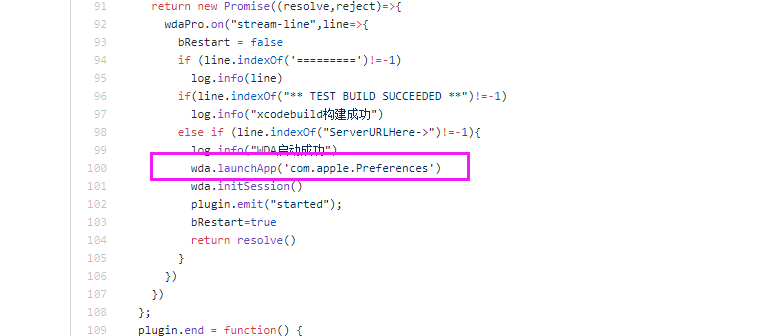
2.you can avoid it in the file /lib/untis/ios-devices/plugins/group.js
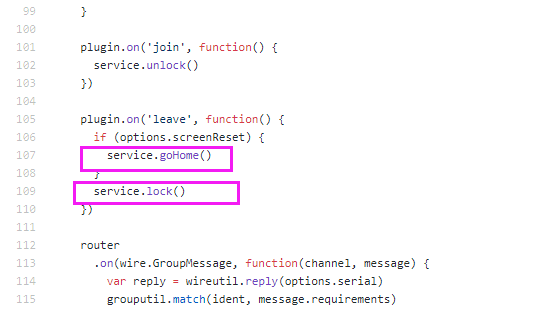
mrx1203
on 9 Sep 2019
@mrx1203 thanks a lot! It worked just great for me! Another issue that by some reason while session with device I'm seeing tons of such unhandled promise rejections:
(node:29529) UnhandledPromiseRejectionWarning: Unhandled promise rejection (rejection id: 30): Error: Input buffer contains unsupported image format
(node:29529) UnhandledPromiseRejectionWarning: Unhandled promise rejection (rejection id: 31): Error: VipsJpeg: Premature end of JPEG file(node:29529) UnhandledPromiseRejectionWarning: Unhandled promise rejection (rejection id: 32): Error: Input buffer contains unsupported image format
(node:29529) UnhandledPromiseRejectionWarning: Unhandled promise rejection (rejection id: 33): Error: Input buffer contains unsupported image format
(node:29529) UnhandledPromiseRejectionWarning: Unhandled promise rejection (rejection id: 34): Error: Input buffer contains unsupported image format
(node:29529) UnhandledPromiseRejectionWarning: Unhandled promise rejection (rejection id: 35): Error: Input buffer contains unsupported image format
(node:29529) UnhandledPromiseRejectionWarning: Unhandled promise rejection (rejection id: 36): Error: Input buffer contains unsupported image format
(node:29529) UnhandledPromiseRejectionWarning: Unhandled promise rejection (rejection id: 37): Error: Input buffer contains unsupported image format
(node:29529) UnhandledPromiseRejectionWarning: Unhandled promise rejection (rejection id: 38): TypeError: First argument must be a string, Buffer, ArrayBuffer, Array, or array-like object.
and seems this issue dramatically increasing payload on CPU while using iOS device on STF web UI. Any ideas what issue could be here? Thanks a lot one more time!
viktorgogulenko
on 9 Sep 2019
@mrx1203 How does the WDA on a ios device in stf interfere with the wda that appium try to install when you run test against that device? I set the capabilitie "newWDA" to true, but sometimes i got an error 65 of xcode.
cairolifc
on 10 Sep 2019
@viktorgogulenko This error was thrown by Sharp. I don't know why it happened yet.but you can catch this exception in the file /lib/untis/ios-devices/plugins/screen/stream.js
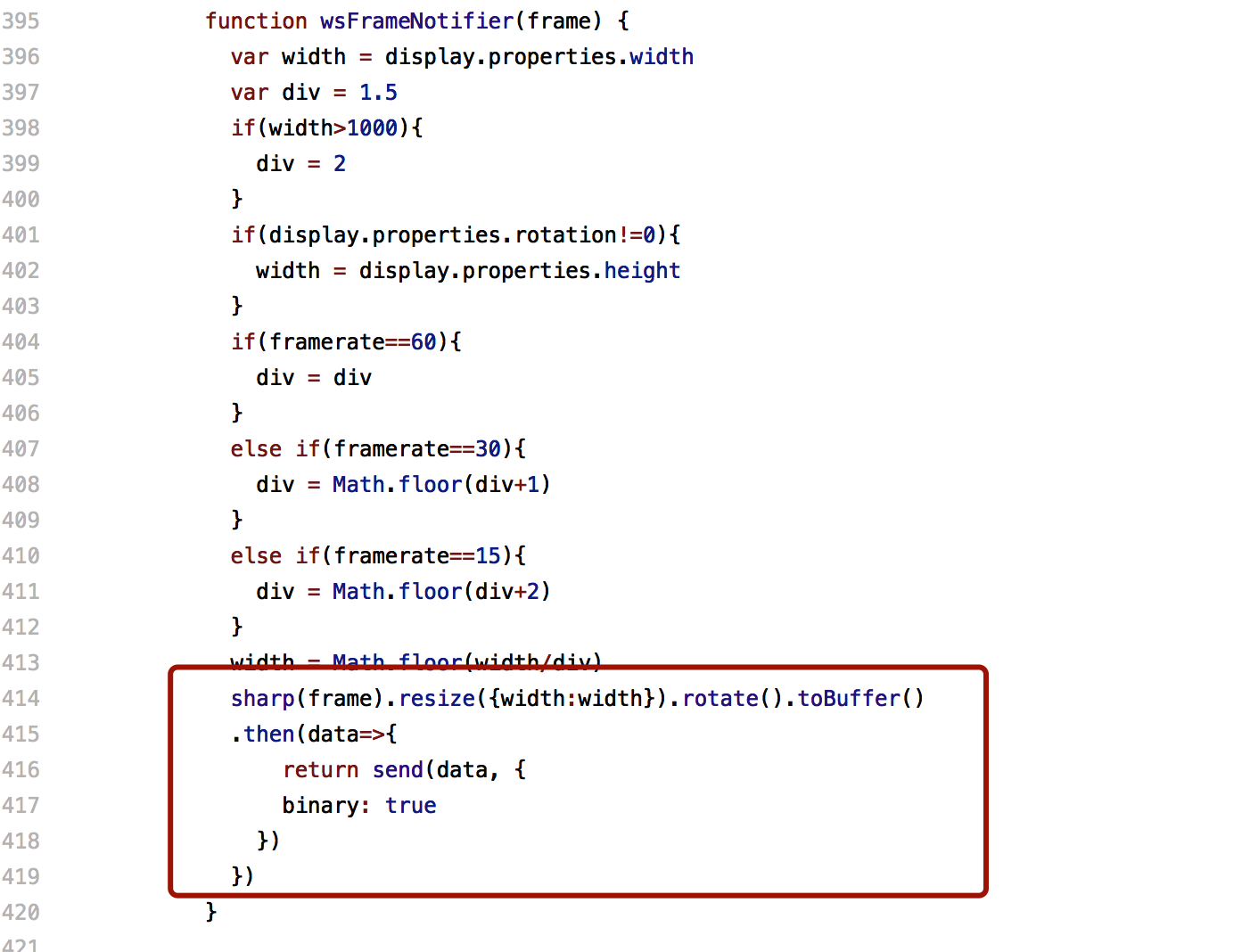
mrx1203
on 13 Sep 2019
@cairolifc There are two ways. One is to configure WDA in appium and modify WDA's Product name on the Build Settings tab. Then set capabilitie "newWDA" to true, and appium will start its own WDA. This will install two WDA on the phone. Pay attention to modifying the port of WDA
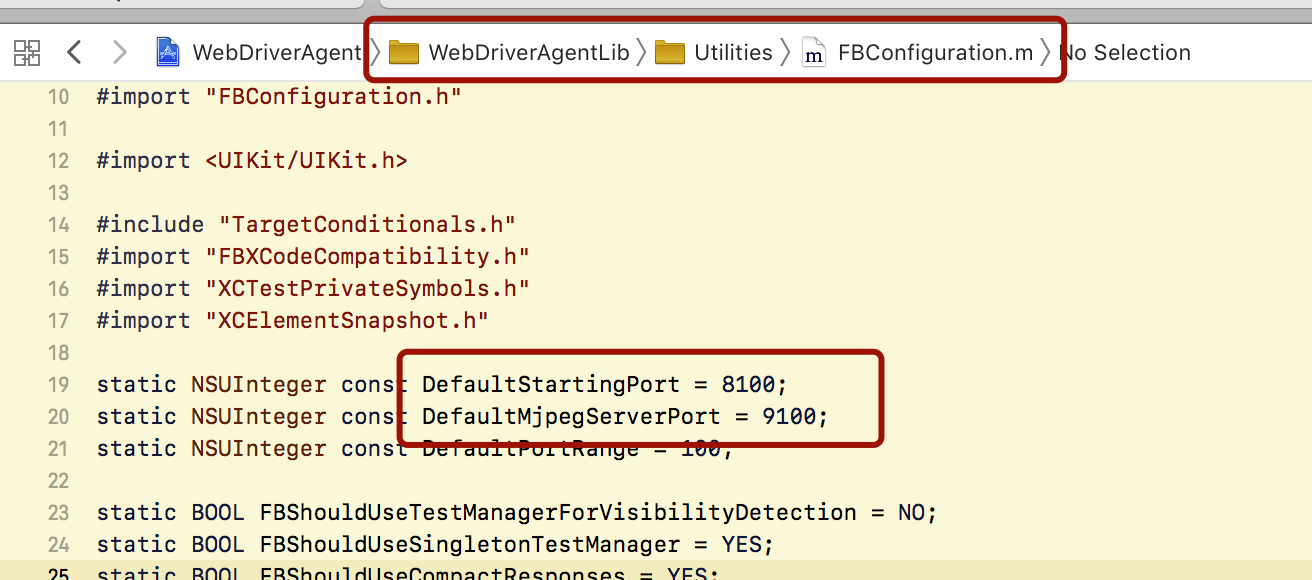
The second method is to use STF‘s WDA without appium's WDA, which only has one WDA on the phone, but you need to get the corresponding port for each device, then set the port to appium's wdaLocalPort Capability, and set the newWDA to false.
mrx1203
on 13 Sep 2019
We have set up https://github.com/mrx1203/stf for the iOS device we getting an error on connecting iOS devices.
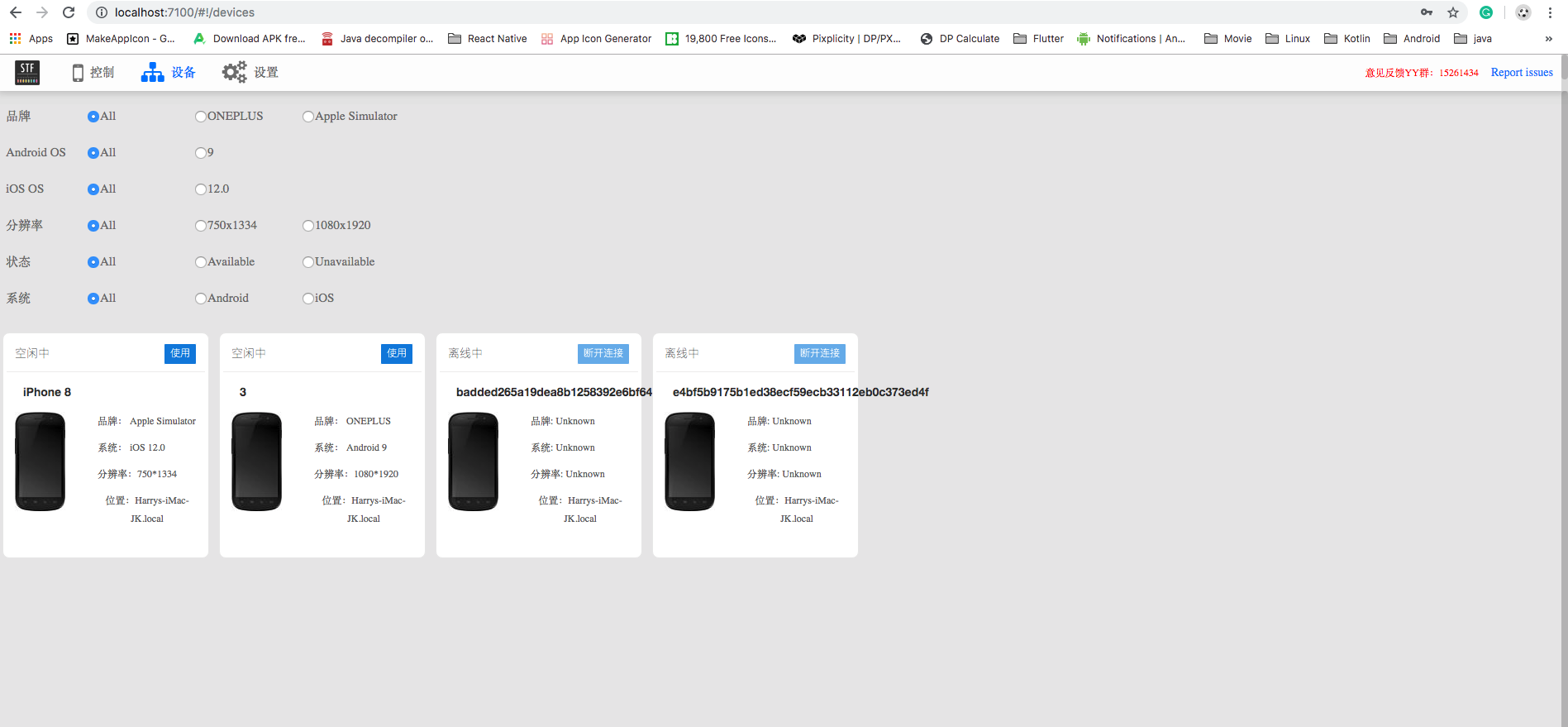
Here is error text:
2019-09-18T15:25:47.043Z INF/ios-device:plugins:wdaProxy 20438 [e4bf5b9175b1ed38ecf59ecb33112eb0c373ed4f] start WDA with params:build-for-testing,test-without-building,-project,/Users/Jaidev/Downloads/stf-master/WebDriverAgent/WebDriverAgent.xcodeproj,-scheme,WebDriverAgentRunner,-destination,id=e4bf5b9175b1ed38ecf59ecb33112eb0c373ed4f,platform=iOS,-configuration,Debug,IPHONEOS_DEPLOYMENT_TARGET=10.2
2019-09-18T15:25:48.412Z INF/ios-device:plugins:wdaProxy 20438 [e4bf5b9175b1ed38ecf59ecb33112eb0c373ed4f] xcodebuild构建成功
2019-09-18T15:25:48.575Z INF/ios-device:plugins:wdaCommands 20438 [e4bf5b9175b1ed38ecf59ecb33112eb0c373ed4f] get request err { RequestError: Error: read ECONNRESET
at new RequestError (/Users/Jaidev/Downloads/stf-master/node_modules/request-promise-core/lib/errors.js:14:15)
at Request.plumbing.callback (/Users/Jaidev/Downloads/stf-master/node_modules/request-promise-core/lib/plumbing.js:87:29)
at Request.RP$callback [as _callback] (/Users/Jaidev/Downloads/stf-master/node_modules/request-promise-core/lib/plumbing.js:46:31)
at self.callback (/Users/Jaidev/Downloads/stf-master/node_modules/request/request.js:185:22)
at emitOne (events.js:115:13)
at Request.emit (events.js:210:7)
at Request.onRequestError (/Users/Jaidev/Downloads/stf-master/node_modules/request/request.js:881:8)
at emitOne (events.js:115:13)
at ClientRequest.emit (events.js:210:7)
at Socket.socketErrorListener (_http_client.js:385:9)
at emitOne (events.js:115:13)
at Socket.emit (events.js:210:7)
at emitErrorNT (internal/streams/destroy.js:64:8)
at _combinedTickCallback (internal/process/next_tick.js:138:11)
at process._tickCallback (internal/process/next_tick.js:180:9)
name: 'RequestError',
message: 'Error: read ECONNRESET',
cause: { Error: read ECONNRESET
at _errnoException (util.js:1024:11)
at TCP.onread (net.js:618:25) code: 'ECONNRESET', errno: 'ECONNRESET', syscall: 'read' },
error: { Error: read ECONNRESET
at _errnoException (util.js:1024:11)
at TCP.onread (net.js:618:25) code: 'ECONNRESET', errno: 'ECONNRESET', syscall: 'read' },
options:
{ method: 'GET',
uri: 'http://localhost:6103/wda/batteryInfo',
json: true,
headers: { 'Content-Type': 'application/json' },
callback: [Function: RP$callback],
transform: undefined,
simple: true,
resolveWithFullResponse: false,
transform2xxOnly: false },
response: undefined }
Unhandled rejection Error: Illegal value for Message.Field .BatteryEvent.level: NaN (TypeError: Illegal value: NaN (not an integer))
at Field.ProtoBuf.Reflect.FieldPrototype.encode (/Users/Jaidev/Downloads/stf-master/node_modules/protobufjs/dist/ProtoBuf.js:2811:27)
at Message.ProtoBuf.Reflect.MessagePrototype.encode (/Users/Jaidev/Downloads/stf-master/node_modules/protobufjs/dist/ProtoBuf.js:2342:31)
at MessagePrototype.encode (/Users/Jaidev/Downloads/stf-master/node_modules/protobufjs/dist/ProtoBuf.js:1981:31)
at Object.envelope (/Users/Jaidev/Downloads/stf-master/lib/wire/util.js:31:53)
at EventEmitter.
at EventEmitter.emit (/Users/Jaidev/Downloads/stf-master/node_modules/eventemitter3/index.js:137:33)
at /Users/Jaidev/Downloads/stf-master/lib/units/ios-device/plugins/wdaCommands.js:153:20
at tryCatcher (/Users/Jaidev/Downloads/stf-master/node_modules/request-promise/node_modu2019-09-18T15:25:50.477Z INF/ios-provider 20328 [*] Providing 0 of 1 device(s); waiting for "e4bf5b9175b1ed38ecf59ecb33112eb0c373ed4f"
les/bluebird/js/release/util.js:16:23)
at Promise._settlePromiseFromHandler (/Users/Jaidev/Downloads/stf-master/node_modules/request-promise/node_modules/bluebird/js/release/promise.js:517:31)
at Promise._settlePromise (/Users/Jaidev/Downloads/stf-master/node_modules/request-promise/node_modules/bluebird/js/release/promise.js:574:18)
at Promise._settlePromise0 (/Users/Jaidev/Downloads/stf-master/node_modules/request-promise/node_modules/bluebird/js/release/promise.js:619:10)
at Promise._settlePromises (/Users/Jaidev/Downloads/stf-master/node_modules/request-promise/node_modules/bluebird/js/release/promise.js:695:18)
at _drainQueueStep (/Users/Jaidev/Downloads/stf-master/node_modules/request-promise/node_modules/bluebird/js/release/async.js:138:12)
at _drainQueue (/Users/Jaidev/Downloads/stf-master/node_modules/request-promise/node_modules/bluebird/js/release/async.js:131:9)
at Async._drainQueues (/Users/Jaidev/Downloads/stf-master/node_modules/request-promise/node_modules/bluebird/js/release/async.js:147:5)
at Immediate.Async.drainQueues (/Users/Jaidev/Downloads/stf-master/node_modules/request-promise/node_modules/bluebird/js/release/async.js:17:14)
at runCallback (timers.js:785:20)
at tryOnImmediate (timers.js:747:5)
at processImmediate [as _immediateCallback] (timers.js:718:5)
@mrx1203 Can you help me to solve this issue?
 jainitDev
on 18 Sep 2019
jainitDev
on 18 Sep 2019
大家好,
從頭開始使用https://github.com/mrx1203/stf重新安裝,一切似乎都在工作,應用程序構建後,我可以通過手機獲取狀態
但這些設備只是在準備中
WendysMAC:bin esawyja$ ./stf local --public-ip 192.168.112.101 2019-08-28T07:57:52.506Z INF/util:procutil 53726 [*] Forking "/Users/esawyja/stf_ios/stf/lib/cli migrate" 2019-08-28T07:57:52.828Z INF/db 53727 [*] Connecting to 127.0.0.1:28015 2019-08-28T07:57:52.846Z INF/db:setup 53727 [*] Database "stf" already exists 2019-08-28T07:57:52.852Z INF/db:setup 53727 [*] Table "users" already exists 2019-08-28T07:57:52.852Z INF/db:setup 53727 [*] Table "accessTokens" already exists 2019-08-28T07:57:52.852Z INF/db:setup 53727 [*] Table "vncauth" already exists 2019-08-28T07:57:52.853Z INF/db:setup 53727 [*] Table "devices" already exists 2019-08-28T07:57:52.853Z INF/db:setup 53727 [*] Table "logs" already exists 2019-08-28T07:57:52.863Z INF/db:setup 53727 [*] Index "users"."adbKeys" already exists 2019-08-28T07:57:52.863Z INF/db:setup 53727 [*] Index "accessTokens"."email" already exists 2019-08-28T07:57:52.863Z INF/db:setup 53727 [*] Index "vncauth"."response" already exists 2019-08-28T07:57:52.863Z INF/db:setup 53727 [*] Index "vncauth"."responsePerDevice" already exists 2019-08-28T07:57:52.863Z INF/db:setup 53727 [*] Waiting for index "users"."adbKeys" 2019-08-28T07:57:52.864Z INF/db:setup 53727 [*] Waiting for index "accessTokens"."email" 2019-08-28T07:57:52.864Z INF/db:setup 53727 [*] Waiting for index "vncauth"."response" 2019-08-28T07:57:52.865Z INF/db:setup 53727 [*] Waiting for index "vncauth"."responsePerDevice" 2019-08-28T07:57:52.868Z INF/db:setup 53727 [*] Index "devices"."owner" already exists 2019-08-28T07:57:52.868Z INF/db:setup 53727 [*] Index "devices"."present" already exists 2019-08-28T07:57:52.868Z INF/db:setup 53727 [*] Index "devices"."providerChannel" already exists 2019-08-28T07:57:52.868Z INF/db:setup 53727 [*] Waiting for index "devices"."owner" ..... [34] ../res/bower_components/font-lato-2-subset/font/LatoLatinLight-Regular.woff 83 bytes {1} {3} {5} [built] [35] ../res/bower_components/font-lato-2-subset/font/LatoLatin-Regular.woff 83 bytes {1} {3} {5} [built] [36] ../res/bower_components/font-lato-2-subset/font/LatoLatin-Bold.woff 83 bytes {1} {3} {5} [built] [1076] ../res/auth/mock/scripts/signin/index.js 276 bytes {5} [built] [1077] ../res/auth/mock/scripts/signin/signin.css 950 bytes {5} [built] [1078] ../~/css-loader!../res/auth/mock/scripts/signin/signin.css 1.82 kB {5} [built] [1079] ../res/auth/mock/scripts/signin/signin.pug 1.91 kB {5} [built] [1080] ../res/auth/mock/scripts/signin/signin-controller.js 871 bytes {5} [built] chunk {6} entry/commons.entry.js (entry/commons.entry.js) 0 bytes [rendered] 2019-08-28T07:58:37.012Z INF/middleware:webpack 53753 [*] Bundle is now valid 2019-08-28T07:58:37.015Z INF/webpack:config 53753 [*] Build progress 100% (complete) 2019-08-28T07:58:38.805Z INF/ios-provider 53751 [*] Providing 0 of 1 device(s); waiting for "734adca808e3fb8549966e4fcee3edcd27668120" 2019-08-28T07:58:48.809Z INF/ios-provider 53751 [*] Providing 0 of 1 device(s); waiting for "734adca808e3fb8549966e4fcee3edcd27668120" 2019-08-28T07:58:58.815Z INF/ios-provider 53751 [*] Providing 0 of 1 device(s); waiting for "734adca808e3fb8549966e4fcee3edcd27668120" 2019-08-28T07:59:18.821Z INF/ios-provider 53751 [*] Providing 0 of 1 device(s); waiting for "734adca808e3fb8549966e4fcee3edcd27668120" 2019-08-28T07:59:21.746Z INF/ios-device:plugins:wdaProxy 53775 [734adca808e3fb8549966e4fcee3edcd27668120] start WDA with params:build-for-testing,test-without-building,-project,/Users/esawyja/stf_ios/stf/bin/WebDriverAgent/WebDriverAgent.xcodeproj,-scheme,WebDriverAgentRunner,-destination,id=734adca808e3fb8549966e4fcee3edcd27668120,platform=iOS,-configuration,Debug,IPHONEOS_DEPLOYMENT_TARGET=10.2 2019-08-28T07:59:28.828Z INF/ios-provider 53751 [*] Providing 0 of 1 device(s); waiting for "734adca808e3fb8549966e4fcee3edcd27668120" 2019-08-28T07:59:38.836Z INF/ios-provider 53751 [*] Providing 0 of 1 device(s); waiting for "734adca808e3fb8549966e4fcee3edcd27668120" 2019-08-28T07:59:43.709Z INF/ios-device:plugins:wdaProxy 53775 [734adca808e3fb8549966e4fcee3edcd27668120] start WDA with params:build-for-testing,test-without-building,-project,/Users/esawyja/stf_ios/stf/bin/WebDriverAgent/WebDriverAgent.xcodeproj,-scheme,WebDriverAgentRunner,-destination,id=734adca808e3fb8549966e4fcee3edcd27668120,platform=iOS,-configuration,Debug,IPHONEOS_DEPLOYMENT_TARGET=10.2 2019-08-28T07:59:48.839Z INF/ios-provider 53751 [*] Providing 0 of 1 device(s); waiting for "734adca808e3fb8549966e4fcee3edcd27668120" 2019-08-28T07:59:53.941Z INF/ios-device:plugins:wdaProxy 53775 [734adca808e3fb8549966e4fcee3edcd27668120] start WDA with params:build-for-testing,test-without-building,-project,/Users/esawyja/stf_ios/stf/bin/WebDriverAgent/WebDriverAgent.xcodeproj,-scheme,WebDriverAgentRunner,-destination,id=734adca808e3fb8549966e4fcee3edcd27668120,platform=iOS,-configuration,Debug,IPHONEOS_DEPLOYMENT_TARGET=10.2 2019-08-28T07:59:58.845Z INF/ios-provider 53751 [*] Providing 0 of 1 device(s); waiting for "734adca808e3fb8549966e4fcee3edcd27668120"我可以使用ideviceinfo -s查看設備
WendysMAC:~ esawyja$ ideviceinfo -s BasebandCertId: 3255536192 BasebandKeyHashInformation: AKeyStatus: 2 SKeyHash: 7MQEUyvzG4gjjZc7KsNNAVTS8g4= SKeyStatus: 0 BasebandSerialNumber: C+2d+g== BasebandVersion: 11.80.00 BoardId: 2 BuildVersion: 14G61 ChipID: 35152 DeviceClass: iPhone DeviceColor: white DeviceName: Iphone2 DieID: 2245115295360244192 HardwareModel: N42AP HasSiDP: true PartitionType: ProductName: iPhone OS ProductType: iPhone5,2 ProductVersion: 10.3.4 ProductionSOC: true ProtocolVersion: 2 TelephonyCapability: true UniqueChipID: 4171421785419 UniqueDeviceID: 734adca808e3fb8549966e4fcee3edcd27668120 WiFiAddress: c0:63:94:3d:a4:44 WendysMAC:~ esawyja$有沒有人對我有任何建議,我不知道該怎麼辦...
我想知道,在Linux、centos 系统安装iOS的SIF集成可以吗?
 pcz88
on 20 Sep 2019
pcz88
on 20 Sep 2019
@oddgames-david , I've successfully set up your fork of openSTF and I'm able to control iOS devices. However, I'm able to perform only touch gestures, scroll gestures don't work. Are you able to perform scroll gestures?
 max-vyshnevskyi
on 20 Sep 2019
max-vyshnevskyi
on 20 Sep 2019
@mrx1203 , as @oddgames-david 's fork based on your fork of openSFT, I would like to ask you too: are you able to perform scroll gestures on the iOS devices via openSTF?
max-vyshnevskyi
on 20 Sep 2019
@pcz88 你的WDA是在这个路径下吗?/Users/esawyja/stf_ios/stf/bin/WebDriverAgent/。不是的话,用--wda-path参数传入你的WDA路径
mrx1203
on 22 Sep 2019
@max-vyshnevskyi I don't know what effect you want, but you can update from https://github.com/mrx1203/stf/commit/2ad51772bbfd33a1cc839fcc0b362f4d45959b16, to check if it's what you want.
Finally, must update WDA from https://github.com/mrx1203/WebDriverAgent, Because I changed the interface name, STF must use the same interface as WDA。
mrx1203
on 22 Sep 2019
Hey All, Sorry to jump in between. Is this latest STF code has support for iOS is it ? Please let me know I will try to check in my local and will see if I can contribute anything.
 skumar1122
on 26 Sep 2019
skumar1122
on 26 Sep 2019
Hey @mrx1203
I've successfully set up your fork of openSTF and I'm not able to control iOS devices. However, I'm able to get succession logs from WDA.
I have added a screenshot of the STF web interface. However, we can take a screenshot of connected iOS devices
Let me know if need to change WDA code.
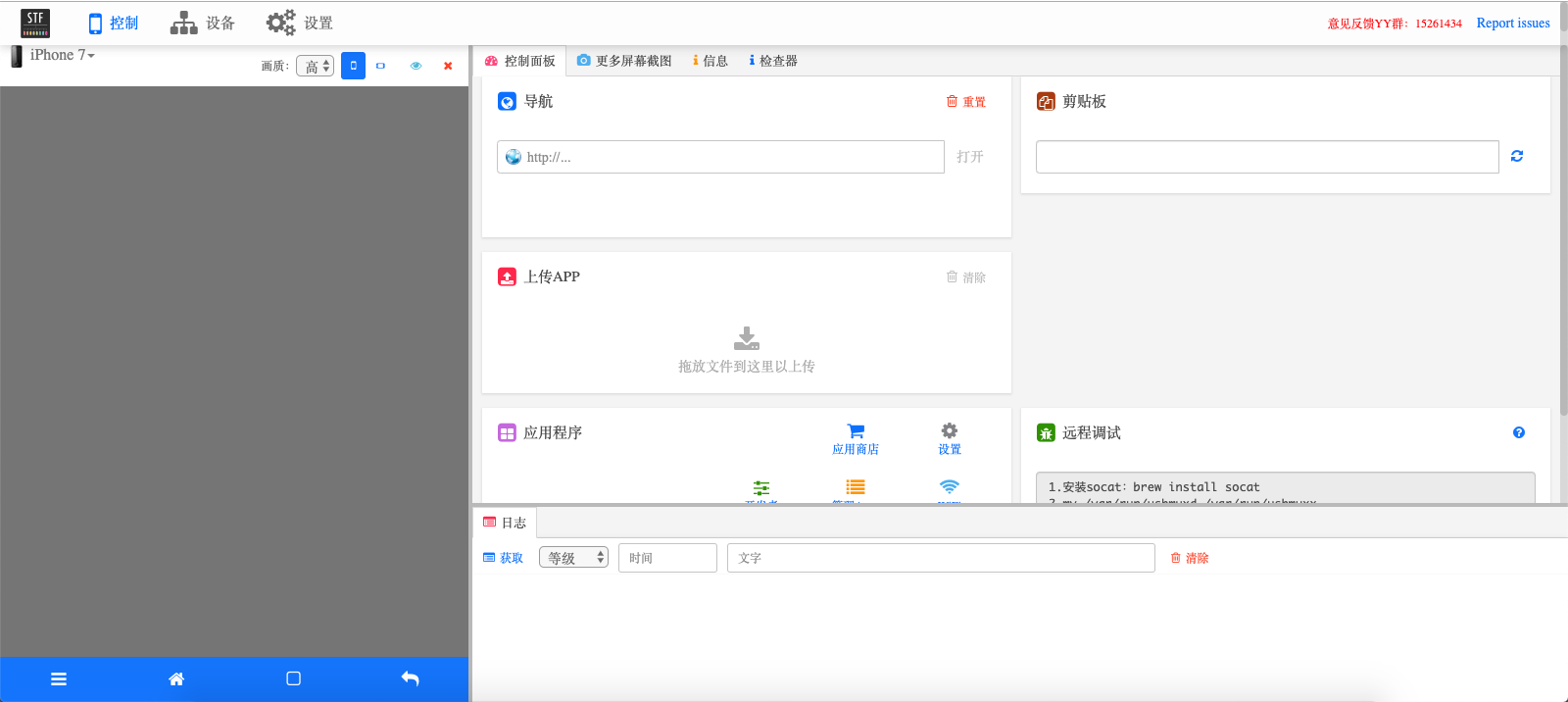
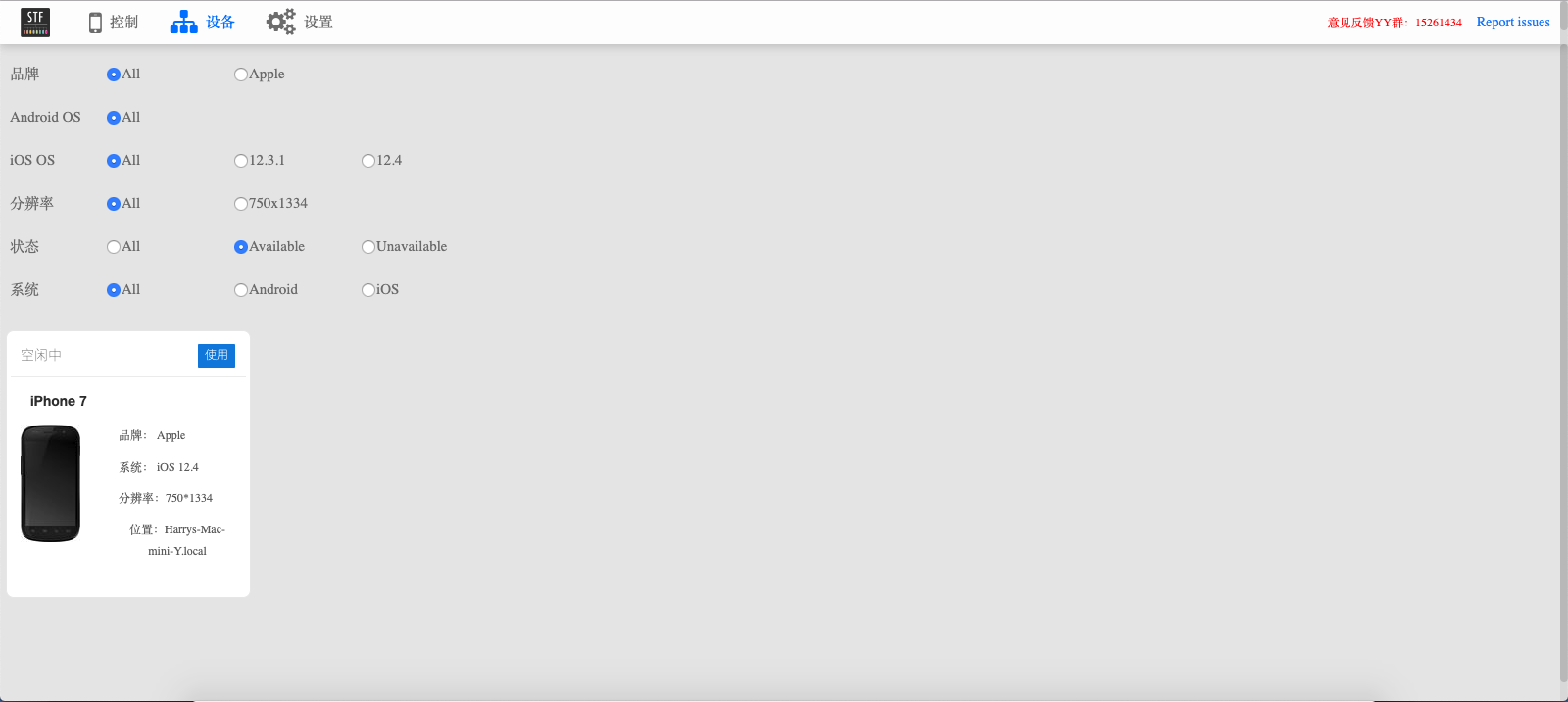
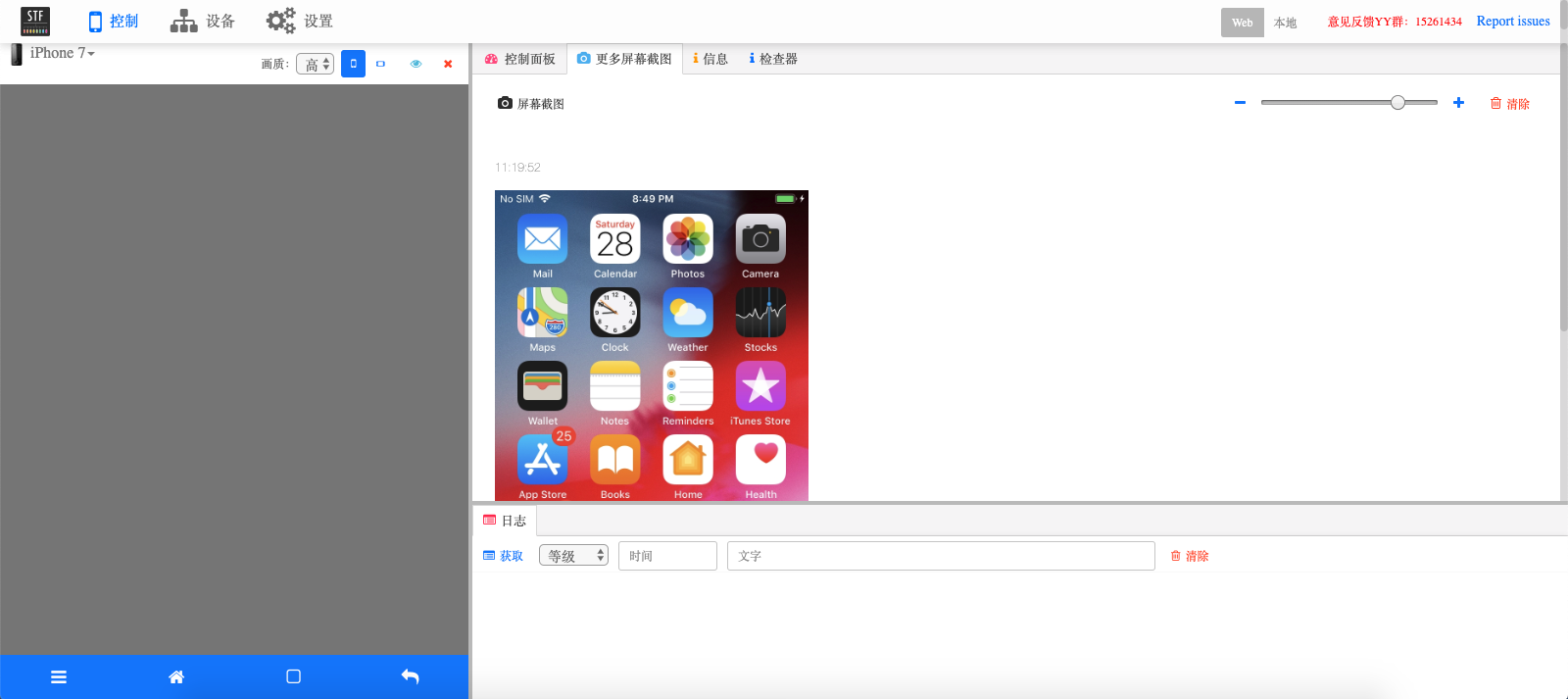
Here are server logs :
2019-09-28T15:31:25.544Z INF/ios-provider 4288 [] Found device "e4bf5b9175b1ed38ecf59ecb33112eb0c373ed4f" (device)
2019-09-28T15:31:25.583Z INF/reaper 4286 [reaper001] Device "e4bf5b9175b1ed38ecf59ecb33112eb0c373ed4f" is present
2019-09-28T15:31:25.899Z INF/ios-provider 4288 [] Registered device "e4bf5b9175b1ed38ecf59ecb33112eb0c373ed4f"
2019-09-28T15:31:26.727Z INF/ios-device:support:push 5454 [e4bf5b9175b1ed38ecf59ecb33112eb0c373ed4f] Sending output to "tcp://127.0.0.1:7116"
2019-09-28T15:31:26.732Z INF/ios-device 5454 [e4bf5b9175b1ed38ecf59ecb33112eb0c373ed4f] Preparing device
2019-09-28T15:31:28.332Z INF/ios-device:support:sub 5454 [e4bf5b9175b1ed38ecf59ecb33112eb0c373ed4f] Receiving input from "tcp://127.0.0.1:7114"
2019-09-28T15:31:28.334Z INF/ios-device:support:sub 5454 [e4bf5b9175b1ed38ecf59ecb33112eb0c373ed4f] Subscribing to permanent channel "ALL"
2019-09-28T15:31:28.340Z INF/ios-device:plugins:display 5454 [e4bf5b9175b1ed38ecf59ecb33112eb0c373ed4f] Reading display info
2019-09-28T15:31:28.917Z INF/ios-device:plugins:identity 5454 [e4bf5b9175b1ed38ecf59ecb33112eb0c373ed4f] Solving identity
2019-09-28T15:31:29.681Z INF/device:plugins:solo 5454 [e4bf5b9175b1ed38ecf59ecb33112eb0c373ed4f] Subscribing to permanent channel "NKLlzt7BP0rD7yt3UN05/GIXFfY="
2019-09-28T15:31:29.684Z INF/ios-device:plugins:screen:stream 5454 [e4bf5b9175b1ed38ecf59ecb33112eb0c373ed4f] Starting WebSocket server on port 6190
2019-09-28T15:31:29.692Z WRN/ios-device:plugins:data 5454 [e4bf5b9175b1ed38ecf59ecb33112eb0c373ed4f] Unable to find device data { serial: 'e4bf5b9175b1ed38ecf59ecb33112eb0c373ed4f',
platform: 'iOS',
manufacturer: 'Apple',
operator: '',
model: 'iPhone 7',
version: '12.4',
abi: 'arm64',
sdk: '',
display:
{ id: 0,
width: 750,
height: 1334,
rotation: 0,
xdpi: 0,
ydpi: 0,
fps: 60,
density: 1,
secure: false,
url: 'ws://localhost:6190',
size: 0 },
phone: { imei: '', imsi: '', phoneNumber: '', iccid: '', network: '' },
product: 'Apple',
cpuPlatform: '',
openGLESVersion: '' }
null
2019-09-28T15:31:29.697Z INF/ios-device:plugins:touch 5454 [e4bf5b9175b1ed38ecf59ecb33112eb0c373ed4f] Touch origin is top left
2019-09-28T15:31:29.699Z INF/ios-device:plugins:touch 5454 [e4bf5b9175b1ed38ecf59ecb33112eb0c373ed4f] Requesting touch consumer to start
2019-09-28T15:31:29.702Z INF/ios-device:plugins:vnc 5454 [e4bf5b9175b1ed38ecf59ecb33112eb0c373ed4f] Starting VNC server on port 6192
2019-09-28T15:31:29.708Z INF/ios-device:plugins:wdaProxy 5454 [e4bf5b9175b1ed38ecf59ecb33112eb0c373ed4f] start iproxy with params:6193 8100 e4bf5b9175b1ed38ecf59ecb33112eb0c373ed4f
2019-09-28T15:31:29.717Z INF/ios-device:plugins:wdaProxy 5454 [e4bf5b9175b1ed38ecf59ecb33112eb0c373ed4f] start iproxy with params:6194 9100 e4bf5b9175b1ed38ecf59ecb33112eb0c373ed4f
2019-09-28T15:31:29.724Z INF/ios-device:plugins:wdaProxy 5454 [e4bf5b9175b1ed38ecf59ecb33112eb0c373ed4f] start WDA with params:build-for-testing,test-without-building,-project,/Users/JaiDev/Documents/STFWork/stf/WebDriverAgent/WebDriverAgent.xcodeproj,-scheme,WebDriverAgentRunner,-destination,id=e4bf5b9175b1ed38ecf59ecb33112eb0c373ed4f,platform=iOS,-configuration,Debug,IPHONEOS_DEPLOYMENT_TARGET=10.2
2019-09-28T15:31:35.546Z INF/ios-provider 4288 [] Providing 0 of 1 device(s); waiting for "e4bf5b9175b1ed38ecf59ecb33112eb0c373ed4f"
2019-09-28T15:31:39.727Z INF/ios-device:plugins:wdaProxy 5454 [e4bf5b9175b1ed38ecf59ecb33112eb0c373ed4f] WDA启动成功
2019-09-28T15:31:39.765Z INF/ios-device 5454 [e4bf5b9175b1ed38ecf59ecb33112eb0c373ed4f] Fully operational
2019-09-28T15:31:45.549Z INF/ios-provider 4288 [*] Providing all 1 device(s)
2019-09-28T15:31:58.486Z IMP/device:plugins:group 5454 [e4bf5b9175b1ed38ecf59ecb33112eb0c373ed4f] Now owned by "[email protected]"
2019-09-28T15:31:58.486Z INF/device:plugins:group 5454 [e4bf5b9175b1ed38ecf59ecb33112eb0c373ed4f] Subscribing to group channel "8Q4d6xbeQNiMVAcgGkebHw=="
2019-09-28T15:31:58.722Z INF/ios-device:plugins:screen:stream 5454 [e4bf5b9175b1ed38ecf59ecb33112eb0c373ed4f] user set framerate:60
2019-09-28T15:31:58.724Z INF/ios-device:plugins:screen:stream 5454 [e4bf5b9175b1ed38ecf59ecb33112eb0c373ed4f] Setting frame producer projection to 478x582
2019-09-28T15:31:58.726Z INF/ios-device:plugins:screen:stream 5454 [e4bf5b9175b1ed38ecf59ecb33112eb0c373ed4f] Requesting frame producer to start
2019-09-28T15:31:58.727Z INF/ios-device:plugins:screen:stream 5454 [e4bf5b9175b1ed38ecf59ecb33112eb0c373ed4f] Launching screen service
2019-09-28T15:31:58.736Z IMP/ios-device:plugins:connect 5454 [e4bf5b9175b1ed38ecf59ecb33112eb0c373ed4f] Remote Connect Started for device "e4bf5b9175b1ed38ecf59ecb33112eb0c373ed4f" at "localhost:6191"
2019-09-28T15:31:59.572Z IMP/ios-device:plugins:connect 5454 [e4bf5b9175b1ed38ecf59ecb33112eb0c373ed4f] Remote Connect Started for device "e4bf5b9175b1ed38ecf59ecb33112eb0c373ed4f" at "localhost:6191"
jainitDev
on 28 Sep 2019
Hi,
What could be the screencast option for iOS and Android?
 kavithamanivel
on 2 Oct 2019
kavithamanivel
on 2 Oct 2019
Does anyone have an idea on what the problem is here please
2019-10-15T12:36:41.063Z INF/ios-device:plugins:display 2775 [00008020-001428503A99002E] Reading display info
2019-10-15T12:36:41.075Z FTL/ios-device 2775 [00008020-001428503A99002E] Setup had an error Error: ENOENT: no such file or directory, open '00008020-001428503A99002E.png'
at Object.fs.openSync (fs.js:646:18)
at Object.fs.readFileSync (fs.js:551:33)
at Function.images.loadFromFile (/Users/diginetiot/farm/esawyja_stf/node_modules/images/index.js:211:37)
at images (/Users/diginetiot/farm/esawyja_stf/node_modules/images/index.js:177:24)
at Object.getDisplay (/Users/diginetiot/farm/esawyja_stf/lib/units/ios-device/support/deviceinfo.js:34:15)
at readInfo (/Users/diginetiot/farm/esawyja_stf/lib/units/ios-device/plugins/util/display.js:36:25)
at /Users/diginetiot/farm/esawyja_stf/lib/units/ios-device/plugins/util/display.js:46:12
at SerialSyrup.ParallelSyrup.invoke (/Users/diginetiot/farm/esawyja_stf/node_modules/stf-syrup/lib/parallel.js:54:24)
at /Users/diginetiot/farm/esawyja_stf/node_modules/stf-syrup/lib/serial.js:43:33
at tryCatch1 (/Users/diginetiot/farm/esawyja_stf/node_modules/stf-syrup/node_modules/bluebird/js/main/util.js:63:19)
at Promise$_callHandler [as _callHandler] (/Users/diginetiot/farm/esawyja_stf/node_modules/stf-syrup/node_modules/bluebird/js/main/promise.js:708:13)
at Promise$_settlePromiseFromHandler [as _settlePromiseFromHandler] (/Users/diginetiot/farm/esawyja_stf/node_modules/stf-syrup/node_modules/bluebird/js/main/promise.js:724:18)
at Promise$_settlePromiseAt [as _settlePromiseAt] (/Users/diginetiot/farm/esawyja_stf/node_modules/stf-syrup/node_modules/bluebird/js/main/promise.js:896:14)
at Promise$_fulfillPromises [as _fulfillPromises] (/Users/diginetiot/farm/esawyja_stf/node_modules/stf-syrup/node_modules/bluebird/js/main/promise.js:1041:14)
at Async$_consumeFunctionBuffer [as _consumeFunctionBuffer] (/Users/diginetiot/farm/esawyja_stf/node_modules/stf-syrup/node_modules/bluebird/js/main/async.js:74:12)
at Async$consumeFunctionBuffer (/Users/diginetiot/farm/esawyja_stf/node_modules/stf-syrup/node_modules/bluebird/js/main/async.js:37:14)
at _combinedTickCallback (internal/process/next_tick.js:132:7)
at process._tickCallback (internal/process/next_tick.js:181:9)
2019-10-15T12:36:41.076Z FTL/util:lifecycle 2775 [00008020-001428503A99002E] Shutting down due to fatal error
2019-10-15T12:36:41.081Z INF/ios-provider 2751 [] Cleaning up device worker "00008020-001428503A99002E"
2019-10-15T12:36:41.081Z ERR/ios-provider 2751 [] Device worker "00008020-001428503A99002E" died with code 1
2019-10-15T12:36:41.081Z INF/ios-provider 2751 [*] Restarting device worker "00008020-001428503A99002E"
man4567890
on 15 Oct 2019
Is there someone facing problems with swiping on ios 13?
cairolifc
on 17 Oct 2019
Did someone resolve an issue with new Xcode 11.1 and ios 13.1.3? I have issues with signing of WDA. By some reason it works fine from Xcode itself, but when I'm trying to connect device to ios stf service - xcode test fails all the time. If you are able to connect device with newest Xcode on board - please share your configs or what did you do resolve it. Thanks a lot in advance!
2019-10-24T09:53:18.630Z INF/ios-device:plugins:wdaProxy 11805 [00008020-0004248A3645002E] start WDA with params:build-for-testing,test-without-building,-project,/var/tmp/stf_ios/stf_oddgames/bin/WebDriverAgent/WebDriverAgent.xcodeproj,-scheme,WebDriverAgentRunner,-destination,id=00008020-0004248A3645002E,platform=iOS,-configuration,Debug,IPHONEOS_DEPLOYMENT_TARGET=9.0
2019-10-24T09:53:21.055Z INF/ios-device:plugins:wdaProxy 11805 [00008020-0004248A3645002] xcodebuild
2019-10-24T09:53:24.129Z INF/ios-provider 11781 [] Providing 0 of 1 device(s); waiting for "00008020-0004248A3645002"
2019-10-24T09:53:34.132Z INF/ios-provider 11781 [] Providing 0 of 1 device(s); waiting for "00008020-0004248A3645002"
2019-10-24T09:53:44.138Z INF/ios-provider 11781 [*] Providing 0 of 1 device(s); waiting for "00008020-0004248A3645002"
2019-10-24T09:53:47.411Z ERR/ios-device:plugins:wdaProxy 11805 [00008020-0004248A3645002] Testing failed:
WebDriverAgentRunner:
WebDriverAgentRunner-Runner.app (1115) encountered an error (Early unexpected exit, operation never finished bootstrapping - no restart will be attempted. (Underlying error: Test runner exited before starting test execution.))* TEST EXECUTE FAILED *
viktorgogulenko
on 24 Oct 2019
@mrx1203 @oddgames-david I've found an reason why STF ios provider is not working for me using latest Xcode 11.1 - workaround with replacing of an old XCUItest library from older versions of Xcode is working for STF connection, but doesn't work for Appium. As Appium is using the same Xcode - it fails to run tests (Appium version 1.15.1). And I have no idea what to do with that - with old XCUITest library works STF, but doesn't work Appium and vice versa :(
viktorgogulenko
on 25 Oct 2019
Hey guys, just in case anyone of you needs it, I reverse engineered how Quicktime does Screenmirroring for iOS devices. I was able to record audio and video from my iOS devices on Linux with that :-D
https://github.com/danielpaulus/quicktime_video_hack
It only works on Linux currently, if anyone of you has a good idea of how to get it working on mac, let me know :-D
 danielpaulussauce
on 28 Oct 2019
danielpaulussauce
on 28 Oct 2019
@viktorgogulenko
Hi! I have little bit different configuration of environment (Xcode 11.0 and ios 13.1.2), but I hope that my steps will help you.
1) Download all resources as STF and WDA to some container.
2) Go to the folder inside Xcode application (Applications/Xcode->Show package contents->Contents/Developer/Platforms/iPhoneOS.platform/Developer/Library/Frameworks/) and replace you XCTest.framework with older version (I use 12.0)
3) Run ./Scripts/bootstrap.sh from WDA directory.
3) Open WDA and replace all Bundle Identifiers and Team in Signing & Capabilities. (You can enable automatically manage)
3.1) Just test you WDA via CMD+U)
4) Install all stuff from mrx1203 guid, run _npm install_ from stf directory.
5) Run rethinkdb from STF directory.
6) In new terminal window run smth like that _bin/stf local --wda-path ../WebDriverAgent/_ from STF directory
Your mac must be trusted by your device and device must be unlocked, of course.
Hope that it will help you!
 RamanDzianishchyk
on 30 Oct 2019
RamanDzianishchyk
on 30 Oct 2019
@RamanDzianishchyk thanks a lot for steps, but now problem actually not in STF, but with latest 1.15.1 Appium - if you are replacing XCTest.framework in Xcode with older one - Appium is no more working by some reason. It tries to install ipa-file and fails because seems there is also a step which is trying to run a XCUI test which is failing. If I'm moving back original XCTest.framework - Appium works fine again, but STF is no more working :)
P.S. I'm using an approach with 2 WDA agents running - one is renamed for STF and the second one is original which is coming with Appium. Maybe there is another way how to set for Appium to use modified WDA from STF as well?
viktorgogulenko
on 30 Oct 2019
@danielpaulussauce
I have written a "USB device driver" for OSX that can detect IOS devices being plugged in and then send the initial mirroring activation sequence. The commented out activation portion of this can be seen here: https://github.com/tmobile/osx_ios_device_trigger/blob/master/osx_ios_device_trigger/main.cpp#L135
The device_trigger code should be able to be enhanced / extended to additionally expose a path to getting the video stream from the device.
I reverse engineered how Quicktime does Screenmirroring.
https://github.com/danielpaulus/quicktime_video_hack
It only works on Linux currently, if anyone of you has a good idea of how to get it working on mac, let me know :-D
 nanoscopic
on 4 Nov 2019
nanoscopic
on 4 Nov 2019
@mrx1203 , as @oddgames-david 's fork based on your fork of openSFT, I would like to ask you too: are you able to perform scroll gestures on the iOS devices via openSTF?
I didn't find that I was able to perform clicks or scrolls using the mrx code. In order to make it work I am using dragfromtoforduration instead of swipe:
https://github.com/tmobile/stf/blob/eb8b9be1c5a3476aef7b81f48103999defe73d13/lib/units/device-ios/plugins/wdaCommands.js#L91
nanoscopic
on 4 Nov 2019
For anyone interested, at T-Mobile we have been working on deploying/enabling IOS support in STF for some time. The pieces are coalescing and reaching a usable point. The support is based in part on the work and information from everyone on this lengthy issue ( thanks to all trying to make IOS devices usable ), and a decent amount of additional code has been written as well.
We have created a service to stream the quicktime video out of ios devices using the quicktime path via ffmpeg. The service itself can be seen here:
https://github.com/tmobile/stf_ios_mirrorfeed
Ffmpeg must be patched to support doing this with IOS devices:
Fork/commit of ffmpeg here:
https://github.com/nanoscopic/ffmpeg/commit/29ca2f2046745916697c2f42d834af73f6435c5c
To ensure the device is always available from the get go, dummy activation of the video streaming can be done via this project:
https://github.com/nanoscopic/osx_ios_video_enabler
We have a package to tie all of this together and provide ios devices to stf:
https://github.com/tmobile/stf_ios_support
The server side code to work with the device unit has been altered some as well:
https://github.com/tmobile/stf/tree/ios-support
The main change there is injection of additional data into the "channel" as a JSON block.
The ios-device unit from mrx has been altered to work together with the other components we have made ( it is now named device-ios in our code )
There are some additional tweaks to nginx on the server side setup to allow a path back to the devices; documentation and code examples for that will be out soon. The stf_ios_support repo will be updated with additional information for fully getting the server side up and working.
nanoscopic
on 4 Nov 2019
@danielpaulussauce This is really a major achievement and very impressive!
 mmirold
on 5 Nov 2019
mmirold
on 5 Nov 2019
@nanoscopic Thanks for sharing this! I hope I can make it work as I am pretty excited about it. When I try to run ./init.sh I get the below error:
Warning: usbmuxd HEAD-affc9af_1 is already installed and up-to-date
To reinstall HEAD_1, run `brew reinstall usbmuxd`
Warning: libimobiledevice HEAD-8510a9b_3 is already installed and up-to-date
To reinstall HEAD_4, run `brew reinstall libimobiledevice`
Node 8 installed
XCODE Version: 11.2
XCODE Version: Major = 11, Minor = 2
Xcode 11.2 installed
==> Downloading https://github.com/nanoscopic/empty/archive/empty.tar.gz
Already downloaded: /Users/cesarmontoya/Library/Caches/Homebrew/downloads/2f7445f51f9fc6f5d74b046701fb820027d66c7c468e286c850a078364639d17--empty.tar.gz
Error: An exception occurred within a child process:
  RuntimeError: Empty archive
 cesar-montoya
on 11 Nov 2019
cesar-montoya
on 11 Nov 2019
@nanoscopic
same issue with @cesar-montoya
 salphaon
on 12 Nov 2019
salphaon
on 12 Nov 2019
@mmirold @nanoscopic also this guy finally released the DTX connection framework detaills
https://github.com/troybowman/dtxmsg
I also reversed engineered this but unfortunately am not allowed to open source it.
With this you can launch WDA by directly talking to testmanagerd and instruments on the device. Also you can control the Accessibility services on the phone with this.
It works on both, Linux and MacOS and the best part, it is independent from Apple's private APIs. In my experience this has been very reliable and stable.
I have started a golang based port of libimobiledevice here: https://github.com/danielpaulus/go-ios
I have never cared to finish it though as I am not allowed to add DTX, which makes the project kind of boring ;-) So if any one would like to use Troy's work to do that, that'd be awesome.
danielpaulussauce
on 12 Nov 2019
@danielpaulussauce
I have written a "USB device driver" for OSX that can detect IOS devices being plugged in and then send the initial mirroring activation sequence. The commented out activation portion of this can be seen here: https://github.com/tmobile/osx_ios_device_trigger/blob/master/osx_ios_device_trigger/main.cpp#L135
The device_trigger code should be able to be enhanced / extended to additionally expose a path to getting the video stream from the device.
I reverse engineered how Quicktime does Screenmirroring.
https://github.com/danielpaulus/quicktime_video_hack
It only works on Linux currently, if anyone of you has a good idea of how to get it working on mac, let me know :-D
I just tried my code again on my Mac, turns out, it works perfectly fine. Must have had a bug in the early stages somewhere that made me think it wouldnt work on mac.
The current release on github needs a small patch first, though.
I am aiming towards making a release this week to include gstreamer capabilities and mac os x support. Then you can stream audio and or video from your device into appium or whatever you have :-D
danielpaulussauce
on 12 Nov 2019
@cesar-montoya @salphaon
When I try to run ./init.sh I get the below error:
Warning: usbmuxd HEAD-affc9af_1 is already installed and up-to-date
This has been addressed in this commit: https://github.com/tmobile/stf_ios_support/commit/4940cf0df59206a91ef1ed75db5e7d749fd92a19
The HEAD version of usbmuxd and libimobiledevice are required for everything to work. The updated code will check if you have the head version installed already and leave it alone if so. If you have some other version installed it will uninstall and update to head. If no version it will install the HEAD version.
TLDR: git pull and try again.
nanoscopic
on 12 Nov 2019
@cesar-montoya @salphaon
When I try to run ./init.sh I get the below error:
Error: An exception occurred within a child process:
RuntimeError: Empty archive
...
That "error" was intentional and has no effect as the brew package was/is fake. I have though updated the "fake" brew package so that it actually does install to hide that error as it is certainly confusing and makes one think that something went wrong.
Update in this commit: https://github.com/tmobile/stf_ios_support/commit/341d10ea11b4d497debb681b75110998f929ac82
nanoscopic
on 12 Nov 2019
Hi all,
Does anyone know where to hardcode the frame rate on the ios-provider? I tried various posts, but the frame rate stays the same. Please if you could help?
man4567890
on 19 Nov 2019
I think this issue should be split up into multiple issues addressing the different aspects of enabling IOS support. It is far too long and it makes it hard to understand the current state of IOS support.
There are multiple major approaches all in varying degrees of "working".
Is there a Wiki somewhere that can be used to collaborate on this effort? I think it is time that the core devs take IOS support seriously and stop saying "this can't be supported because there is no one to make it work and/or no functioning code for it".
nanoscopic
on 20 Nov 2019
@nanoscopic again i don't know if this is the correct place to ask but, any idea why ffpmeg process is ending when I connect a device? I am getting the below error constantly:
INFO[0005] Starting: ffmpeg                              proc=ffmpeg type=proc_start uuid=b1fd36110c752e1d62a22373561c1a28f1975f2c
WARN[0005] Ended: ffmpeg                                 proc=ffmpeg type=proc_end uuid=b1fd36110c752e1d62a22373561c1a28f1975f2c
@here
I have done this part and I can see all the softwares installed and I can start rethinkdb and stf local.
Initial steps
Clone this repo down to your provider machine
Install XCode
Install certs for your XCode Developer to sign
Double click your cert files to install them into the cert store
Add your developer Apple ID to XCode
XCode -> XCode menu -> Preferences -> Accounts Tab
- under Apple IDs list
Choose Apple ID
...
Run ./init.sh
Do I need to follow Server side setup: , Provider setup: , Starting provider these steps too, If i wanted to run this in my local machine. I have used STF before for Android devices and it is working with simple start from terminal.
I am excited to use iOS now. Please let me know if I need to do extra steps than that If i want to run iOS devices?
Thanks
Shiva
skumar1122
on 26 Nov 2019
@here
I have done this part and I can see all the softwares installed and I can start rethinkdb and stf local.
Initial steps
Clone this repo down to your provider machine
Install XCode
Install certs for your XCode Developer to sign
Double click your cert files to install them into the cert store
Add your developer Apple ID to XCode
XCode -> XCode menu -> Preferences -> Accounts Tab
- under Apple IDs list
Choose Apple ID
...
Run ./init.shDo I need to follow
Server side setup: , Provider setup: , Starting providerthese steps too, If i wanted to run this in my local machine. I have used STF before for Android devices and it is working with simple start from terminal.I am excited to use iOS now. Please let me know if I need to do extra steps than that If i want to run iOS devices?
Thanks
Shiva
Yeah I think you need to have two machines, one that will be running stf and another one that will be the iOS provider. I am trying to figure this out as well as the instructions are not very clear.
cesar-montoya
on 27 Nov 2019
@cesar-montoya ( and anyone else with issues or questions about the stf_ios_support repo ) I'd prefer if there are issues with the TMobile setup that you create a Github issue on the stf_ios_support repo so that we can address and respond to those in a place that is threaded. This single colossal issue is absurd and what I was saying. It has been some time since I posted that and no response yet from core devs???
To answer your question though, you'll need to look at the ffmpeg output, which can be easily seen using view_log ffmpeg to determine what the error was that caused it to stop and restart.
@skumar1122 The last updates just committed/pushed to the repo should allow a standard STF server to be used with the IOS provider code. If it is easier to setup / use a standard STF server side you may wish to do that. The only information not posted yet that will be needed is how to setup the nginx rewrite path so that video can go through your STF server nginx and get back to the provider machine feeding out the phone video.
The latest updates also allow the provider / stf to not need a VPN setup; this should make it easier for everyone to get a similar setup working without worrying about the VPN stuff initially.
I also generally rewrote the readme because it was unclear in some ways ( as mentioned ) There should be a machine for the STF server/matrix. There should be a machine for each "provider". A "provider machine" will soon be able to have multiple IOS devices USB connected to it. Right now only one works but a few more changes will let multiple devices work.
nanoscopic
on 4 Dec 2019
Hi All,
I got iOS 13.2.3 running with STF by using https://github.com/mrx1203/stf and https://github.com/mrx1203/WebDriverAgent, compiled with Xcode 11.2 and XCTest.framework from Xcode 10.3. All is working and I can control the iOS phones with clicking a button and swiping. On iOS 12.x we used the curl commands and WDA to open apps etc, as in
JSON_HEADER='-H "Content-Type:application/json"'
DEVICE_URL=http://localhost:$port_no
echo $JSON_HEADER
echo $DEVICE_URL
Return to home screen
curl -X POST $JSON_HEADER -d "" $DEVICE_URL/wda/homescreen
curl -X POST $JSON_HEADER -d "{\"desiredCapabilities\":{\"bundleId\":\"com.apple.mobilephone\"}}" $DEVICE_URL/session
The /wda/homescreen still works but the desiredCapabilities gives an error as in below when trying to open the dialler for example
curl -X POST $JSON_HEADER -d "{\"desiredCapabilities\":{\"bundleId\":\"com.apple.mobilephone\"}}" $DEVICE_URL/session
{
"value" : {
"error" : "session not created",
"message" : "'capabilities' is mandatory to create a new session",
"traceback" : ""
},
"sessionId" : "DB212EC7-9DF6-4EE4-A704-F73E54CAA9A7"
@mrx1203 , the previous release of your wda build worked with desiredCapabilities, but not with the new build. Could you please help me understanding how to open a app for example with the new build, or anyone else that have the same problem?
Thanks all
man4567890
on 5 Dec 2019
@cesar-montoya
Thank you for the update. I have now pulled latest stf code and trying to test iOS devices.
@man4567890 Heya, I can see it works for you. Do you know if STF is supporting latest node version(12.x or 13.x). As mentioned in recent document I can see latest node supports but It's actually not. It still needs v8.x. Could you please let me know which version worked for you?
STF Requirements:
Node.js >= 6.9 (latest stable version preferred)
The module '/usr/local/lib/node_modules/stf/node_modules/zmq/build/Release/zmq.node'
was compiled against a different Node.js version using
NODE_MODULE_VERSION 57. This version of Node.js requires
NODE_MODULE_VERSION 79. Please try re-compiling or re-installing
the module (for instance, using `npm rebuild` or `npm install`).
@man4567890 Try to replace desiredCapabilities with capabilities
mrx1203
on 5 Dec 2019
@nanoscopic Do you know your latest commit changes will help working with iOS by using using standard STF.
skumar1122
on 5 Dec 2019
@skumar1122 Latest node8 works fine. The reason node8 is needed is due to many modules used by STF not working on newer versions. I briefly looked into what it would take to get it all running on node12+ and decided it wasn't worth it. My recollection of when I looked into it was that 10 or so modules used depend on node8. It is not insurmountable and someone could probably move the code to modules that work on newer stuff within 40 hours or work or so... I just don't think anyone cares to spend that effort.
Besides the node8 dependency the node module list generally needs to be updated. Many of the module versions specified are far out of date.
In regard to latest stf_ios_support commit working with standard STF: yes; it should work. My goal generally is to have IOS devices working well with a standard STF server side so that IOS support doesn't trample on or conflict with any upstream OpenSTF changes. I have not, though, actually tested that out yet.
nanoscopic
on 5 Dec 2019
@man4567890 Try to replace desiredCapabilities with capabilities
@mrx1203
I did try and change it to capabilities, but then it returns the screen that is open on the iPhone, see below
Goto home screen - this works
Mac-mini:~ $ curl -X POST $JSON_HEADER -d "" $DEVICE_URL/wda/homescreen
{
"value" : null,
"sessionId" : "A96EB41A-27CE-41CC-8FC3-C104FDFF29D7"
}
Try to open the dialler with capabilities - returns springboard
Mac-mini:~ $ curl -X POST $JSON_HEADER -d "{\"capabilities\":{\"bundleId\":\"com.apple.mobilephone\"}}" $DEVICE_URL/session
{
"value" : {
"sessionId" : "01C14CF6-A745-4E05-85C8-905DCEC61424",
"capabilities" : {
"device" : "iphone",
"browserName" : " ",
"sdkVersion" : "13.2.3",
"CFBundleIdentifier" : "com.apple.springboard"
}
},
"sessionId" : "01C14CF6-A745-4E05-85C8-905DCEC61424"
}
Opened up the dialler manually on the phone - the same query returns the screen that is open
Mac-mini:~ $ curl -X POST $JSON_HEADER -d "{\"capabilities\":{\"bundleId\":\"com.apple.mobilephone\"}}" $DEVICE_URL/session
{
"value" : {
"sessionId" : "3819C587-EFE2-4246-A3E4-73C5B3EAD994",
"capabilities" : {
"device" : "iphone",
"browserName" : "Phone",
"sdkVersion" : "13.2.3",
"CFBundleIdentifier" : "com.apple.mobilephone"
}
},
"sessionId" : "3819C587-EFE2-4246-A3E4-73C5B3EAD994"
}
With SMS screen open
Mac-mini:~ $ curl -X POST $JSON_HEADER -d "{\"capabilities\":{\"bundleId\":\"com.apple.mobilephone\"}}" $DEVICE_URL/session
{
"value" : {
"sessionId" : "24C9ABD0-58BA-4FEB-B882-094BEA4A1A7C",
"capabilities" : {
"device" : "iphone",
"browserName" : "Messages",
"sdkVersion" : "13.2.3",
"CFBundleIdentifier" : "com.apple.MobileSMS"
}
},
"sessionId" : "24C9ABD0-58BA-4FEB-B882-094BEA4A1A7C"
}
Mac-mini:~ $
It seem that the command only show you what is open now, does not open the requested app anymore. Is there another way to open and close apps? Or some example code to open and close apps please?
man4567890
on 6 Dec 2019
@skumar1122 Latest node8 works fine. The reason node8 is needed is due to many modules used by STF not working on newer versions. I briefly looked into what it would take to get it all running on node12+ and decided it wasn't worth it. My recollection of when I looked into it was that 10 or so modules used depend on node8. It is not insurmountable and someone could probably move the code to modules that work on newer stuff within 40 hours or work or so... I just don't think anyone cares to spend that effort.
Besides the node8 dependency the node module list generally needs to be updated. Many of the module versions specified are far out of date.
In regard to latest stf_ios_support commit working with standard STF: yes; it should work. My goal generally is to have IOS devices working well with a standard STF server side so that IOS support doesn't trample on or conflict with any upstream OpenSTF changes. I have not, though, actually tested that out yet.
@nanoscopic Great! Thanks for information.
Unfortunately , Its not working with v8.16.2 in my local.
I have cloned stf_ios_support into my local and started rethinkdb with stf local at same time. I can see stf is launched but it shows empty device list. But here I have iPhone8 connected in my local.
STF logs:
MacLaptop:stf_ios_support$ stf local
2019-12-10T14:21:14.236Z INF/util:procutil 81175 [] Forking "/usr/local/lib/node_modules/stf/lib/cli migrate"
2019-12-10T14:21:17.592Z INF/db 81176 [] Connecting to 127.0.0.1:28015
2019-12-10T14:21:17.606Z INF/db:setup 81176 [] Database "stf" already exists
2019-12-10T14:21:17.610Z INF/db:setup 81176 [] Table "users" already exists
2019-12-10T14:21:17.610Z INF/db:setup 81176 [] Table "accessTokens" already exists
2019-12-10T14:21:17.611Z INF/db:setup 81176 [] Table "vncauth" already exists
2019-12-10T14:21:17.611Z INF/db:setup 81176 [] Table "devices" already exists
2019-12-10T14:21:17.611Z INF/db:setup 81176 [] Table "logs" already exists
2019-12-10T14:21:17.617Z INF/db:setup 81176 [] Index "users"."adbKeys" already exists
2019-12-10T14:21:17.617Z INF/db:setup 81176 [] Waiting for index "users"."adbKeys"
2019-12-10T14:21:17.621Z INF/db:setup 81176 [] Index "accessTokens"."email" already exists
2019-12-10T14:21:17.621Z INF/db:setup 81176 [] Index "vncauth"."response" already exists
2019-12-10T14:21:17.621Z INF/db:setup 81176 [] Index "vncauth"."responsePerDevice" already exists
2019-12-10T14:21:17.621Z INF/db:setup 81176 [] Index "devices"."owner" already exists
2019-12-10T14:21:17.621Z INF/db:setup 81176 [] Index "devices"."present" already exists
2019-12-10T14:21:17.621Z INF/db:setup 81176 [] Index "devices"."providerChannel" already exists
2019-12-10T14:21:17.621Z INF/db:setup 81176 [] Waiting for index "accessTokens"."email"
2019-12-10T14:21:17.621Z INF/db:setup 81176 [] Waiting for index "vncauth"."response"
2019-12-10T14:21:17.622Z INF/db:setup 81176 [] Waiting for index "vncauth"."responsePerDevice"
2019-12-10T14:21:17.622Z INF/db:setup 81176 [] Waiting for index "devices"."owner"
2019-12-10T14:21:17.622Z INF/db:setup 81176 [] Waiting for index "devices"."present"
2019-12-10T14:21:17.622Z INF/db:setup 81176 [] Waiting for index "devices"."providerChannel"
2019-12-10T14:21:17.623Z INF/db:setup 81176 [] Index "users"."adbKeys" is ready
2019-12-10T14:21:17.623Z INF/db:setup 81176 [] Index "accessTokens"."email" is ready
2019-12-10T14:21:17.624Z INF/db:setup 81176 [] Index "vncauth"."response" is ready
2019-12-10T14:21:17.624Z INF/db:setup 81176 [] Index "vncauth"."responsePerDevice" is ready
2019-12-10T14:21:17.625Z INF/db:setup 81176 [] Index "devices"."owner" is ready
2019-12-10T14:21:17.625Z INF/db:setup 81176 [] Index "devices"."present" is ready
2019-12-10T14:21:17.625Z INF/db:setup 81176 [] Index "devices"."providerChannel" is ready
2019-12-10T14:21:17.631Z INF/util:procutil 81175 [] Forking "/usr/local/lib/node_modules/stf/lib/cli triproxy app001 --bind-pub tcp://127.0.0.1:7111 --bind-dealer tcp://127.0.0.1:7112 --bind-pull tcp://127.0.0.1:7113"
2019-12-10T14:21:17.634Z INF/util:procutil 81175 [] Forking "/usr/local/lib/node_modules/stf/lib/cli triproxy dev001 --bind-pub tcp://127.0.0.1:7114 --bind-dealer tcp://127.0.0.1:7115 --bind-pull tcp://127.0.0.1:7116"
2019-12-10T14:21:17.636Z INF/util:procutil 81175 [] Forking "/usr/local/lib/node_modules/stf/lib/cli processor proc001 --connect-app-dealer tcp://127.0.0.1:7112 --connect-dev-dealer tcp://127.0.0.1:7115"
2019-12-10T14:21:17.638Z INF/util:procutil 81175 [] Forking "/usr/local/lib/node_modules/stf/lib/cli processor proc002 --connect-app-dealer tcp://127.0.0.1:7112 --connect-dev-dealer tcp://127.0.0.1:7115"
2019-12-10T14:21:17.640Z INF/util:procutil 81175 [] Forking "/usr/local/lib/node_modules/stf/lib/cli reaper reaper001 --connect-push tcp://127.0.0.1:7116 --connect-sub tcp://127.0.0.1:7111"
2019-12-10T14:21:17.643Z INF/util:procutil 81175 [] Forking "/usr/local/lib/node_modules/stf/lib/cli provider --name UKMB00148355.local --min-port 7400 --max-port 7700 --connect-sub tcp://127.0.0.1:7114 --connect-push tcp://127.0.0.1:7116 --group-timeout 900 --public-ip localhost --storage-url http://localhost:7100/ --adb-host 127.0.0.1 --adb-port 5037 --vnc-initial-size 600x800 --mute-master never"
2019-12-10T14:21:17.646Z INF/util:procutil 81175 [] Forking "/usr/local/lib/node_modules/stf/lib/cli auth-mock --port 7120 --secret kute kittykat --app-url http://localhost:7100/"
2019-12-10T14:21:17.648Z INF/util:procutil 81175 [] Forking "/usr/local/lib/node_modules/stf/lib/cli app --port 7105 --secret kute kittykat --auth-url http://localhost:7100/auth/mock/ --websocket-url http://localhost:7110/"
2019-12-10T14:21:17.651Z INF/util:procutil 81175 [] Forking "/usr/local/lib/node_modules/stf/lib/cli api --port 7106 --secret kute kittykat --connect-push tcp://127.0.0.1:7113 --connect-sub tcp://127.0.0.1:7111"
2019-12-10T14:21:17.654Z INF/util:procutil 81175 [] Forking "/usr/local/lib/node_modules/stf/lib/cli websocket --port 7110 --secret kute kittykat --storage-url http://localhost:7100/ --connect-sub tcp://127.0.0.1:7111 --connect-push tcp://127.0.0.1:7113"
2019-12-10T14:21:17.657Z INF/util:procutil 81175 [] Forking "/usr/local/lib/node_modules/stf/lib/cli storage-temp --port 7102"
2019-12-10T14:21:17.659Z INF/util:procutil 81175 [] Forking "/usr/local/lib/node_modules/stf/lib/cli storage-plugin-image --port 7103 --storage-url http://localhost:7100/"
2019-12-10T14:21:17.661Z INF/util:procutil 81175 [] Forking "/usr/local/lib/node_modules/stf/lib/cli storage-plugin-apk --port 7104 --storage-url http://localhost:7100/"
2019-12-10T14:21:17.662Z INF/util:procutil 81175 [] Forking "/usr/local/lib/node_modules/stf/lib/cli poorxy --port 7100 --app-url http://localhost:7105/ --auth-url http://localhost:7120/ --api-url http://localhost:7106/ --websocket-url http://localhost:7110/ --storage-url http://localhost:7102/ --storage-plugin-image-url http://localhost:7103/ --storage-plugin-apk-url http://localhost:7104/"
2019-12-10T14:21:21.257Z INF/triproxy 81177 [app001] PUB socket bound on tcp://127.0.0.1:7111
2019-12-10T14:21:21.258Z INF/triproxy 81178 [dev001] PUB socket bound on tcp://127.0.0.1:7114
2019-12-10T14:21:21.260Z INF/triproxy 81177 [app001] DEALER socket bound on tcp://127.0.0.1:7112
2019-12-10T14:21:21.261Z INF/triproxy 81177 [app001] PULL socket bound on tcp://127.0.0.1:7113
2019-12-10T14:21:21.261Z INF/triproxy 81178 [dev001] DEALER socket bound on tcp://127.0.0.1:7115
2019-12-10T14:21:21.262Z INF/triproxy 81178 [dev001] PULL socket bound on tcp://127.0.0.1:7116
2019-12-10T14:21:21.382Z INF/db 81179 [] Connecting to 127.0.0.1:28015
2019-12-10T14:21:21.393Z INF/db 81180 [] Connecting to 127.0.0.1:28015
2019-12-10T14:21:21.395Z INF/reaper 81181 [reaper001] Subscribing to permanent channel "ALL"
2019-12-10T14:21:21.398Z INF/reaper 81181 [reaper001] Reaping devices with no heartbeat
2019-12-10T14:21:21.399Z INF/processor 81179 [proc001] App dealer connected to "tcp://127.0.0.1:7112"
2019-12-10T14:21:21.400Z INF/processor 81179 [proc001] Device dealer connected to "tcp://127.0.0.1:7115"
2019-12-10T14:21:21.402Z INF/db 81181 [reaper001] Connecting to 127.0.0.1:28015
2019-12-10T14:21:21.407Z INF/reaper 81181 [reaper001] Receiving input from "tcp://127.0.0.1:7111"
2019-12-10T14:21:21.408Z INF/reaper 81181 [reaper001] Sending output to "tcp://127.0.0.1:7116"
2019-12-10T14:21:21.411Z INF/processor 81180 [proc002] App dealer connected to "tcp://127.0.0.1:7112"
2019-12-10T14:21:21.411Z INF/processor 81180 [proc002] Device dealer connected to "tcp://127.0.0.1:7115"
2019-12-10T14:21:21.606Z INF/provider 81182 [] Subscribing to permanent channel "EGHl82P7Q/61ychgr63KOA=="
2019-12-10T14:21:21.627Z INF/provider 81182 [] Sending output to "tcp://127.0.0.1:7116"
2019-12-10T14:21:21.628Z INF/provider 81182 [] Receiving input from "tcp://127.0.0.1:7114"
2019-12-10T14:21:21.634Z INF/provider 81182 [] Tracking devices
2019-12-10T14:21:21.713Z INF/auth-mock 81183 [] Listening on port 7120
2019-12-10T14:21:21.969Z INF/app 81184 [] Using pre-built resources
2019-12-10T14:21:21.979Z INF/app 81184 [] Listening on port 7105
2019-12-10T14:21:21.986Z INF/db 81184 [] Connecting to 127.0.0.1:28015
2019-12-10T14:21:22.023Z INF/websocket 81186 [] Subscribing to permanent channel "ALL"
2019-12-10T14:21:22.028Z INF/websocket 81186 [] Listening on port 7110
2019-12-10T14:21:22.034Z INF/db 81186 [] Connecting to 127.0.0.1:28015
2019-12-10T14:21:22.038Z INF/websocket 81186 [] Sending output to "tcp://127.0.0.1:7113"
2019-12-10T14:21:22.038Z INF/websocket 81186 [] Receiving input from "tcp://127.0.0.1:7111"
2019-12-10T14:21:22.759Z INF/api 81185 [] Subscribing to permanent channel "ALL"
2019-12-10T14:21:22.813Z INF/api 81185 [] Listening on port 7106
2019-12-10T14:21:22.843Z INF/api 81185 [] Sending output to "tcp://127.0.0.1:7113"
2019-12-10T14:21:22.843Z INF/api 81185 [] Receiving input from "tcp://127.0.0.1:7111"
2019-12-10T14:21:22.989Z INF/db 81185 [] Connecting to 127.0.0.1:28015
2019-12-10T14:21:24.354Z INF/poorxy 81190 [] Listening on port 7100
2019-12-10T14:21:24.595Z INF/storage:plugins:image 81188 [] Listening on port 7103
2019-12-10T14:21:24.618Z INF/storage:plugins:apk 81189 [] Listening on port 7104
2019-12-10T14:21:24.692Z INF/storage:temp 81187 [] Listening on port 7102
skumar1122
on 10 Dec 2019
The stf_ios_support repo is designed primarily to be a provider of IOS devices to a separate STF server.
The stf local command is meant to run everything on a single machine, but stf_ios_support is not integrated into the stf local command at this time.
In order to get IOS devices working with stf_ios_support you need to do two things:
- Run STF server itself ( using
stf localshould be acceptable ) - Run the stf_ios_support
coordinator. Thecoordinatoris a single program that starts up all of the other necessary components to "provide" connected IOS devices to the STF server. You can think of it as the equivalent ofstf provider.
Additional description of how stf_ios_support works and is structured can be found on the Wiki of the stf_ios_support repo. See https://github.com/tmobile/stf_ios_support/wiki
Issues you may run into while attempting to use stf_ios_support coordinator together with stf local:
- If I recall correctly
stf localonly listens on localhost/127.0.0.1 for providers to communicate to. As a result thestf providerstarted by thecoordinatorwill need to communicate with 127.0.0.1 to work. That should be okay; you can set the server IP inconfig.jsonto be 127.0.0.1 - The latest changes that let you use the
coordinatorwithout a VPN setup still require you to specify a interface that the coordinator listens on. I suppose you can specifyloas the interface and it may work, but I have not tried. - There needs to be a SSL/WSS path back from the STF frontend to get the video for the IOS device. This path is currently hardcoded to use the hostname set in
config.json.stf localdoesn't use SSL that I can recall, so there will be an issue there. Additional changes to thecoordinatorwould be needed to get video showing properly even when the above two issues are addressed.
nanoscopic
on 11 Dec 2019
@man4567890
luanch app with this: curl -X POST "Content-Type: application/json" -d "{\"bundleId\":\"com.apple.mobilesafari\"}" http://localhost:6109/session/FB5215E8-2211-4661-AE1A-FE77A0EFDFCC/wda/apps/launch
close app with: curl -X POST "Content-Type: application/json" -d "{\"bundleId\":\"com.apple.mobilesafari\"}" http://localhost:6109/session/FB5215E8-2211-4661-AE1A-FE77A0EFDFCC/wda/apps/terminate
change the port and sessionid with yours
mrx1203
on 26 Dec 2019
@nanoscopic,
Such great work, so it should work for IOS devices?
IOS versions? Any requirements?
THANK YOU!
 EitanBe
on 27 Jan 2020
EitanBe
on 27 Jan 2020
@EitanBe
Thanks. Glad to be able to contribute to making STF more capable. My hope is that it can be stable and usable enough for all that we can begin to collaborate on this as the solution for IOS STF rather than the previous state of uncertainty and scattered random projects.
The version support is the same as that for WDA ( WebDriverAgent ). The lowest IOS version it has been tested on currently is 10.3.3. It should work properly up to and including the latest released version of IOS ( 13.3 ).
The requirements currently to setup a working provider and STF server are:
- A machine running Mac OS to setup and run the provider/coordinator. The exact version of Mac OS required depends on the Xcode version needed to support your IOS device. Latest IOS version will require latest Xcode, which in turn requires relatively new OS version. Currently we have been testing still running Mojave. ( Catalina is not required ) The only demand on the MacOS machine hardware itself is speed enough to encode video frames at the rate that you configure. Older Mac Minis work fine generally.
- A physical IOS device to connect via USB to the machine running Mac OS
- A server or VM to run STF server ( normal STF server with some minor tweaks to nginx config for video can be used )
- A LAN or Wifi network on which both the provider(s) and STF server have an address. Running everything on localhost is not yet supported.
- For fast ( nearly instantaneous ) mouse support ( clicking ), and keyboard: Jailbroken IOS device running Veency. Non-jailbroken devices are supported, but clicking has a 1.5 ~ 5 second delay depending on the number of elements onscreen ( caused by slow Xcuitest implementation )
Right now a Mac OS machine is required for each IOS device. That requirement will go away in the near future and it should become possible to "provide" some yet unknown multiple of IOS devices per Mac OS machine. The current restriction is due to the way live video is streamed. ( simultaneous devices work if video is disabled )
nanoscopic
on 28 Jan 2020
Hi @nanoscopic,
It looks like there are some issues in the install process:
https://github.com/tmobile/stf_ios_support/issues/12
I follow the GitHub: stf_ios_support, (is it the right one?)
Where can I find more instructions on how to install and run it?
Can i get please more details on:
A server or VM to run STF server ( normal STF server with some minor tweaks to nginx config for video can be used ) - how to set it?
how can I use simulators?
I can help you with documentation - I really want to help you somehow.
Thanks a lot!
EitanBe
on 28 Jan 2020
@EitanBe
The issue you reported has been fixed. Thank you for making a ticket for it.
Yes, the stf_ios_support repo is the main project; following the instructions at the root of the repo should be sufficient to get you up and running.
Simplified instructions assuming you do all the following on the Mac machine you intend to be a provider:
- Tweak
config.jsonand configure your Apple user in Xcode - Run
./init.shthenmake - Start the coordinator using
./run
For more instructions on setting up a server for STF; you can either read the upstream OpenSTF documentation, or follow the server information using docker-compose provided here: https://github.com/tmobile/stf_ios_support/tree/master/server
The nginx config tweak is/are the lines starting here:
https://github.com/tmobile/stf_ios_support/blob/master/server/nginx/nginx.conf#L78
As far as using simulators the support for that has not yet been written. The feature will be added in the near future. The ticket for it is here: https://github.com/tmobile/stf_ios_support/issues/6
You may also want to look at the wiki: https://github.com/tmobile/stf_ios_support/wiki
I believe that anyone can edit the wiki right now? ( this is true for the openstf/stf wiki at least ) If you come up with a better set of instructions feel free to add them in as new wiki page on the stf_ios_support repo wiki. I'm not clear on the etiquette of adding information to the github.com/openstf/stf/wiki, perhaps a maintainer of the main project could comment on adding more detail to that wiki?
nanoscopic
on 28 Jan 2020
@nanoscopic,
Another issue:
Sorry for interrupting you so much ;-(
gIns/WebDriverAgentRunner.xctest/Frameworks/WebDriverAgentLib.framework: replacing existing signature
* TEST BUILD SUCCEEDED *
git clone https://github.com/tmobile/osx_ios_device_trigger.git repos/osx_ios_device_trigger
Cloning into 'repos/osx_ios_device_trigger'...
remote: Enumerating objects: 28, done.
remote: Counting objects: 100% (28/28), done.
remote: Compressing objects: 100% (14/14), done.
remote: Total 28 (delta 8), reused 23 (delta 7), pack-reused 0
Unpacking objects: 100% (28/28), done.
/Applications/Xcode.app/Contents/Developer/usr/bin/make -C repos/osx_ios_device_trigger
xcodebuild -scheme osx_ios_device_trigger TARGET_BUILD_DIR="../../bin"
Build settings from command line:
TARGET_BUILD_DIR = ../../bin
note: Using new build system
note: Planning build
note: Constructing build description
error: No signing certificate "Mac Development" found: No "Mac Development" signing certificate matching team ID "##########" with a private key was found. (in target 'osx_ios_device_trigger' from project 'osx_ios_device_trigger')
* BUILD FAILED *
make[1]: * [../../bin/osx_ios_device_trigger] Error 65
make: * [bin/osx_ios_device_trigger] Error 2
EitanBe
on 28 Jan 2020
Change it manually:
cd repos/osx_ios_device_trigger/
open osx_ios_device_trigger.xcodeproj/
change sign manually.
fixed the issue
EitanBe
on 28 Jan 2020
@nanoscopic,
$ make dist
git clone https://github.com/nanoscopic/stf-ios-provider.git repos/stf-ios-provider --branch master
Cloning into 'repos/stf-ios-provider'...
remote: Enumerating objects: 98, done.
remote: Counting objects: 100% (98/98), done.
remote: Compressing objects: 100% (80/80), done.
remote: Total 98 (delta 10), reused 89 (delta 8), pack-reused 0
Unpacking objects: 100% (98/98), done.
go get github.com/fsnotify/fsnotify
go get github.com/sirupsen/logrus
go build view_log.go
/bin/sh: offline/build_info.json: No such file or directory
make: * [offline/dist.tgz] Error 1
Ei
EitanBe
on 28 Jan 2020
@nanoscopic,
stf local - run
./run for coordintor run
provider logs:
INFO[0381] Process start - mirrorfeed mirrorfeed_bin=bin/mirrorfeed pipe=video_pipes/pipe_8000 port=8000 proc=mirrorfeed tunName=eth0 type=proc_start uuid=#################
WARN[0381] Process end - mirrorfeed proc=mirrorfeed type=proc_end uuid=###########
INFO[0390] Process start - stf_provider client_hostname=MU_NAME client_ip= proc=stf_provider server_hostname=127.0.0.1 server_ip=127.0.0.1 type=proc_start
STF: all looks good
no iPhone devices appears.
any idea?
Thanks a lot
EitanBe
on 29 Jan 2020
Another thing I connect an IPhone device and it doesn't appear in the STF dashboard.
Once I disconnected the device, it appears in the dashboard as a disconnected state.
From the log:
./view_log -proc wda
panic: open bin/wda/req_log.json: no such file or directory
goroutine 1 [running]:
main.main()
/Users/***/stam/stf_ios_support/view_log.go:47 +0x660
$ ./view_log -proc stf_device_ios
2020-01-30T13:48:20.506Z FTL/device 19476 [######################] Setup had an error Error: Cannot find module 'images'
at Function.Module._resolveFilename (module.js:548:15)
at Function.Module._load (module.js:475:25)
at Module.require (module.js:597:17)
at require (internal/module.js:11:18)
at Object.
at Module._compile (module.js:653:30)
at Object.Module._extensions..js (module.js:664:10)
at Module.load (module.js:566:32)
at tryModuleLoad (module.js:506:12)
at Function.Module._load (module.js:498:3)
at Module.require (module.js:597:17)
at require (internal/module.js:11:18)
at Object.
at Module._compile (module.js:653:30)
at Object.Module._extensions..js (module.js:664:10)
at Module.load (module.js:566:32)
2020-01-30T13:48:20.507Z FTL/util:lifecycle 19476 [######################] Shutting down due to fatal error
Am I missing something?
How can I debug and understand where the issue?
Thanks a lot!
EitanBe
on 1 Feb 2020
@EitanBe
view_log was failing because it had to be updated to match the new updated config.json format. That has been done now in the latest commit.
It is a little odd that view_log for stf_device_ios worked once and not the other. Without the latest commit it should have failed both times. It appears that your stf-ios-provider repo has not been built. One of the recent commits fixes that, by trigger 'npm install' within that repo. You can also do that manually; but pulling the latest commits and running 'make' again should fix the issue.
As for why your device IOS device does not appear in STF as usable it sounds as though the ZeroMQ device registration/activation done by the stf_device_ios stf node unit is failing. The stf_device_ios log is the main one to look at which you've done. The other is ./view_log -proc stf_provider. Both of them work together to do the initial registration when a device is connected.
The only things that will be displayed by ./view_log -proc wda are requests to the WebDriverAgent itself. Those don't occur until you start interacting with the device within the STF web interface.
It looks as though the device detection itself is working, as you show a log with uuid hashmarked out. Once you npm install repos/stf-ios_provider I think your issue should be resolved.
In your pasted output of the coordinator, there are the following two lines:
INFO[0381] Process start - mirrorfeed mirrorfeed_bin=bin/mirrorfeed pipe=video_pipes/pipe_8000 port=8000 proc=mirrorfeed tunName=eth0 type=proc_start uuid=#################
WARN[0381] Process end - mirrorfeed proc=mirrorfeed type=proc_end uuid=###########
Sometimes it will happen that the various subprocesses will fail once and then be restarted, but if they end and do not restart themselves then something has gone wrong. ( or if they keep restarting over and over ) In this case it looks like mirrorfeed is dying for some reason. You can view the log output of it using ./view_log -proc mirrorfeed Example normal output:
Opening incoming video: video_pipes/pipe_8000
Receiving incoming video
Received connection
time="2020-01-31T11:07:33-08:00" level=info msg="recv: size 530x994"
time="2020-01-31T11:07:33-08:00" level=info msg="recv: on"
Listening on 192.168.255.10:8000
Opening incoming video: video_pipes/pipe_8000
I would guess that the video feed cannot be opened because ffmpeg process is failing. Look for a 'Process end - ffmpeg' message output from coordinator. Ffmpeg fails when quicktime/avfoundation video streaming does not work on your device. You can test if that is working by opening 'quicktime player', File -> New Movie Recording, and then selecting your IOS device from the dropdown next to the center 'record' icon. If your device is working as it should, video from the device would then appear in quicktime. If it does not, the following steps may be needed to get it working:
- Go to 'Settings -> Advanced' and click 'Reset Media Services' on your IOS device. This is typically all that is needed to get it working.
- Reboot your IOS device. ( sometimes needed )
- Reboot your Mac OS system ( sometimes needed; but less typical )
Once video appears in quicktime player, then start the coordinator again and ffmpeg and mirrorfeed should work properly.
Until they work properly, stf_device_ios unit will not be started by the coordiantor, hence the device won't show up as active and usable.
--
TLDR:
- pull stf_ios_support
- cd repos/stf-ios-provider && npm install
- double check quicktime player streaming video works; and take action if needed
- start up coordinator again
nanoscopic
on 2 Feb 2020
@EitanBe
About the signing of osx_ios_device_trigger; it shouldn't need to be signed and shouldn't be committed in a configuration trying to sign. It should work without being signed. I'll keep that in mind and need to test on a clean system without any certificates installed. Thanks for posting about this.
nanoscopic
on 2 Feb 2020
@nanoscopic
Thank you so much!!!
EitanBe
on 2 Feb 2020
@nanoscopic ,
i follow your steps:
- pull stf_ios_support
cd repos/stf-ios-provider && npm install - V
double check quicktime player streaming video works; and take action if needed - V
start up coordinator again -V
Now I gtt this exception:
Debugger listening on ws://0.0.0.0:9240/f9ab9f02-f138-40d3-8418-7c34b664135e
For help see https://nodejs.org/en/docs/inspector
2020-02-02T09:46:21.340Z INF/device:support:push 25977 [my_udid] Sending output to "tcp://127.0.0.1:7270"
2020-02-02T09:46:21.343Z INF/device 25977 [my_udid] Preparing device
2020-02-02T09:46:21.547Z INF/device:support:sub 25977 [my_udid] Receiving input from "tcp://127.0.0.1:7250"
2020-02-02T09:46:21.547Z INF/device:support:sub 25977 [my_udid] Subscribing to permanent channel "*ALL"
2020-02-02T09:46:21.550Z FTL/device 25977 [my_udid] Setup had an error TypeError: r.on is not a function
at /Users/my_user/stam/stf_ios_support/repos/stf-ios-provider/lib/units/device-ios/plugins/vncControl.js:38:5
at SerialSyrup.ParallelSyrup.invoke (/Users/my_user/node_modules/stf-syrup/lib/parallel.js:54:24)
at /Users/my_user/node_modules/stf-syrup/lib/serial.js:43:33
at tryCatch1 (/Users/my_user/node_modules/stf-syrup/node_modules/bluebird/js/main/util.js:63:19)
at Promise$_callHandler [as _callHandler] (/Users/my_user/node_modules/stf-syrup/node_modules/bluebird/js/main/promise.js:708:13)
at Promise$_settlePromiseFromHandler [as _settlePromiseFromHandler] (/Users/my_user/node_modules/stf-syrup/node_modules/bluebird/js/main/promise.js:724:18)
at Promise$_settlePromiseAt [as _settlePromiseAt] (/Users/my_user/node_modules/stf-syrup/node_modules/bluebird/js/main/promise.js:896:14)
at Async$_consumeFunctionBuffer [as _consumeFunctionBuffer] (/Users/my_user/node_modules/stf-syrup/node_modules/bluebird/js/main/async.js:74:12)
at Async$consumeFunctionBuffer (/Users/my_user/node_modules/stf-syrup/node_modules/bluebird/js/main/async.js:37:14)
at _combinedTickCallback (internal/process/next_tick.js:132:7)
at process._tickCallback (internal/process/next_tick.js:181:9)
2020-02-02T09:46:21.550Z FTL/util:lifecycle 25977 [my_udid] Shutting down due to fatal error
EitanBe
on 2 Feb 2020
It looks that you are so close to the solution.... rrrrr I'm so waiting for that!!!
EitanBe
on 2 Feb 2020
@EitanBe
This commit for stf-ios-provider fixes the 'r.on' issue: https://github.com/nanoscopic/stf-ios-provider/commit/1a629943df25f3f1fabee4534a3c1167c4482ea9
Unfortunately the way the Makefile is setup right now it does not auto-pull updates to the various repos used by stf_ios_support, so you'll need to git pull repos/stf-ios-provider manually. The r.on problem will then go away. ( no need to make again )
I will look into making the Makefile automatically pull updates; or at least give some indication that there is an update that can be applied. ( or mention of it at least in the docs )
nanoscopic
on 2 Feb 2020
Thank you @nanoscopic ,
I pulled repos/stf-ios-provider
now this issue:
797ca992a098 /tmp/UDID.png
at checkExecSyncError (child_process.js:607:13)
at execFileSync (child_process.js:627:13)
at readInfo (/Users/my_user/stam/stf_ios_support/repos/stf-ios-provider/lib/units/device-ios/util/display.js:41:7)
at /Users/my_user/stam/stf_ios_support/repos/stf-ios-provider/lib/units/device-ios/util/display.js:69:12
at SerialSyrup.ParallelSyrup.invoke (/Users/my_user/node_modules/stf-syrup/lib/parallel.js:54:24)
at /Users/my_user/node_modules/stf-syrup/lib/serial.js:43:33
at tryCatch1 (/Users/my_user/node_modules/stf-syrup/node_modules/bluebird/js/main/util.js:63:19)
at Promise$_callHandler [as _callHandler] (/Users/my_user/node_modules/stf-syrup/node_modules/bluebird/js/main/promise.js:708:13)
at Promise$_settlePromiseFromHandler [as _settlePromiseFromHandler] (/Users/my_user/node_modules/stf-syrup/node_modules/bluebird/js/main/promise.js:724:18)
at Promise$_settlePromiseAt [as _settlePromiseAt] (/Users/my_user/node_modules/stf-syrup/node_modules/bluebird/js/main/promise.js:896:14)
at Promise$_fulfillPromises [as _fulfillPromises] (/Users/my_user/node_modules/stf-syrup/node_modules/bluebird/js/main/promise.js:1041:14)
at Async$_consumeFunctionBuffer [as _consumeFunctionBuffer] (/Users/my_user/node_modules/stf-syrup/node_modules/bluebird/js/main/async.js:74:12)
at Async$consumeFunctionBuffer (/Users/my_user/node_modules/stf-syrup/node_modules/bluebird/js/main/async.js:37:14)
at _combinedTickCallback (internal/process/next_tick.js:132:7)
at process._tickCallback (internal/process/next_tick.js:181:9)
2020-02-04T06:43:52.960Z FTL/util:lifecycle 33451 [UDID] Shutting down due to fatal error
Thanks!
EitanBe
on 4 Feb 2020
@EitanBe
I haven't seen this particular error before. It is coming from this line of code: execFileSync( "/usr/local/bin/idevicescreenshot", [ "-u", options.serial, filename ], {} )
There were previously some timing issues that could cause this command to fail to grab a screenshot if the device was still in the process of resetting its usb interface to enable video streaming, but that has already been resolved.
I would suggested attempting to run idevicescreenshot -u [your UUID] test.png and see what output you get.
This is the second situation I've seen where that command fails, so I will update the code to at least detect when the command errors out and output the error. The stf-ios-provider will still have to die even in that case though as it needs the resolution in order to function properly. It shouldn't be necessary but I could see an option to be able to set the resolution manually being helpful to avoid having to run this command on startup of the stf-ios-provider device_ios unit.
nanoscopic
on 4 Feb 2020
@nanoscopic,
Thanks you right:
Now i can see the device but it disconnects state.
I had to mount the device manually. Now i can see the device.
But a new exception:
Debugger listening on ws://0.0.0.0:9240/31d9db85-9b8b-45fe-b89f-2b0c85867b21
For help see https://nodejs.org/en/docs/inspector
2020-02-05T07:19:20.479Z INF/device:support:push 43011 [UDID] Sending output to "tcp://127.0.0.1:7270"
2020-02-05T07:19:20.482Z INF/device 43011 [UDID] Preparing device
2020-02-05T07:19:20.678Z INF/device:support:sub 43011 [UDID] Receiving input from "tcp://127.0.0.1:7250"
2020-02-05T07:19:20.678Z INF/device:support:sub 43011 [UDID] Subscribing to permanent channel "*ALL"
2020-02-05T07:19:20.681Z INF/device-ios:plugins:display 43011 [UDID] Reading display info
2020-02-05T07:19:20.993Z INF/device-ios:plugins:identity 43011 [UDID] Solving identity
2020-02-05T07:19:21.114Z INF/device-ios:plugins:solo 43011 [UDID] Subscribing to permanent channel "2deyBEzbiU7QTXQSDGzTo0dYQxw="
2020-02-05T07:19:21.115Z INF/device-ios:plugins:solo 43011 [UDID] Video - width: 750, height: 1334, url: wss://127.0.0.1/frames/10.50.0.170/8000/x
2020-02-05T07:19:21.116Z INF/device-ios:plugins:touch 43011 [UDID] Touch origin is top left
2020-02-05T07:19:21.117Z INF/device-ios:plugins:touch 43011 [UDID] Requesting touch consumer to start
2020-02-05T07:19:21.140Z INF/device 43011 [UDID] Fully operational
2020-02-05T07:19:21.140Z INF/device-ios:plugins:solo 43011 [UDID] Sent ready message
2020-02-05T07:19:21.150Z INF/device-ios:plugins:solo 43011 [UDID] Got Probe; responding with identity
events.js:183
throw er; // Unhandled 'error' event
^
Error: Illegal value for Message.Field .DevicePhoneMessage.imsi of type string: undefined (not a string)
at Field.
at Field.ProtoBuf.Reflect.FieldPrototype.verifyValue (/Users/my_user/node_modules/protobufjs/dist/ProtoBuf.js:2721:29)
at MessagePrototype.set (/Users/my_user/node_modules/protobufjs/dist/ProtoBuf.js:1799:63)
at new Message (/Users/my_user/node_modules/protobufjs/dist/ProtoBuf.js:1725:42)
at Router.
at Router.emit (/Users/my_user/node_modules/eventemitter3/index.js:118:35)
at Router.
at emitTwo (events.js:126:13)
at exports.Socket.emit (events.js:214:7)
at exports.Socket.Socket._flushRead (/Users/my_user/node_modules/zmq/lib/index.js:638:15)
at exports.Socket.Socket._flushReads (/Users/my_user/node_modules/zmq/lib/index.js:676:23)
at Object._zmq.onReadReady (/Users/my_user/node_modules/zmq/lib/index.js:297:10)
EitanBe
on 5 Feb 2020
@EitanBe
This imsi message is due to your device not having one ( it is an identifier for a cellular device; likely you are using a wifi only device ). This was breaking the serialization protocol. Here is a simple fix for this issue that will let you start up without this breaking: https://github.com/nanoscopic/stf-ios-provider/commit/03ffea64cda3479d7390d2169cc6aa2e2747c798
Git pull repos/stf-ios-provider and try again and this problem will be gone.
nanoscopic
on 7 Feb 2020
@nanoscopic ,
Now no erros in
./view_log -proc stf_device_ios
BUT
./view_log -proc stf_provider
2020-02-09T07:25:46.835Z INF/provider 72701 [*] IOS Device disconnect ##UDID##
In the dashbaord in disconnected state.
The device is connected and I can see it in itunes or xcode.
Thanks a lot~!
EitanBe
on 9 Feb 2020
@nanoscopic ,
any chance you have an idea what is the issue?
thanks!
EitanBe
on 11 Feb 2020
@EitenBe
Yes, after further investigation running locally without OpenVPN or Tunnelblick I found the startup code was still incorrect and had to be fixed. The latest updates to stf_ios_support repo address this. The changes also go together with an update to node 12 for repos/stf-ios-provider.
You should pull both the main repo, and repos/stf-ios-provider, and rerun make. You may also rerun init.sh in order to install node 12, or simply run brew install node@12.
nanoscopic
on 12 Feb 2020
@nanoscopic,
So I understand that it can run on node 12?
I understand we have dependency run only on node8.
something changed?
Thanks !!!
EitanBe
on 13 Feb 2020
@EitanBe
STF "server" components still are only compatible with Node 8, so stf local or similar cannot run on Node 12. Those components, though, can easily be run in either docker desktop for Mac, or using Linux docker in a VM running on Mac. That, or the server side components can be run on another server altogether. The "server" components could also be updated with a much larger amount of effort; but IOS support has no specific need to make that happen.
The pieces that stf_ios_provider itself runs internally, stf-provider, and device-ios-unit, have been fully updated to run on Node 12. In my experimentation it also still continues to run on Node 8 if desired for some reason. I think it should also run on Node 13, but I haven't attempted it since finishing the changes.
The changes made to the split out portion of STF can be seen in this commit:
https://github.com/nanoscopic/stf-ios-provider/commit/44821848bbf02c111decab6449c3728293419050
There weren't a significant amount of changes needed codewise; but essentially all dependencies changed by multiple major versions.
The biggest changes made to make this possible:
- zmq module was dropped; replaced by much newer zeromq module
- request module was dropped; replaced by much newer node-fetch
- images module was dropped; replaced by pngjs and jpeg-js; enabling everything to be pure JS instead of depending on native modules. This required the most changes compared to everything else.
These major changes can and probably should also be made to the OpenSTF project as a whole, as they can be done without actually requiring Node 12. If the core developers would like this, I could probably replicate what I've done to the Android provider code also as a PR. I'm sure there are lots of other reasons besides these though that would hold back the rest of the code from supporting Node 12 yet.
This was done primarily because it looks as though support for Node 8 on latest Mac OS is quickly becoming deprecated. Losing the ability to run the IOS provider bits of STF natively would be troublesome, so the changes were made to prevent that from becoming a problem in the near future.
nanoscopic
on 13 Feb 2020
@nanoscopic ,
found 3 vulnerabilities (1 low, 2 high)
run npm audit fix to fix them, or npm audit for details
mkdir -p offline/repos/stf-ios-provider
rm -rf offline/repos/stf-ios-provider/*
ln -s ../../../repos/stf-ios-provider/node_modules/ offline/repos/stf-ios-provider/node_modules
ln -s ../../../repos/stf-ios-provider/package.json offline/repos/stf-ios-provider/package.json
ln -s ../../../repos/stf-ios-provider/package-lock.json offline/repos/stf-ios-provider/package-lock.json
ln -s ../../../repos/stf-ios-provider/runmod.js offline/repos/stf-ios-provider/runmod.js
ln -s ../../../repos/stf-ios-provider/lib/ offline/repos/stf-ios-provider/lib
go get github.com/fsnotify/fsnotify
go get github.com/sirupsen/logrus
go build view_log.go
mkdir -p offline/logs
touch offline/logs/openvpn.log
tar -h -czf offline/dist.tgz video_pipes run stf_ios_support.rb .sh view_log empty.tgz bin/ util/.pl config.json -C offline repos/ logs/ build_info.json
tar: empty.tgz: Cannot stat: No such file or directory
tar: Error exit delayed from previous errors.
.$ /run
FATA[0000] OpenVPN is not running type=openvpn_not_loaded
EitanBe
on 13 Feb 2020
@EitanBe
The current HEAD does not use "empty.tgz" as it no longer uses a fake brew package install to install brew dependencies. You should pull the latest stf_ios_support update to avoid the above.
( that change was done 1 week ago )
The latest updates also address the "OpenVPN is not running" issue. "vpn.type" within config.json needs to be set to "none" to avoid the issue also. The change to fix this issue was just committed yesterday.
The individual issues are being addressed specifically within the stf_ios_support issues. It is desirable to have specific issues within their own issue, rather than appending to this very generic "get ios support working" ticket, simply to keep each individual issue its own topic for ease of tracking and letting people see the level of detail they wish.
I would like to avoid specific technical issues within this specific issue, and keep it to overall discussion. Since the issues are specific to stf_ios_support, it makes sense for them to go in that repo. In the future as IOS support becomes a closer part of the openstf/stf project, it would make sense at that time for them to be submitted as an openstf/stf issue.
It already makes sense to submit new issues to openstf/stf if the issues stem from something specific about the openstf/stf code. An example of this is this portion of your post:
found 3 vulnerabilities (1 low, 2 high)
run npm audit fix to fix them, or npm audit for details
The vulns in question are coming from the outdated lodash dependency in the stf-syrup node module. That module is created / maintained by the core project, and an issue to update lodash dependency in package.json for stf-syrup node module should be created with the core project.
nanoscopic
on 13 Feb 2020
Thank you!!! @nanoscopic ,
Hi another issue
./view_log -proc stf_provider
Each option can be be overwritten with an environment variable by converting the
option to uppercase, replacing dashes with underscores and prefixing it with
STF_PROVIDER_ (e.g. STF_PROVIDER_NAME).
Cannot find module 'zeromq/v5-compat'
Debugger listening on ws://127.0.0.1:9230/b86a844a-6e0a-4132-b904-cb5188db1214
For help see https://nodejs.org/en/docs/inspector
runmod.js provider [serial..]
(node:46228) [DEP0005] DeprecationWarning: Buffer() is deprecated due to security and usability issues. Please use the Buffer.alloc(), Buffer.allocUnsafe(), or Buffer.from() methods instead.
2020-02-16T11:03:31.237Z INF/provider 46228 [] Sending output to "tcp://127.0.0.1:7270"
2020-02-16T11:03:31.237Z INF/provider 46228 [] Receiving input from "tcp://127.0.0.1:7250"
Starting inspector on 127.0.0.1:9230 failed: address already in use
Starting inspector on 127.0.0.1:9230 failed: address already in use
Starting inspector on 127.0.0.1:9230 failed: address already in use
Starting inspector on 127.0.0.1:9230 failed: address already in use
Starting inspector on 127.0.0.1:9230 failed: address already in use
Starting inspector on 127.0.0.1:9230 failed: address already in use
Starting inspector on 127.0.0.1:9230 failed: address already in use
EitanBe
on 19 Feb 2020
@nanoscopic please help me.... have problem with this....
https://github.com/tmobile/stf_ios_support/issues/20
 tepmehatop
on 19 Feb 2020
tepmehatop
on 19 Feb 2020
@EitanBe
I think that you are encountering the zeromq error due to the specific version of zeromq module installed on your system through npm. The package.json file for stf-ios-provider has been updated to use zeromq 6.0.0-beta.6 . Rerun npm install within the stf_ios_support/repos/stf-ios-provider folder and that will install that version if it is not there already.
You can also look at the package-lock.json file to see the currently installed version of zeromq in that same directory.
I have altered the Makefile in stf_ios_support also so that npm install will be done automatically again if stf-ios-provider/package.json changes in the future, to help prevent an issue similar to this in the future.
nanoscopic
on 20 Feb 2020
@tepmehatop I have responded to your issue there in the stf_ios_support. I check and respond to all issues there on a regular basis. Due to the amount of people following this specific ticket I ask that you keep issues with stf_ios_support to the issues there rather then duplicating an ask for help here.
nanoscopic
on 20 Feb 2020
Does anyone have a issue with clicking a password field, for example when you try and login to an AP, that the keyboard disappear, this is with @mrx1203 build. It also seems like the keyboard is not active when using the gui, see below
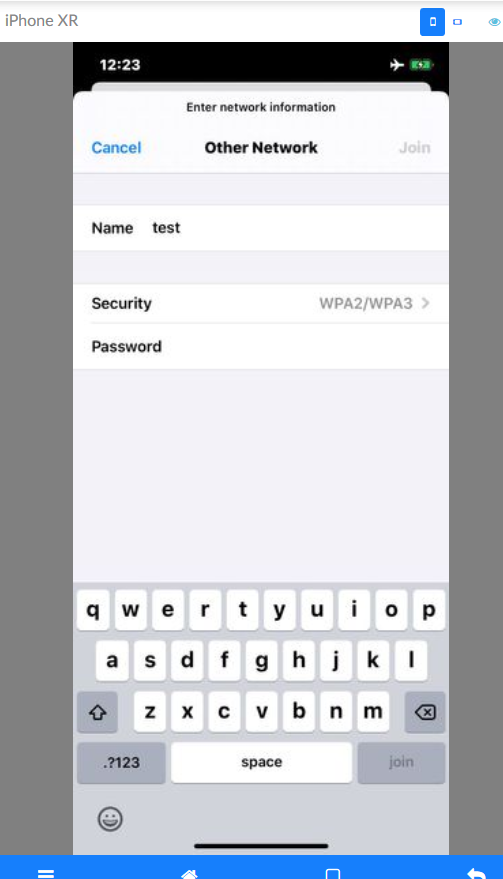
I click password and the keyboard disappear, it is opened on the phone though

Typing from the GUI keyboard does not work either, you must use the keyboard that's displayed when you open the phone on the GUI
On iOS 12.4 it works, IE the keyboard does not disappear when you click the password field, problem seems to be on iOS 13.3.1
man4567890
on 20 Feb 2020
Another thing I notice is that when you get a popup message for accepting something on iOS 13.3.1, if you click enable/accept/yes button normally on the right, it just hits the cancel button
This is a frame grabbed from a video, although I clicked Enable, you can see the Cancel button is being highlighted
man4567890
on 20 Feb 2020
Does anyone have a issue with clicking a password field, for example when you try and login to an AP, that the keyboard disappear, this is with @mrx1203 build. It also seems like the keyboard is not active when using the gui, see below
I click password and the keyboard disappear, it is opened on the phone though
Typing from the GUI keyboard does not work either, you must use the keyboard that's displayed when you open the phone on the GUI
On iOS 12.4 it works, IE the keyboard does not disappear when you click the password field, problem seems to be on iOS 13.3.1
This is because Apple added security input in iOS13. When the password input box gets the focus, it cannot capture the screen image, but you can still enter the password through the remote keyboard
mrx1203
on 20 Feb 2020
Hi @mrx1203 , my remote keyboard does not seem to work, any idea for what I should look for please
man4567890
on 20 Feb 2020
Hi @mrx1203 , my remote keyboard does not seem to work, any idea for what I should look for please
try to replace the code with this: NSString *textToType = request.arguments[@"value"]; in the function handleKeys of the file WebDriverAgent/WebDriverAgentLib/Commands/FBElementCommands.m
mrx1203
on 20 Feb 2020
Thanks so much @mrx1203 , it works!!!, this is how I got the function looking at the moment
- (id
)handleKeys:(FBRouteRequest *)request
{
NSString *textToType = request.arguments[@"value"];
//NSString *textToType = [request.arguments[@"value"] componentsJoinedByString:@""];
NSUInteger frequency = [request.arguments[@"frequency"] unsignedIntegerValue] ?: [FBConfiguration maxTypingFrequency];
NSError *error;
if (![FBKeyboard typeText:textToType frequency:frequency error:&error]) {
return FBResponseWithStatus([FBCommandStatus invalidElementStateErrorWithMessage:error.description traceback:nil]);
}
return FBResponseWithOK();
}
man4567890
on 20 Feb 2020
Any update on this please?
On Sun, 23 Feb 2020, 13:02 Mark, notifications@github.com wrote:
Hello, very very hope for any help with the issue..
may be it's help some one in future.
tmobile/stf_ios_support#24
https://github.com/tmobile/stf_ios_support/issues/24Please and thank's a lot!
@nanoscopic https://github.com/nanoscopic @EitanBe
https://github.com/EitanBe @mrx1203 https://github.com/mrx1203—
You are receiving this because you were mentioned.
Reply to this email directly, view it on GitHub
https://github.com/openstf/stf/issues/64?email_source=notifications&email_token=AMXKWZMPL66EXA2EHYUIKZ3REJJUTA5CNFSM4BOLEUSKYY3PNVWWK3TUL52HS4DFVREXG43VMVBW63LNMVXHJKTDN5WW2ZLOORPWSZGOEMVYYMA#issuecomment-590056496,
or unsubscribe
https://github.com/notifications/unsubscribe-auth/AMXKWZI2ZLGDHEYJFUNFNJ3REJJUTANCNFSM4BOLEUSA
.
man4567890
on 27 Feb 2020
@man4567890
You'll have to clarify what you have a problem with. The issue 24 you link to had to be closed because it was a brain dump of random problems with no cohesive "ask". I addressed as many of them as I could and requested individual tickets be created for any remaining issues. I haven't received any response back since then. If there are remaining issues from that, I'm unaware of them.
If you would create issues for individual problems, with sufficient information on what you would like help with, then I will be happy to address them.
nanoscopic
on 21 Mar 2020
Hi @nanoscopic , apologies, I'm still struggling with the
Another thing I notice is that when you get a popup message for accepting something on iOS 13.3.1, if you click enable/accept/yes button normally on the right, it just hits the cancel button
< , see my comment above, I don't understand what you mean by issue 24?
man4567890
on 21 Mar 2020
@man4567890
Your last comment in this thread says "Any update on this please?" and then quotes "Hello, very very hope for any help with the issue.. may be it's help some one in future. tmobile/stf_ios_support#24"
The quote doesn't describe any issue; it only links to Issue #24 within the tmobile/stf_ios_support repo. I am referring to that issue; which has already been addressed and is now closed.
As for a popup message not clicking in the correct location, I have only seen that occur in one situation so far: When using VNC with a jailbroken device and having the coordinate mapping / scale set incorrectly.
Your other comments seem to be in regard to @mrx1203 code. His setup for IOS is entirely different from the stf_ios_support setup. Which setup are you using when you encounter the issue clicking on a popup?
Are you able to click on other screen items besides popups correctly?
If you are using stf_ios_support, you can run ./view_log -proc wdaproxy to get additional debug output about what exactly is happening during that specific click. The debug output of a click generally includes information about how the coordinate you clicked is mapped to a specific element.
nanoscopic
on 21 Mar 2020
Hi @nanoscopic ,
Sorry but the comment "Hello, very very hope for any help with the issue.. may be it's help some one in future. tmobile/stf_ios_support#24" was not made by me, I think it came from "tepmehatop commented 28 days ago" . I apologize for the "Any update on this please?" and for not specifying the issue. My code is based on @mrx1203 code.
Thanks
man4567890
on 22 Mar 2020
@man4567890 You made your response by clicking "quote reply" from a post related to stf_ios_support; that is why I responded.
stf_ios_support and mrx code is entirely different and essentially unrelated. If you are using mrx code, then I cannot address issues you may encounter. Early on in my testing of IOS STF support I decided not to use the mrx code because of instability and few responses to user issues. The stf_ios_support does use a limited fork of mrx code for some parts, but the majority of the code is new and not forked from anywhere else.
Despite the differences, there are similarities though:
- For the most part, stf_ios_support uses upstream Appium/WebDriverAgent with a few minor changes. The changes allow clicking on system elements on real devices; upstream does not support that currently.
- For the most part, stf_ios_support uses upstream wdaproxy with a few changes. The changes allow running a prebuilt WDA, and also provide additional logging output of requests made to WDA.
The major differences:
- Video is streamed in an entirely different way, using a modified ffmpeg and golang code to serve out video frames using the AVFoundation / Quicktime path. This is similar to the published "ios minicap" in the OpenSTF namespace, but still different.
- Much functionality of the STF "ios device unit" and "device provider" is implemented in golang instead of in JS. In mrx code everything is done in NodeJS. In stf_ios_support golang is used instead to increase stability and better synchronize the "startup" process of getting a device connected to STF.
- The setup of stf_ios_support is aimed primarily at real devices, not at simulators. In the future simulator support will be added also, but currently there is no straightforwards way to use simulators with stf_ios_support.
nanoscopic
on 23 Mar 2020
Hi @mrx1203 ,
I have a problem build with Xcode 11.4 and iOS 13.4, when I build in Xcode I get this below, do you have any suggestions on how to fix this please? I used your repo and WebDriverAgent from your repo

man4567890
on 2 Apr 2020
Hi @mrx1203 , do not worry, I got is sorted by placing the device files in xcode, thank you
man4567890
on 2 Apr 2020
@man4567890
I encountered the same problem, which happened in Xcode 11.2 and IOS 13.3. How can I solve this problem?
I have added the corresponding version file to devicesupport in Xcode
 ViolenceAesthetics
on 28 Apr 2020
ViolenceAesthetics
on 28 Apr 2020
@man4567890 @ViolenceAesthetics
replace CocoaAsyncSocket with GCDAsyncSocket。
update the code from https://github.com/mrx1203/WebDriverAgent
mrx1203
on 28 Apr 2020
Heyo, btw I have decided to open source the DTX messaging framework, which is responsible for launching and killing apps, running xcuitests and getting cpu and memory stats from devices.
Here is a tool to dump raw XCUITests DTX messages:
https://github.com/danielpaulus/ios_simulator_dtx_dump
and here is the codec library:
https://github.com/danielpaulus/dtx_codec
Eventually I'll add it to https://github.com/danielpaulus/go-ios so you can do all the things stated above without using any apple tools
 danielpaulus
on 18 May 2020
danielpaulus
on 18 May 2020
@mrx1203, please I need some help again, after updating brew and reinstalling
brew install --HEAD usbmuxd
brew unlink usbmuxd
brew link usbmuxd
brew install --HEAD libimobiledevice
brew update
It seems that the iproxy version has changed and with it the way it is called, on a machine that still has the old version of iproxy, I get this
`iOS-01:bin digi$ iproxy -v
usage: iproxy LOCAL_TCP_PORT DEVICE_TCP_PORT [UDID]
iOS-01:bin digi$ iproxy 16140 18140 f793fc704a671534a8df987c2f1b4994232dd242
waiting for connection
^C
iOS-01:bin digi$
`
On the machine that was updated, if I do the same commands
`Mac-mini:Cellar digi$ iproxy -v
iproxy 2.0.2
Mac-mini:Cellar digi$ iproxy 16140 18140 f793fc704a671534a8df987c2f1b4994232dd242
Invalid listen port specified in argument '16140'!
Mac-mini:Cellar digi$ iproxy -h
Usage: iproxy [OPTIONS] LOCAL_PORT:DEVICE_PORT [LOCAL_PORT2:DEVICE_PORT2 ...]

Proxy that binds local TCP ports to be forwarded to the specified ports on a usbmux device.

OPTIONS:
  -u, --udid UDID    target specific device by UDID
  -n, --network      connect to network device
  -l, --local        connect to USB device (default)
  -s, --source ADDR  source address for listening socket (default 127.0.0.1)
  -h, --help         prints usage information
  -d, --debug        increase debug level
  -v, --version      prints version information

Homepage:    <https://libimobiledevice.org>
Bug Reports: <https://github.com/libimobiledevice/libusbmuxd/issues>
Mac-mini:Cellar digi$
`
When I start stf on the updated machine, all I get is this
`2020-06-23T14:21:35.175Z INF/ios-device:plugins:wdaProxy 33366 [f793fc704a671534a8df987c2f1b4994232dd242] exit with code :234
2020-06-23T14:21:35.175Z INF/ios-device:plugins:wdaProxy 33366 [f793fc704a671534a8df987c2f1b4994232dd242] start iproxy with params:6104 9100 f793fc704a671534a8df987c2f1b4994232dd242
2020-06-23T14:21:35.194Z INF/ios-device:plugins:wdaProxy 33366 [f793fc704a671534a8df987c2f1b4994232dd242] exit with code :234
2020-06-23T14:21:35.194Z INF/ios-device:plugins:wdaProxy 33366 [f793fc704a671534a8df987c2f1b4994232dd242] start iproxy with params:6103 8100 f793fc704a671534a8df987c2f1b4994232dd242
2020-06-23T14:21:35.213Z INF/ios-device:plugins:wdaProxy 33366 [f793fc704a671534a8df987c2f1b4994232dd242] exit with code :234
2020-06-23T14:21:35.213Z INF/ios-device:plugins:wdaProxy 33366 [f793fc704a671534a8df987c2f1b4994232dd242] start iproxy with params:6104 9100 f793fc704a671534a8df987c2f1b4994232dd242
2020-06-23T14:21:35.270Z INF/ios-device:plugins:wdaProxy 33366 [f793fc704a671534a8df987c2f1b4994232dd242] exit with code :234
2020-06-23T14:21:35.270Z INF/ios-device:plugins:wdaProxy 33366 [f793fc704a671534a8df987c2f1b4994232dd242] start iproxy with params:6103 8100 f793fc704a671534a8df987c2f1b4994232dd242
`
Any suggestions please
man4567890
on 23 Jun 2020
@man4567890 try to add options: -l -s 127.0.0.1。
like this: iproxy 16140 18140 -l -s 127.0.0.1 -u f793fc704a671534a8df987c2f1b4994232dd242
mrx1203
on 24 Jun 2020
@mrx1203 , yes that works, but where would I change it in the code please
`Mac-mini:~ digi$  iproxy 16140 18140 -l -s 127.0.0.1 -u f793fc704a671534a8df987c2f1b4994232dd242
Creating listening port 16140 for device port 18140
waiting for connection
^C
Mac-mini:~ digi$
`
@man4567890 lib/units/ios-device/plugins/wdaProxy.js , plugin.startIproxy funtion
mrx1203
on 24 Jun 2020
Thanks @mrx1203 I will try and get this working
man4567890
on 24 Jun 2020
Hi @mrx1203 , I need some help again, when using Xcode 12.x to build, I get this error
2020-11-25T06:06:41.350Z WRN/ios-device:plugins:data 67477 [00008101-001625D438C1401E] Unable to find device data { serial: '00008101-001625D438C1401E',
  platform: 'iOS',
  manufacturer: 'Apple',
  operator: '',
  model: undefined,
  version: '14.2.1',
  abi: 'arm64e',
  sdk: '',
  display:
   { id: 0,
     width: 1170,
     height: 2532,
     rotation: 0,
     xdpi: 0,
     ydpi: 0,
     fps: 60,
     density: 1,
     secure: false,
     url: 'ws://localhost:6148',
     size: 0 },
  phone: { imei: '', imsi: '', phoneNumber: '', iccid: '', network: '' },
  product: 'Apple',
  cpuPlatform: '',
  openGLESVersion: '' }
null
2020-11-25T06:06:41.352Z INF/ios-device:plugins:touch 67477 [00008101-001625D438C1401E] Touch origin is top left
2020-11-25T06:06:41.353Z INF/ios-device:plugins:touch 67477 [00008101-001625D438C1401E] Requesting touch consumer to start
2020-11-25T06:06:41.355Z INF/ios-device:plugins:vnc 67477 [00008101-001625D438C1401E] Starting VNC server on port 6150
2020-11-25T06:06:41.358Z INF/ios-device:plugins:wdaProxy 67477 [00008101-001625D438C1401E] start iproxy with params:6151 8100 00008101-001625D438C1401E
2020-11-25T06:06:41.364Z INF/ios-device:plugins:wdaProxy 67477 [00008101-001625D438C1401E] start iproxy with params:6152 9100 00008101-001625D438C1401E
2020-11-25T06:06:41.367Z INF/ios-device:plugins:wdaProxy 67477 [00008101-001625D438C1401E] start WDA with params:build-for-testing,test-without-building,-project,/Users/diginetiot/farm/stf/bin/WebDriverAgent/WebDriverAgent.xcodeproj,-scheme,WebDriverAgentRunner,-destination,id=00008101-001625D438C1401E,platform=iOS,-configuration,Debug,IPHONEOS_DEPLOYMENT_TARGET=10.2
2020-11-25T06:06:44.127Z INF/ios-device:plugins:wdaProxy 67477 [00008101-001625D438C1401E] xcodebuild构建成功
2020-11-25T06:06:45.717Z INF/ios-device:plugins:wdaProxy 67477 [00008101-001625D438C1401E] WDA启动成功
2020-11-25T06:06:45.735Z INF/ios-device 67477 [00008101-001625D438C1401E] Fully operational

/Users/diginetiot/farm/stf/node_modules/protobufjs/dist/ProtoBuf.js:2641
                    throw Error("Illegal value for "+this.toString(true)+" of type "+this.type.name+": "+val+" ("+msg+")");
                          ^
Error: Illegal value for Message.Field .DeviceIdentityMessage.model of type string: undefined (not a string)
    at Field.<anonymous> (/Users/diginetiot/farm/stf/node_modules/protobufjs/dist/ProtoBuf.js:2641:27)
    at Field.ProtoBuf.Reflect.FieldPrototype.verifyValue (/Users/diginetiot/farm/stf/node_modules/protobufjs/dist/ProtoBuf.js:2721:29)
    at MessagePrototype.set (/Users/diginetiot/farm/stf/node_modules/protobufjs/dist/ProtoBuf.js:1799:63)
    at new Message (/Users/diginetiot/farm/stf/node_modules/protobufjs/dist/ProtoBuf.js:1728:42)
    at Router.<anonymous> (/Users/diginetiot/farm/stf/lib/units/ios-device/plugins/solo.js:34:27)
    at Router.emit (/Users/diginetiot/farm/stf/node_modules/eventemitter3/index.js:118:35)
    at Router.<anonymous> (/Users/diginetiot/farm/stf/lib/wire/router.js:36:12)
    at emitTwo (events.js:126:13)
    at exports.Socket.emit (events.js:214:7)
    at exports.Socket.Socket._flushRead (/Users/diginetiot/farm/stf/node_modules/zmq/lib/index.js:638:15)
    at exports.Socket.Socket._flushReads (/Users/diginetiot/farm/stf/node_modules/zmq/lib/index.js:676:23)
    at Object._zmq.onReadReady (/Users/diginetiot/farm/stf/node_modules/zmq/lib/index.js:297:10)
2020-11-25T06:06:45.760Z INF/ios-provider 66082 [*] Cleaning up device worker "00008101-001625D438C1401E"
2020-11-25T06:06:45.761Z ERR/ios-provider 66082 [*] Device worker "00008101-001625D438C1401E" died with code 1
Please could you help?
man4567890
on 25 Nov 2020
@man4567890 add your phone model to DeviceType in the file stf/lib/units/ios-device/support/TypeToModel.js
mrx1203
on 25 Nov 2020
@mrx1203 , do I have to add undefined?
model: undefined,
So add something like this
iPhone13,2":"undefined"
platform: 'iOS',
  manufacturer: 'Apple',
  operator: '',
  model: undefined,
  version: '14.2.1',
  abi: 'arm64e',
  sdk: '',
  display:
   { id: 0,
     width: 1170,
     height: 2532,
     rotation: 0,
     xdpi: 0,
     ydpi: 0,
     fps: 60,
     density: 1,
     secure: false,
     url: 'ws://localhost:6148',
     size: 0 },
  phone: { imei: '', imsi: '', phoneNumber: '', iccid: '', network: '' },
  product: 'Apple',
  cpuPlatform: '',
  openGLESVersion: '' }
@man4567890 like this : “iPhone13,2“ : “iPhone 12“
other more devicetype : https://gist.github.com/adamawolf/3048717
mrx1203
on 25 Nov 2020
Thanks sooo much, that worked!!
man4567890
on 25 Nov 2020
Here's to seeing continued updates to this issue for the next 10 years. Cheers! 🥳✨
nanoscopic
on 4 Feb 2021
Recommend a new tool for WDA launch(which can be run on both Linux, Mac, Windows):
https://github.com/alibaba/tidevice
codeskyblue
on 4 Feb 2021
@codeskyblue lulz. Yet another implementation of the MobileDevice framework, but in another language. Because... we... need these? It's cute and all, but it doesn't seem to serve any real purpose. Please though tell me every one of these any of you find. Finding more is like collecting stamps. They are mostly without value, but hey... I have another one! This one has a small picture of an airplane! 🥳
nanoscopic
on 4 Feb 2021
@nanoscopic it is not another replementation. It's the only possible way to launch WDA without xcodebuild. and the only possible way to run in Linux, Windows.
There is not way to do it with MobileDevice framework.
codeskyblue
on 4 Feb 2021
@codeskyblue Ah nice. Thanks for pointing that out. I missed that in the general hilarity of another one of these. I laughed and joked about it because I literally spent the last week writing a tool that does almost all the other same things your tool does: https://github.com/nanoscopic/iosif
Since you've released a method of launching WDA now open source I'll implement this as well into iosif, and in turn into ControlFloor. Thanks.
nanoscopic
on 4 Feb 2021
Related issues
 gounthar
·
7Comments
gounthar
·
7Comments
 lgleasain
·
7Comments
lgleasain
·
7Comments
 armdev
·
5Comments
armdev
·
5Comments
 ThinkerT
·
4Comments
ThinkerT
·
4Comments
 jagsme
·
5Comments
jagsme
·
5Comments
Most helpful comment
Team,
Entire World is waiting for this precious solution for iOS with OpenSTF. STF team can consider manishPatwari's webdriver agent implementation of mirroring and accessing connected IOs devices. I know you guys are busy with other stuff's. But to make openSTF more power ful with IOs, we all should be united. Team need to tell, what they want actually ? what is blocking. Regards.