Stencil: Unclear which JS file in dist should be used for Internet Explorer 11
It seems there are 2 possible main files: index.js (which points to esm) and index.cjs.js. Neither is suited for IE 11. Documentation is lacking in this respect.
 ArthurClemens
All 9 comments
As far as I can tell when used for the browser it should be:
- module:
/dist/<library-name>/<library-name>.esm.js - nomodule:
/dist/<library-name>/<library-name>.js
 alex-ketch
on 11 Sep 2020
alex-ketch
on 11 Sep 2020
When I create a new project components-lib with starter setting component, and install and build, my dist folder looks like this:
./dist
├── [        224]  cjs
│   ├── [        726]  components-lib.cjs.js
│   ├── [      32970]  index-1e5bfcf5.js
│   ├── [         15]  index.cjs.js
│   ├── [        599]  loader.cjs.js
│   └── [        635]  my-component.cjs.entry.js
├── [        192]  collection
│   ├── [        215]  collection-manifest.json
│   ├── [         96]  components
│   │   └── [        128]  my-component
│   │       ├── [         28]  my-component.css
│   │       └── [       1682]  my-component.js
│   ├── [         11]  index.js
│   └── [         96]  utils
│       └── [        130]  utils.js
├── [        192]  components-lib
│   ├── [        222]  components-lib.esm.js     <== note there is no file components-lib.js
│   ├── [          0]  index.esm.js              <== note this file is completely empty
│   ├── [        299]  p-0bdbdffa.entry.js
│   └── [       6031]  p-24d0f0ad.js
├── [        128]  custom-elements
│   ├── [       1651]  index.d.ts
│   └── [       1102]  index.js
├── [        256]  esm
│   ├── [        535]  components-lib.js
│   ├── [      32304]  index-a5c9c759.js
│   ├── [          1]  index.js
│   ├── [        517]  loader.js
│   ├── [        566]  my-component.entry.js
│   └── [        256]  polyfills
│       ├── [      94164]  core-js.js
│       ├── [      10382]  css-shim.js
│       ├── [      19514]  dom.js
│       ├── [        320]  es5-html-element.js
│       ├── [       1136]  index.js
│       └── [       4383]  system.js
├── [         48]  index.cjs.js
├── [         31]  index.js
└── [        224]  types
    ├── [         96]  components
    │   └── [         96]  my-component
    │       └── [        220]  my-component.d.ts
    ├── [       1510]  components.d.ts
    ├── [         48]  index.d.ts
    ├── [      57854]  stencil-public-runtime.d.ts
    └── [         96]  utils
        └── [         85]  utils.d.ts

13 directories, 34 files
So using components-lib/components-lib.esm.js for module capable browsers works fine. But the non-module version does not exist.
ArthurClemens
on 12 Sep 2020
Having the same question here. With the stencil starter it also comes with this config:
    {
      type: 'dist',
      esmLoaderPath: '../loader',
    },
So I tried loading the index.js file in the generated loader folder, still no luck, browser gave me
Uncaught SyntaxError: Unexpected token 'export'
PS. Also tried loading it from dist/collection/components/my-component/my-component.js and browser gave me
Uncaught SyntaxError: Cannot use import statement outside a module
Stencil version: v2.0.3
Tried a build in v1.8.5 and both the my-component.esm.js and my-component.js files are there in the dist/my-component/ folder
 seanwuapps
on 14 Sep 2020
seanwuapps
on 14 Sep 2020
Where can I find a Stencil project that works in Internet Explorer 11?
ArthurClemens
on 25 Sep 2020
The main problem is that nowhere in the docs we can find any explanation about the dist files.
What are all the p.
 santicalvo
on 28 Sep 2020
santicalvo
on 28 Sep 2020
The build for old browsers is disabled by default since v2 (https://github.com/ionic-team/stencil/blob/master/CHANGELOG.md#-200-2020-08-31).
here is the documentation to enable it https://stenciljs.com/docs/config-extras
 dmartinjs
on 7 Oct 2020
dmartinjs
on 7 Oct 2020
OMG this link is gold.
ArthurClemens
on 7 Oct 2020
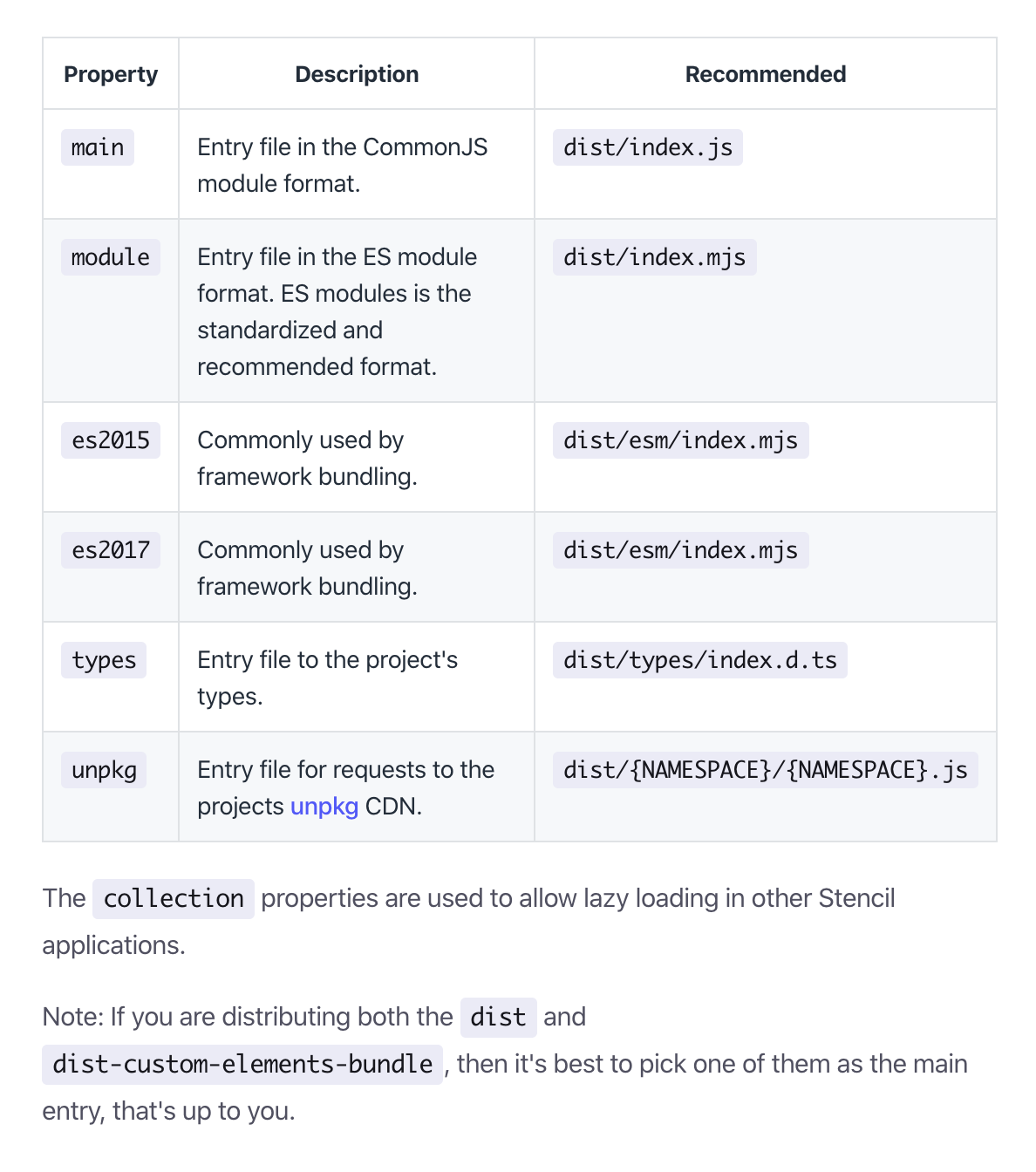
For dist/ files, you have some informations here https://stenciljs.com/docs/publishing#package-json
dmartinjs
on 7 Oct 2020
This works.
In stencil.config.ts I've set buildEs5: true and the example extras settings.
After the build and firing up a local server in www, index.html loads www/build/project.js and the default "my-component" (so nothing fancy) works in IE 11, Edge 80, Safari 11.
I do suggest that you add this to the documentation, for example under "Guides" could be a topic "Older browsers", and existing page Browser support could link to there.
ArthurClemens
on 10 Oct 2020
Related issues
 ckrack
·
3Comments
ckrack
·
3Comments
 joewoodhouse
·
3Comments
joewoodhouse
·
3Comments
 guidoknoll
·
3Comments
guidoknoll
·
3Comments
 karsvaniersel
·
3Comments
karsvaniersel
·
3Comments
 glemiere
·
3Comments
glemiere
·
3Comments
Most helpful comment
The main problem is that nowhere in the docs we can find any explanation about the dist files.
What are all the p..entry.js files? Which files do we need? It is not well explained in the docs.