Stencil: Loading multiple independent components in parallel lead loader to URL conflicts
This is a rebirth of #793, as it was closed by @ionic-issue-bot after time of inactivity.
Stencil version:
@stencil/[email protected]
I'm submitting a:
[x] bug report
[ ] feature request
[ ] support request
Current behavior:
In an app that's part of a enterprise platform, I add the following scripts at the bottom of BODY (tried also with HEAD), by using document.createElement and document.body.appendChild:
<script src="https://a-long-domain/app/editor/editor.js"
    data-resources-url="/assets/editor/editor/"></script>

<script src="https://a-long-domain/app/panes/panes.js"
    data-resources-url="/assets/panes/panes/"></script>
Each component is provided independently from the another. They both are installed via npm and bundled as assets with Webpack.
But, instead of loading each from their respective URL paths, this is how they are trying to load:
* /app/editor/editor.js                 | status 200
* /app/panes/panes.js                   | status 200
* /app/panes/panes/editor.ue0uvjqh.js   | status 404   <--- wrong path
* /app/panes/panes/panes.fb02prxi.js    | status 200
Notice that editor loader is using panes path instead of its own right path.
If I revert the order of the scripts, I get the same result, but reverted (tries loading panes from editor path).
Expected behavior:
Each component should load with its own path, not trying to oversmart the URL, as below
* /app/editor/editor.js                 | status 200
* /app/panes/panes.js                   | status 200
* /app/editor/editor/editor.ue0uvjqh.js | status 200
* /app/panes/panes/panes.fb02prxi.js    | status 200
Steps to reproduce:
Do as it's described above.
Related code:
No need.
Other information:
If I write a code to wait until the first component is ready and only then it adds script to the second component, it works. This is how I did it:
    var editorScript = addWebComponent({
        resourcesPath: '/assets/editor/editor/',
        scriptUrl: '/assets/editor/editor.js'
    });
    editorScript.addEventListener('load', function() {
        addWebComponent({
        resourcesPath: '/assets/panes/panes/',
        scriptUrl: '/assets/panes/panes.js'
    });
I tried this case also with versions 0.7.5 and 0.9.2
 marinho
All 6 comments
Same here , using script tag to import components from multiple sources causes that
 romulocintra
on 23 Aug 2018
romulocintra
on 23 Aug 2018
I'd like to have some feedback from team, at least. Both this and previous issues were basically ignored.
marinho
on 10 Sep 2018
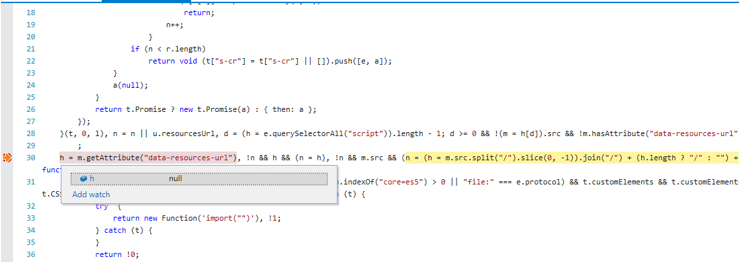
I tried work around by defining 'data-resources-url' along with script tag. It helped to reduce the number of reproducing issue but I am still seeing it once in 20 times of reloading a page. Somehow, Stencil JS is finding null value for 'data-resources-url' when issue is occurring.
 chiragajmeri
on 9 Jan 2019
chiragajmeri
on 9 Jan 2019
I'm hitting a similar bug but even when I'm only loading one component. For whatever reason the stencil loader finds the wrong script tag and grabs the script url path from there. It seems to me that the loader logic is quite brittle, as it just finds the last script tag on the page at run time that has either a src or data-resources-url attribute. It just assumes that is the correct tag. See here: https://github.com/ionic-team/stencil/blob/master/src/client/loader.ts#L39
Not only is that unreliable, it consistently fails to work if you async load your component (with the async attribute in the script tag). To find the script tag that loaded the currently running code, please consider using document.currentScript. If that is not an option I would suggest, for example, to make it mandatory to have the script tag in the following format:
<script src="/path/to/mycomponent.js" data-stencil-component="mycomponent"></script>
That way the loader can simply do querySelector('script[data-stencil-component="mycomponent"]'); to find the correct script.
This issue is quite annoying as I now have to patch the built loader file to get my component to work on a client website.
 richrd
on 31 Jan 2019
richrd
on 31 Jan 2019
I decided to fix this so I forked stencil. Feel free to use the fork as described in the readme here:
https://github.com/richrd/stencil
Hopefully this will be officially fixed in stencil soon.
richrd
on 31 Jan 2019
Stencil 1.0 relies on system.js a battle-proof module loader, so this issue does not longer apply!
 manucorporat
on 29 Apr 2019
manucorporat
on 29 Apr 2019
Related issues
 elmariofredo
·
3Comments
elmariofredo
·
3Comments
 anthonylebrun
·
3Comments
romulocintra
·
3Comments
anthonylebrun
·
3Comments
romulocintra
·
3Comments
 ryanmunger
·
3Comments
ryanmunger
·
3Comments
 mitchellsimoens
·
3Comments
mitchellsimoens
·
3Comments
Most helpful comment
Same here , using script tag to import components from multiple sources causes that