Stencil: component files fail to load if the app.js is inlined into the subpath html file
Stencil version:
@stencil/[email protected]
I'm submitting a:
[x] bug report
[ ] feature request
[ ] support request => Please do not submit support requests here, use one of these channels: https://forum.ionicframework.com/ or https://stencil-worldwide.slack.com
Current behavior:
I want to build a web app that host on a sub path such as Github Project Page.
I set the publicPath: "build" in the stencil.config.js , but get a 404 error in the browser console.
It try to load http://localhost:3333/build/app.tv6pldgw.js.
Expected behavior:
The correct path is http://localhost:3333/build/app/app.tv6pldgw.js
Steps to reproduce:
Related code:
exports.config = {
  publicPath: "build",
  serviceWorker: false
};
Other information:
What is the correct way to build a stencil web app which hosted on a subpath?
 magic-akari
All 23 comments
what happens if you set the public path to build/app ?
 Xiphe
on 19 Feb 2018
Xiphe
on 19 Feb 2018
If I set the publicPath to build or /build, it will load the wrong path http://localhost:3333/build/app.xxx.js.
If I set the publicPath to build/app, no error will appear in the browser console. But some components javascript files will not load.
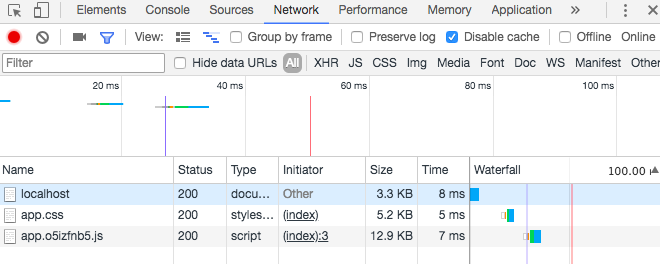
It seems like the /build/app is the default value which behave as expected.
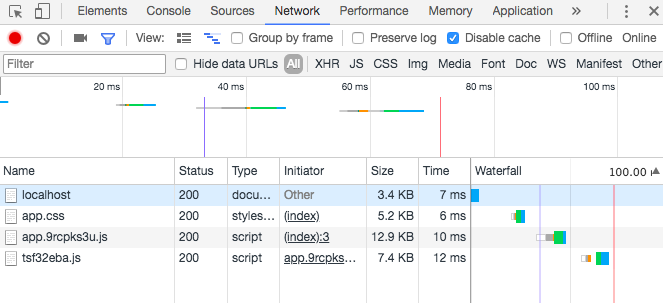
But I am trying to build a web app which hosted on a subpath. It is helpful if I can remove the first slash of the path.
magic-akari
on 20 Feb 2018
I've looked into this pretty in depth and I have a few things to add. My use case is to have my web components in a subpath on the server (https://patterns.boston.gov/web-components/all.js) and be able to load those components from other domains.
Additionally, I'm somewhat interested in being able to do prerendering on this server.
Here are some things I've found:
Setting any
publicPathat all keeps components from being able to be loaded from another domain. Having a public path disablesdiscoverPublicPathand causes additional component scripts to be loaded from the page’s domain, not the loader’s domain.What I think the OP is seeing mostly is that
publicPathis also assumed to include thenamespacepath component as well.When the loader script is inlined as part of prerendering, it assumes that
wwwDiris the equivalent of/on the server. If you setwwwDirto match/(setting it to"public"for example) you can usebuildDirto put the component JS in a subdirectory.If you set
wwwDirto a directory likepublicyou probably want to setemptyWWWtofalsein your config to prevent Stencil from deleting your other files (which are the reason you want the components in a subdir to begin with).The downside is that Stencil will write things into
wwwDirthat are not nicely compartmentalized into your subdirectory. Due to #563 you get anindex.htmlfile, and you also get thehost.config.jsonfile.
I think there's work to be done to nail down more precisely what the config directories and paths are each for, what they're relative to, _&c_.
I'd definitely like to see the use case of having things in a sub directory work correctly.
 fionawhim
on 21 Feb 2018
fionawhim
on 21 Feb 2018
you can also set the publicPath to a full url like http://localhost:3333/build/app you'd obviously need to change this url for dev/production but this works fine for my use case.
Xiphe
on 22 Feb 2018
@finneganh:
Setting any publicPath at all keeps components from being able to be loaded from another domain. Having a public path disables discoverPublicPath and causes additional component scripts to be loaded from the page’s domain, not the loader’s domain.
AFAIK this is intended and related to https://github.com/ionic-team/stencil/issues/464
Xiphe
on 22 Feb 2018
Interesting. Yeah, it looks like I misunderstood it from the start. I wish it were clearer / more explicitly supported to have Stencil build entirely in a subpath of my server, though, since wwwDir pretty definitely has to point to / if you're not using publicPath.
fionawhim
on 22 Feb 2018
It seems like that if the app.js is inlined into the html file, component javascript files will fail to load.
It only happened in the prerender process.(@stencil/[email protected])
But now, the latest stencil (0.6.18) will inline the app.js as default option.
magic-akari
on 7 Mar 2018
Ok, let's solve this! Thank you for your patience. The hard part here are the many different scenarios and use-cases, and what we've built so far doesn't take them all into account. So if I can get some help trying to list out all of our use-cases, we can update the config and write the unit tests to make sure they're all covered. I'll start working on organizing the scenarios...
 adamdbradley
on 7 Mar 2018
adamdbradley
on 7 Mar 2018
- Run from
file://
location: file://index.html

config: {
  namespace: "App",
  fsNamespace: "app"
}

<html>
<head>
    <script src="build/app.js"></script>
</head>
<body>
    <my-app></my-app>
</body>
</html>
- Prerendered HTML relocates the inlined script to the bottom of the HTML.
location: http://mydomain.com/

config: {
  namespace: "App",
  fsNamespace: "app"
}

<html>
<body>
    <my-cmp><prerendered-html></prerendered-html></my-cmp>
    <script>/* inlined loader script */</script>
</body>
</html>
- Non-prerendered HTML inlined script stays in the same location.
location: http://mydomain.com/

config: {
  namespace: "App",
  fsNamespace: "app"
}

<html>
<head>
    <script>/* inlined loader script */</script>
</head>
<body>
    <my-cmp></my-cmp>
</body>
</html>
- Change the location of where the loader script will find build files.
location: http://mydomain.com/

config: {
  namespace: "App",
  fsNamespace: "app"
  publicPath: 'some/other/path/app/'
}

<html>
<head>
    <script src="/some/other/path/app.js"></script>
</head>
<body>
    <my-cmp></my-cmp>
</body>
</html>

Request build files from:
http://mydomain.com/some/other/path/app/
- Loader script concatenated into another script, such as a webpack build like
main.js. It must be able to figure out it's current location.
location: http://mydomain.com/

config: {
  namespace: "App",
  fsNamespace: "app"
}

<html>
<head>
    <script src="/build/main.js"></script>
</head>
<body>
    <my-cmp></my-cmp>
</body>
</html>

Request build files from:
http://mydomain.com/build/app/
- Loader script on another domain than the base html file.
location: http://mydomain.com/

config: {
  namespace: "App",
  fsNamespace: "app"
}

<html>
<head>
    <script src="http://someotherdomain.com/build/main.js"></script>
</head>
<body>
    <my-cmp></my-cmp>
</body>
</html>

Request build files from:
http://someotherdomain.com/build/app/
Here is another possible use case:
- App uses hash based routing and uses relative paths instead of absolute paths.
location: http://mydomain.com/some/other/path/index.html

<html>
<head>
    <script src="build/main.js"></script>
</head>
<body>
    <my-cmp></my-cmp>
</body>
</html>

Request build files from:
http://mydomain.com/some/other/path/build
The benefit of this approach is that you can run the app from anywhere.
For example, if you want to be able to run any version of the app from a testing server:
// To test the current production version of the app
http://test.mydomain.com/test/prod

// To test a stage build of the app
http://test.mydomain.com/test/stage

// To test an old version of the app (e.g. to diagnose a user problem)
http://test.mydomain.com/test/1.0.2/
During deployment you simply copy the files into the versioned directory and it will run without the rooted path needing to be built into the app.
 cjorasch
on 7 Mar 2018
cjorasch
on 7 Mar 2018
run from electron
probably as same as running fromfile://run from chrome extension.
popup page or options page.
magic-akari
on 7 Mar 2018
Ok, so an internal update we'll do is that if publicPath is set, then it will ALWAYS use that without any modifications (it does ensure it ends with / though). Next, if publicPath is not set, we do not give it a default value. This way we know if we should always use the value or try to dynamically figure out the path.
Also, when prerendering, we can add a data attribute to the inlined script of where the runtime should find the scripts, such as <script data-path="/build/app/"> for the same reasons.
adamdbradley
on 12 Mar 2018
Also, would it make more sense if it was called scriptPath? Best way to say it is that this value is the url where all the lazy loaded scripts can be found.
adamdbradley
on 12 Mar 2018
Is it just related to scripts or is related to other assets as well? Maybe it is a different setting but it seems like you need some root for all resources.
cjorasch
on 12 Mar 2018
resourcePath?
resourcesPath?
componentResourcesPath?
I'm leaning toward resourcePath
adamdbradley
on 12 Mar 2018
Pretty good. Maybe publishedPath?. I like resourcePath too.
 marinho
on 12 Mar 2018
marinho
on 12 Mar 2018
Ok the tests are pretty complicated, but they're simulating the window executing the loader and core scripts for our various scenarios: https://github.com/ionic-team/stencil/blob/master/src/compiler/build/test/resource-path-www.spec.ts
The refactor involves renaming publicPath. In most cases it's a config that won't need to be changed. However, if it does need to be customized it can be done for each output target (such as www or distribution).
config.public = '/some/custom/path/';
to
config.outputTargets = [
  { type: 'www', resourcePath: '/some/custom/path/' }
];
Another difference is that if a custom resourcePath is given, it'll always use it exactly as given. If a resourcePath isn't provided, then it uses the default buildPath plus the namespace, such as /build/app.
adamdbradley
on 13 Mar 2018
How to build app and use relative paths as @cjorasch said?
the following config doesn't work.
<script src="build/app.js"></script>
config.outputTargets = [
  { type: 'www', resourcePath: 'build/' }
];
or keep config.outputTargets not set.
<script src="build/app.js" data-resource-path="build"></script>
<script src="build/app.js" data-resource-path="./build"></script>
You should be able to not set it all. I think resourcePath is used if there is a specific location.
adamdbradley
on 13 Mar 2018
Sorry, I am confused.
Let me clarify what I mean.
I want to build a web page called pageA.All the web files are assumed in one root folder.
If I want to access it through http://example.com/some/path/ , I just copy all the files to /some/path/ and keep the files structure.
Take the React as an example. I use React with Webpack. I usually bundle all the source files into one single output file. It is easy for me to host it anywhere. I set the script path to a relative path and all things are done.
Considering stencil uses lazy loading, It is more complex for me.
Is it possible to load all the source files (such as style, js script, etc) from relative path?
Or if I can run it from file:// (just open index.html), it must works anywhere.
I cannot find the right way to config it now.
Thanks for your patience and time.
magic-akari
on 13 Mar 2018
Yes, it's largely the same as it was before. The lazy loaded files can be relative to your main bundle, or you can set a specific absolute path.
adamdbradley
on 13 Mar 2018
Also these changes have not been published yet, we'll have more info when it is. Thanks
adamdbradley
on 13 Mar 2018
why not
const url = "./" + bundleId + ((useScopedCss(domApi.$supportsShadowDom, cmpMeta) ? '.sc' : '') + '.js');
or
const url = "../" + namespace + "/" + bundleId + ((useScopedCss(domApi.$supportsShadowDom, cmpMeta) ? '.sc' : '') + '.js');
Related issues
 JuBaBaBa
·
18Comments
JuBaBaBa
·
18Comments
 petemcwilliams
·
19Comments
petemcwilliams
·
19Comments
 kartikgreen
·
48Comments
kartikgreen
·
48Comments
 cmaas
·
19Comments
cmaas
·
19Comments
 ch3rub1
·
19Comments
ch3rub1
·
19Comments
Most helpful comment
Interesting. Yeah, it looks like I misunderstood it from the start. I wish it were clearer / more explicitly supported to have Stencil build entirely in a subpath of my server, though, since
wwwDirpretty definitely has to point to/if you're not usingpublicPath.