Status-react: Show connection status within app
Description
It would be nice to have an indicator somewhere in the app that would show which mailserver the app is connected to, and whether the connection is active. This should work in conjunction with the current network status notifications.
In case when there is a connection failure, click on the indicator should display a window with a more detailed error text, that can be useful during error report submission.
 siphiuel
All 9 comments
I think this issue should be marked as high-priority. Below, you can find more technical details how this Connectivity Indicator could be implemented.
State "Connected with N"
- when we have at least one peer connected
- N is replaced with the number of connected peers
admin_peersJSON-RPC command can be used to retrieve currently connected peers (CallPrivateRPCmust be used)- in order to detect changes regarding connected peers, there are two options: polling
admin_peersor usingdiscovery.summarysignal; the best would be a combined solution as I am not sure ifdiscovery.summaryworks always (e.g. if discovery is disabled) - peers discovery is disabled (check "State Connected + searching")
N >= config.RequireTopics[whisper].minis considered good connectivity andN >= config.RequireTopics[whisper].maxoptimal connectivity
State "Connected with N incl MailServer"
- as "Connected with N" but
admin_peersresult must contain a selected mail server - "Connected with 1 incl MailServer" means that we have one peer which is a mail server
State "Connected with N and searching"
- as "Connected with N" but if and only if peers discovery protocol is enabled
- it can be detected with
discovery.startedanddiscovery.stoppedsignals
State "Disconnected and searching"
- no peers but peers discovery protocol enabled
State "Disconnected"
- no peers and peers discovery protocol disabled
- it pretty much means a deadlock; it should never happen
indicator = status | status searching
status = connected | disconnected
connected = "Connected with N" | "Connected with N incl MailServer"
disconnected = "Disconnected"
searching = "and searching"
Outstanding issues
- We detect flaky peers in devp2p protocol but it's not possible to surface this information to status-react currently. It's only used in Whisper internal functions.
 adambabik
on 7 Nov 2018
adambabik
on 7 Nov 2018
Thanks @adambabik , great writeup!
siphiuel
on 7 Nov 2018
@siphiuel Where do you imagine this being shown? Is this a "technical" thing that we want to show to everybody?
 EugeOrtiz
on 7 Nov 2018
EugeOrtiz
on 7 Nov 2018
This needs to be shown to the users. Right now the app has no transparency on what is going behind the scenes, and anything doesn't work then there is almost no feedback to the user. This probably be inside those grey popups at the top that indicate the current state.
 jakubgs
on 7 Nov 2018
jakubgs
on 7 Nov 2018
I'd like this to be always visible somewhere in the corner, as a green/red indicator, and a click on it would show more detailed info as per @adambabik 's description. Maybe this can be visible only if a corresponding preferences option is turned on.
siphiuel
on 7 Nov 2018
Yeah, and icon indicator with details on hover/touch does sound much nicer.
jakubgs
on 7 Nov 2018
Talking to @siphiuel we agreed that we should show any connection problem only when it is a problem, not all the time. For this we can use current badges to inform if a user lost its connection.
We also agreed that the stats/logs should be accessible through the MacOS menu. Maybe under Help > "See stats"
EugeOrtiz
on 14 Nov 2018
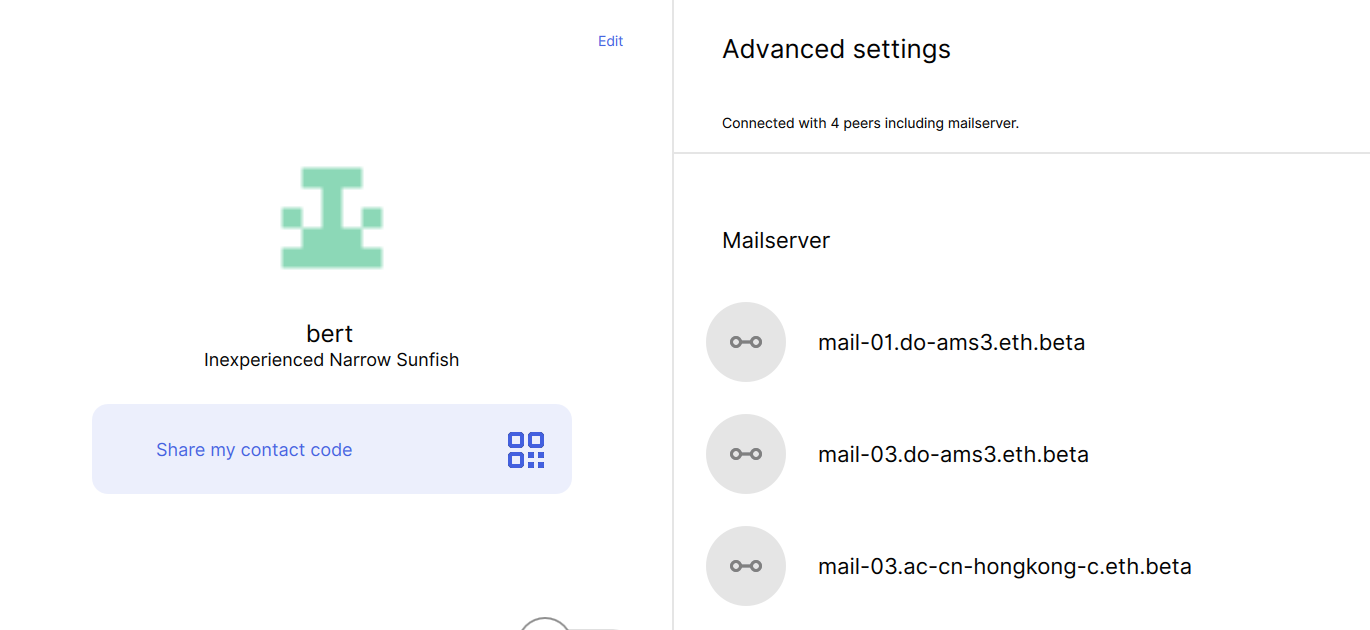
 rcullito
on 26 Nov 2018
rcullito
on 26 Nov 2018
hey @EugeOrtiz I wasn't able to access the zeplin link for the badges in your comment above. I just double checked my account with Zeplin and I am able to log in, so perhaps it is a question of being granted access to a specific project? If you could share access that would be great, thanks!
I haven't seen the badges yet, but one other design concept that was discussed for this feature was a "traffic signal" to indicate connectivity. Let me know if either you or @errorists would be up for talking abou that too :+1:
rcullito
on 26 Nov 2018
Related issues
 alwx
·
4Comments
alwx
·
4Comments
 andmironov
·
3Comments
andmironov
·
3Comments
 mfekadu
·
3Comments
mfekadu
·
3Comments
 annadanchenko
·
3Comments
annadanchenko
·
3Comments
 Serhy
·
3Comments
Serhy
·
3Comments
Most helpful comment
I think this issue should be marked as high-priority. Below, you can find more technical details how this Connectivity Indicator could be implemented.
State "Connected with N"
admin_peersJSON-RPC command can be used to retrieve currently connected peers (CallPrivateRPCmust be used)admin_peersor usingdiscovery.summarysignal; the best would be a combined solution as I am not sure ifdiscovery.summaryworks always (e.g. if discovery is disabled)N >= config.RequireTopics[whisper].minis considered good connectivity andN >= config.RequireTopics[whisper].maxoptimal connectivityState "Connected with N incl MailServer"
admin_peersresult must contain a selected mail serverState "Connected with N and searching"
discovery.startedanddiscovery.stoppedsignalsState "Disconnected and searching"
State "Disconnected"
Outstanding issues