Status-react: Scan public key from within wallet
User Story
As a user, I want to scan another user's public key so that I can send assets to them.
Description
In user testing we observed that of 8 participants, all struggled to find their own wallet address to give to someone else to start a transaction (_Wallet Address is under Receive, and participants didn't expect it there_). Participants were able to find their public key under Profile. Assuming that they had found their wallet address (_how would the know there are two QR codes_), it was puzzling that the other user was not able to scan this key. _An error message is generated saying that the key cannot be recognized_
Our, design team's, assumption is that if initiating a transaction from chat, using the public key is possible, initiating a transaction using the public key from within wallet should also be possible.
Type: Bug
Summary: Whatever is neccesary to recognize and use a public key when using the QR code scan feature in Wallet > Send Transaction> Specify Recipient > Scan QR code.
Expected behavior
When I select Scan QR code in wallet and the code I scan is a public key OR a wallet address I can initiate a transaction to the owner of this key OR address.
Actual behavior
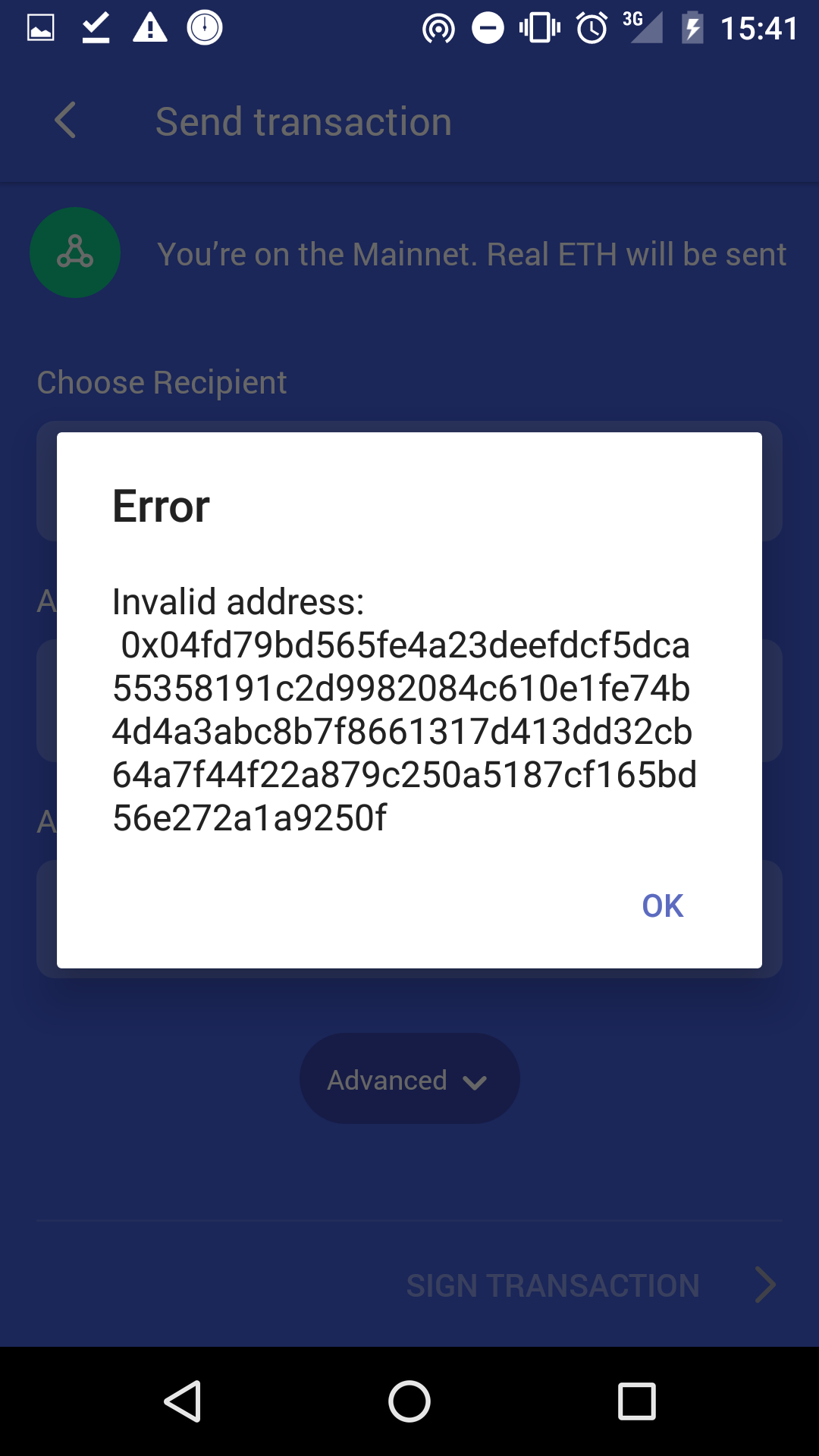
When I select Scan QR code in wallet and the code I scan is a public key I receive an error mssage that the code is not recognized.
Reproduction
Open Wallet > Send Transaction> Specify Recipient > Scan QR code > [scan a public key]
Solution
TBD
- [ ] ...
- [ ] ...
Additional Information
- Status version: Nightly build May 23
 hesterbruikman
All 6 comments
@hesterbruikman do you think this could come post-beta? It will affect only users who want to transact in person, and they have the option to transact with "Contacts" using their public key.
Hard to say how many users will want to transact face-to-face.
 rachelhamlin
on 29 May 2018
rachelhamlin
on 29 May 2018
@rachelhamlin
@jeluard
Good point on the in-person use case.I checked and th issue actually occurs for entering a public key as a recipient in wallet, irrespective of the method. I hope we can get at least solution 4 in for beta.
A few levels of solutions
[ ] 1. _prevent the issue_: eventually derrive a wallet address we feel more comfortale injecting in Whisoer to merge the keys
[ ] 2. _manage the issue_: surface the wallet address; people get lost into the contact key in the profile screen partly because the wallet address is 'hidden' under [Receive transaction]
[ ] 3. _manage the issue_: Allow using the public key as recipient. This is the request of this GH issue. I imagine we may have not done this as maybe it automatically accept a contact for chat as well. I'm not sure if this is the case or would be a problem.
[ ] 4. _recover from the issue_: Provide a sensible error message
Imagine this scenario
- You start using Status but don't have any assets yet
- I ask you for your address so I can send you some to get started.
- You find your [Contact code] in [Profile] and send it to me (in Status, another messenger or email. You either copy the key manually or use the [Share icon]. If you use the [Share icon] you likely use another messenger as you don't see Status _(seperate issue)_
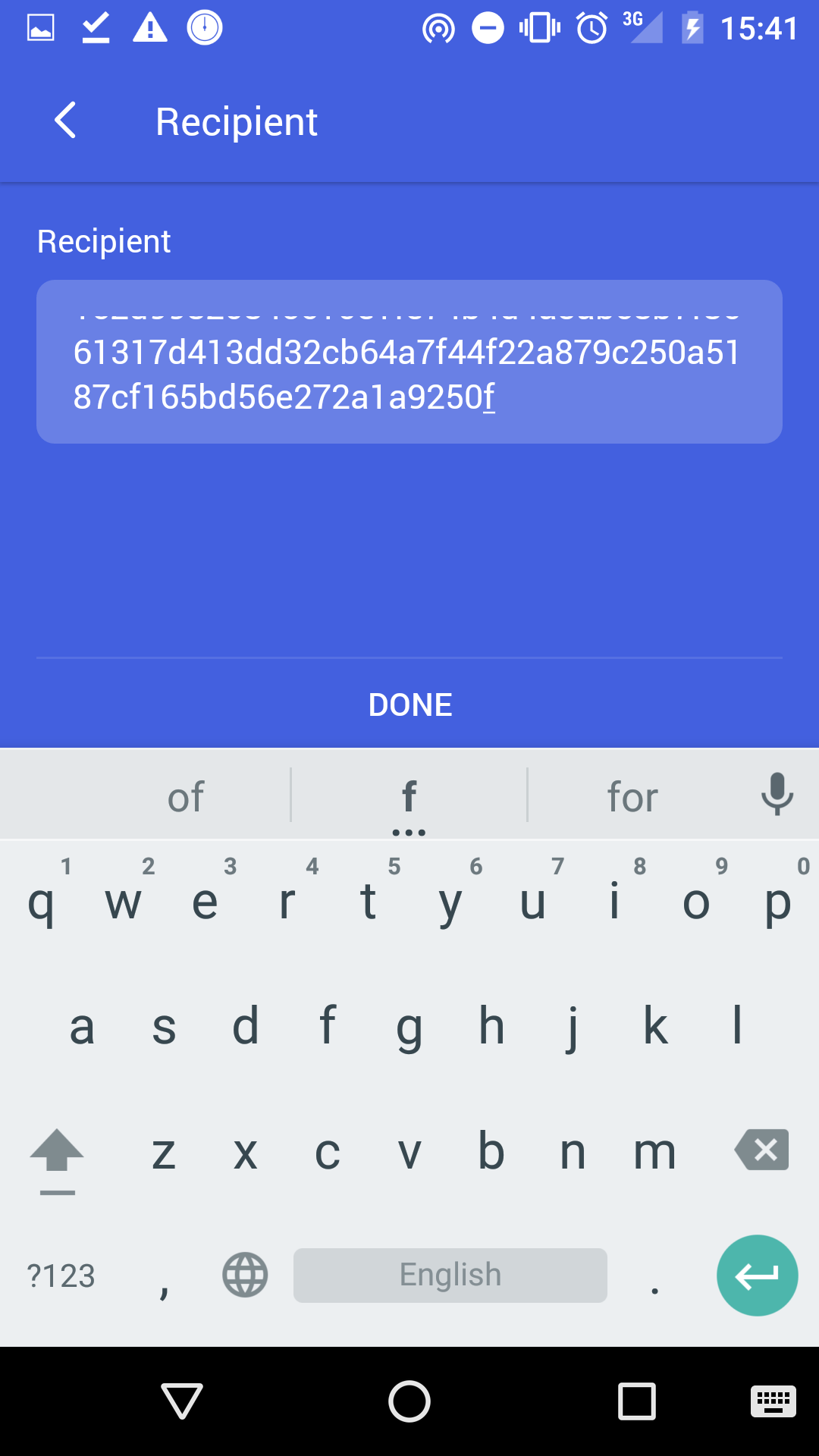
- I try to copy the key you sent in the [Choose recipient] field. This opens a dialog for me to select [Enter recipient address]. On the next screen I paste your key in the field.
- I receive an error message that tells me the key is not recognized, but it doesn't tell me why or what I can do. _updating the error message copy might be an intermediary solution_
hesterbruikman
on 29 May 2018
Having two ids and their QR code representations is the source of the problem. If we allow either of those two ids to be used seamlessly we'll only add to the confusion.
 goranjovic
on 29 May 2018
goranjovic
on 29 May 2018
@hesterbruikman agreed, that's an issue. So:
Scan QR codefrom Wallet >Send transactiontypically leads to users scanning thepublic address QR code, not thewallet QR code.Enter recipient addressfrom Wallet >Send transactionprobably leads to users copying thepublic address, not thewallet address.
Again looking at the downside: higher friction to transact, possible confusion leads users to give up, though other options do exist.
I think we should probably think more carefully about the role of each ID in identity and managing multiple wallets before implementing solution 3, though it's worth discussing.
@denis-sharypin @goranjovic comparing solutions 2 and 4, which would you be more comfortable targeting for beta?
rachelhamlin
on 30 May 2018
This issue has been automatically marked as stale because it has not had recent activity. It will be closed if no further activity occurs. Thank you for your contributions.
![status-github-bot[bot] picture](https://avatars.githubusercontent.com/in/8157?v=4&s=40) status-github-bot[bot]
on 24 Sep 2018
status-github-bot[bot]
on 24 Sep 2018
This issue has been automatically closed. Please re-open if this issue is important to you.
status-github-bot[bot]
on 1 Oct 2018
Related issues
 alwx
·
4Comments
alwx
·
4Comments
 andmironov
·
3Comments
andmironov
·
3Comments
 Serhy
·
3Comments
Serhy
·
3Comments
 mfekadu
·
3Comments
Serhy
·
3Comments
mfekadu
·
3Comments
Serhy
·
3Comments
Most helpful comment
Having two ids and their QR code representations is the source of the problem. If we allow either of those two ids to be used seamlessly we'll only add to the confusion.