Static-web-apps: ARM deployment with Configuration initially fails when no Static Web App is deployed
I want to automate the creation of an Azure Static Web App in Azure DevOps Release Pipelines using ARM templates and set a Configuration variable to be used by the embedded Azure Functions which are deployed later to the resource in the pipeline.
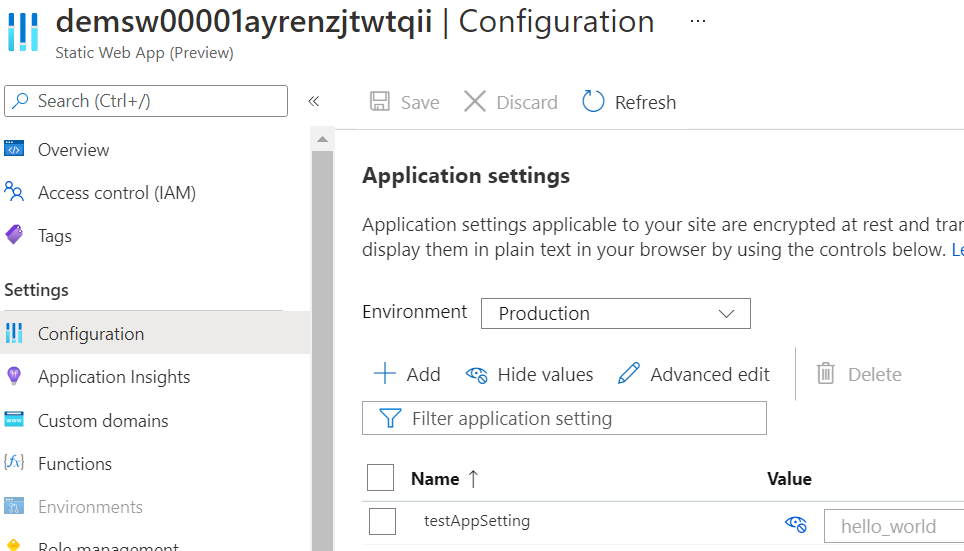
Directly setting configuration variables using ARM for Static Web Apps is actually not documented, but suggested here by @miwebst). When adding the config child resource, the deployment however fails on first deployment with the following error:
Deployment failed. Correlation ID: <correlation_id>. {
  "Code": "BadRequest",
  "Message": "SkuCode 'SKU' is invalid.",
  "Target": null,
  "Details": [
    {
      "Message": "SkuCode 'SKU' is invalid."
    },
    {
      "Code": "BadRequest"
    },
    {
      "ErrorEntity": {
        "ExtendedCode": "55925",
        "MessageTemplate": "SkuCode '{0}' is invalid.",
        "Parameters": [
          "SKU",
          "Free"
        ],
        "Code": "BadRequest",
        "Message": "SkuCode 'SKU' is invalid."
      }
    }
  ],
  "Innererror": null
}
When I try to do an initial deployment with the config child resource removed, the Static Web App resource is created perfectly fine. If I re-add the config child resource after I deployed the Static Web App and embedded Functions and do an incremental ARM deployment, the Configuration values are set correctly and I don't get the error above.
Is there any way to set Configuration variables using ARM templates on the initial deployment when no Static Web App and corresponding Azure Functions are deployed to the resource yet? I tried to call the Azure CLI in my Azure DevOps release pipeline to set the Configuration variables instead of ARM, but that workaround is blocked due to this issue.
To summarize:
- The following scenario works: 1) Deploy ARM _without_ config, 2) Deploy Static Web App to Resource, 3) Deploy ARM incrementally _with_ config
- The following scenario does not work: 1) Deploy ARM initially _with_ config
The used ARM template is listed below:
ARM template
{
    "$schema": "https://schema.management.azure.com/schemas/2019-04-01/deploymentTemplate.json#",
    "contentVersion": "1.0.0.0",
    "parameters": {
        "StaticWebApp.Demo.Name": {
            "type": "string",
            "defaultValue": "demsw00001"
        },
        "StaticWebApp.Demo.DisplayName": {
            "type": "string",
            "defaultValue": "StaticWebApp.Demo"
        },
        "StaticWebApp.Demo.Sku": {
            "type": "string",
            "defaultValue": "Free"
        }
    },
    "variables": {
        "StaticWebApp.Demo.Name": "[concat(parameters('StaticWebApp.Demo.Name'), uniqueString(resourceGroup().id))]"
    },
    "resources": [
        {
            "apiVersion": "2020-09-01",
            "name": "[variables('StaticWebApp.Demo.Name')]",
            "type": "Microsoft.Web/staticSites",
            "location": "[resourceGroup().location]",
            "tags": {
                "displayName": "[parameters('StaticWebApp.Demo.DisplayName')]"
            },
            "properties": {
            },
            "sku": {
                "tier": "[parameters('StaticWebApp.Demo.Sku')]",
                "name": "[parameters('StaticWebApp.Demo.Sku')]"
            },
            "resources":[
                {
                    "apiVersion": "2020-09-01",
                    "name": "appsettings",
                    "type": "config",
                    "location": "[resourceGroup().location]",
                    "properties": {
                        "testAppSetting": "hello_world"
                    },
                    "dependsOn": [
                        "[resourceId('Microsoft.Web/staticSites', variables('StaticWebApp.Demo.Name'))]"
                    ]
                }
            ]
        }
    ],
    "outputs": {
        "StaticWebApp.Demo.Name": {
            "type": "string",
            "value": "[variables('StaticWebApp.Demo.Name')]"
        }
    }
}
 gastonmuijtjens
All 7 comments
Hey @gastonmuijtjens , I believe this is a known issue that is fixed in our upcoming release. Let me double check the error and I'll confirm if this is fixed or not.
 miwebst
on 1 May 2021
miwebst
on 1 May 2021
Confirmed this is fixed in our next release, I'll follow-up when its available but should be 1-2 weeks:
miwebst
on 1 May 2021
Hey @gastonmuijtjens , this should be available now!
miwebst
on 12 May 2021
@miwebst Thanks for the follow-up. Tested it, and I can confirm it works now. Above template works on initial deployment and configuration variables are set correctly. I'll close the issue.
gastonmuijtjens
on 12 May 2021
Since Static Web Apps just went GA, will be sweet to know what the paid tier SKU code will be. I suppose the ARG query will also expose it.
 sayanghosh123
on 16 May 2021
sayanghosh123
on 16 May 2021
@sayanghosh123 try "Standard".
miwebst
on 17 May 2021
Thanks @miwebst - I confirm that works.
sayanghosh123
on 17 May 2021
Related issues
 molson194
·
3Comments
molson194
·
3Comments
 thomastvedt
·
5Comments
thomastvedt
·
5Comments
 stephtr
·
5Comments
stephtr
·
5Comments
 adamjcooper
·
6Comments
adamjcooper
·
6Comments
 henryjcee
·
5Comments
henryjcee
·
5Comments