Static-web-apps: add custom domain button is disabled
I am currently unable to complete setup of a custom domain. The add button shows here as disabled.
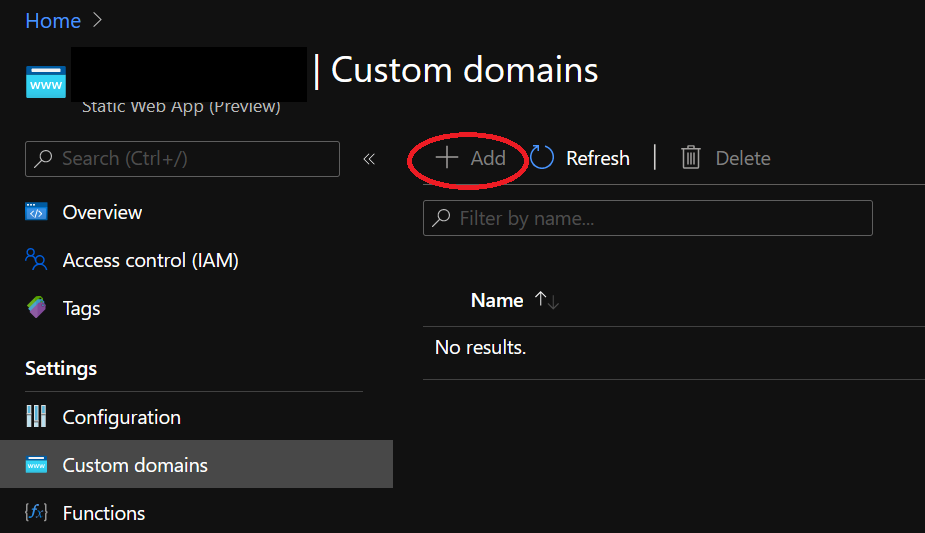
Is there a reason this button is currently disabled?
 matcha440
All 15 comments
FYI, I found a workaround for this by using Azure CLI. Here's the command that worked for me. So if anyone else runs into this issue, I hope it helps them out too.
az staticwebapp hostname set --hostname www.example.com --name MyStaticWebApp
https://docs.microsoft.com/en-us/cli/azure/staticwebapp/hostname?view=azure-cli-latest#az-staticwebapp-hostname-set
matcha440
on 7 Aug 2020
I'm facing the same problem.
 HaykSahakyan
on 8 Aug 2020
HaykSahakyan
on 8 Aug 2020
FYI, I found a workaround for this by using Azure CLI. Here's the command that worked for me. So if anyone else runs into this issue, I hope it helps them out too.
az staticwebapp hostname set --hostname www.example.com --name MyStaticWebApphttps://docs.microsoft.com/en-us/cli/azure/staticwebapp/hostname?view=azure-cli-latest#az-staticwebapp-hostname-set
I'm getting an error: "CNAMERecord is invalid. Please ensure the CNAME record has been created."
HaykSahakyan
on 8 Aug 2020
FYI, I found a workaround for this by using Azure CLI. Here's the command that worked for me. So if anyone else runs into this issue, I hope it helps them out too.
az staticwebapp hostname set --hostname www.example.com --name MyStaticWebApphttps://docs.microsoft.com/en-us/cli/azure/staticwebapp/hostname?view=azure-cli-latest#az-staticwebapp-hostname-set
I'm getting an error: "CNAMERecord is invalid. Please ensure the CNAME record has been created."
Do you have your domain setup in your DNS zone as a CNAME to your static web app's address yet? You have to be sure you do that first, and then give it time to propagate through DNS. If not, then yeah this won't work.
matcha440
on 8 Aug 2020
FYI, I found a workaround for this by using Azure CLI. Here's the command that worked for me. So if anyone else runs into this issue, I hope it helps them out too.
az staticwebapp hostname set --hostname www.example.com --name MyStaticWebApphttps://docs.microsoft.com/en-us/cli/azure/staticwebapp/hostname?view=azure-cli-latest#az-staticwebapp-hostname-set
I'm getting an error: "CNAMERecord is invalid. Please ensure the CNAME record has been created."
Do you have your domain setup in your DNS zone as a CNAME to your static web app's address yet? You have to be sure you do that first, and then give it time to propagate through DNS. If not, then yeah this won't work.
Thank you! CNAME was configured (CloudFlare) but I figured out that the problem was that record was "proxied". So I switched it to "DNS only" for a moment to make it visible to Azure and successfully added my custom domain name. I can see it in Azure console and my static web app is accessible with that custom domain name.
BUT.
When I'm switching that CNAME record back to "Proxied" I'm getting "Error code: SSL_ERROR_NO_CYPHER_OVERLAP"
in browser. Does it mean that I should keep that CNAME record in CloudFlare as "DNS only"? For me this is unacceptable.
SSL mode in CloudFlare is set to "Full".
HaykSahakyan
on 9 Aug 2020
FYI, The problem was on CloudFlare's side.
Cloudflare SSL only applies up to first level subdomains. For example, you might not be seeing any errors on the root domain (yoursite.com) and www (www.yoursite.com) over https://, but get errors on second level subdomains (test.www.yoursite.com). This can be fixed with a Cloudflare Dedicated Certificate with Custom Hostnames.
For example:
blog.yourdomain.com would be fine (one level)
travel.blog.yourdomain.com would not work (two levels)"
HaykSahakyan
on 9 Aug 2020
Unfortunately, trying the workaround (CLI) only gives me Operation returned an invalid status code 'Conflict'
 dcollien
on 10 Aug 2020
dcollien
on 10 Aug 2020
I noticed the title on the button says, "Reached maximum custom domains for a Free Static Web App. " which is very odd, since I just deleted the domain from another one to add it to this one...
dcollien
on 10 Aug 2020
I noticed the title on the button says, "Reached maximum custom domains for a Free Static Web App. " which is very odd, since I just deleted the domain from another one to add it to this one...
Didn't even know that there such a limit, is there any official docs about that?
Anyhow in my case, I was going to add my very first custom domain but "Add" button was disabled.
HaykSahakyan
on 10 Aug 2020
That's the first I've seen it too.
I finally managed to get mine working via the CLI, here's a limerick:
There once was a limit on domains
That was giving developers pains
It was eventually consistent,
So you had to be persistent
'til the CLI no longer complains
dcollien
on 10 Aug 2020
There has always been a limit of 1 custom domain per Free Static Web App resource. The button being disabled is a regression in the Portal that we are working to fix.
 miwebst
on 10 Aug 2020
miwebst
on 10 Aug 2020
There has always been a limit of 1 custom domain per Free Static Web App resource. The button being disabled is a regression in the Portal that we are working to fix.
Thanks! How should I make Static Web App paid resource to overcome that limit?
HaykSahakyan
on 10 Aug 2020
We only have the free sku today :) do you have a scenario when you need more than 1 custom domain for a single static web app?
miwebst
on 10 Aug 2020
We only have the free sku today :) do you have a scenario when you need more than 1 custom domain for a single static web app?
There is no such scenario at this moment :) Just because you mentioned "Free" I decided to clarify :) Thank you!
HaykSahakyan
on 10 Aug 2020
This should be fixed now in the Portal. Sorry for the inconvenience!
miwebst
on 10 Aug 2020
Related issues
 henryjcee
·
5Comments
henryjcee
·
5Comments
 JoeWirtley
·
5Comments
JoeWirtley
·
5Comments
 m-sterspace
·
3Comments
m-sterspace
·
3Comments
 stephtr
·
5Comments
stephtr
·
5Comments
 wictorwilen
·
3Comments
wictorwilen
·
3Comments
Most helpful comment
That's the first I've seen it too.
I finally managed to get mine working via the CLI, here's a limerick:
There once was a limit on domains
That was giving developers pains
It was eventually consistent,
So you had to be persistent
'til the CLI no longer complains