Standard: <PackageReference> System.* when targeting NET Framework leads to ambiguity
Related to Framework compat
In a project targeting 4.6, references:
    <PackageReference Include="System.ComponentModel.Annotations" />
    <PackageReference Include="System.ServiceModel.Primitives" />
And:
    <Reference Include="System.ComponentModel.DataAnnotations"  />
    <Reference Include="System.ServiceModel" />
Appear to be synonymous (because builds pass) when in reality:
<PackageReference> is restoring packages, rewriting generated nupkg dependencies and introducing version complexity and binplacing new dlls (or facade dlls?)
<Reference>, comparatively, is unambiguously depending on the Framework and not changing any nuget collateral.
As there does not appear to be a particularly compelling reason to use <PackageReference> in this way when targeting .NET Framework 4.5/4.6, and even doing this opens up compat issues such as Issue #1179 , then <PackageReference> for System.* packages net45/net46 should cause a build error in the msbuild/vs toolchain or cause a runtime error. [or there should be a doc describing why this is a bad idea]
Edit: Additionally there is loads of confusion online:
https://weblog.west-wind.com/posts/2019/Feb/19/Using-NET-Standard-with-Full-Framework-NET
As a side note a number of people pointed out to me that Paket - which is an alternate package manager for NuGet packages - considers versions of .NET 4.7.1 and older incompatible with .NET Standard so you can't actually install .NET Standard packages for those versions by default.
Makes sense - Microsoft has acknowledged that using .NET Standard on anything prior to 4.7.1 is not a good idea and I would add using 4.7.1 is not optimal either, but alas it does work with some of the messy hackery described above.
Where did Microsoft acknowledge this in an official capacity?
And, if this is the case, why does System.Servicemodel.Primitives.4.4.0.nuspec look like this:
      <group targetFramework=".NETFramework4.5" />
      <group targetFramework=".NETFramework4.6">
        <dependency id="NETStandard.Library" version="1.6.1" />
      </group>
      <group targetFramework=".NETFramework4.6.1" />
why does System.Servicemodel.Primitives.4.7.0.nuspec look like this:
      <group targetFramework=".NETFramework4.5" />
      <group targetFramework=".NETFramework4.6">
        <dependency id="NETStandard.Library" version="2.0.3" exclude="Build,Analyzers" />
      </group>
      <group targetFramework=".NETFramework4.6.1" />
What is this package going to do on 4.5, 4.6, 4.6.1, 4.6.2?
And the lib folders:
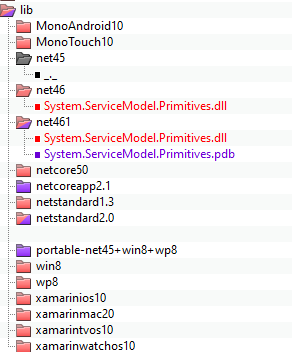
Why is the binplace different across 4.5, 4.6, 4.6.1, 4.6.2?
Behavior seems to be:
- 4.5 explicit discard/no-op
- 4.6 binplace 1 dll
- 4.6.1 binplace 2 dlls??
- 4.6.2 - not called out, so .netstandard20 path is followed, (??) then for version S.SM.Primitives 4.4 there's 1 dll, and in S.SM.Primitive 4.7 there are 2 dlls.
Given this behavior, why would I want
<PackageReference Include="System.ServiceModel.Primitives" />
anywhere near a .NET 4.6.x project?
There seems to be some discussion of this sort of thing being a nuget restore warning here: https://github.com/NuGet/Home/issues/8376 however there seems to be also a possibility that the nuget authors forcefully break people targeting 4.5 thru to 4.6.2 which would be preferable to difficult to define behavior.
 shcummin
All 13 comments
These packages are the "portable" surface area for these libraries. Not every framework has System.ServiceModel.dll and not all of System.ServiceModel.dll is supported on all frameworks. The package represents a subset of the API in System.ServiceModel that is supported across multiple frameworks.
If you're only running on desktop, you don't need the package, you can just use the Reference. If you're targeting .NETStandard and want to run in multiple frameworks then use the package. /cc @StephenBonikowsky @mconnew - WCF team
 ericstj
on 16 Dec 2019
ericstj
on 16 Dec 2019
@ericstj
If you're only running on desktop
This translates to if you're only targeting net46, right? this sentence trips me up because we have a net46 assembly that gets consumed by specific cloud services.
For a specific example, can we call this always good:
  <PropertyGroup>
    <TargetFrameworks>net462;netstandard2.0</TargetFrameworks>
  </PropertyGroup>
  <Import Project="Sdk.props" Sdk="Microsoft.NET.Sdk" />
  <ItemGroup>
    <PackageReference Include="System.ServiceModel.Primitives" Condition="'$(TargetFramework)' == 'netstandard2.0'" />
    <Reference Include="System.ServiceModel" Condition="'$(TargetFramework)' == 'net462'" />
  </ItemGroup>
While calling this always bad:
  <PropertyGroup>
    <TargetFrameworks>net462;netstandard2.0</TargetFrameworks>
  </PropertyGroup>
  <Import Project="Sdk.props" Sdk="Microsoft.NET.Sdk" />
  <ItemGroup>
    <PackageReference Include="System.ServiceModel.Primitives" />
  </ItemGroup>
?
shcummin
on 16 Dec 2019
If you're only running on desktop, you don't need the package
Chatted with @shcummin offline and there seems to be a bit of a confusion what we mean when we say "desktop" as his app also runs on the cloud and didn't know if this feedback applied in his case.
When we say "desktop" what we mean is that your project targets .NET Framework as opposed to .NET Core or .NET Standard. We just used to call it desktop internally as it was installed with Windows, but we will try to refer to it as .NET Framework to avoid confusions in the future.
 joperezr
on 16 Dec 2019
joperezr
on 16 Dec 2019
@shcummin, I can understand why the package contents can look confusing as there's a lot of history wrapped up in the package layout. You listed the nuspec file for System.Servicemodel.Primitives.4.4.0 as:
      <group targetFramework=".NETFramework4.5" />
      <group targetFramework=".NETFramework4.6">
        <dependency id="NETStandard.Library" version="1.6.1" />
      </group>
      <group targetFramework=".NETFramework4.6.1" />
Let's take each framework version one line at a time as each one has something subtly different about it.
.NET Framework 4.5
The first line says the package can be used for .NET Framework 4.5. This doesn't mean you get the most recent set of api's available to you on net45, it means this package can be used on net45 and you don't need to track down an older package. Personally I couldn't tell you which package version corresponds to a particular .NET Framework version or .NET Standard version without doing some work checking each version on nuget.org and working it out. Expecting developers to know which version to pick for a particular framework version isn't reasonable. So we include the latest binaries for all supported version in the latest package. This means you can simply pick the very latest System.ServiceModel.* packages and know you will have the most up to date contract and binaries available for each framework.
To understand the file system layout is where some of the history comes in. There are 2 different sets of assemblies in a nuget package. The first is a reference assembly. This is the assembly which is passed to the compiler when compiling your code. It has zero implementation in it, just empty stubs for all the public api of the package. Then you have the implementation assembly. Because .NET Framework has the full implementation assembly System.Servicemodel.dll in the GAC, we don't provide an implementation assembly for .NET Framework. But your application assembly is referencing System.ServiceModel.Primitives.dll and not System.ServiceModel.dll so at runtime the CLR expects to load an assembly with the name System.ServiceModel.Primitives.dll containing the implementation. This means we need a type forwarding facade. This is basically an assembly with a strong name that matches the reference assembly with no implementation but instead an assembly level TypeForwardedToAttribute for each type that is in the reference assembly. The attribute basically says the type used to be in this assembly but it was moved to another one, and to check the assemblies referenced by this assembly to find it. The facade for .NET Framework type forwards to System.ServiceModel.dll. For .NET Core, it type forwards to System.Private.ServiceModel.dll which lives in the referenced System.Private.ServiceModel nuget package.
.NET Framework 4.5 is different than all the later framework versions as the type forwarding facade actually shipped with the framework. It was later realized this wasn't the best idea as it meant releases had to be done concurrent with .NET Framework to get the correct facade shipped. But that's the reason why the net45 folder is empty, because the facade was shipped with .NET Framework but later versions weren't.
.NET Framework 4.6
As we added more api's, newer facade's needed to be created. As we were moving along the .NET Standard versions, it meant new contract versions wouldn't work on older framework versions. For example, net45 supports .NET Standard 1.1, but to use .NET Standard 1.3, you must be running at least net46. When we added new functionality to our .NET Standard version of our implementation (that is used on .NET Core), we depended on api's which were only available in .NET Standard 1.3. This meant our new contract version could only be used on net46. At this point, newer facades weren't being shipped with the framework so we included it in the nuget package.
The reason you see a different version of NetStandard.Library being depended on in the 4.7 version of our nuget package is because of a security update in .NET Core. The same way that the latest version of WCF packages can be used on earlier versions, the same is true of NetStandard.Library. If you look at the dependencies on nuget.org for the 2.0.3 version of NetStandard.Library, you will see sections for earlier versions of .NET Standard too. There was a security fix made in on of the libraries we depend on and to make sure an older insecure version of the library isn't used with WCF, we bumped up the version of NetStandard.Library that we reference to prevent it being allowed.
.NET Framework 4.6.1
If you check the .NET implementation support table you can see that .NET Standard 2.0 is supported on .NET Framework 4.6.1. WCF is sticking at .NET Standard 2.0 until we come across something which requires us to move up. This means as we add support for more api's from .NET Framework and add them to our contract, we don't need to target anything beyond net461. I can't tell you why there's a symbol (.pdb) file extra for net461 as that doesn't make sense. For net461 you only get a type forwarding facade so there's no code to provide symbols for. This might be a bug in our build system but will be harmless.
.NET Framework 4.6.2
You had the right idea about what will happen on 4.6.2, there's a subtle but important difference with what actually happens though. .NET Framework will look for a folder for it's own TFM (net462 in this case), and if it doesn't find it, will look for each subsequent lower version. Only when it has exhausted the net4xx TFM's will it start looking for netstandard TFM's. So for example, if you were compiling for .NET Framework 4.8, it would look for net48, net472, net471, net47, net462, net461.
As to what should you do in your project? This depends on what api's you need and what target frameworks you specify. If you are only targeting .NET Framework, and aren't going anywhere near .NET Core, then don't reference the nuget package and just have a reference System.ServiceModel. This means you can only specify net462 as a target framework. If you also target netstandard2.0, this will break when doing a compile because when you compile for netstandard2.0, you won't have any references to WCF api's.
If you are creating a library which will run on net462 as well as .NET Core and don't have code conditionally compiled for .NET Framework (e.g. to use api's not available on core), then only target netstandard2.0 and use a package reference to the WCF nuget packages and your library will work on all netstandard platforms.
If you have conditionally compiled code which involves using WCF api's only available on .NET Framework, then you will need to have both a package reference as well as a .NET Framework S.SM.dll reference and add a condition to the ItemGroup or the individual reference elements to only include them on the relevant TFM.
 mconnew
on 16 Dec 2019
mconnew
on 16 Dec 2019
@mconnew
So for example, if you were compiling for .NET Framework 4.8, it would look for net48, net472, net471, net47, net462, net461.
Is net45 specifically not in this list? as I swear I witnessed a net46 target follow a netstandardX dependency instead of net45 for a nupkg depdendency that cross targeted net45/netstandardX
If you are creating a library which will run on net462 as well as .NET Core and don't have code conditionally compiled for .NET Framework (e.g. to use api's not available on core), then only target netstandard2.0 and use a package reference to the WCF nuget packages and your library will work on all netstandard platforms.
If you have conditionally compiled code which involves using WCF api's only available on .NET Framework, then you will need to have both a package reference as well as a .NET Framework S.SM.dll reference and add a condition to the ItemGroup or the individual reference elements to only include them on the relevant TFM.
My code doesn't have NET Framework specific code in it - at least it compiles fine. however what is adding a layer of complexity is my code may end up deployed beside other net46 EXEs. Thus, if I am the only library at the party that targets netstandard, then the first EXE that brings me in starts to bring in the facades. Therefore if I'm targeting System.Servicemodel.Primitives.4.4.0, and some other lib referenced by some other exe brings in System.Servicemodel.Primitives.4.5.0, I assume I'm in a broken state because the EXEs aren't rewriting each other's binding redirects.
Therefore I'm led to believe that having a library with a 100% safe WCF dependency across net45/net46/Framework is to call out each framework version individually in the csproj and only use <PackageReference> when i'm actually targeting netstandard, and use <Reference>otherwise
Edit: I keep forgetting to wrap markers around code so it dropped a few of my XML tags in the last paragraph
shcummin
on 16 Dec 2019
Thinking about it, I might be wrong in the order it searches the TFM's. For example, if a package provides a netstandard1.3 implementation and a net45 implementation and you are actually targeting .NET Framework 4.6, I can see the argument that choosing netstandard1.3 over net45 is the right thing as it's the "higher" version. But I don't think that happens because otherwise you could accidently use the .NET Core implementation on .NET Framework instead of type forwarding. @ericstj, can you comment on what would happen in that scenario?
But for my specific example I was talking about WCF so if you are targeting 4.8 and using WCF packages, it will find the net461 version. For WCF, there's no ambiguity as we provide netstandardX.Y and net4XX folders and the net461 is more specific than netstandard2.0 so the correct one will get picked.
If you are only going to run on .NET Framework, then only target the lowest framework version you wish to support and reference System.ServiceModel and don't use package references for anything that's part of the framework such as WCF.
mconnew
on 16 Dec 2019
Another way to think about this problem:
Regarding this quote by @RickStrahl : https://weblog.west-wind.com/posts/2019/Feb/19/Using-NET-Standard-with-Full-Framework-NET
For the time being I think any popular 3rd party library that is expected to work on full .NET Framework, should continue to ship a full framework target in addition to .NET Standard.
Relevant to this statement and the discussion of LibGit2Sharp, it seems this statement should be more general - if you know your lib works in Framework X and has Framework X consumers, then you should always have a full framework target & that target should not in turn PackageReference System*, for anything - the relative popularity of library is irrelevant :)
Edit: example
If i had a projects, where ProjectC depended on ProjectB and ProjectB depends on ProjectA:
ProjectA - net46 with <Reference>
ProjectB - net46
ProjectC - net46 exe
Then for fun or profit, someone wanted to have ProjectA target netstandard for consumption in a completely different product, but not change any code, and then rewrote the framework dependency:
ProjectA - net46, netstandard both with <PackageReference Include="System.">
ProjectB - net46
ProjectC - net46 exe
Unless ProjectB and ProjectC also decide to target netstandard, this can only add needless headaches.
Therefore it's safer:
ProjectA - net46 with <Reference Include="System.">, netstandard with <PackageReference Include="System.">
ProjectB - net46
ProjectC - net46 exe
shcummin
on 16 Dec 2019
Now Microsoft.ApplicationInsights now depends on System.Diagnostics.DiagnosticsSource, which for some reason brings in fewer facades but at least gives us 5 more dlls
Can dotnet provide more guidance specifically on what is mentioned in blogposts talking about netstandard, specifically:
Makes sense - Microsoft has acknowledged that using .NET Standard on anything prior to 4.7.1 is not a good idea and I would add using 4.7.1 is not optimal either, but alas it does work with some of the messy hackery described above.
and
For the time being I think any popular 3rd party library that is expected to work on full .NET Framework, should continue to ship a full framework target in addition to .NET Standard.
If Microsoft has ack'd that using netstandard in net45/net462 is "not a good idea", then why is Microsoft continuing to publish "Microsoft." and "System." nuget packages with net45 targets that use netstandard? why does my net462 application now need to binplace "System.Memory.dll"?
shcummin
on 9 Apr 2020
@shcummin we are currently undergoing an effort that will make sure that all of our new NuGet packages won't require extra dlls or facades. I actually have a PR open right now which is taking care of that exact thing: https://github.com/dotnet/corefx/pull/42901#issuecomment-611770142
The big problem with using .NET Standard assemblies when running on .NET Framework below v4.7.2 is that we do require some facades in order for everything to work smoothly. Most project types by default will inject these facades along with your app, which is why using a netstandard 2.0 assembly in 4.6.1 is supported. The problem most people hit is that once they have custom projects, or very old project templates, or simply a project type that is not fully supported, is that these facades are not injected or deployed by default which leads to most of these problems.
For the time being I think any popular 3rd party library that is expected to work on full .NET Framework, should continue to ship a full framework target in addition to .NET Standard.
That recommendation is probably fair, since you can't control what the projects of your consumers will look like. If you only provide a netstandard assembly, you will require the consumer project to be authored correctly and to not have any custom-like references (which believe me, there are so many projects like this) so I would second that recommendation at this point just as a safe guard so that you ensure that any project will be able to consume you without hitting issues.
If Microsoft has ack'd that using netstandard in net45/net462 is "not a good idea", then why is Microsoft continuing to publish "Microsoft." and "System." nuget packages with net45 targets that use netstandard? why does my net462 application now need to binplace "System.Memory.dll"?
That is exactly what my PR that I mentioned above is doing 😄. The whole point of it is to make sure that if you depend on the latest version of our packages, you shouldn't need these facades because all of our packages will now also carry a .NET Framework asset.
joperezr
on 10 Apr 2020
@joperezr Very cool - can you translate this to what your PR means for Microsoft.ApplicationInsights nuget package specifically? I think I might be missing something.
I get Microsoft.ApplicationInsights > System.Diagnostics.DiagnosticsSource
and then what 'extra' I'm seeing binplaced:
System.Buffers.dll
System.Diagnostics.DiagnosticsSource.dll
System.Memory.dll
System.Numerics.Vectors.dll
System.Runtime.CompilerServices.Unsafe.dll
Does this set become zero in my net462 project? (I'd hope so)
shcummin
on 10 Apr 2020
so the latest version of Microsoft.ApplicationInsights (package 2.13.1) today provides a .NET Framework asset, but it depends on DiagnosticSource which in turn depends on System.Memory, and System.Memory package only has a netstandard2.0 asset ( which means this will cause the shims to be injected in your project). The shims aren't the ones that you call out above, the shims are (depending on which platform you target) between 7-70 extra dlls that we put in your bin folder in order for those netstandard targeted assemblies to run correctly. If you are Only seeing the above in your bin folder, it means you target a framework that doesn't require the facades, so my PR won't help you much, it will only help you if you target something like net4.6.1 which would then be putting around 70 extra assemblies in your bin folder.
and then what 'extra' I'm seeing binplaced:
System.Buffers.dll System.Diagnostics.DiagnosticsSource.dll System.Memory.dll System.Numerics.Vectors.dll System.Runtime.CompilerServices.Unsafe.dll
Those are not really extra assemblies per se. Microsoft.ApplicationInsights depends on System.Diagnostics.Source, which implementation depends on System.Memory, and System.Memory's implementation depends on System.Buffers, System.Numerics.Vectors.dll and System.Runtime.CompilerServices.Unsafe.dll. All of these assemblies are not installed on .NET Framework by default, so really think of them as any other third party dependency, so that means that they will have to be carried with your application no matter what. The only way to get rid of those, is if Microsoft.ApplicationInsights changes their implementation so that they don't depend on System.Diagnostics.DiagnosticSource any more and only use types that are installd on .NET Framework, which I don't think will happen. All this means that the fact that Microsoft.ApplicationInsights doesn't depend on System.Memory directly, doesn't mean it doesn't depend on it indirectly, because one of its direct dependencies does directly depend on it. Does that make sense?
joperezr
on 10 Apr 2020
@joperezr Interesting... I believe that makes sense but I would like to test if i'm following -
How can I tell apart a 'bad' System.* 'shim' and a 'real dependency' System.* project?
This is an example of something I would like to add to my unit tests, so I can integrate Microsoft.* and System.* projects and not end up in the "Wait, what is WCF doing now?" scenario I was in during December.
shcummin
on 10 Apr 2020
If you want to check if we are injecting the facades into your project, one easy way to do it is to temporarily add the following target into your .csproj and then building and checking which string is printed out:
<Target Name="CheckingIfProjectRequiresNetstandardShims"
DependsOnTargets="ResolveReferences"
Condition="'$(_ShortFrameworkIdentifier)' == 'net' AND '$(_TargetFrameworkVersionWithoutV)' >= '4.6.1'">
<Message Importance="High" Text="The netstandard facades will be injected into your bin folder" Condition="'$(DependsOnNetStandard)' == 'true'" />
<Message Importance="High" Text="The netstandard facades will NOT be injected into your bin folder" Condition="'$(DependsOnNetStandard)' != 'true'" />
</Target>
After adding that to your .csproj, run the following command from a developer command prompt: msbuild yourProject.csproj /t:CheckingIfProjectRequiresNetstandardShims /flp:v=normal And check the string that is printed out.
Another way to check is to simply open the System.* library you are seeing using a decompiler like ILSpy, and seeing if the assembly has any code in it or if it really is only defining typeforwards. Finally, one other way to try is to (if you are using PackageReference to add your dependencies) check your obj\project.assets.json file that gets generated after restoring your project, and that will list out all of the true NuGet dependencies of your app. Anything that is not there but present in the bin folder, is likely a facade.
joperezr
on 10 Apr 2020
Related issues
 virzak
·
4Comments
virzak
·
4Comments
 juscelior
·
3Comments
juscelior
·
3Comments
 xiedongweo
·
4Comments
xiedongweo
·
4Comments
 rathnagiri
·
3Comments
rathnagiri
·
3Comments
 sam-wheat
·
5Comments
sam-wheat
·
5Comments
Most helpful comment
so the latest version of Microsoft.ApplicationInsights (package 2.13.1) today provides a .NET Framework asset, but it depends on DiagnosticSource which in turn depends on System.Memory, and System.Memory package only has a netstandard2.0 asset ( which means this will cause the shims to be injected in your project). The shims aren't the ones that you call out above, the shims are (depending on which platform you target) between 7-70 extra dlls that we put in your bin folder in order for those netstandard targeted assemblies to run correctly. If you are Only seeing the above in your bin folder, it means you target a framework that doesn't require the facades, so my PR won't help you much, it will only help you if you target something like net4.6.1 which would then be putting around 70 extra assemblies in your bin folder.
Those are not really extra assemblies per se. Microsoft.ApplicationInsights depends on System.Diagnostics.Source, which implementation depends on System.Memory, and System.Memory's implementation depends on System.Buffers, System.Numerics.Vectors.dll and System.Runtime.CompilerServices.Unsafe.dll. All of these assemblies are not installed on .NET Framework by default, so really think of them as any other third party dependency, so that means that they will have to be carried with your application no matter what. The only way to get rid of those, is if Microsoft.ApplicationInsights changes their implementation so that they don't depend on System.Diagnostics.DiagnosticSource any more and only use types that are installd on .NET Framework, which I don't think will happen. All this means that the fact that Microsoft.ApplicationInsights doesn't depend on System.Memory directly, doesn't mean it doesn't depend on it indirectly, because one of its direct dependencies does directly depend on it. Does that make sense?