Standard: DataAnnotation Validation in Xamarin.Forms
Hi Team,
I have class library in .net Standard 2.0 with EntityFrameworkCore. I have created class with Custom DataAnnotation as below:
Model Definition
```C#
public class UserLogin : NotificationObject
{
[DbRequired]
[Display(Name = "USER NAME", Prompt = "ENTER USER NAME")]
public string User_Name
{
get { return GetValue(() => User_Name); }
set { SetValue(() => User_Name, value); }
}
    [Display(Name = "PASSWORD", Prompt = "ENTER PASSWORD")]
    [DataType(DataType.Password)]
    [DbRequired]
    public string User_Password
    {
        get { return GetValue(() => User_Password); }
        set { SetValue(() => User_Password, value); }
    }
}
```
But this data annotation validation is working in Asp.Net Core and WPF. But we want to use the same in Xamarin.Forms for Android & iOS and UWP. Is it possible or any workaround? As I heard that in .net Standard you need write once and can be reuse in all other environment
 PKYADAV
All 7 comments
@divega any idea why this wouldn't work? It should just work in Xamarin too, no?
 terrajobst
on 9 Jul 2019
terrajobst
on 9 Jul 2019
@PKYADAV what is DbRequiredAttribute? Is that your own custom validation attribute? What do you mean exactly with the data annotation validation not working? Please provide a precise descriptions of expected and actual behaviors and any exceptions. A small repro project would be ideal.
 divega
on 9 Jul 2019
divega
on 9 Jul 2019
Hi @divega,
Yes, DbRequiredAttribute is custom validation attribute and it is working in WPF, ASP.NET CORE and Blazor but not in xamarin.forms.
Below image is our target, write class library in .net Standard, class library will be decorated with Validation Attribute and re-use the same in all application:
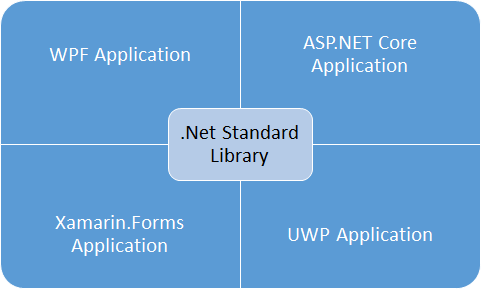
Please suggest / guide us.
I have already posted the same on StackOverflow and Xamarin Forums.
Thanks !!
PKYADAV
on 9 Jul 2019
@PKYADAV, thanks for answering my first question. Please also answer this part:
What do you mean exactly with the data annotation validation not working? Please provide a precise descriptions of expected and actual behaviors and any exceptions. A small repro project would be ideal.
I ask this because (among other reasons) I want to understand if you are invoking ValidateObject() directly or expecting this to happen automatically. One of the technologies mentioned in your first post, ASP.NET Core, implements validation based on data annotations, but others like EF Core don’t.
As I said, a repro would be ideal.
divega
on 9 Jul 2019
@divega sorry for delay in response as my notification was off and couldn't get notified.
Again sorry for your question as I didn't get your question that what exactly you want to know from my side .
Request to elaborate once again please !!
PKYADAV
on 16 Jul 2019
@PKYADAV Xamarin.Forms doesn't have SDK support for INotifyDataErrorInfo at this point
https://github.com/xamarin/Xamarin.Forms/issues/5524
So you would need to wire this up yourself.
https://www.codeproject.com/Articles/1274851/Xamarin-Forms-Validations-Made-Simple
 PureWeen
on 8 Sep 2019
PureWeen
on 8 Sep 2019
You might want to check out this library I wrote: https://www.nuget.org/packages/Xamarin.AttributeValidation/
It allows you to validate your UI by simply putting Attributes above your properties in the ViewModel. That's it. Nothing more to do. Just like you do in ASP.NET Core. The Validation Messages are automatically shown in the form of a little floating text bubble, hovering over the entry. Very similar to the native Android Validation.
For an example, or a detailed explanation, check out the repository: https://github.com/kevin-mueller/Xamarin.AttributeValidation
 kevin-mueller
on 24 Apr 2020
kevin-mueller
on 24 Apr 2020
Related issues
 KexyBiscuit
·
3Comments
KexyBiscuit
·
3Comments
 juscelior
·
3Comments
juscelior
·
3Comments
 mpetrinidev
·
3Comments
mpetrinidev
·
3Comments
 Jmales
·
3Comments
Jmales
·
3Comments
 praeclarum
·
5Comments
praeclarum
·
5Comments