Standard: Issues with .NET Standard and Click Once
Summary
There is currently a bug that prevents ClickOnce setups from correctly deploying all the necessary .NET Standard support files. But you can work this around by editing your project file.
Symptoms and root cause
Running the application from inside of Visual Studio succeeds, so does publishing and installing. But when the application is launched, it crashes with with an exception like this one:
Unable to initialize the application (Could not load file or assembly 'System.Runtime, Version=4.1.1.0, Culture=neutral, PublicKeyToken=b03f5f7f11d50a3a' or one of its dependencies. The System cannot find the file specified.
The root cause is bug in the way ClickOnce discovers and packages dependencies from the application project.
Workaround
In order to make sure the right files are added to your installer, you need to add a custom target to your project file:
- Right click your project and select Unload Project.
- Then, right click your project again and select Edit \
. - Locate the first
<Import>element and copy & paste the code from below before the<Import>element. - Right click your project and select Reload Project
  <ItemGroup>
    <PublishFile Include="netfx.force.conflicts">
      <Visible>False</Visible>
      <PublishState>Exclude</PublishState>
      <IncludeHash>True</IncludeHash>
      <FileType>Assembly</FileType>
    </PublishFile>
  </ItemGroup>
  <Target Name="FixClickOnceDependencies" BeforeTargets="_DeploymentComputeClickOnceManifestInfo">
    <ItemGroup>
      <_noCopyRefs Include="@(ReferencePath)" Condition="'%(ReferencePath.Private)' == 'false'" />
      <_noCopyRefsByFileName Include="@(_noCopyRefs->'%(FileName)')">
        <OriginalItem>%(Identity)</OriginalItem>
      </_noCopyRefsByFileName>
      <_libByFileName Include="@(ReferenceCopyLocalPaths->'%(FileName)')">
        <OriginalItem>%(Identity)</OriginalItem>
      </_libByFileName>
      <_overlappingRefByFileName Include="@(_noCopyRefsByFileName)" Condition="'@(_noCopyRefsByFileName)' == '@(_libByFileName)' AND '%(Identity)' != ''" />
      <_overlappingLibByFileName Include="@(_libByFileName)" Condition="'@(_noCopyRefsByFileName)' == '@(_libByFileName)' AND '%(Identity)' != ''" />
      <_overlappingRef Include="@(_overlappingRefByFileName->'%(OriginalItem)')" />
      <_overlappingLib Include="@(_overlappingLibByFileName->'%(OriginalItem)')" />
    </ItemGroup>
    <ItemGroup Condition="'@(_overlappingRef)' != ''">
      <ReferencePath Remove="@(_overlappingRef)" />
      <ReferencePath Include="@(_overlappingLib)">
        <Private>True</Private>
      </ReferencePath>
    </ItemGroup>
  </Target>
 terrajobst
All 64 comments
Looking forward to this fix... Not so much implementing the workarounds ;) -- Any ETA? Soon, Summer 2018, etc?
 JranZu
on 24 Oct 2017
JranZu
on 24 Oct 2017
This doesn't appear to work. System.Runtime is still not getting deployed even after adding the extra target to my csproj.
System.IO.FileNotFoundException: Could not load file or assembly 'System.Runtime, Version=4.1.2.0, Culture=neutral, PublicKeyToken=b03f5f7f11d50a3a' or one of its dependencies. The system cannot find the file specified. ---> System.IO.FileNotFoundException: Could not load file or assembly 'System.Runtime, Version=4.0.0.0, Culture=neutral, PublicKeyToken=b03f5f7f11d50a3a' or one of its dependencies. The system cannot find the file specified.
 NArnott
on 24 Oct 2017
NArnott
on 24 Oct 2017
This work around does not not work. It just moves the problem along so that the application will publish and install but it then will not run. You get an invisible APPCRASH with the following Application Event log.
Application: ClickOnceIssueDemo.exe Framework Version: v4.0.30319 Description: The process was terminated due to an unhandled exception. Exception Info: System.IO.FileNotFoundException Exception Info: System.IO.FileNotFoundException at ClickOnceIssueDemo.App..cctor() Exception Info: System.TypeInitializationException at ClickOnceIssueDemo.App.Main()
In the hope that someone can help with this I have created a simple application and put it here:.
I have been unable to determine what file is missing. The Fusion Log Viewer does not show anything and attaching the debugger directly to the exe does not give show any additional information either. I am at a loss how to resolve this. I have wasted a day and a half on this already.
The sample application targets .NET 4.7 and shows a main window displaying the time. It uses a .NET Standard 2.0 class library to provide the time. If you clone the repository and open the solution in VS2017 it will run fine.
The application is based on a sample provided by Laurent Bugnion of Galasoft for another issue I had related to his newly released .NET Standard version of MVVMLight.
[UPDATE]
I have just tried updating the test application to target .NET 4.7.1 and it seems to have resolved the issue. I removed the work-around hack to project file and it still seems to work. Going to try the same approach on the real project with which I am having problems.
[UPDATE 2]
Upgrading to target ,NET Framework 4.7.1 seems to have solved the issue for me. There are still minor niggles getting it to include certain files but at least now I see which files are missing in the Fusion Log Viewer.
 JPhilC
on 25 Oct 2017
JPhilC
on 25 Oct 2017
@terrajobst it seems it did not fix the issue
I compared the output between OnceClick and Non-OnceClick and files below are missing on OnceClick one. And because of that I'm getting the error Could not load file or assembly 'System.Runtime, Version=4.1.2.0, Culture=neutral, PublicKeyToken=b03f5f7f11d50a3a' or one of its dependencies.
Any workaround for that? Thanks in advance 🤗
System.Collections.Concurrent.dll
System.Collections.dll
System.ComponentModel.dll
System.ComponentModel.EventBasedAsync.dll
System.Diagnostics.Contracts.dll
System.Diagnostics.Debug.dll
System.Diagnostics.Tools.dll
System.Diagnostics.Tracing.dll
System.Dynamic.Runtime.dll
System.Globalization.dll
System.IO.Compression.dll
System.IO.dll
System.Linq.dll
System.Linq.Expressions.dll
System.Linq.Parallel.dll
System.Linq.Queryable.dll
System.Net.Http.dll
System.Net.Networklnformation.dll
System.Net.Primitives.dll
System.Net.Requests.dll
System.Net.WebHeaderCollection.dll
System.ObjectModel.dll
System.Reflection.dll
System.Reflection.Extensions.dll
System.Reflection.Primitives.dll
System.Resources.ResourceManager.dll
System.Runtime.dll
System.Runtime.Extensions.dll
System.Runtime.Handles.dll
System.Runtime.lnteropServices.dll
System.Runtime.Numencs.dll
System.Runtime.SerializationJson.dll
System.Runtime.Serialization.Primitives.dll
System.Runtime.Serialization.Xml.dll
System.Security.Principal.dll
System.Text.Encoding.dll
System.Text.Encoding.Extensions.dll
System.Text.RegularExpressions.dll
System.Threading.dll
System.Threading.Tasks.dll
System.Threading.Tasks.Parallel.dll
System.Threading.Timer.dll
System.Xml.ReaderWriter.dll
System.Xml.XDocument.dll
System.Xml.XmlSerializer.dll
_Update Upgrading to target ,NET Framework 4.7.1 seems to have solved the issue for me too. I removed the work-around from the project file and it still seems working_
 cilerler
on 9 Nov 2017
cilerler
on 9 Nov 2017
Actually we are still running into the issue with this ClickOnce deployment even after upgrading to 4.7.1.
 Shashanka77
on 20 Nov 2017
Shashanka77
on 20 Nov 2017
Yes, this workaround won't work when targeting 4.7.1. We are in contact with the ClickOnce team in order to get a fix for this issue.
 joperezr
on 20 Nov 2017
joperezr
on 20 Nov 2017
This also affects the Desktop Bridge WAP projects. The right files weren't getting copied into the AppX directory. Same list above.
 clairernovotny
on 28 Nov 2017
clairernovotny
on 28 Nov 2017
@terrajobst
regarding this issue, is there any update?!
 ikourfaln
on 28 Nov 2017
ikourfaln
on 28 Nov 2017
I've tested the described workaround on a net462 WPF clickonce project published from VS2017 - did not work. The app crashes and my log says
---> System.IO.FileNotFoundException: Could not load file or assembly 'System.Runtime, Version=4.1.2.0, Culture=neutral, PublicKeyToken=b03f5f7f11d50a3a' or one of its dependencies. The system cannot find the file specified.
---> System.IO.FileNotFoundException: Could not load file or assembly 'System.Runtime, Version=4.0.0.0, Culture=neutral, PublicKeyToken=b03f5f7f11d50a3a' or one of its dependencies. The system cannot find the file specified.
when instantiating the first (main) viewmodel of the WPF application.
A few weeks ago we successfully published from VS2015 on net46 without any netstandard dependencies, of course. Unfortunately, we did not even see this issue during the upgrades, since it compiles and runs happily. Others have said, that upgrading to net471 might resolve the issue - gonna try now. However, I'm not sure if this is is acceptable, since there is no net471 installer for some windows 10 versions (we're behind company wsus).
 nzain
on 7 Feb 2018
nzain
on 7 Feb 2018
At the moment I think your only option is to publish to a staging area, edit the config file to change the version range of the affected assemblies then save as and resign the manifest files using mageui. That is the way I am currently deploying with clickonce. Here are my notes as to what I do:

JPhilC
on 7 Feb 2018
I can confirm that simply targeting net471 _would_ resolve my issue, but that does not work on all company machines, since 471 only installs on some very specific win10 versions not available on our wsus. We give up (restored last working net46 clickonce version without netstandard dependencies) and wait.
nzain
on 7 Feb 2018
net471 doesn't appear to solve my issue, and I'm also concerned that net471 is limited on the windows versions. We are now very much in a stuck situation. We need to use nuget packages that have dependencies (such as Microsoft.Extensions.Logging), which only has a netstandard1.1 version. Once we pull those kind of nugets into a WPF app that uses clickonce, our deploys fail.
Is there any work happening to fix this?
NArnott
on 7 Feb 2018
I am looking into the same deploy issue, and like @nzain said, upgrading to 4.7.1 will limit the windows versions. Hope there will be a fix soon?
 kevingoos
on 7 Feb 2018
kevingoos
on 7 Feb 2018
Yes, we are very sorry you are hitting these issues. We have identified the problem and have contacted the clickOnce team in order for them to fix this ASAP. The fix is on track to make it to VS 15.8.
joperezr
on 7 Feb 2018
@joperezr and is there any info about when this vs version will be released?
kevingoos
on 8 Feb 2018
Has anyone tried adding these dlls to the project as content ?
Shashanka77
on 8 Feb 2018
@Shashanka77 no not tried this yet, feel free to try!
kevingoos
on 8 Feb 2018
is there any info about when this vs version will be released?
I believe timelines for releases are not defined yet, but I'll try to find out and update this thread.
joperezr
on 8 Feb 2018
@Shashanka77 I just tried the dlls as content files, as it seems to work. It seems that in general Click Once blacklists any assembly that matches one that exists in the .NET Framework, such as System.Runtime or System.IO. Assembly names like System.IO.Compression doesn't exist in the framework, so makes it into clickonce deployments by default.
Adding as content files (which I have about 10 that were needed) adds more management, such as when adding or upgrading nuget packages, but it works for now. Really looking forward to that fix.
Here's an example of the addition to my csproj file that forces their inclusion into a clickonce package:
<Content Include="..\packages\System.Diagnostics.Tracing.4.3.0\lib\net462\System.Diagnostics.Tracing.dll">
    <Link>System.Diagnostics.Tracing.dll</Link>
  </Content>
NArnott
on 8 Feb 2018
@joperezr are there any news about this issue? This is real pain for me
 vrykov
on 19 Feb 2018
vrykov
on 19 Feb 2018
@NArnott What if you use a glob? I had to do something similar, for similar reasons, for the WAP packaging project for Desktop Bridge apps. Adding the entire output directory of the app as content, with the right Link path, did the trick:
<Content Include="..\PackageExplorer\bin\$(Configuration)\net461\**\*.dll">
<Link>NuGetPackageExplorer\%(RecursiveDir)%(Filename)%(Extension)</Link>
</Content>
@onovotny Thanks for the trick. I tried it, and started getting errors from clickonce that files were already installed. Looks like any assembly that is referenced both in the project as a dll, and as content (per your work-around), would end up in the click-once manifest twice, causing it to fail to download on a user machine. Any ideas how to solve that problem?
NArnott
on 19 Feb 2018
You'd need a dedup step, or an exclude. depending on how many files are duplicated, it could be easiest to just have Exclude="..\foo\bar.dll;..\foo\zed.dll".
clairernovotny
on 19 Feb 2018
If you can get the already referenced items as a set of items, then you can also do Exclude="@(TheItems)"
clairernovotny
on 19 Feb 2018
The details provided by @onovotny worked fine for me.
Waiting on the proper fix for this issue...
 bruno-david
on 6 Mar 2018
bruno-david
on 6 Mar 2018
Can confirm that the workaround along with changing the target framework does not work, but including the file as content works.
 DOMZE
on 14 Mar 2018
DOMZE
on 14 Mar 2018
I seem to have the same problem as @Shashanka77:
Unable to install or run the application. The application requires that assembly System.Xml.XPath.XDocument Version 4.1.0.0 be installed in the Global Assembly Cache (GAC) first.
As suggested by @onovotny, I tried including the dll as content in my csproj file:
<ItemGroup>
<Content Include="bin\Debug\System.Xml.XPath.XDocument.dll">
<Link>System.Xml.XPath.XDocument.dll</Link>
</Content>
</ItemGroup>
However, the error remains...
 hafkenscheid
on 20 Mar 2018
hafkenscheid
on 20 Mar 2018
Having the same issue, any updates or solutions yet?
 Karlheinzniebuhr
on 22 Mar 2018
Karlheinzniebuhr
on 22 Mar 2018
No updates on the fix, since we are still waiting for VS 15.8.
You can check the above comment from @onovotny which provided a possible workaround: https://github.com/dotnet/standard/issues/529#issuecomment-366695368
joperezr
on 22 Mar 2018
This did not fix the issue for me either.
 RealDotNetDave
on 31 Mar 2018
RealDotNetDave
on 31 Mar 2018
I'm using version 15.6.6 now, and it seems to be working.
As a workaround, I had added the missing DLLs as content links in the csproj used for clickonce. After updating visual studio, I deployed and started getting the following error when I ran the program:
The file 'C:\Users*USERNAME\AppData\Local\Temp\Deployment\BZO7LWNL.LKQ\TWK6GYPB.WB8*SomeAssembly.dll' already exists.
I then looked at the manifest and noticed that the files I added manually were now getting added twice, so I removed the manual additions from the csproj, and it's correctly adding them now.
NArnott
on 24 Apr 2018
Using VS 15.6.6 too, but the problem persists for me. We build for
<framework targetVersion="4.6.2" profile="Full" supportedRuntime="4.0.30319" />
Starting the application shows the following error:
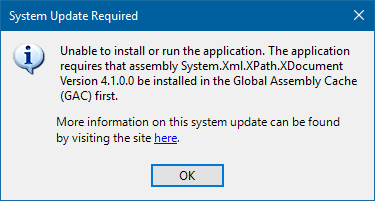
@NArnott maybe you now run a mix, where some files are copied correctly and some files are duplicated by yourself?
nzain
on 25 Apr 2018
@nzain We are targeting version 4.7.1 and just did a ClickOnce deploy and got the exact same popup message as in your post.
Did you figure out any fixes?
 raphil
on 2 May 2018
raphil
on 2 May 2018
@raphil As others have mentioned above, you can try to add missing dlls manually (Visual Studio: project properties > publish > application files). There are quite a lot dlls and I stopped trying after 5 or so. I'm waiting for the fix announced for version 15.8.
nzain
on 2 May 2018
I am also waiting for 15.8 for 3 months now, is there no way to schedule this update in an earlier version?
Now I need to keep my nuget packages up to date in two version, the .net core version (for my asp.net core projects). And the .net framework 4.6.1 version (for my WPF projects). This is not a really big task but it is just annoying and double work. So it would be really handy if it get fixes somewhere soon :)
kevingoos
on 2 May 2018
@nzain actually, I was able to address this by compiling on 15.5.6 instance I had. I will be sure not to upgrade that instance until we know all is working well. :)
Adding the dll's manually will not work, as you said, there are many and we would need to do this each time we publish (we publish using ClickOnce). (I guess I could always create a directory and place all the missing dll's and copy and paste each time, but.....)
raphil
on 2 May 2018
Me too.
 MelbourneDeveloper
on 9 May 2018
MelbourneDeveloper
on 9 May 2018
I too am having this issue. I see that 15.8 is now released in preview. Has anyone installed it to verify that this issue is fixed?
 saulyt
on 11 May 2018
saulyt
on 11 May 2018
For our deployment it seems that installing the latest .net framework (4.7.2) on the client fixes the issue.
 arthurvb
on 18 May 2018
arthurvb
on 18 May 2018
@arthurvb Was it enough to install 4.7.2 on the deployment machine, or did you need to target 4.7.2 in your application?
saulyt
on 18 May 2018
Upgrading to .NET 4.7.2 did not work for me sadly, however I have found that going into the Project Properties -> Publish, and clicking Application Files and then one by one setting the assemblies needed to Include instead of Prerequisite worked for me.
 banksdev
on 18 May 2018
banksdev
on 18 May 2018
@saulyt only on the machine where the program is run
arthurvb
on 18 May 2018
I upgraded a machine to .NET 4.7.2 and did not have the missing file error during the clickonce installation, but the program crashed on startup with no error message (just disappeared and was no longer running.) I then installed VS 15.8 Preview and installed again on the 4.7.2 machine and it worked. However, when I tried installing it on a machine with 4.7.1 I once again received the missing files error during installation. It seems that VS 15.8 does not fix the issue (at least if you are not running .NET 4.7.2).
saulyt
on 7 Jun 2018
Just been looking at the fixed issues in VS 15.8 Preview 2 and this issue does not appear to be there. Can someone confirm whether a fix for this issue is scheduled for release with VS 15.8?
JPhilC
on 7 Jun 2018
As far as I can tell, unfortunately, ClickOnce team haven't yet been able to produce a fix for this issue. I'll push for somebody on their team to report back to this thread so that we can get an ETA and a state of things.
joperezr
on 12 Jun 2018
@joperezr any progress?
kevingoos
on 18 Jun 2018
I was able to get in touch with the ClickOnce team and they say the fix is still targeting 15.8. It just hasn't been on the Previews of 15.8 yet, but it should be there for RTM.
joperezr
on 18 Jun 2018
@joperezr Thanks for the update.
Its pretty disappointing this has taken so long to resolve (if indeed it even has been resolved).
https://docs.microsoft.com/en-us/visualstudio/releasenotes/vs2017-preview-relnotes#15.8_Preview3
 RhomGit
on 27 Jun 2018
RhomGit
on 27 Jun 2018
As @joperezr mentioned, it will be included in 15.8, unfortunately we did just miss the deadline for Preview 3.
 John-Hart
on 27 Jun 2018
John-Hart
on 27 Jun 2018
@John-Hart So if I understand it correctly, the fix is implemented at this point?
Sorry that we are so skeptical about this now, but we are already waiting for 6 months on a fix, which is crucial to start using .net standard, in a stable way, in our project...
kevingoos
on 29 Jun 2018
I cannot find it in preview 4 either?
kevingoos
on 11 Jul 2018
This was the issue with 15.5.6 target 4.7.1, after VS update to 15.7.5 today its got fixed with the work around specified on the top of this thread.
 Janidbest
on 13 Jul 2018
Janidbest
on 13 Jul 2018
@Janidbest Is really solved the issue? Today I started ClickOnce for a new production release which is scheduled for tomorrow. I guess we all lucky today!
 cealmees
on 13 Jul 2018
cealmees
on 13 Jul 2018
Adding this to my csproj, after retargeting 4.7.1 doesn't work
<ItemGroup>
<Content Include="..\PackageExplorer\bin\$(Configuration)\net461\**\*.dll">
<Link>NuGetPackageExplorer\%(RecursiveDir)%(Filename)%(Extension)</Link>
</Content>
</ItemGroup>
Also upgrading to .net 4.7.2 didn't work either. Really looking forward to this fix
 dj-curls
on 17 Jul 2018
dj-curls
on 17 Jul 2018
I was having this issue with a 4.7.1 WPF app, but went into the publish settings on the wpf projects properties and then under install mode and settings section clicked the application files button. Found the missing reference which for me was system.net.http.dll which had its publish status as Prerequisite and changed it to Include and this resolved the issue. I am running VS 15.7.5 and seem to be able to resolve the issue with this.
 rholsman
on 19 Jul 2018
rholsman
on 19 Jul 2018
If you are publishing a WPF / WinForms Application you can go to your Project > Properties > Publish > Application Files > and change Publish Status ( Prerequisite (Auto) to Include). Original Source Stack Overflow Step by Step Process. If you are deploying a Class Library or VSTO addin that's where it becomes complex since you don't have "Publish > Application Files", in which you have to manually modify the Click Once Manifest to include the DLLs, Add the Deployed DLLs to the publish directory, and finally resign it the solution manifest and the application manifest with MageUI. I created an article that is also Step By Step here.
 clintmasden
on 21 Jul 2018
clintmasden
on 21 Jul 2018
As @joperezr mentioned, it will be included in 15.8, unfortunately we did just miss the deadline for Preview 3.
Has anyone tested if the fix is any of the latest couple of 15.8 previews?
Visual Studio 2017 version 15.8 Preview 5 - released July 26, 2018
edit: I saw on this thread that the fix should be available now on the previews (since mid-July).
https://developercommunity.visualstudio.com/content/problem/111414/clickonce-with-dependcy-with-netstandard-does-not.html
RhomGit
on 28 Jul 2018
Has anyone tested if the fix is any of the latest couple of 15.8 previews?
Visual Studio 2017 version 15.8 Preview 5 - released July 26, 2018
I successfully built a ClickOnce release today with no project edits and a target of .NET Framework 4.7.1 using 15.8 Preview 5.
 willson556
on 6 Aug 2018
willson556
on 6 Aug 2018
I am able to create a ClickOnce package now without any issues in VS2017. I still don't see .NET Core as a prerequisite. Will that be added?
RealDotNetDave
on 6 Aug 2018
We have this error _(Unable to install or run the application. The application requires that assembly System.Xml.XPath.XDocument Version 4.1.0.0 be installed in the Global Assembly Cache (GAC) first.)_ only for users with Windows x86. Users with Windows x64 can install and use ClickOnce app without errors
 velvetdust
on 8 Aug 2018
velvetdust
on 8 Aug 2018
Is this fix intended to solve https://github.com/Microsoft/msbuild/issues/3057 and https://github.com/Microsoft/msbuild/issues/3058 ?
 Daniel-Svensson
on 8 Aug 2018
Daniel-Svensson
on 8 Aug 2018
Honestly, I'm not quite sure what I copy/pasted into my project, but it worked. Thanks!
In my case, I got an error on Installation that said something like "The application requires that assembly netfx.force.conflicts version 0.0.0.0"
 noisycarlos
on 24 Aug 2018
noisycarlos
on 24 Aug 2018
@RealDotNetDave
I still don't see .NET Core as a prerequisite. Will that be added?
.NET Core is not a prerequisite for your app to run. Your app will run on .NET Framework, and it only needs the right facades in place in order to work. With the fixes that the ClickOnce team made, these facades will be packaged as well, so it is not a requisite to have .NET Core.
joperezr
on 24 Aug 2018
Closing as this an announcement. For the record, we've started to track issues related to .NET Framework support with this label.
terrajobst
on 14 Mar 2019
Related issues
 KevinWG
·
3Comments
KevinWG
·
3Comments
 KexyBiscuit
·
3Comments
KexyBiscuit
·
3Comments
 virzak
·
4Comments
KexyBiscuit
·
3Comments
virzak
·
4Comments
KexyBiscuit
·
3Comments
 chrisaut
·
3Comments
chrisaut
·
3Comments
Most helpful comment
@Shashanka77 I just tried the dlls as content files, as it seems to work. It seems that in general Click Once blacklists any assembly that matches one that exists in the .NET Framework, such as System.Runtime or System.IO. Assembly names like System.IO.Compression doesn't exist in the framework, so makes it into clickonce deployments by default.
Adding as content files (which I have about 10 that were needed) adds more management, such as when adding or upgrading nuget packages, but it works for now. Really looking forward to that fix.
Here's an example of the addition to my csproj file that forces their inclusion into a clickonce package:
<Content Include="..\packages\System.Diagnostics.Tracing.4.3.0\lib\net462\System.Diagnostics.Tracing.dll">
    <Link>System.Diagnostics.Tracing.dll</Link>
  </Content>