Standard-version: Tool doesn't generate new version: Invalid Version: undefined / Unexpected token {
Describe the bug
We use the tool to find out next version based on our commits and tags history. Last time it was run successfully is ~3 months ago:
Our repo is not a JS repo, rather just an arbitrary repo following conventional commits and having git tags in every release.
 npm --proxy <our-proxy> install standard-version
 npm WARN saveError ENOENT: no such file or directory, open '/builds/<...>/package.json'
 npm notice created a lockfile as package-lock.json. You should commit this file.
 npm WARN enoent ENOENT: no such file or directory, open '/builds/<...>/package.json'
 npm WARN <...> No description
 npm WARN <...> No repository field.
 npm WARN <...> No README data
 npm WARN <...> No license field.
 + [email protected]
 added 262 packages from 131 contributors and audited 262 packages in 39.565s
 found 0 vulnerabilities
 $ npx standard-version --skip.commit --skip.tag  --dry-run | grep  -m 1 -o "[0-9]\+\.[0-9]\+\.[0-9]\+" > version.txt
 $ export APP_VERSION=$(cat version.txt)
 $ echo $APP_VERSION
 1.24.0
But today we noticed this does not work any more even with the same environment:
npm --proxy <...> install [email protected]
npm WARN <...> No repository field.
npm WARN <...>No license field.

+ [email protected]
added 268 packages from 134 contributors and audited 268 packages in 26.718s
found 0 vulnerabilities

 $ npx standard-version --skip.commit --skip.tag  --dry-run | grep  -m 1 -o "[0-9]\+\.[0-9]\+\.[0-9]\+" > version.txt
 Unexpected token {
When trying to run locally from the same Docker image, I see error which is not really helpful:
root@f393e9bc54c9:/...# npx standard-version --skip.commit --skip.tag  --dry-run
Invalid Version: undefined
As I tried different node versions as well as different tool versions, it seems like something changed in the dependencies, I have no other ideas...
I tried to make a project-independent reproducer, something like that has given me similar error, but I'm not sure whether it's really the same:
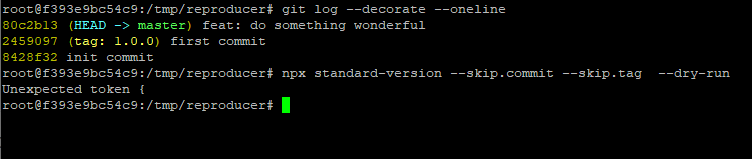
Here is the code to reproduce it for this artificial example:
 docker run -it --rm node:latest bash
# Following commands are inside container

root@dab3af6d518c:/# mkdir /tmp/reproducer
root@dab3af6d518c:/# cd /tmp/reproducer/
root@dab3af6d518c:/tmp/reproducer# npm install standard-version
root@dab3af6d518c:/tmp/reproducer# git init
root@dab3af6d518c:/tmp/reproducer# git config --global user.email "[email protected]"
root@dab3af6d518c:/tmp/reproducer# git config --global user.name "Your Name"
root@dab3af6d518c:/tmp/reproducer# git commit -m "init" --allow-empty
root@dab3af6d518c:/tmp/reproducer# git add package.json
root@dab3af6d518c:/tmp/reproducer# git commit -m "feat: do first release"
root@dab3af6d518c:/tmp/reproducer# git tag 1.0.0
root@dab3af6d518c:/tmp/reproducer# echo 123 > new_file
root@dab3af6d518c:/tmp/reproducer# git add new_file
root@dab3af6d518c:/tmp/reproducer# git commit -m "feat: do second release"
root@dab3af6d518c:/tmp/reproducer# git log --oneline --decorate
9e5c7a6 (HEAD -> master) feat: do second release
45d4deb (tag: 1.0.0) feat: do first release
a44239c init

root@dab3af6d518c:/tmp/reproducer# npx standard-version --skip.commit --skip.tag  --dry-run
Invalid Version: undefined

Current behavior
Tool gives "Invalid version" error
Expected behavior
Tool should generate proper new version number based on commits
Environment
standard-versionversion(s): 9.0.0, latest, previous, all the same- Node/npm version: Docker 8.16.2, also tried latest, same
- OS: Linux, Ubuntu
 okainov
All 3 comments
The same message - Invalid Version: undefined
 4n70w4
on 2 Mar 2021
4n70w4
on 2 Mar 2021
Do you have a package.json file without the "version" property?
I had to set packageFiles to [] to make standard-version use git tags to determine the version, and you probably want to set bumpFiles to [] as well if you don't want a version in your package.json.
 MiniGod
on 22 Mar 2021
MiniGod
on 22 Mar 2021
Do you have a package.json file without the "version" property?
No I don't have package.json at all, because I use this tool to give me version based on commits and tags, I'm not using it for any kind of JS project. See reproducer example in my initial post. It was working before and now it's broken.
okainov
on 22 Mar 2021
Related issues
 joefraley
·
6Comments
joefraley
·
6Comments
 marcoturi
·
5Comments
marcoturi
·
5Comments
 chris-dura
·
4Comments
chris-dura
·
4Comments
 eemeli
·
4Comments
eemeli
·
4Comments
 weaintplastic
·
5Comments
weaintplastic
·
5Comments
Most helpful comment
Do you have a
package.jsonfile without the"version"property?I had to set
packageFilesto[]to makestandard-versionuse git tags to determine the version, and you probably want to setbumpFilesto[]as well if you don't want a version in yourpackage.json.