Standard-version: Cannot skip tag prefix
I need tags to be simple numbers.
According to docs I need to pass -t flag to skip tags when no value provided.
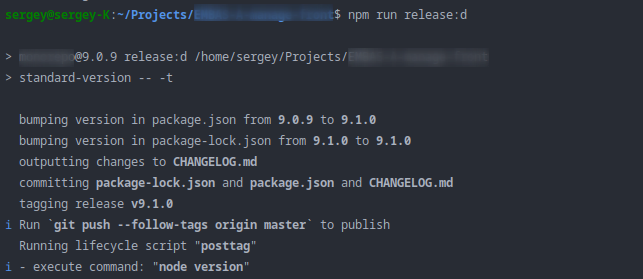
However, when I run release:d I have created tag with v prefix.
package.json excerpt
...
"scripts": {
  ...
  "release": "standard-version",
  "release:d": "standard-version -- -t"
},
"devDependencies": {
  ...,
  "standard-version": "^7.0.1",
}
node -v
v12.13.1
 gultyaev
All 4 comments
standard-version --tag-prefix= works for me.
 Laruxo
on 3 Dec 2019
Laruxo
on 3 Dec 2019
Well it works, but in README it's said that If you do not want to have any tag prefix you can use the -t flag without value.. I've tried that. Even tried npx standard-version -t but that still added v to my tag name
gultyaev
on 9 Dec 2019
@gultyaev the same question. did you have solved it ?
 CreatorMetaSky
on 31 Jan 2020
CreatorMetaSky
on 31 Jan 2020
Yeah this is a bug or at least a mistake in the documentation.
The -t / --tag-prefix flag is not a boolean flag. It is a string type. So if you pass nothing, it will fallback to the default value v. So you need to be explicit about the value.
Either:
standard-version -t ""
or
standard-version --tag-prefix ""
or
standard-version --tag-prefix=
I ran into this a couple of times before I figured out the problem, also thanks to @Laruxo 's comment
 jorenbroekema
on 1 May 2020
jorenbroekema
on 1 May 2020
Related issues
 eemeli
·
4Comments
eemeli
·
4Comments
 lydemann
·
3Comments
lydemann
·
3Comments
 loktionov129
·
6Comments
loktionov129
·
6Comments
 escapedcat
·
4Comments
escapedcat
·
4Comments
 denouche
·
6Comments
denouche
·
6Comments
Most helpful comment
standard-version --tag-prefix=works for me.