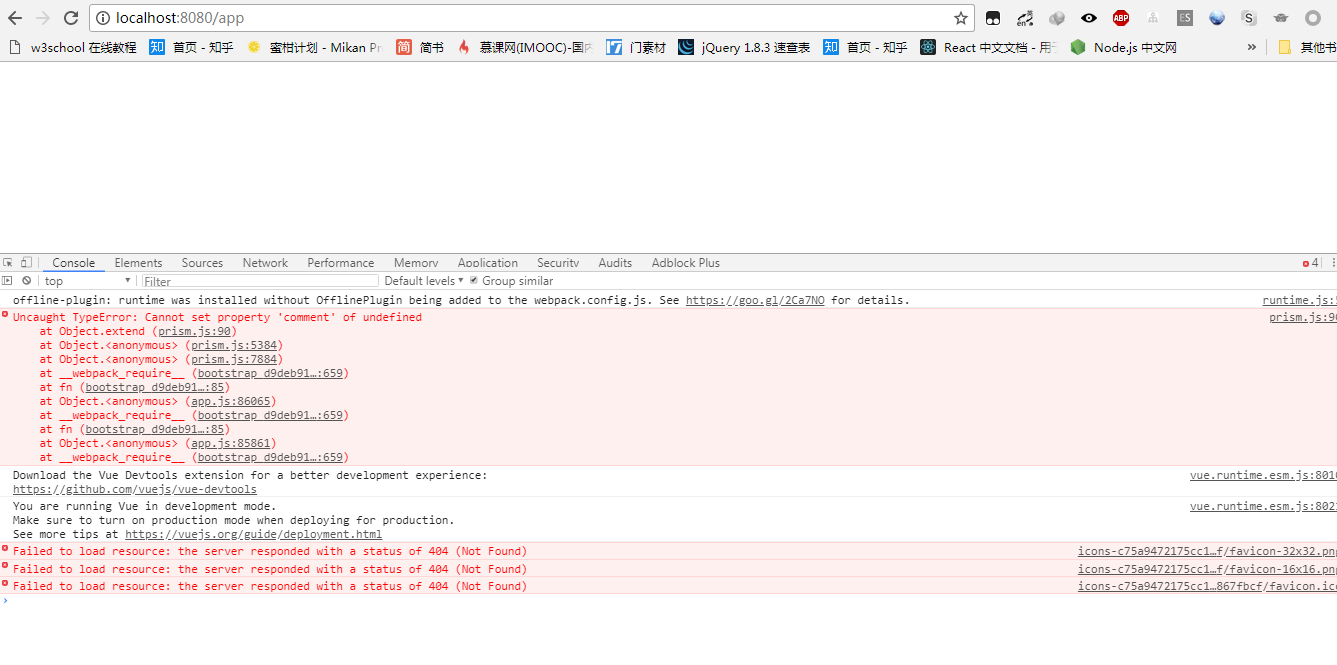
Stackedit: Uncaught TypeError: Cannot set property 'comment' of undefined
error info:
Uncaught TypeError: Cannot set property 'comment' of undefined
at Object.extend (prism.js:90)
at Object.
at Object.
at __webpack_require__ (bootstrap 4821f47ec4e428c4e6c0:659)
at fn (bootstrap 4821f47ec4e428c4e6c0:85)
at Object.
at __webpack_require__ (bootstrap 4821f47ec4e428c4e6c0:659)
at fn (bootstrap 4821f47ec4e428c4e6c0:85)
at Object.
at __webpack_require__ (bootstrap 4821f47ec4e428c4e6c0:659)
 Jesn
Jesn
All 16 comments
+1, same from me
 futurist
on 18 May 2018
futurist
on 18 May 2018
+2, same from me
so,What should I do?
 Tarhyru
on 22 May 2018
Tarhyru
on 22 May 2018
Did you get this on stackedit.io ? Can you share a markdown sample to reproduce the issue ?
 benweet
on 23 May 2018
benweet
on 23 May 2018
stackedit.io..Quick start ,I can run up
no error have report
Tarhyru
on 23 May 2018
But...
Tarhyru
on 23 May 2018
Can you try to reinstall your node_modules with npm v5?
benweet
on 23 May 2018
fine I run up,but i alawys use npm v 5.6.
so i speculate,it‘s Network link problem
because in other linux computer,I find the PhantomJS Downloads are always impossible to complete。
And again to execute install,the can't be download
Need rm node_modules and /tmp/PhantomJS。
other maybe before i use chineses path cause some error,This is very common
but I don't want to prove it
In any case thx
Tarhyru
on 23 May 2018
+3, same problem for me
 WillsXiao
on 1 Jun 2018
WillsXiao
on 1 Jun 2018
楼上那个..这个问题已经解决了....
就两个可能
1、依赖安装不完全
2、文件目录有中文.
Tarhyru
on 2 Jun 2018
Upgrade npm to the latest version npm i npm@latest -g is work for me
 ursulashan
on 5 Jun 2018
ursulashan
on 5 Jun 2018
Yes, upgrading to the latest npm and running npm install again should fix the problem.
benweet
on 5 Jun 2018
I upgrade my npm and cnpm to the latest version(npm 6.1.0, cnpm 6.0.0).
Then remove node_modules folder and execute cnpm install to reinstall the dependency packages.
But the problem remains unresolved.
 jaune162
on 14 Jun 2018
jaune162
on 14 Jun 2018
你看它安装PhantomJS是不是报错了..
比如下载进度没到100%....
或者你可以先想办法把PhantomJS装上再,重新安装依赖...
这个问题大概率是..依赖安装不完全...
前面已经提过了..
Tarhyru
on 14 Jun 2018
问题找到了,这个不是npm版本的问题。而是prismjs的问题。由于package.json中配置的是"prismjs": "^1.6.0",我这里下载包的时候直接下载了最新版1.15.0,而最新版本的prismjs有BUG,所以会一直报错(测试的1.15.0和1.14.0都有问题)。换成1.9.0版本就没有问题了(因为package-lock.json中是1.9.0)。
参加我提的这个issue,https://github.com/PrismJS/prism/issues/1448
英文比较渣,可能会有语法上的问题,凑合看吧。
jaune162
on 22 Jun 2018
@jaune162 试过你的方法,改成1.9.0的版本然后就可以了
Jesn
on 9 Jul 2018
我的方法是:
- 删除node_modules
- 设置package.json的prismjs版本为1.9.0
- 先手动安装prismjs:
npm install [email protected] - 安装其他依赖包:
npm install - 启动成功:
npm start
 woncode
on 4 Nov 2018
woncode
on 4 Nov 2018
Related issues
 dandv
·
4Comments
dandv
·
4Comments
 beib
·
9Comments
beib
·
9Comments
 bdeanindy
·
5Comments
bdeanindy
·
5Comments
 javadba
·
7Comments
javadba
·
7Comments
 alankis
·
4Comments
alankis
·
4Comments
Most helpful comment
+2, same from me
so,What should I do?