Stackedit: UML flowchart diagrams do not render
When attempting to use flowchart.js markup in a markdown document in the editor, it doesn't render in the preview pane.
For instance:
st=>start: Problem
sub1=>subroutine: Resolve Problem
e=>end: Problem Resolved
op1=>operation: Escalate to Escalation Engineer
op2=>operation: Escalate to Management
cond1=>condition: Able to Resolve?
cond2=>condition: Able to Resolve?

st->op1->cond1
cond1(yes)->sub1->e
cond1(no)->op2
op2->cond2
cond2(yes)->sub1->e
cond2(no)->e
Just displays as text:

 tydel
tydel
All 4 comments
You using = when you should be using - and vice-versa?
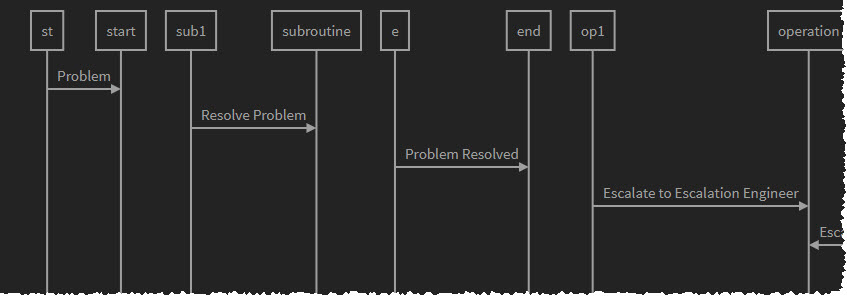
I tried this in v4 and it rendered your first sequence (remove the escape from the gravebacktick symbol leading the sequence)
\``` sequence
st->start: Problem
sub1->subroutine: Resolve Problem
e->end: Problem Resolved
op1->operation: Escalate to Escalation Engineer
op2->operation: Escalate to Management
cond1->condition: Able to Resolve?
cond2->condition: Able to Resolve?
\```
 RachelAmbler
on 13 Oct 2017
RachelAmbler
on 13 Oct 2017
In the v5, you will have to use the mermaid syntax (```mermaid).
 benweet
on 5 Nov 2017
benweet
on 5 Nov 2017
@benweet Would be great if this can be documented. I couldn't find any info related to this except looking into issues.
 yxliang01
on 15 Mar 2018
yxliang01
on 15 Mar 2018
You can render UML diagrams using Mermaid. For example, this will produce a sequence diagram:
```mermaid
sequenceDiagram
Alice ->> Bob: Hello Bob, how are you?
Bob-->>John: How about you John?
Bob--x Alice: I am good thanks!
Bob-x John: I am good thanks!
Note right of John: Bob thinks a long
long time, so long
that the text does
not fit on a row.
Bob-->Alice: Checking with John...
Alice->John: Yes... John, how are you?
```
And this will produce a flow chart:
```mermaid
graph LR
A[Square Rect] -- Link text --> B((Circle))
A --> C(Round Rect)
B --> D{Rhombus}
C --> D
```
 martin-neotech
on 14 Oct 2019
martin-neotech
on 14 Oct 2019
Related issues
 joekaiser
·
5Comments
joekaiser
·
5Comments
 alankis
·
4Comments
alankis
·
4Comments
 javadba
·
7Comments
javadba
·
7Comments
 dandv
·
4Comments
dandv
·
4Comments
 beib
·
9Comments
beib
·
9Comments
Most helpful comment
@benweet Would be great if this can be documented. I couldn't find any info related to this except looking into issues.