Stack: Stack 1.7.1 outputs raw ANSI codes on Windows 10
Stack 1.7.1 (Version 1.7.1, Git revision 681c800873816c022739ca7ed14755e85a579565 (5807 commits) x86_64 hpack-0.28.2) outputs 'raw' 'ANSI' codes on Windows 10 (the ConHost terminals - Command Prompt and PowerShell) rather than those codes being interpreted as console virtual terminal sequences. Earlier versions of stack (specifically, 1.7.0) behaved as expected.
I do not know how stack handles 'ANSI' codes, but my best guess of the source of the problem is as follows: ConHost on Windows 10 is ANSI-capable, but it is not ANSI-enabled by default; applications have to 'turn it on'. The ansi-terminal package seeks to do that, the first time one of its relevant functions is used (a function that behaves differently on Windows when ANSI-support is native or it is emulated; ansi-terminal provides emulation for legacy Windows operating systems). It seems to me that stack is sending ANSI codes to the terminal before it has enabled it and outside of the functions provided by ansi-terminal.
In that regard, I searched the stack source code for System.Console.ANSI (the main ansi-terminal module). It is imported in modules Stack.Types.Runner and Text.PrettyPrint.Leijen.Extended.
Unfortunately, the former module does not use explicit imports, but I think it uses only hSupportsANSI from ansi-terminal. That function does not 'turn on ANSI' (and its heuristics probably are not very reliable on Windows).
The latter module (Text.PrettyPrint.Leijen.Extended) does use explicit imports. It uses hSupportsANSI too but it also uses setSGRCode (in function displayANSISimple). setSGRCode is a function from ansi-terminal that 'turns on ANSI' on Windows, if ANSI-support is available and not yet turned on.
However, I added some Debug.Trace.trace functions to that setSGRCode usage and discovered:
(1) stack was sending ANSI codes to the terminal before evaluating those setSGRCode uses. It appears to me that displayANSISimple is not the only way stack introduces 'ANSI` codes into its output; and
(2) once it used those setSGRCode uses, ANSI was no longer 'raw' but triggered the expected colours. That is, as expected, once a call to the ansi-terminal functionality was made, that package 'turned on ANSI'. (It was -- verbose that triggered, at some point, the use of displayANSISimple.)
 mpilgrem
All 17 comments
Further to the above, I think that stack is now using simpleLogFunc from module RIO.Prelude.Logger of package RIO to introduce 'ANSI' codes into its output - by-passing the functions defined in package ansi-terminal that would enable ANSI in ANSI-capable ConHost terminals on Windows 10. If stack aims to do that, it needs to enable ANSI itself.
That is, stack needs to do something other than rely on hSupportsANSI which uses heuristics to determine (only) whether the functions defined in the ansi-terminal package will work with a given handle. hSupportsANSI does not detect that functions defined in the RIO package will work on Windows.
mpilgrem
on 29 Apr 2018
@snoyberg could we get a release with this in it? 🙏
 Porges
on 18 Jun 2018
Porges
on 18 Jun 2018
This may not yet be fully resolved, see #4091.
 snoyberg
on 18 Jun 2018
snoyberg
on 18 Jun 2018
It should be resolved for Win10 though? I mean, I'm getting good at reading raw ANSI codes but it would be nice to not have to 😁
Porges
on 19 Jun 2018
It's non-trivial to make a release, so if we know there's another change in the pipeline, I'd rather not jump into making one right now. That said, you could upgrade to the Git master version (via stack upgrade --git) to get this fix immediately.
snoyberg
on 19 Jun 2018
@snoyberg forgot I could do that. Thanks!
Porges
on 19 Jun 2018
Random-but-related question: does stack upgrade --git always use the last non-git version to do the build, even if you have a newer git-based version? (Asking as upgrading to the latest git version is showing the ANSI codes again.)
Porges
on 24 Jun 2018
If I understand the question: it will rebuild Stack with whichever stack executable you called on the command line.
snoyberg
on 24 Jun 2018
That's interesting then... during upgrading of stack it was again printing ANSI garbage, but this doesn't happen during normal usage.
Edit: Just confirmed this by running stack upgrade --git again:
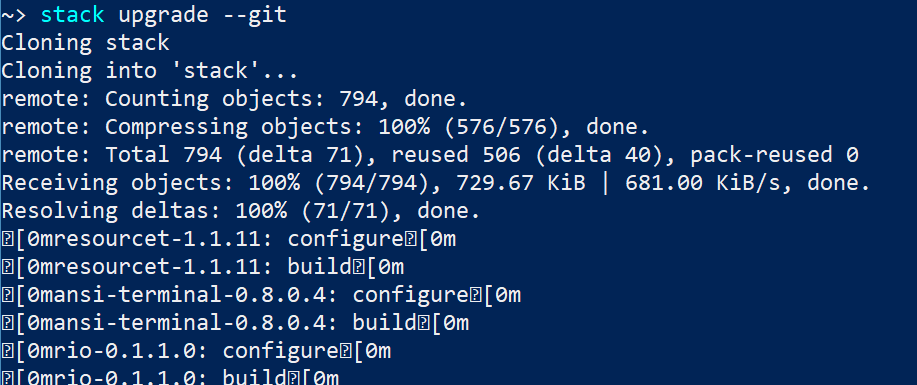
Not a big problem since I only see it during upgrade --git 🙂
Porges
on 24 Jun 2018
Can you run this sequence of commands and see what happens?
stack --version
stack upgrade --git --verbose
If you still get the weird output the first time, then repeat again. I just merged a PR (#4106) that makes yet another change to this codepath.
snoyberg
on 24 Jun 2018
I could not reproduce @Porges 'stack upgrade' problem on Windows 7 in a native terminal, using Version 1.8.0, Git revision b9bc6a6e0483f55b98064125a717e5e3211f893d x86_64 hpack-0.28.2 to stack upgrade --git to Version 1.8.0, Git revision 33e5a742d0e22d9f499a57e5ea3c2f6425496b4c x86_64 hpack-0.28.2.
mpilgrem
on 27 Jun 2018
However, I can reproduce @Porges 'stack upgrade' problem on Windows 10 in a native terminal, using Version 1.8.0, Git revision b9bc6a6e0483f55b98064125a717e5e3211f893d x86_64 hpack-0.28.2 to stack upgrade --git to Version 1.8.0, Git revision 33e5a742d0e22d9f499a57e5ea3c2f6425496b4c x86_64 hpack-0.28.2. That is a puzzle. I'll investigate further.
mpilgrem
on 27 Jun 2018
Yes so I upgraded from 466da22ce21c to HEAD and had the same thing.
Porges
on 28 Jun 2018
The result of my investigations so far is that the following line (in function sourceUpgrade in module Stack.Upgrade) disables the ANSI-capability of the ANSI-capable native terminal on Windows 10:
let args = [ "clone", repo , "stack", "--depth", "1", "--recursive", "--branch", branch]
withWorkingDir (toFilePath tmp) $ proc "git" args runProcess_
I am investigating further why.
mpilgrem
on 29 Jun 2018
This, this and this suggest to me that it is an upstream problem with the git clone command clearing but not restoring the ENABLE_VIRTUAL_TERMINAL_PROCESSING flag.
mpilgrem
on 29 Jun 2018
Would it be possible to work around this by restoring the flag within Stack after calling git?
snoyberg
on 29 Jun 2018
The commit above is intended to do just that.
mpilgrem
on 29 Jun 2018
Related issues
 23ua
·
4Comments
23ua
·
4Comments
 mgsloan
·
3Comments
mgsloan
·
3Comments
 s5k6
·
3Comments
s5k6
·
3Comments
 abhinav
·
4Comments
abhinav
·
4Comments
 silky
·
3Comments
silky
·
3Comments
Most helpful comment
It's non-trivial to make a release, so if we know there's another change in the pipeline, I'd rather not jump into making one right now. That said, you could upgrade to the Git master version (via
stack upgrade --git) to get this fix immediately.