Stable-baselines: Increasing memory usage during training with DQN
Describe the bug:
Memory usage increases linearly during training when using DQN. When training with a large number of timesteps this can cause OOM. I originally noticed this when training on a custom env using DQN, but have since replicated using Cartpole environment.
Code:
import gym
from stable_baselines import DQN
from stable_baselines.deepq.policies import MlpPolicy

env = gym.make('CartPole-v1')
model = DQN(MlpPolicy, env, gamma=0.997, buffer_size=2500, batch_size=256, exploration_fraction=0.12952,
            target_network_update_freq=500, prioritized_replay=False, verbose=0)
model.learn(total_timesteps=7500)
Memory use plot (made using mprof run):
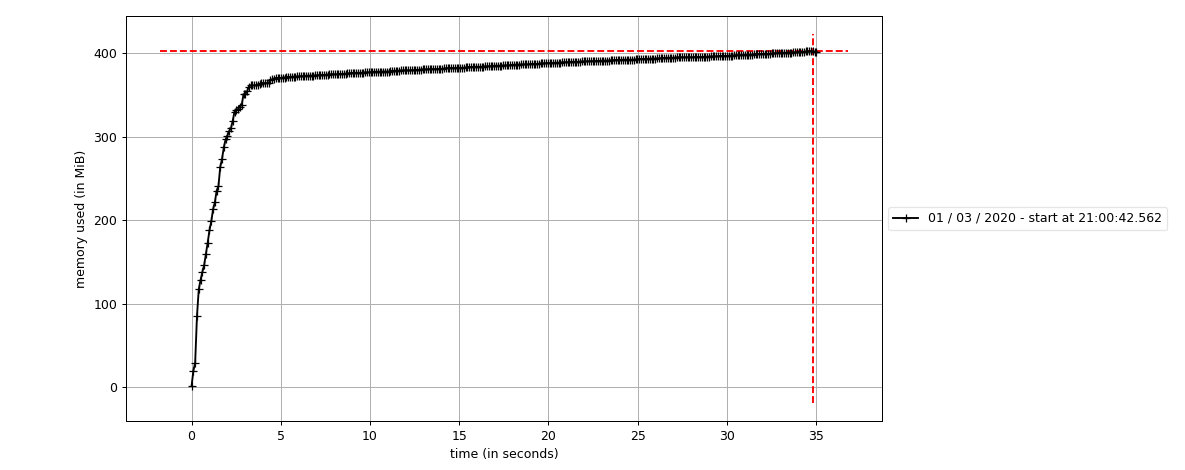
I would have expected the plot to plateau once the replay buffer was full (at 2500 steps), but the memory use continues to increase past this point.
System Info:
Describe the characteristic of your environment:
Linux, Ubuntu 18.04
Stable baselines version 2.9.0 without MPI (installed using conda) .
Python version 3.7.6
Tensorflow version 1.14
numpy version 1.18.1
 RobSumner
All 4 comments
Hmm, I have had multi-day DQN runs in the past with no leaking issues like this (and currently running one for a third day). I will try to replicate this once I have a machine available.
Edit: There are some other issues related to leaking (e.g. #182 #642), but those were solved by updating/changing some other packages.
 Miffyli
on 2 Mar 2020
Miffyli
on 2 Mar 2020
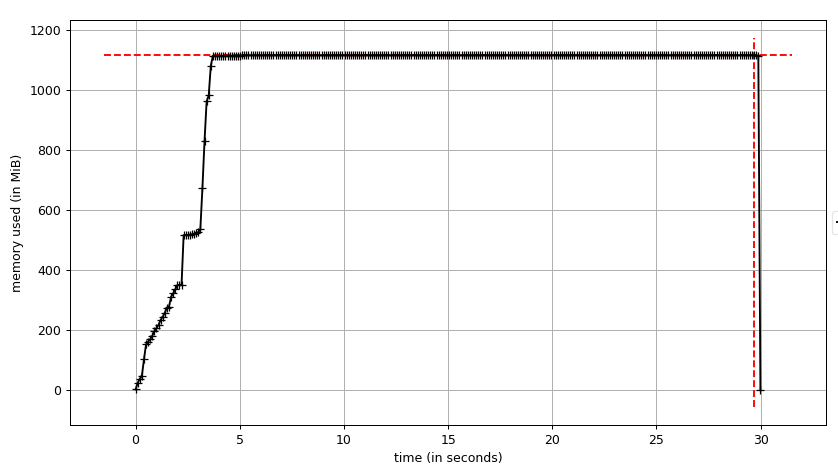
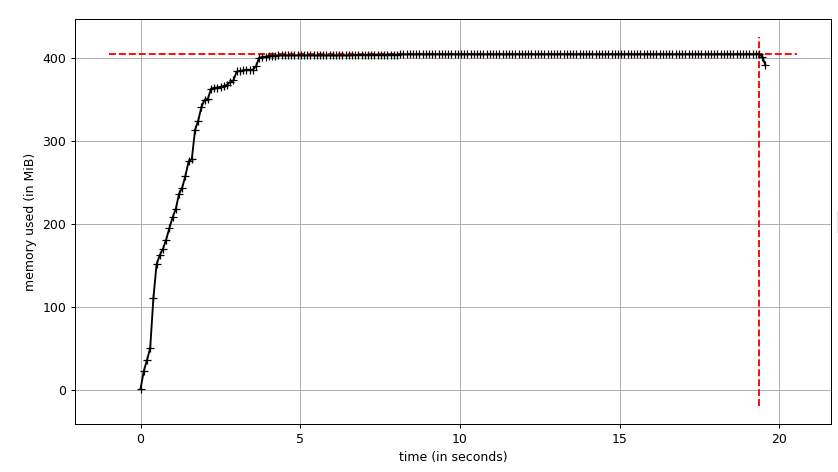
I did not observe the same behavior on my machine with the given code (plots below from mprof). Ubuntu 18.04, Python 3.6.9 (not conda), Tensorflow 1.14.0, Numpy 1.18.1, stable baselines 2.9.0. Smells like the reason is in one of the underlying libraries (or maybe even Python version).
With GPU:
Without GPU:
Miffyli
on 4 Mar 2020
I have now replicated the non-leaking behaviour (for python 3.6.9 and 3.7.6) by changing the setup process for the virtual environment.
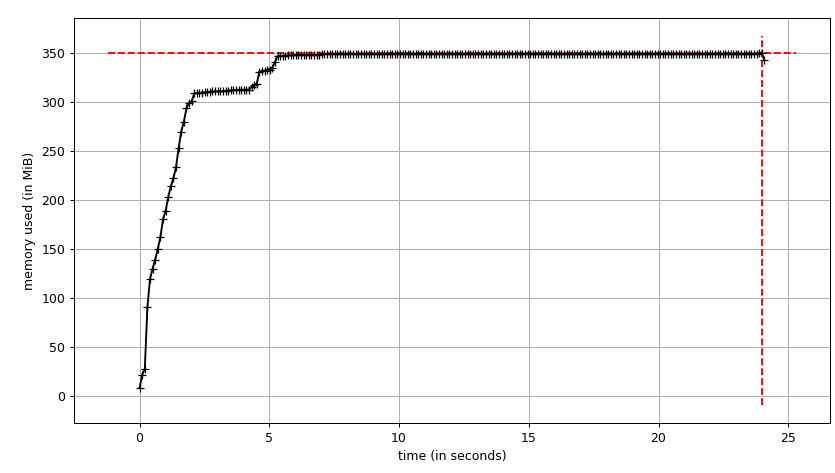
I found that installing Tensorflow using Pip rather than Conda will fix the issue, although I haven't been able to find the exact package difference that caused the problem.
For reference (or anyone else having the same issue) the commands used were:
conda create --name env python=3.7.6
conda activate env
python -m pip install --upgrade pip setuptools wheel
pip install stable-baselines[mpi]
pip install tensorflow==1.14
Closing this one as it does not seem to be related to stable baselines.
 araffin
on 6 Mar 2020
araffin
on 6 Mar 2020
Related issues
 maystroh
·
3Comments
maystroh
·
3Comments
 matthew-hsr
·
3Comments
matthew-hsr
·
3Comments
 smorad
·
3Comments
smorad
·
3Comments
 shwang
·
3Comments
shwang
·
3Comments
 SerialIterator
·
3Comments
SerialIterator
·
3Comments