Ssd.pytorch: FileNotFoundError: [Errno 2] No such file or directory: 'COCO_ROOT/annotations/instances_trainval35k.json'
When I run train.py It shows an error: FileNotFoundError: [Errno 2] No such file or directory: 'COCO_ROOT/annotations/instances_trainval35k.json' but only have 'instances_trainval35k.json.zip' in that place.Whaat's wrong???
 Bigwode
All 20 comments
@amdegroot
loading annotations into memory...
Traceback (most recent call last):
File "train.py", line 259, in
train()
File "train.py", line 82, in train
MEANS))
File "/home/chenzw/tensor/ssd/data/coco.py", line 92, in __init__
INSTANCES_SET.format(image_set)))
File "/home/chenzw/anaconda3/envs/tensor3/lib/python3.5/site-packages/pycocotools/coco.py", line 84, in __init__
dataset = json.load(open(annotation_file, 'r'))
FileNotFoundError: [Errno 2] No such file or directory: 'COCO_ROOT/annotations/instances_trainval35k.json'
Bigwode
on 18 Apr 2018
I have the same problem, have you solved the problem?
 kelly08385
on 15 May 2018
kelly08385
on 15 May 2018
I have the same problem too, did you guys fix it?
 JY-D
on 17 May 2018
JY-D
on 17 May 2018
@amdegroot I have the same problem also, was this solved?
 argideritzalpea
on 18 Jun 2018
argideritzalpea
on 18 Jun 2018
I'm not able to download the file "https://s3.amazonaws.com/amdegroot-datasets/instances_trainval35k.json.zip". The COCO data preparation script tries to download this file, but I end up with a "instances_trainval35k.json.zip" that just contains an error message.
 landersson
on 25 Jun 2018
landersson
on 25 Jun 2018
@landersson too, have someone solved it?
-------------------------------update-----------------------------
could find clue in "https://github.com/matterport/Mask_RCNN/blob/master/samples/coco/coco.py"
 AllenMao
on 25 Jun 2018
AllenMao
on 25 Jun 2018
@AllenMao can you please explain how to fix it?
 isalirezag
on 5 Jul 2018
isalirezag
on 5 Jul 2018
@isalirezag Details see Line 480~482 in "https://github.com/matterport/Mask_RCNN/blob/master/samples/coco/coco.py".
AllenMao
on 6 Jul 2018
@AllenMao Thank you very much!
I was able to make it train on coco, but unfortunately, whatever i do i cannot make it evaluate on coco. do you have any suggestion on that ?
isalirezag
on 6 Jul 2018
@isalirezag i update coco.py, and update eval.py in this repository. evaluate coco with below:
COCODetection(args.voc_root, ['minival'],
                                BaseTransform(300, dataset_mean),
                                COCOAnnotationTransform())
AllenMao
on 9 Jul 2018
@Bigwode
You can download that file below.
https://dl.dropboxusercontent.com/s/s3tw5zcg7395368/instances_valminusminival2014.json.zip
After download that, just rename filename and paste it at correct directory.
 seongkyun
on 14 Aug 2018
seongkyun
on 14 Aug 2018
@seongkyun It is just valminusminival2014.json, it contains 35k val images.
However, coco trainval35k datasets include 82k train images + 35k val images. So if you rename it, you just use 35k val images to train rather than trainval35k dataset
 ujsyehao
on 28 Aug 2018
ujsyehao
on 28 Aug 2018
@ujsyehao I've got it. Then if i want to use whole the images (82k + 32k) for training phase, which file should I use? or is there any link to download correct json file?
seongkyun
on 28 Aug 2018
@ujsyehao
@seongkyun
Thank you for your analysis!
Have you found a solution?
 foralliance
on 4 Dec 2018
foralliance
on 4 Dec 2018
Same problem, can anyone fix it?
 AlvinIsonomia
on 16 Mar 2019
AlvinIsonomia
on 16 Mar 2019
zip“instances_trainval35k.json.zip” and put "instances_trainval35k.json" in correct file
 YLONl
on 23 Mar 2019
YLONl
on 23 Mar 2019
@YLONl But the thing is that file you've told "instances_trainval35k.json.zip" is the incorrect file. Nobody can not unzip or run that "*.json" file even just deleting the ".zip" in the filename.
seongkyun
on 25 Mar 2019
@Bigwode
You can download that file below.
https://dl.dropboxusercontent.com/s/s3tw5zcg7395368/instances_valminusminival2014.json.zip
After download that, just rename filename and paste it at correct directory.
this solution works for me.
file instances_valminusminival2014.json and instances_trainval35k.json should be the same file just with different name. Besides, I dont think there are 35k images in the trainval35k folder. Does anybody know what's the real meaning of 35k?
 ShangyinGao
on 5 Apr 2019
ShangyinGao
on 5 Apr 2019
@ujsyehao I've got it. Then if i want to use whole the images (82k + 32k) for training phase, which file should I use? or is there any link to download correct json file?
I'm with the same question in mind. Does anyone know how to do it?
 xafarranxera
on 21 May 2019
xafarranxera
on 21 May 2019
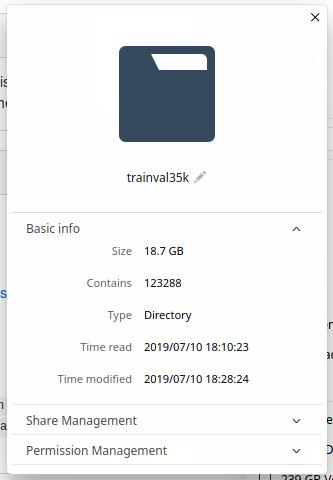
@ShangyinGao, as you can see in the next picture, it is more than 120k photos.
 SalahAdDin
on 11 Jul 2019
SalahAdDin
on 11 Jul 2019
Related issues
 kouyichi
·
5Comments
kouyichi
·
5Comments
 lmingyin
·
5Comments
lmingyin
·
5Comments
 Elyorcv
·
4Comments
Elyorcv
·
4Comments
 squirrel16
·
5Comments
squirrel16
·
5Comments
 MakeToast
·
3Comments
MakeToast
·
3Comments
Most helpful comment
I'm not able to download the file "https://s3.amazonaws.com/amdegroot-datasets/instances_trainval35k.json.zip". The COCO data preparation script tries to download this file, but I end up with a "instances_trainval35k.json.zip" that just contains an error message.