Srt: Connection setup failure:connection time out
Hi all,
I'm trying to generate a srt-stream from a file by ffmpeg and decoder it ,but failed.My command as following
ffmpeg -re -i D:/test.flv -c:v copy -c:a
copy -f mpegts -muxrate 7M srt://127.0.0.1:2345?pkt_size=1316&mode=caller
Listener:
ffmpeg  -i srt://:2345?mode=listener  -c:v copy -c:a copy -f flv tcp://127.0.0.1:6789
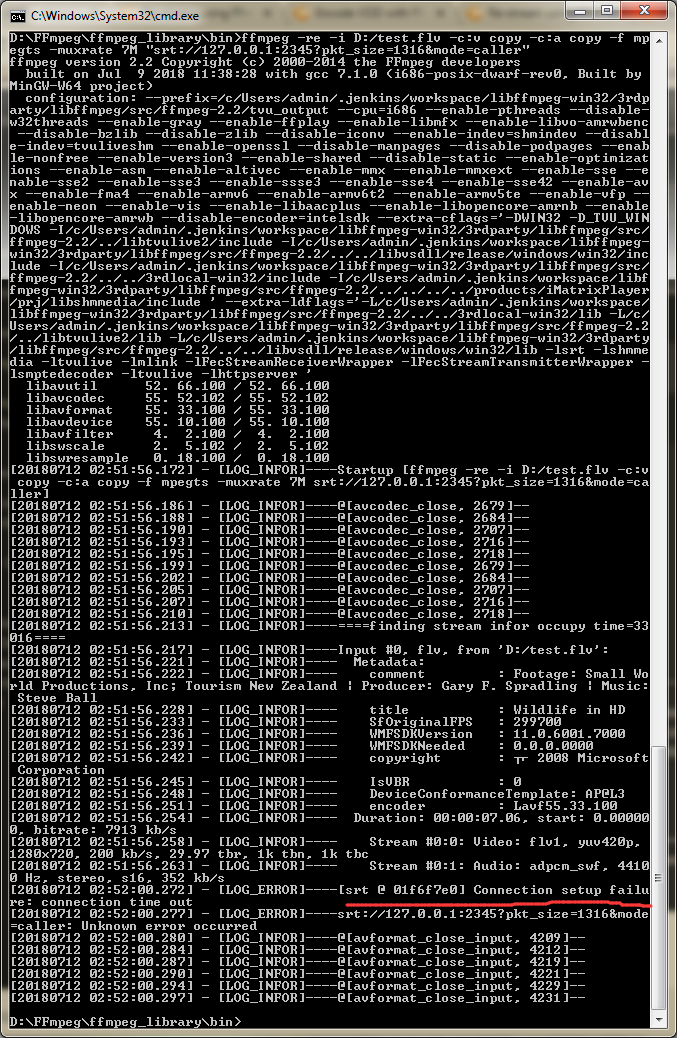
But when I config Caller,it shows error: connection setup failure:connection time out as the picture.

The config of listener:

Anyone know the reason? Thanks!
 Amyyum
All 13 comments
Please try the same with using the srt-live-transmit tool from the SRT package.
Use pipelines instead of SRT URI in the ffmpeg commands (the - used instead of the resource URI should resolve to stdin/stdout), and use srt-live-transmit with file://con in the direction where you are connected to ffmpeg through the pipeline (this designates stdin, when used as input, or stdout, when used as output).
If with this configuration it's working, please report the problem to ffmpeg. If not, please try to grab the pcap for packets for this listener port and attach it.
I just tried this on Windows to flip a live stream from UDP to SRT, also by connecting to localhost - no problems found.
 ethouris
on 11 Jul 2018
ethouris
on 11 Jul 2018
I can't really understand it than you mention ”Use pipelines instead of SRT URI in the ffmpeg commands”? If there is possible to show me your test command? @ethouris
Amyyum
on 12 Jul 2018
Hello @Amyyum ,
Could you please try putting SRT URL in quotes in your caller command, like so:
ffmpeg -re -i D:/test.flv -c:v copy -c:a copy -f mpegts -muxrate 7M "srt://127.0.0.1:2345?pkt_size=1316&mode=caller"
Thanks
 rndi
on 12 Jul 2018
rndi
on 12 Jul 2018
Hi @rndi
I have try like you mention,but the result is the same.
Amyyum
on 12 Jul 2018
Ok, and is your listener running as
ffmpeg -i srt://:2345?mode=listener -c:v copy -c:a copy -f flv tcp://127.0.0.1:6789
at the same time? Reason for asking: your original screenshots shows SRT URL as "srt://:10.12.23.22:1234" which isn't right. Maybe also try
ffmpeg -i srt://0.0.0.0:2345?mode=listener -c:v copy -c:a copy -f flv tcp://127.0.0.1:6789
although that should be the same thing.
rndi
on 12 Jul 2018
Hi @rndi thanks for your help .I tried like your suggestion ,it connected success,but can't sendmsg or recvmsg .
This is the log :
caller:
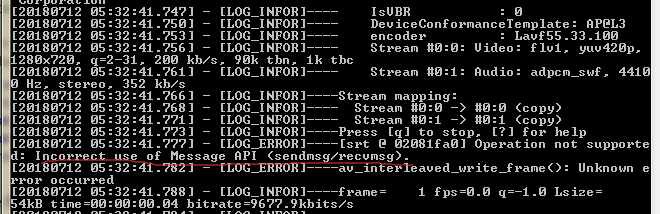
listener:

Amyyum
on 12 Jul 2018
Try adding pkt_size=1316 for both caller and listener to SRT URI as you had in your original examples. Don't forget to put quotes around the URIs. But if the problem persists, I suspect there is an issue with FFmpeg's implementation of the SRT protocol adapter. You will probably need to grab latest FFmpeg build or build it yourself from sources and try with that. If it still fails, search FFmpeg tickets on the topic and maybe open a fresh one in their ticketing system.
Another alternative is to use srt-live-transmit application that comes with SRT library and pipe its input/output into FFmpeg as it was already suggested. This way you won't be using FFmpeg's SRT implementation at all.
rndi
on 12 Jul 2018
I tried, but the problem persists.I will try other methods.Anyway,thanks very much!
Amyyum
on 12 Jul 2018
@Amyyum: The pipes. Instead of making ffmpeg output to SRT, make it output to the pipeline, then pipe it through the srt-live-transmit.
That is, when you have something like that in ffmpeg:
ffmpeg -i some-input -some -other -parameters srt://host:port?parameters...
Do
ffmpeg -i some-input -some -other -parameters pipe:1 | srt-live-transmit file://con srt://host:port?parameters...
Similarly with the input. Instead of
ffmpeg -i srt://... ...others...
Do
srt-live-transmit srt://... file://con | ffmpeg -i pipe:0 ...others...
Remember that pkt_size is not to be used in SRT URI with srt-live-transmit and it has the packet size of 1316 by default.
ethouris
on 12 Jul 2018
Wait. Invalid socket ID is the error reported with MJ_NOTSUP, MN_SIDINVAL. This is reported from listen and accept function if you used wrong listener socket ID.
Please retry with the above changes - it will use the "official" flipping application from SRT instead of the SRT interface defined inside ffmpeg. If you have the same thing, we'll investigate it further with detailed logs. Otherwise it's a problem in the ffmpeg SRT interface and it should be redirected there.
ethouris
on 12 Jul 2018
This issue is a month old; does anyone have maybe updates about it?
ethouris
on 6 Aug 2018
Might be connected with #407.
 maxsharabayko
on 17 Jan 2019
maxsharabayko
on 17 Jan 2019
Closed due to inactivity.
 mbakholdina
on 20 Feb 2020
mbakholdina
on 20 Feb 2020
Related issues
 oviano
·
6Comments
oviano
·
6Comments
 gou4shi1
·
5Comments
gou4shi1
·
5Comments
 amukhsimov
·
3Comments
amukhsimov
·
3Comments
 prabh13singh
·
9Comments
prabh13singh
·
9Comments
 vandanachadha
·
6Comments
vandanachadha
·
6Comments
Most helpful comment
@Amyyum: The pipes. Instead of making ffmpeg output to SRT, make it output to the pipeline, then pipe it through the
srt-live-transmit.That is, when you have something like that in ffmpeg:
Do
Similarly with the input. Instead of
Do
Remember that
pkt_sizeis not to be used in SRT URI withsrt-live-transmitand it has the packet size of 1316 by default.