Hi all!
I'm completely new to SRT and have an issue.
I have MPEG2 TS over IP streamer which outputs udp://239.10.10.3:1234 stream. It is in the same network with SRT server (PC). I try to make an SRT stream and send it to remote SRT receiver (PC) and make udp://239.10.10.3:1234 again but no luck. The server connects to listener but can't start the transmission. Command line:
Server: ./stransmit -v udp://239.10.10.3:1234 srt://10.85.10.27:5000
Listener: ./stransmit -v srt://:5000 udp://239.10.10.3:1234
I tried for the listener: ./stransmit -v srt://:5000?adapter=10.85.10.27 udp://239.10.10.3:1234 - no difference
What are the right SRT settings for my case?
Thank you in advance!
 DmytroIatskyi
All 10 comments
The udp address is a multicast address and I don't think stransmit supports pulling or pushing to multicast addresses. You can use ffmpeg to pull in the UDP multicast and pipe it via stdio to stransmit (and vice-versa at the receiving end) to properly deal with multicast udp.
 ReubenM
on 7 Jun 2017
ReubenM
on 7 Jun 2017
Thank you for reply!
According to the manual on the transmitting site I should enter:
./stransmit udp://:5000 srt://remote.example.com:9000
I entered:
./stransmit -v udp://239.10.10.3:1234 srt://10.85.10.27:5000
Or:
./stransmit -v udp://:1234 srt://10.85.10.27:5000
No luck
What is the difference between my string and the string in the manual?
Is there a chance that my physical scheme is not correct?
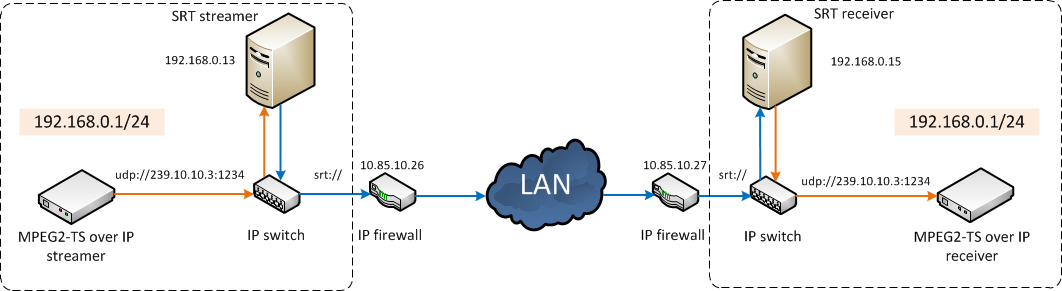
Should I generate the UDP stream on SRT server PC? Is it possible to take the stream from the external streamer and then generate SRT at all?
DmytroIatskyi
on 8 Jun 2017
ReubenM, you could have checked the sources before you "don't think it supports", it's easy, just open the source file and look for "multicast" phrase :).
So, yes, if you add multicast=1 parameter to the URI, it will also subscribe to the multicast group for reading the data. There's also a shortcut, dunno how standard, but often used: if there's @ before the host specification, this is turned into "multicast=1" parameter by the UriParser.
Note that this could be probably done automatically by recognizing the range of IP address 224.0.0.0 to 239.255.255.254 as a multicast group, but AFAIK this usually isn't practised. So, try:
./stransmit udp://@239.10.10.3:1234 srt://10.85.10.27:5000
If still any problems, please report.
 ethouris
on 8 Jun 2017
ethouris
on 8 Jun 2017
Thank you, ethouris!
./stransmit udp://@239.10.10.3:1234 srt://10.85.10.27:5000 worked fine, though in order to check it I needed to remove IP firewalls from the chain.
I stuck with firewall settings. I have MikroTik RB750. According to SRT Deployment Guide, I added the srcnat and dstnat rules for port 5000 but the chain doesn't work. Could anybody help with proper settings?
DmytroIatskyi
on 8 Jun 2017
@ethouris Well, I deserve that for not grepping the code. :-P I was simply going off of the output for stransmit -h.
@DmytroIatskyi: srcnat and dstnat shouldn't have anything to do with ports, it's for associating an internal address with and external address. All ports in and out. (Unless additional firewall rules filter the ports) Are you perhaps getting srcnat / dstnat mixed up with port-forwarding? Manual Port-forwarding would work just as well. But if you are using srcnat / dstnat make sure you add an additional external address to the router dedicated to the internal SRT host.
ReubenM
on 8 Jun 2017
@ReubenM: good point, probably some extended help for stransmit would be nice. There are also socket options applicable for both SRT and UDP sockets, which deserve to be explained.
ethouris
on 9 Jun 2017
I simplified the scheme of DmytroIatskyi.
for source command is:
./stransmit -v udp://@239.10.10.3:1234?adapter=10.10.70.50 srt://10.85.10.22:5000
for destination:
./stransmit -v srt://:5000 udp://239.10.10.10:1234
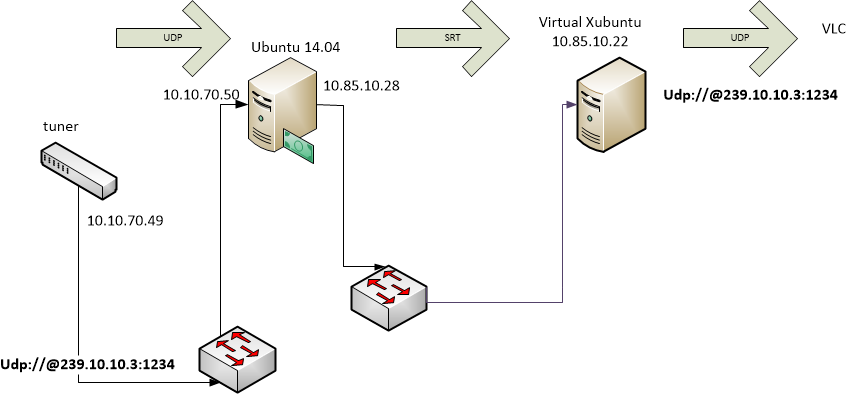
And it works
 mrbloom
on 13 Jun 2017
mrbloom
on 13 Jun 2017
Does the stransmit documentation cover this case?
 adamyellen
on 16 Nov 2017
adamyellen
on 16 Nov 2017
At least the Stransmit documentation - Medium: UDP should cover it.
ethouris
on 16 Nov 2017
Perfect. Thank you!
adamyellen
on 16 Nov 2017
Related issues
 DigitalTVDev
·
4Comments
DigitalTVDev
·
4Comments
 stevomatthews
·
7Comments
stevomatthews
·
7Comments
 amjy
·
4Comments
amjy
·
4Comments
 moonbc
·
4Comments
moonbc
·
4Comments
 aamirrad
·
5Comments
aamirrad
·
5Comments
Most helpful comment
ReubenM, you could have checked the sources before you "don't think it supports", it's easy, just open the source file and look for "multicast" phrase :).
So, yes, if you add
multicast=1parameter to the URI, it will also subscribe to the multicast group for reading the data. There's also a shortcut, dunno how standard, but often used: if there's@before the host specification, this is turned into "multicast=1" parameter by the UriParser.Note that this could be probably done automatically by recognizing the range of IP address 224.0.0.0 to 239.255.255.254 as a multicast group, but AFAIK this usually isn't practised. So, try:
If still any problems, please report.