Squirrel.windows: MSI Startup Job Name
After running the *.msi installer generated by Squirrel, the name of the startup job that is added for all users on the system defaults to "Program" with no information along with it. Is there a way to customize the name and/or publisher for this startup item?
 Mierenga
All 15 comments
I'm not sure why it shows up as Program, here's what we write it as: https://github.com/Squirrel/Squirrel.Windows/blob/master/vendor/wix/template.wxs#L28
Maybe you're not setting Title?
 anaisbetts
on 1 Mar 2017
anaisbetts
on 1 Mar 2017
Thanks for the location of the template file.
My nuspec (and generated nupkg) file has both the id & title fields populated, both as the same value, e.g. MyApp. The file MyApp.exe is in the C:\Program Files (x86)\MyApp Installer\ directory. It's clearly odd (to me) that the template is able to use the id and title fields for writing the names in the file path, but not for the Registry entry.
Looking in HKEY_LOCAL_MACHINE at SOFTWARE\Microsoft\Windows\CurrentVersion\Run, I also do not have an entry for the item, although it does show up in TaskManager->Startup (as "Program"). Not sure if it the registry entry is no longer supposed to be there for some reason? (The MSI is still installed and working for all users).
I have been playing with adding different registry items to this location and it seems I can get a startup item that is called "Program" from the TEST1 & TEST6 section of the following .REG file:
Windows Registry Editor Version 5.00

[HKEY_LOCAL_MACHINE\SOFTWARE\Microsoft\Windows\CurrentVersion\Run]

; TEST1: Displays the startup item as "Program"
"MyAppMachineInstallerTEST1"="\"%ProgramFiles%\\MyApp Installer\\Program\""

; TEST2: Displays the startup item as "Program.exe --checkInstall"
"MyAppMachineInstallerTEST2"="\"%ProgramFiles%\\MyApp Installer\\Program.exe --checkInstall\""

; TEST3: Does not add a KV pair to the registry because the string value is not properly escaped
"MyAppMachineInstallerTEST3"="%ProgramFiles%\MyApp Installer\MyApp3.exe --checkInstall"

; TEST4: Displays the startup item as "MyApp4.exe --checkInstall"
"MyAppMachineInstallerTEST4"="\"C:\\Program Files (x86)\\MyApp Installer\\MyApp4.exe --checkInstall\""

; TEST5: Displays the startup item as "MyApp5.exe --checkInstall"
"MyAppMachineInstallerTEST5"="\"%ProgramFiles%\\MyApp Installer\\MyApp5.exe --checkInstall\""

;TEST6: Displays the startup item as "Program"
"MyAppMachineInstallerTEST6"="\"Program\""
I'm not sure exactly how these test scenarios relate to my issue.
I will be building a minimal test app to see if the problem persists with a fresh project, as well as testing the current .MSI on another Windows system to see if the results differ in any way.
Any more info or support on this will be greatly appreciated.
Mierenga
on 3 Mar 2017
I am having this problem across every app that I've packaged and have verified it on 2 separate Windows 10 systems.
This is the metadata that I have put into a nuspec where this issue occurs:
<metadata>
    <id>TestSquirrel</id>
    <version>1.0.0</version>
    <title>AppTitle</title>
    <authors>Mierenga</authors>
    <owners>owner</owners>
    <licenseUrl>http://example.com</licenseUrl>
    <projectUrl>http://example.com</projectUrl>
    <requireLicenseAcceptance>false</requireLicenseAcceptance>
    <description>My package description.</description>
    <summary>a summary</summary>
    <releaseNotes>notes</releaseNotes>
    <copyright>2039</copyright>
    <language>en-001</language>
    <tags>tag1 tag2</tags>
</metadata>
Can anyone verify that they have used the MSI installer to generate a Task Manager->Startup item that has a name corresponding to their metadata or anything other than "Program"?
Note: the program shows up as "AppTitle Machine-Wide Installer" as expected in the Control Panel->Programs and Features
Mierenga
on 10 Mar 2017
I have located the problem for this issue.
- View the "Command line" column on
Task Manager->Startup window - Entry for "Program" item is
"C:\Program" Files\AppTitle Installer\TestSquirrel.exe --checkInstall. - It should be
"C:\Program Files\AppTitle Installer\TestSquirrel.exe --checkInstall" - To fix, I added quotes around the Registry value at
HKLM\SOFTWARE\WOW6432Node\Microsoft\Windows\CurrentVersion\Run\TestSquirrelMachineInstaller - It now shows up as "TestSquirrel.exe --checkInstall"
I've attempted to modify template.wxs to implement a fix and rebuild Squirrel from source, but haven't been able to get my changes to show up in my project. Not sure yet what I am doing wrong.
Mierenga
on 14 Mar 2017
@Mierenga is it still an issue with the latest version of Squirrel?
 Thieum
on 2 May 2019
Thieum
on 2 May 2019
Not sure, @Thieum I haven't used squirrel for a while now. I see @bitdisaster made a change recently to the line that defines the registry value, but he didn't change any syntax of the %ProgramFiles% part, so it seems like it could still potentially be an issue. I don't really know how the substitution is supposed to work in Windows. Perhaps he might know what it appears as in Task Manager.
Mierenga
on 4 May 2019
Also have this problem. I'm getting this on the current release (1.9.1). I'll see if I can tweak the MSI installer so that it puts double quotes in
 benlye
on 17 Jun 2019
benlye
on 17 Jun 2019
Another problem is that the machine-wide installer always points to %ProgramFiles%, which is the 64-bit program files path on a 64-bit system, even if the machine-wide installer is actually located in %ProgramFiles(86)% (the 32-bit Program Files path).
In my application (which builds a 32-bit MSI) I was able to get the machine-wide installer to work properly by changing this line in template.wxs:
<RegistryValue Type="expandable" Name="{{Id}}MachineInstaller" Value="%ProgramFiles%\{{Title}} Installer\{{Id}}.exe --checkInstall" />
to this:
<RegistryValue Type="expandable" Name="{{Id}}MachineInstaller" Value=""%ProgramFiles(x86)%\{{Title}} Installer\{{Id}}.exe" --checkInstall" />
A bit more info...
Because Task Manager is 64-bit it expands the Run key value broken (%ProgramFiles% expands to C:\Program Files) but because the Run key is stored in WOW6432Node, when it is actually run, in the 32-bit context, it executes correctly (calling from C:\Program Files (x86)).
It would probably be better to use a string value in the Run key rather than an expandable one, with the absolute path rather than the %ProgramFiles% variable. It would be a lot less confusing, and Task Manager would work.
benlye
on 17 Jun 2019
@benlye Nice research! Would you consider creating a PR with the fix you are suggesting?
Thieum
on 17 Jun 2019
Yep, I'll work on it.
benlye
on 17 Jun 2019
I added proper 64bit MSI support back in February. Its just not released https://github.com/Squirrel/Squirrel.Windows/pull/1453
The correct behavior you should see with that fix is the following:
32bit MSI installs to Program Files and uses Run key on 32-bit OS
32bit MSI installs to Program Files(x86) and uses WOW6432Node Run key on 64-bit OS
64bit MSI installs to Program Files uses Run key on 64bit OS (you have to use new option --msi-win64)
 bitdisaster
on 17 Jun 2019
bitdisaster
on 17 Jun 2019
@bitdisaster, cool, I'll try to figure out how to test the devel branch.
After the testing I've done, I believe Task Manager will still not display the Startup task properly on a 64-bit OS with a 32-bit MSI.
You are using a REG_EXPAND_SZ value, and populating it with the variable %ProgramFiles%. When Task Manager (which is 64-bit) parses this it will expect to find the installer executable in C:\Program Files\..., but it is not there so the Startup task display is broken. Task Manager is apparently not smart enough to understand that values in the WOW6432Node Run key need the 32-bit %ProgramFiles% path.
See the entry for 'Program' here - this is what happens with a 32-bit MSI:
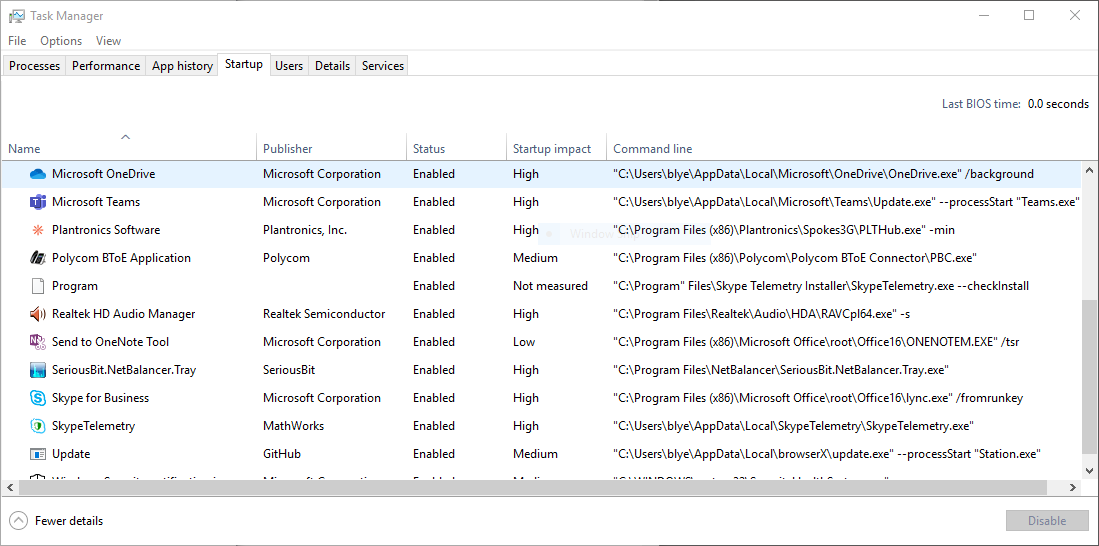
Functionally this is still OK because when the Operating System executes the Run key value, in the 32-bit context, the installer runs because %ProgramFiles% expands to C:\Program Files (x86).
I would propose two changes in addition to what you've already done:
- Use a standard registry string value, pointing at the actual 32-bit or 64-bit Program Files path, not an environment variable. That way Task Manager won't be confused about where to find the executable.
- Put double quotes around the full path, which is good practice for a path with spaces in it on Windows
I'm happy to do both those and submit a PR.
benlye
on 17 Jun 2019
It seems like this syntax at L29:
<RegistryValue Type="string" Name="{{Id}}MachineInstaller" Value=""[APPLICATIONROOTDIRECTORY]{{Id}}DeploymentTool.exe" --checkInstall" />
Implements both my suggestions, at least for my 32-bit MSI on 64-bit Windows package. I still need to test the 64-bit MSI package.
There are a few other aspects of the MSI installer which also need looking at. Top of the list would be that uninstalling it does not remove the installer file or the registry value.
benlye
on 17 Jun 2019
Hmm, it uninstalled just fine last time I tested. The latest fix even Upgrade code set so that old versions get removed on update.
bitdisaster
on 17 Jun 2019
Hmm, it uninstalled just fine last time I tested. The latest fix even Upgrade code set so that old versions get removed on update.
It's completely possible that I've installed and uninstalled it so many times that the OS can't tell if it should remove the files or not. I'm still yet to successfully test my app with the devel branch. If I get a chance I'll try it on a vanilla system.
benlye
on 17 Jun 2019
Related issues
 Mzartek
·
4Comments
Mzartek
·
4Comments
 ralish
·
4Comments
ralish
·
4Comments
 JonZso
·
5Comments
JonZso
·
5Comments
 estyfen
·
4Comments
estyfen
·
4Comments
 joshiji
·
6Comments
joshiji
·
6Comments