Sqlitebrowser: Export button in Browse Data tab
Describe the new feature
Export button under Browse Data tab that would allow the user to export after filtering
Additional info
Please answer these questions before submitting your feature request.
Is your feature request related to an issue? Please include the issue number.
Does this feature exist in another product or project? Please provide a link.
Do you have a screenshot? Please add screenshots to help explain your idea.
Under Execute SQL there is a button that let's you export the table after running a SQL query (circled in red below)
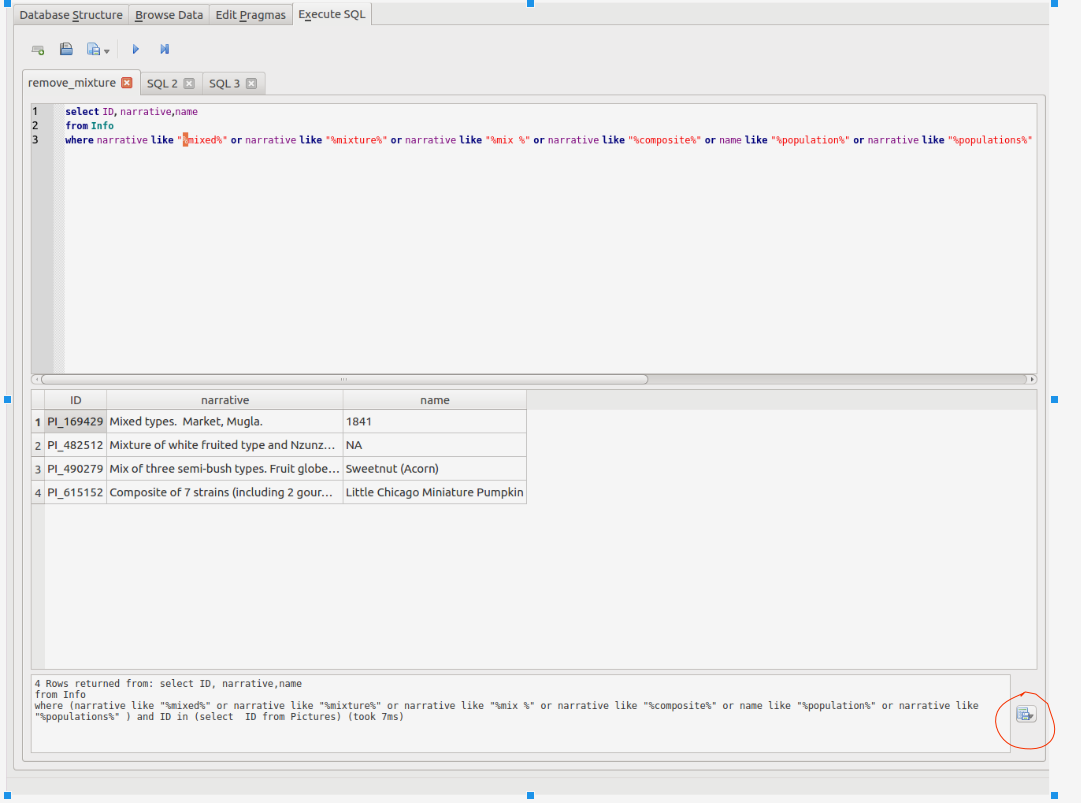
It would be nice to have the same button under the Browse Data tab that would allow the user to export after filtering.
 ch728
ch728
All 4 comments
Good idea, @ch728. If you try our nightly build, you will find a new button in the Browse Data for saving the current filtering as a new SQL view. That is only a step away from a CSV export.
But this new feature makes a lot of sense and it is feasible.
 mgrojo
on 1 Jun 2018
mgrojo
on 1 Jun 2018
@ch728, the feature is now implemented. If you install a nightly build or compile yourself from the repository, you will find a similar popup menu in the 'Browse Data' tab as in the 'Execute SQL' tab.

I copy here the What's This info for the button:
This popup menu provides the following options applying to the currently browsed and filtered table:
- Export to CSV: this option exports the data of the browsed table as currently displayed (after filters, display formats and order column) to a CSV file.
- Save as view: this option saves the current setting of the browsed table (filters, display formats and order column) as an SQL view that you can later browse or use in SQL statements.
If it works for you, please close this issue.
mgrojo
on 2 Jun 2018
I downloaded the new build, and I am now able to export after filtering. Thank you!
ch728
on 2 Jun 2018
Well done @mgrojo. :smile:
 justinclift
on 2 Jun 2018
justinclift
on 2 Jun 2018
Related issues
mgrojo
·
4Comments
 tonurics
·
3Comments
tonurics
·
3Comments
 VA1DER
·
3Comments
VA1DER
·
3Comments
 meness
·
4Comments
meness
·
4Comments
 henrykironde
·
4Comments
henrykironde
·
4Comments