Sqlitebrowser: Why is sqlitebrowser trying to spy on me
Details for the issue
Every time I use sqlitebrowser, quietly and in the background it is trying to send information to the following address with this message.
"Error when connecting to https://raw.githubusercontent.com/sqlitebrowser/sqlitebrowser/master/currentrelease
Connection timed out"
Useful extra information
I'm opening this issue because:
- [ ] DB4S is crashing
- [ ] DB4S has a bug
- [ ] DB4S needs a feature
- [x] DB4S has another problem
I'm using DB4S on:
- [x] Windows: ( _version:_ ___ )
- [ ] Linux: ( _distro:_ ___ )
- [ ] Mac OS: ( _version:_ ___ )
- [ ] Other: ___
I'm using DB4S version:
- [x] 3.10.1
- [ ] 3.10.0
- [ ] 3.9.1
- [ ] Other: ___
I have also:
- [ ] Tried out the latest nightly version: https://github.com/sqlitebrowser/sqlitebrowser#nightly-builds
- [ ] Searched for an existing similar issue: https://github.com/sqlitebrowser/sqlitebrowser/issues?utf8=%E2%9C%93&q=is%3Aissue%20
 crash1013
All 4 comments
it is trying to send information to the following address
Its not 'sending' but 'receiving'.
If you click the link (which GitHub has automatically linked, so its a valid link) you'll see it returns the following information:
3.10.1
https://github.com/sqlitebrowser/sqlitebrowser/releases/tag/v3.10.1
This is the current version, and a link to the current version.
This is DB4S's way of working out whether you're running the latest version or not. I presume your firewall is blocking DB4S from talking to the outside world, so yes, the connection is timing out.
If DB4S detects its running an old version, then this dialog pops up:

(using the above collected information)
If you click 'View' and 'Preferences', you'll see a 'check for updates' option.
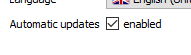
If you untick this (so there isn't a tick in it .. like this)
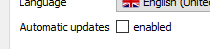
then DB4S won't check for updates, won't attempt to download the above file, and won't trip your firewall, and won't display a 'timed out' warning.
 chrisjlocke
on 6 Nov 2017
chrisjlocke
on 6 Nov 2017
@crash1013 - Does that make sense? Are you happier with that explanation?
chrisjlocke
on 9 Nov 2017
Closing due to no response. @crash1013 - Feel free to comment back when you return. You can still comment on closed issues.
chrisjlocke
on 15 Nov 2017
i working on not have internet envirment. when i open it. show tip message. close it then application don't use.
 TapXWorld
on 1 Feb 2018
TapXWorld
on 1 Feb 2018
Related issues
chrisjlocke
·
3Comments
 mgrojo
·
4Comments
mgrojo
·
4Comments
 dridk
·
3Comments
chrisjlocke
·
3Comments
dridk
·
3Comments
chrisjlocke
·
3Comments
 aneroid
·
4Comments
aneroid
·
4Comments
Most helpful comment
Its not 'sending' but 'receiving'.
If you click the link (which GitHub has automatically linked, so its a valid link) you'll see it returns the following information:
This is the current version, and a link to the current version.
This is DB4S's way of working out whether you're running the latest version or not. I presume your firewall is blocking DB4S from talking to the outside world, so yes, the connection is timing out.
If DB4S detects its running an old version, then this dialog pops up:
(using the above collected information)
If you click 'View' and 'Preferences', you'll see a 'check for updates' option.
If you untick this (so there isn't a tick in it .. like this)
then DB4S won't check for updates, won't attempt to download the above file, and won't trip your firewall, and won't display a 'timed out' warning.