Sqldelight: Android Studio 3.5 Canary 10 doesn't recognize sources generated with SqlDelight 1.1.1
AS: 3.5 Canary 10
AGP: 3.5 Alpha 10
SqlDelight 1.1.1
Sample: https://github.com/burntcookie90/sqldelighterror
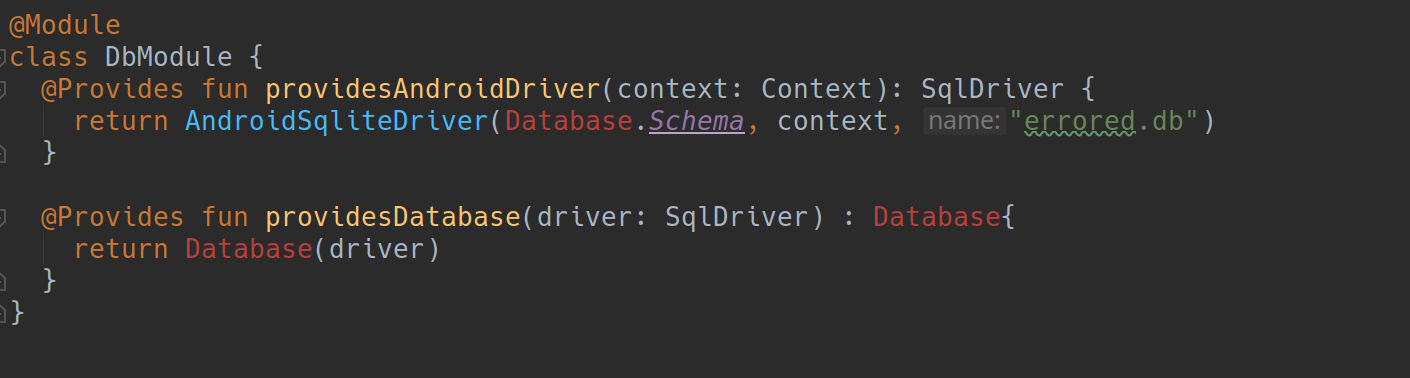
Android Studio is unable to resolve the reference to the generated code. However, builds are successful
 burntcookie90
All 11 comments
go to common module clean and assemble will do the trick, but this still a bug and we have to do this everytime common module code changes
 nlgtuankiet
on 16 Apr 2019
nlgtuankiet
on 16 Apr 2019
I have the same issue with IJ 2019.1 and console build doesn't work either for mpp project.
 thevery
on 16 Apr 2019
thevery
on 16 Apr 2019
@thevery what kotlin/gradle/agp/sqldelight versions are you on, which command are you running from CLI and do you see the generate task being run/generated sources being created?
 AlecStrong
on 16 Apr 2019
AlecStrong
on 16 Apr 2019
1.3.30, 4.10.3, 3.3.2/3.3.1, assembleDebug.
Sources are actually generated but not picked up by both IDEA and Gradle.
thevery
on 16 Apr 2019
I was having the same issue and REMOVING the following lines in gradle.properties fixed it
# Enable Configure on demand
org.gradle.configureondemand=true
#Enable parallel builds
org.gradle.parallel=true
 North101
on 16 Apr 2019
North101
on 16 Apr 2019
Just tried OP's sample with Kotlin1.3.30, AGP3.5.0-alpha11, Gradle5.3.1 and SQLDelight1.1.3, and still had same issue.
But adding following line to dbmodels/build.gradle fixed the unresolved reference error.
android {
    sourceSets.main.java.srcDirs += "$buildDir/sqldelight"
}
 yshrsmz
on 16 Apr 2019
yshrsmz
on 16 Apr 2019
Sqldelight sample breaks on update 1.0.3->1.1.1, but probably I'm doing something wrong? Change commit here: https://github.com/thevery/sqldelight-1300/commit/645b1635ab4781b7fe629f6d995735b71a4ba563
thevery
on 16 Apr 2019
@thevery
Sqldelight sample breaks on update 1.0.3->1.1.1
That should be a different issue, and tracked at #1294
yshrsmz
on 16 Apr 2019
Ok, looks like my original issue was fixed by: 1) main->commonMain 2) android gradle 3.2->3.3 3) invalidate and restart.
thevery
on 16 Apr 2019
It might be related to https://youtrack.jetbrains.net/issue/IDEA-210433. I see that setup here is different (both modules are android modules), but maybe the root cause is similar
 lwasyl
on 19 Apr 2019
lwasyl
on 19 Apr 2019
I also had problems building with Gradle Configure on Demand enabled. None of the tasks prior to compilation would fail, they would just silently refuse to generate the code, then the compilation task would fail because of missing types.
Once I set configure on demand to false, all was well.
org.gradle.configureondemand=false
 rivercartwright
on 24 Apr 2019
rivercartwright
on 24 Apr 2019
Related issues
 sreexamus
·
4Comments
sreexamus
·
4Comments
 JiongBull
·
3Comments
JiongBull
·
3Comments
 tellypresence
·
4Comments
tellypresence
·
4Comments
 treelzebub
·
3Comments
treelzebub
·
3Comments
 jrodbx
·
4Comments
jrodbx
·
4Comments
Most helpful comment
I was having the same issue and REMOVING the following lines in gradle.properties fixed it