Sql-docs: WHERE IS DOWNLOAD LINK!!!????
Where is the download link. ? I have a job to do. don't make my life more complex
Document Details
⚠ Do not edit this section. It is required for docs.microsoft.com ➟ GitHub issue linking.
- ID: 45daf2f0-bb22-338f-062b-a9fabcb71a92
- Version Independent ID: b6e909fe-15d9-c1cf-c018-d4f6f36ff31f
- Content: Download SQL Server Management Studio (SSMS) - SQL Server
- Content Source: docs/ssms/download-sql-server-management-studio-ssms.md
- Product: sql
- Technology: ssms
- GitHub Login: @dnethi
- Microsoft Alias: dinethi
 NishSG
All 10 comments
The download links are the Available Languages section. Click the name of the language you want SSMS localised in.
 BrynJones216
on 5 Nov 2019
BrynJones216
on 5 Nov 2019
Thank you . That gives me 32 bit version. Where is the options to select 64 bit.?
NishSG
on 5 Nov 2019
Click on 'Download SSMS' heading above
 OldVSDeveloper
on 5 Nov 2019
OldVSDeveloper
on 5 Nov 2019
@NishSG Thank you for the question.
This was recently updated with large blue syntax near the top of the article. 64-bit is the default.
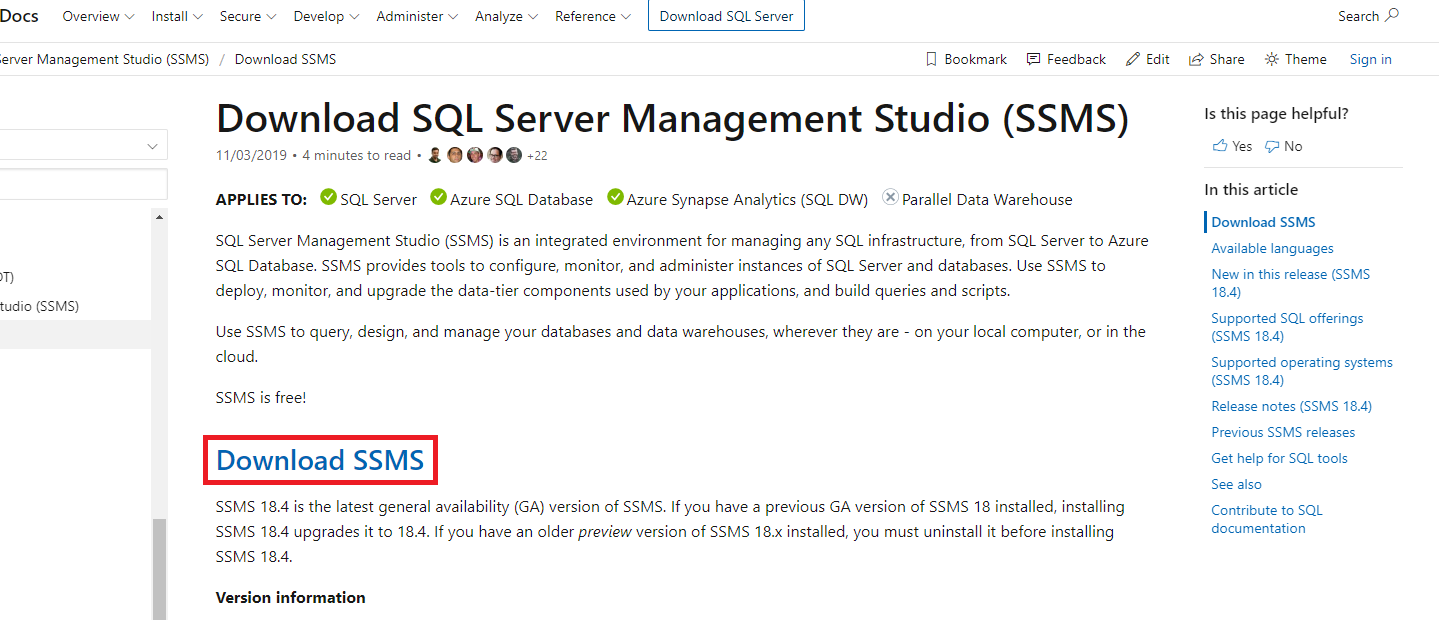
Please comment below if there are additional questions.
 msebolt
on 5 Nov 2019
msebolt
on 5 Nov 2019
@msebolt Just because the text is blue doesn't mean I think it's a hyperlink. I thought it was just a big heading that had an incorrect style applied to it. I imagine most users don't expect blue heading-sized text to be links. Please add an affordance ( https://uxplanet.org/ux-design-glossary-how-to-use-affordances-in-user-interfaces-393c8e9686e4 ) that makes it an obvious hyperlink by adding an underline or style it as a button.
 Jehoel
on 6 Nov 2019
Jehoel
on 6 Nov 2019
Or just wording as Click here to Download SSMS :-) ... sad to say I had to look at comments to get the download link too!
 JamesHorsley
on 6 Nov 2019
JamesHorsley
on 6 Nov 2019
@msebolt Its not 64bit by default, default is 32bit. Please add 64bit download option.
 jimicze
on 6 Nov 2019
jimicze
on 6 Nov 2019
Yeah -- pretty weird. When I couldn't find the download link in the obvious places, I just looked at doing it in another language I knew and saw that English was an option there - how very counter-intuitive. The "Download SSMS" definitely doesn't look like a link and I didn't go anywhere near it.
 firefly237
on 6 Nov 2019
firefly237
on 6 Nov 2019
Kindly improve your instructions on how to Download, just because it is hyperlink no one could assume that clicking there would download the software. Kindly improve the texting like "click here to download SSMS to your local computer".
 prashantprp
on 11 Nov 2019
prashantprp
on 11 Nov 2019
It's insane that in the year 2020 the people responsible by this page have zero knowledge of the basic principles of usability. This is the type of arrogance that the IT guys are associated with that make the rest of the world waste a huge amount of time (multiply that by the number of downloads of the SSMS) just because someone thought the way he thinks is the "correct" one. Fix the link and don't use one in the title for a section where people expect to have instructions on how to download. Absolutely surreal.
 pjcorreia
on 11 Nov 2019
pjcorreia
on 11 Nov 2019
Related issues
 rlundy
·
4Comments
rlundy
·
4Comments
 eliotg
·
3Comments
eliotg
·
3Comments
 chlafreniere
·
3Comments
chlafreniere
·
3Comments
 hdisma
·
3Comments
hdisma
·
3Comments
 jamesstead
·
4Comments
jamesstead
·
4Comments
Most helpful comment
@msebolt Just because the text is blue doesn't mean I think it's a hyperlink. I thought it was just a big heading that had an incorrect style applied to it. I imagine most users don't expect blue heading-sized text to be links. Please add an affordance ( https://uxplanet.org/ux-design-glossary-how-to-use-affordances-in-user-interfaces-393c8e9686e4 ) that makes it an obvious hyperlink by adding an underline or style it as a button.