Spyder: Matplotlib windows are not shown in front of Spyder on OS X
I updated to Anaconda 2.3.0 (OS X 64 bit, Python 2.7) with Spyder 2.3.5.2. I configured Spyder with interactive graphics but then no graphic window is shown. Only inline graphics work.
I deleted the Anaconda installation and the Anaconda configuration folders with rm -rf .conda/ .spyder2/ .ipython/ .matplotlib/ and installed Anaconda 2.3.0 again. But that didn't help.
Any idea how to get interactive graphics in Anaconda 2.3.0 with Spyder back again?
 ghost
ghost
All 8 comments
Questions:
- What's the exact name of the option you're using to set interactive graphics?
- Are you doing it for Python or IPython consoles?
 ccordoba12
on 12 Jul 2015
ccordoba12
on 12 Jul 2015
Steps to reproduce:
1.) Start Spyder 2.3.5.2 from Anaconda Launcher
2.) Go to preferences -> IPython console -> Graphics -> Backend: changed to "Automatic"
3.) Select "Apply" and close preferences
3.) Restart IPython kernel
4.) Create simple graphic like
import pylab
import numpy as np

x = np.linspace(0, 2*np.pi, 100)
y = np.sin(x)
pylab.grid()
pylab.plot(x, y)
=> No interactive window pops up or is open in the background
Also quit Spyder and restart after change in preferences didn't shows the interactive graphic window.
ghost
on 13 Jul 2015
I can reproduce this issue and I'll fix it in 2.3.6
The problem with the automatic backend on Mac is that new plot windows are generated behind Spyder, and no new entries are shown in the Dock to select them. So the only way to see those windows is by minimizing Spyder.
I'm going to change that so that at least a new entry is generated in the dock (by using a different backend), although new windows will still be generated behind Spyder.
ccordoba12
on 24 Aug 2015
Sorry, I just found out that I can't do the fix I mentioned because it won't work for external Python interpreters.
@kvico, the only solution for now is for you to select the Qt backend instead of the Automatic one.
ccordoba12
on 24 Aug 2015
This is related to issue #2085 and #2054.
ccordoba12
on 24 Aug 2015
@ccordoba12 thanks for your investigation and workaround!
ghost
on 26 Aug 2015
fig = pylab.gcf()
fig.canvas.manager.window.raise_()
This works for me for the automatic backend.
 rantanplan77
on 23 Mar 2017
rantanplan77
on 23 Mar 2017
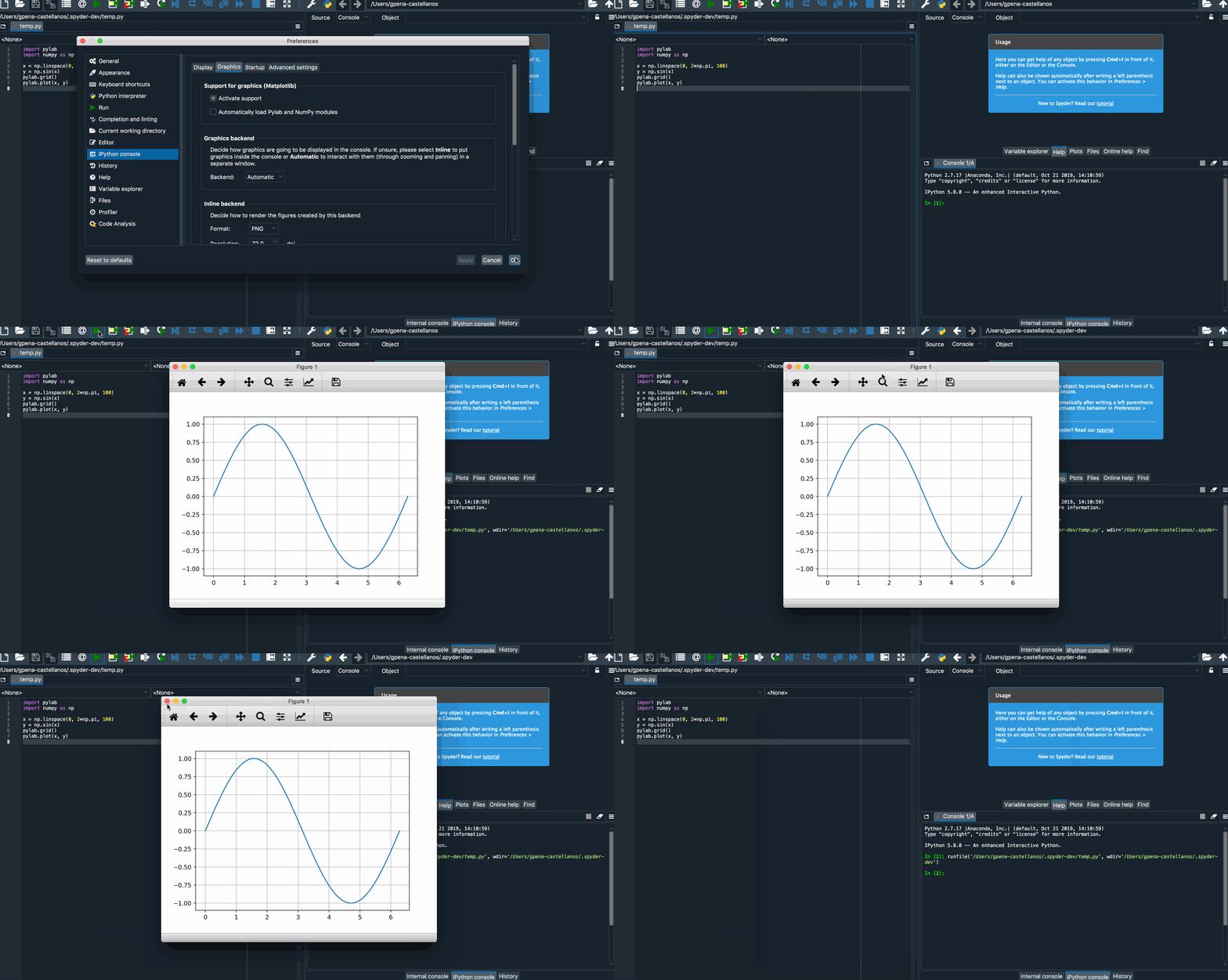
I cannot reproduce this on latest master on mac. Closing
 goanpeca
on 28 Nov 2019
goanpeca
on 28 Nov 2019
Related issues
 Khalilsqu
·
3Comments
Khalilsqu
·
3Comments
 neilsf1975
·
3Comments
neilsf1975
·
3Comments
 spyder-bot
·
3Comments
spyder-bot
·
3Comments
 ok97465
·
3Comments
ok97465
·
3Comments
 dalthviz
·
3Comments
dalthviz
·
3Comments
Most helpful comment
Steps to reproduce:
1.) Start Spyder 2.3.5.2 from Anaconda Launcher
2.) Go to preferences -> IPython console -> Graphics -> Backend: changed to "Automatic"
3.) Select "Apply" and close preferences
3.) Restart IPython kernel
4.) Create simple graphic like
=> No interactive window pops up or is open in the background
Also quit Spyder and restart after change in preferences didn't shows the interactive graphic window.