Springdoc-openapi: using https
Given that the current url for swagger-ui uses https.
Then the generated server url still uses http.

So executing an api-call fails.
The Request URL uses http.
TypeError: Failed to fetch
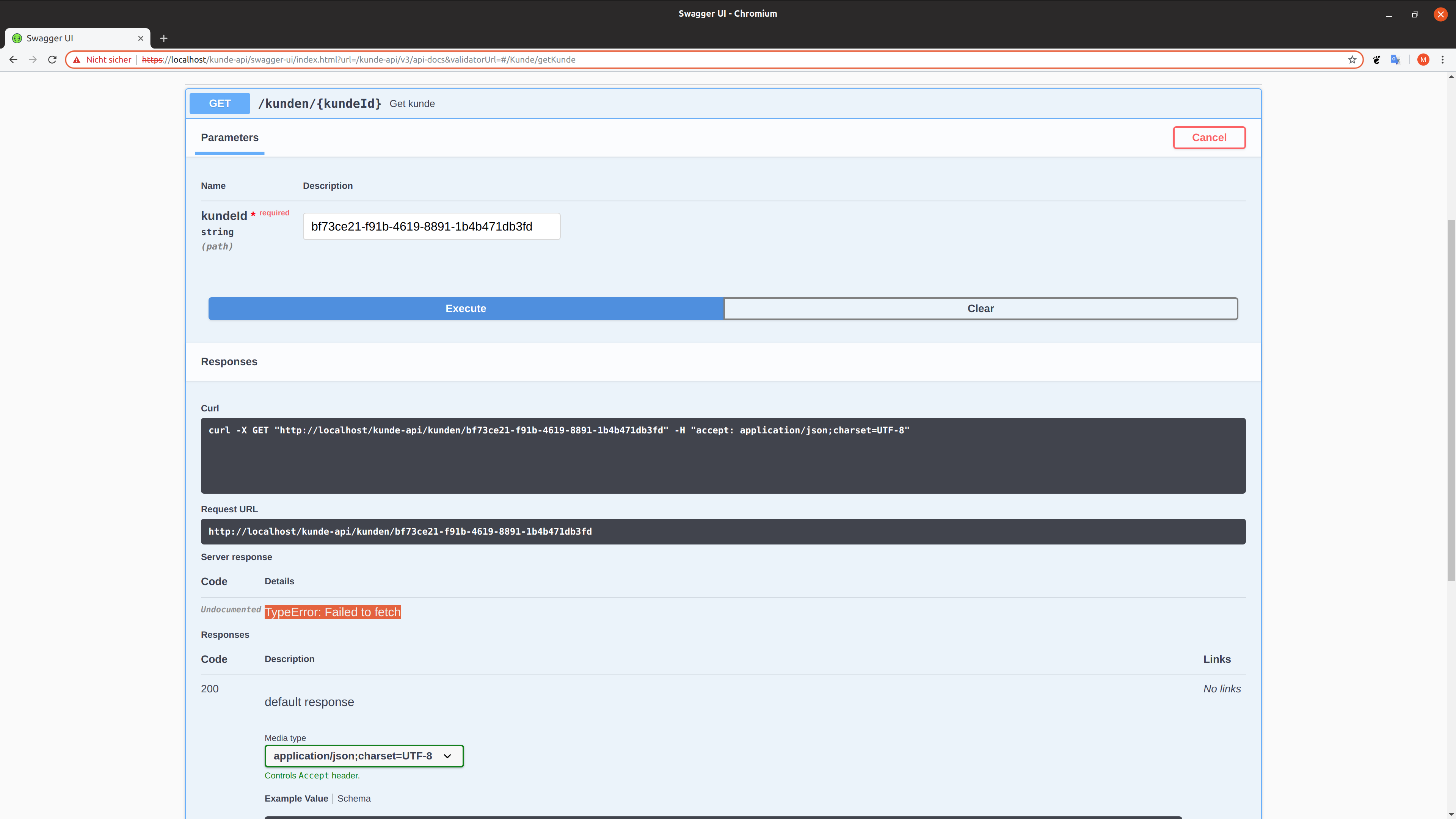
Any idea how to get it work?
 octopus-prime
All 16 comments
Hi,
We are not able to repoduce your issue.
The swagger-ui works without any issue on https;
Can you please describe the way to reproduce it ?
 springdoc
on 17 Oct 2019
springdoc
on 17 Oct 2019
- Configure spring-boot-app to run with http
- Deploy the app to kubernetes
- Make the app reachable from outside with ingress and https
- Open the swagger-ui of the deployed app
- Execute an api-call
octopus-prime
on 17 Oct 2019
For a quick workaround (if resources and docs are accessed from the same base URL) disable org.springdoc.api.OpenApiResource (springdoc.api-docs.enabled=false) and to replace it with an alternative where calculateServerUrl is defined as:
private void calculateServerUrl() {
generalInfoBuilder.setServerBaseUrl("/");
}
It's more likely than not that the application serving the docs is used through some (TLS terminating, path rewriting etc) reverse proxy or other complex setup, so would be maybe useful support configuring the base URL freely (i.e could be both relative or absolute) from properties?
Related specification describing the server URL configuration options:
https://swagger.io/docs/specification/api-host-and-base-path/
 ghost
on 17 Oct 2019
ghost
on 17 Oct 2019
hi @kvedel,
thanks for hints.
private void calculateServerUrl() { generalInfoBuilder.setServerBaseUrl("/"); }
i am not sure where to implement that.
Related specification describing the server URL configuration options:
https://swagger.io/docs/specification/api-host-and-base-path/
okay. i have to configure servers.
i am not sure... does springdoc support openapi.yaml? Or is springdoc annotation-driven only?
nevertheless i tried
@OpenAPIDefinition(servers = {
@Server(url = "http://localhost:8002/preis-api", description = "docker"),
@Server(url = "https://localhost/preis-api", description = "kubernetes")
})
and i works.
but
- now i have to select the right server from
Serverslist in ui. - the source code knows where it should run. this hurts a lot!
- i wonder why i have to select an url from
Serverslist because the url is already given by url in browser.
is there any possibility to configure servers list by injecting them while deployment? so is there a way of configuration other than annotation in code?
octopus-prime
on 18 Oct 2019
Hi,
You can also use: The OpenAPI definition Bean, and inject the value of your serversUrl from your configuration files.
@Bean
public OpenAPI customOpenAPI() {
return new OpenAPI().addServersItem(new Server().url("https://myserver.com"))
.components(new Components().addSecuritySchemes("basicScheme",
new SecurityScheme().type(SecurityScheme.Type.HTTP).scheme("basic")))
.info(new Info().title("SpringShop API").version("V0")
.license(new License().name("Apache 2.0").url("http://springdoc.org")));
}
Thanks! Works like a charm!
octopus-prime
on 19 Oct 2019
We had the same issue and we didn't want to have environment specific URLs in our config. Therefore we tried to configuring the context path as serverUrl and it works like a charm (even the generated curl statement is correct):
@Bean
public OpenAPI springShopOpenAPI(
@Value("${info.app.version}") String appVersion,
@Value("${server.servlet.context-path}") String contextPath
) {
return new OpenAPI()
.addServersItem(new Server().url(contextPath))
.info(new Info()
.title("Lala")
.description("Lala")
.version(appVersion))
.components(new Components()
.addSecuritySchemes("basicScheme",
new SecurityScheme().type(SecurityScheme.Type.HTTP).scheme("basic")));
}
 mariusreusch
on 13 Feb 2020
mariusreusch
on 13 Feb 2020
I fixed this with this:
@Configuration
public class OpenAPIConfiguration {

    @Bean
    public OpenAPI openAPI() {
        return new OpenAPI()
                .addServersItem(new Server().url("/"));
    }
}
 anthony-o
on 17 Apr 2020
anthony-o
on 17 Apr 2020
Hi, sorry for bumping. Anyone know how to remove only the server description "Generated server url"? I see that I can set a new server url, but I do not want to manually add the server url, because for deployment the baseurl will change.
 Serdarrr
on 11 Aug 2020
Serdarrr
on 11 Aug 2020
@Cytor,
You just use the standard swagger annotation @OpenAPIDefinition (ideally, in a spring Bean):
https://github.com/swagger-api/swagger-core/wiki/Swagger-2.X---Annotations#OpenAPIDefinition
@OpenAPIDefinition(info = @Info(title = "API Examples", version = "1.0"),
        servers = @Server(url = "http://toto.com", description = "your descrption"),
        tags = @Tag(name = "Operations"))
@Component
public class MyConfig {

}
 bnasslahsen
on 11 Aug 2020
bnasslahsen
on 11 Aug 2020
@bnasslahsen Thanks. I am familiar with the code config you placed and also via Spring Bean method. This way unfortunately I also need to define the URL address and I would like to only edit the description URL, ideally remove it and not mess with the URL which is automatically generated by springdoc.
Serdarrr
on 11 Aug 2020
@Cytor,
For changing only the description you have OpenApiCustomiser:
    @Bean
    public OpenApiCustomiser serverOpenApiCustomiser1() {
        return openAPI -> openAPI.getServers().forEach(server -> server.setDescription("my new description"));
    }
@bnasslahsen The code does not change the description of current base Url.
Serdarrr
on 11 Aug 2020
@Cytor,
It replaces the "Generated server url" description.
But if you need more assistance, please add sample HelloController with the expected OpenAPI description.
bnasslahsen
on 11 Aug 2020
@bnasslahsen This is the code I am using and it doesn't change the default description to "my new description".
@SpringBootApplication
public class Application {

    public static void main(String[] args) {
        SpringApplication.run(Application.class, args);
    }

    @Bean
    public OpenApiCustomiser serverOpenApiCustomiser1() {
        return openAPI -> openAPI.getServers().forEach(server -> server.setDescription("my new description"));
    }
}
@Cytor,
Here is a full working code.
@SpringBootApplication
public class Application {

    public static void main(String[] args) {
        SpringApplication.run(Application.class, args);
    }


    @Bean
    public OpenApiCustomiser serverOpenApiCustomiser1() {
        return openAPI -> openAPI.getServers().forEach(server -> server.setDescription("my new description"));
    }

    @RestController
    public class HelloController {

        @GetMapping("/hello")
        String hello( ) {
            return "Hello";
        }

    }

}
And this is the generated spec:
openapi: 3.0.1
info:
  title: OpenAPI definition
  version: v0
servers:
  - url: 'http://localhost:8080'
    description: my new description
paths:
  /hello:
    get:
      tags:
        - hello-controller
      operationId: hello
      responses:
        '200':
          description: OK
          content:
            '*/*':
              schema:
                type: string
components: {}
Can you test and confirm that you are getting the same result.
If the following code doesn't work on your local environment, then you will have to add the link to a minimal reproducible sample.
bnasslahsen
on 11 Aug 2020
Related issues
 debargharoy
·
3Comments
debargharoy
·
3Comments
 kingtran2112
·
5Comments
kingtran2112
·
5Comments
 riimeik
·
4Comments
riimeik
·
4Comments
 SSK-code
·
4Comments
SSK-code
·
4Comments
 hectoryo
·
5Comments
hectoryo
·
5Comments
Most helpful comment
I fixed this with this: