Steps to reproduce
- Join two conversations A and B
- Invite people in both conversations
- Have a vivid conversation in both channels
- Enter channel A and wait for new messages
- Have another participant send a message to B
- Wait for the message to be notified
- Click on conversation B to view the message in the discussion
Expected behaviour
When clicking on B ideally the conversation and the message should appear right away.
Actual behaviour
It takes about 3 seconds to switch to that conversation's view, and then 1 second to load the messages and scroll
Talk app
Observed on the company instance (NC 20 + Talk 10)
Solutions
One idea would be to preload / pre-render the most active (or just favorite?) conversations, this way switching would be instantaneous. But would use up more memory.
First need to analyze where the delay comes from and either reduce it or adjust the UX to make it look more responsive, for example by directly switching to the conversation view before the 3 seconds delay.
 PVince81
All 19 comments
I had a quick look and it seems the switching code is rather complex: sending a leave event to the old room, then a join event to the new one. I haven't figured out yet when the token switch is happening.
In theory we could switch the route earlier but need to be careful of side effects.
PVince81
on 22 Oct 2020
as far as I can see, Messages are already cached in the state as messagesList with token as key.
so switching earlier would make it show these messages
maybe then it would need a spinner or something while loading the new ones
PVince81
on 22 Oct 2020
I added some delays in participantsService.joinConversation and noticed that the view is already switched at the very beginning.
Now I was testing on master, maybe this has already improved.
Also my test setup doesn't have as many conversations and messages than the company instance.
- [ ] test with more conversations and data
- [ ] check if the delay is due to sidebar re-rendering or anything unrelated to the MainView
PVince81
on 22 Oct 2020
I noticed that for chats with more people and more messages the delay increases.
For a private chat with few messages it's faster, but still 2 seconds even for a cached 1-1 conversation (on the company instance)
PVince81
on 22 Oct 2020
I tested the following in my local env:
- conversation A: 100 people inside (and 100 messages for each of them joining)
- conversation B: 3 people
- conversation C: 3 people
When switching between B and C it takes less than a second.
When switching to A, it takes 2-3 seconds.
Now there's also the question whether the switching happens before or after all the network calls went through.
Ideally we should cancel irrelevant network calls when switching.
PVince81
on 22 Oct 2020
In theory we could switch the route earlier but need to be careful of side effects.
been there, tried that. with the HPB clustering we have and the upcoming federation (where the server you talk to might not be yours) there is not a lot we can do there.
Also note our instance is still slower as we don't run latest stable20
 nickvergessen
on 22 Oct 2020
nickvergessen
on 22 Oct 2020
Ideally we should cancel irrelevant network calls when switching.
We already do this
nickvergessen
on 22 Oct 2020
Thanks for the info.
However I noticed that we already switch the view early, even before calling joinConversation but it takes time to appear.
I was suspecting the long list of avatar calls we do which might block the other ones (browsers have a limited number of parallel connections at a time). Or maybe the DOM takes a long time to be compute.
Needs further research.
PVince81
on 22 Oct 2020
I checked in the Vue debugger and it seems to spend some time adding all participants and messages with a lot of mutations. I wonder if it would be faster to either batch the mutations (if that is possible) or have mutations addParticipants() and addMessages()
PVince81
on 22 Oct 2020
I did a quick local test batching both participants and messages.
There was no noticable difference between both.
PVince81
on 22 Oct 2020
I'm onto something:
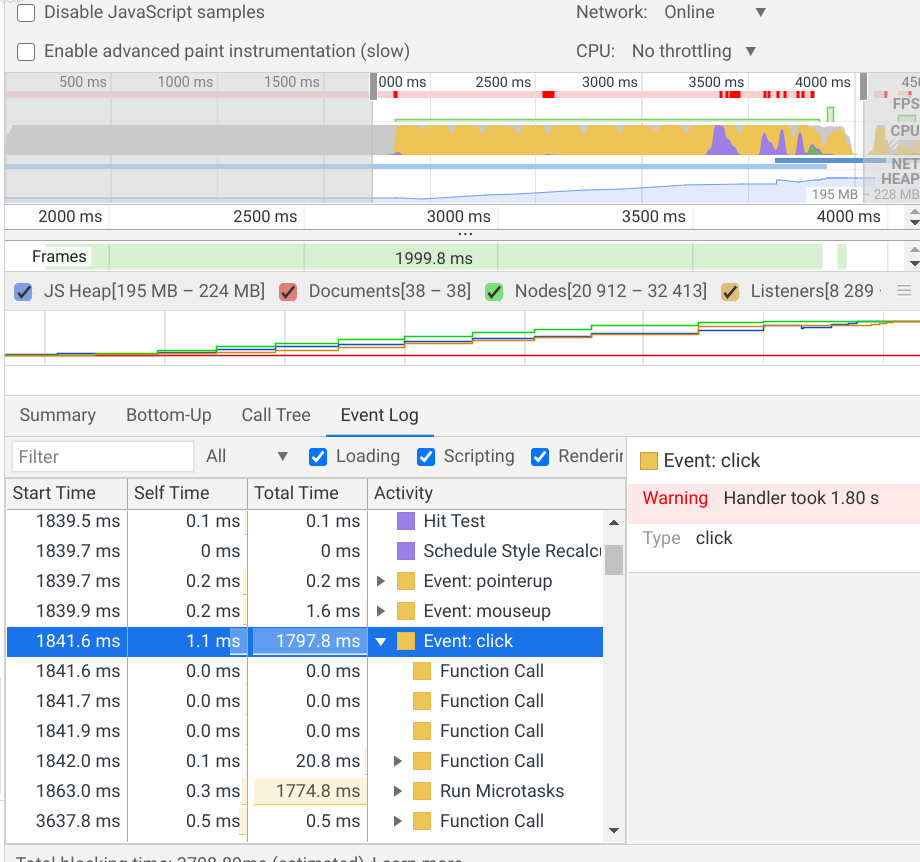
PVince81
on 22 Oct 2020
When setting Vue.config.performance = true Chrome produces this:
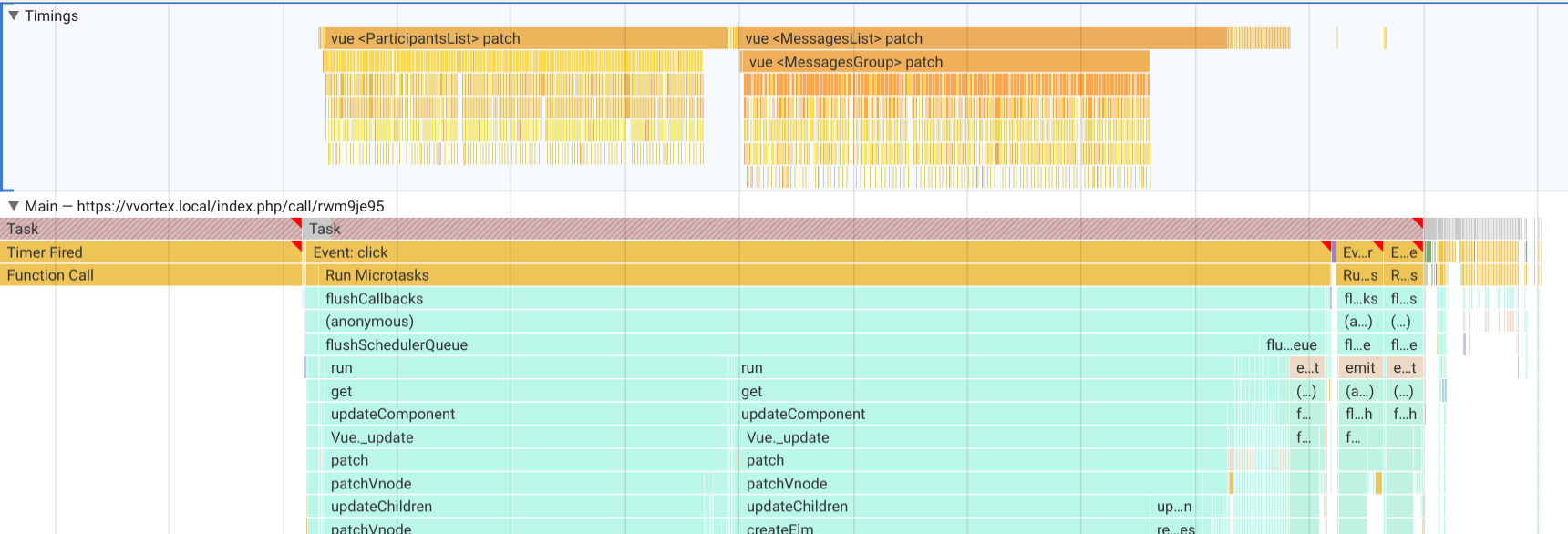
it's Vue's flushschedulerQueue that takes 1.80 seconds.
PVince81
on 22 Oct 2020
cough virtual scroller cough
nickvergessen
on 22 Oct 2020
I only have 100 participants and a bit more than 100 messages. If this was 1000+ I'd say we need pagination.
But only 100 shouldn't be that slow to process.
Yeah... I guess a virtual scroller with 20 elements for both the participants list and messages list would be fine.
I'm still curious about how to optimize Vue in such cases, it might be doing magic that we don't need when just appending messages.
PVince81
on 22 Oct 2020
I'm also wondering about the efficiency of messagesGroupedByAuthor.
Every time the messagesList changes it would be recomputing all the groups.
But: I didn't observe any bottleneck there during the benchmarks, so maybe it's ok to keep.
While reading the code I found this little one: https://github.com/nextcloud/spreed/pull/4439 (no signifant perf improvement, but still)
PVince81
on 22 Oct 2020
Ok, I guess not much point looking further as we'll anyway want a virtual scroller, which makes sense for the chat and participant use cases: https://github.com/Akryum/vue-virtual-scroller
It seems we had a DynamicScroller before https://github.com/nextcloud/spreed/pull/2296/files#diff-8161b5c80aa601ab393b624ced26b96b0fe998eb7bafa2e88545abd9b25ed410R31 but got scrapped. @ma12-co ?
I didn't find the PR where it was removed to read about the reasons.
Anyway, we can try again :smile:
PVince81
on 22 Oct 2020
I looked into this with @skjnldsv but we haven't found a reliable way to add a virtual scroller for variable height components (messages). Want to do a call to talk about this?
 ma12-co
on 23 Oct 2020
ma12-co
on 23 Oct 2020
https://www.npmjs.com/package/vue-virtual-scroll-list is automatically calculating sizes
 skjnldsv
on 23 Oct 2020
skjnldsv
on 23 Oct 2020
I'm also wondering about the efficiency of
messagesGroupedByAuthor.
Every time themessagesListchanges it would be recomputing all the groups.
Yeah, iirc we did some benchmark testing on the split, was decent up to a pretty good amount.
Mixing virtual-scroller and infinite scrolling could be interesting
skjnldsv
on 23 Oct 2020
Related issues
 MarcoZehe
·
4Comments
MarcoZehe
·
4Comments
 mario
·
3Comments
nickvergessen
·
5Comments
mario
·
3Comments
nickvergessen
·
5Comments
 isas-institute
·
4Comments
PVince81
·
4Comments
isas-institute
·
4Comments
PVince81
·
4Comments
Most helpful comment
cough virtual scroller cough