Spreed: Copy paste image into the chat
We are using Riot for our teams and often we take screenshots, copy and paste them in the Riot chat directly. Such a useful little thing. Helps to report bugs and such. Would be fantastic to see it implemented.
 tiotrom
All 18 comments
This could be looked at after #1129
 nickvergessen
on 9 Sep 2019
nickvergessen
on 9 Sep 2019
Hi, I'll be grateful if this option will be implemented. As above, feature is really helpful and must have to be implemented. 💃
 vix95
on 28 Jan 2020
vix95
on 28 Jan 2020
This feature should be added as soon as possible. This facilitates picture communication :sunglasses:.
 Valdnet
on 28 Jan 2020
Valdnet
on 28 Jan 2020
Pictures in chat is an absolutely vital service to provide and one of the things lacking, making switching from discord and riot difficult!
 Flingafu
on 28 Jan 2020
Flingafu
on 28 Jan 2020
we really need this in our little team
 Mercurial
on 12 Feb 2020
Mercurial
on 12 Feb 2020
@tiotrom do you mean drag and drop file upload? I tested copy-pasting with riot and I'm unable to do it.
 ma12-co
on 6 Mar 2020
ma12-co
on 6 Mar 2020
@ma12-co I know that e.g. telegram web is allowing copy and paste images into chats
Would be also really nice to get this feature - I am using it myself quite a lot :)
 szaimen
on 6 Mar 2020
szaimen
on 6 Mar 2020
@tiotrom do you mean drag and drop file upload? I tested copy-pasting with riot and I'm unable to do it.
Did you try with copy image? Or copy file? Like if you have an image in your browser, right click it and "copy image" then paste in Riot, it should work. A great use was when I screenshot my desktop (add whatever annotations to it) and simply copy that and paste it into Riot. Signal Desktop also allows for that. Make sit super fast to share bugs and such in chats.
tiotrom
on 7 Mar 2020
How do I press CTRL + V inside the chat browser tab and share my file with the group?
I also tried drag and drop from Windows Explorer... that too did not work.
It would be cool if clipboard support was available for .GIF, .PNG, .JPG and even .WEBM. if possible, media clips under certain size too (like Discord uses 8meg max).
 grand-lotus-iroh
on 22 Mar 2020
grand-lotus-iroh
on 22 Mar 2020
I also tried drag and drop from Windows Explorer... that too did not work.
It will come with teh next major version in time for Nextcloud 19
nickvergessen
on 22 Mar 2020
I also tried drag and drop from Windows Explorer... that too did not work.
It will come with teh next major version in time for Nextcloud 19
Yes! I'm waiting for that! ❤️
vix95
on 23 Mar 2020
I also tried drag and drop from Windows Explorer... that too did not work.
It will come with teh next major version in time for Nextcloud 19
That will be great. A very useful feature.
 ediazcomellas
on 12 Apr 2020
ediazcomellas
on 12 Apr 2020
@ma12-co Is pasting screenshots from the clipboard still missing? If yes, we would like to implement it and submit a PR or is there some work-in-progress already? Thank you.
 guryanovev
on 27 Apr 2020
guryanovev
on 27 Apr 2020
Hi @guryanovev!
yep, the feature is still missing and it would be awesome if you'd implement it :)
ma12-co
on 27 Apr 2020
guryanovev
on 28 Apr 2020
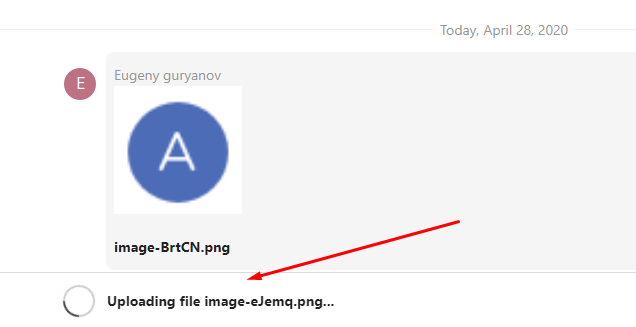
One thing I noticed -- when you paste a screenshot or drag a file there is a delay about 0.5-1 second without any indication, it is probably the moment when actual uploading is in progress. Maybe it would be helpful to have some kind of busy-indication on top of chat control, something like this;
guryanovev
on 28 Apr 2020
Yeah, there is also another idea to have something like a "Confirm" window which allows you to check previews etc first, in case you drop the wrong file into the wrong conversation or something.
Can't find an issue at the moment. Where did we discuss this @ma12-co
nickvergessen
on 28 Apr 2020
I don't think we discussed this in an issue @nickvergessen
@guryanovev Ideally as a first step for this we'd need something similar to the temporary message that is appended to the message list and gets deleted when the real message is received.
Please join us in our talk development channel so we can coordinate this more easily :)
https://cloud.nextcloud.com/call/c7fz9qpr
ma12-co
on 28 Apr 2020
Related issues
 pilsnerbeer
·
3Comments
pilsnerbeer
·
3Comments
 isas-institute
·
4Comments
isas-institute
·
4Comments
 danxuliu
·
3Comments
nickvergessen
·
5Comments
danxuliu
·
3Comments
nickvergessen
·
5Comments
 ChristophAGietl
·
4Comments
ChristophAGietl
·
4Comments
Most helpful comment
@ma12-co Is pasting screenshots from the clipboard still missing? If yes, we would like to implement it and submit a PR or is there some work-in-progress already? Thank you.