Spreed: Spreed/Talk possibly not HTTP/2 compatible
Hi Dev-Team!
It seems that NC Talk isn't HTTP/2 compatible? It only works for me when i turn off HTTP/2 on my webserver. On any form of client with any browser or the Talk Android app.
Specs of my server:
NC13 RC2
Talk App 3.0.1
Debian 9.3 (Stretch)
Apache 2.4.25
MariaDB 10.1.26
PHP 7.0.27
No special STUN server or so, everything default
Settings i have to comment out in the sites-available conf-file that it works:
Protocols h2 http/1.1
H2Push on
H2PushPriority * after
H2PushPriority text/css before
H2PushPriority image/jpeg after 32
H2PushPriority image/png after 32
H2PushPriority application/javascript interleaved
...
I also tried disabling the different H2Push options or all of them, but no success.
 Schnookeuz
All 37 comments
Works on my system with nginx http2 and brotli
 xf-
on 20 Jan 2018
xf-
on 20 Jan 2018
2.0 didn't work with HTTP2, but we fixed that for 3.0
It was actually one of the main tasks and works quite well here.
If you could describe a bit more what is not working, we might be able to help you a bit more.
 nickvergessen
on 22 Jan 2018
nickvergessen
on 22 Jan 2018
Bumped into this problem too on 12.0.5.
Running nextcloud inside a kubernetes cluster behind a nginx ingress, which uses HTTP2.
Probably I'll wait for 13 to rollout Talk.
 mamoit
on 2 Feb 2018
mamoit
on 2 Feb 2018
I activated http/2 on my server today. I can confirm the problem that the video chat with the talk app is not possible. I also activated a turn server (coturn) where everything went well before.
NC13 RC4
Talk App 3.0.1
Debian 9.3 (Stretch)
Apache 2.4.25
MariaDB 10.1.26
PHP 7.0.27
coturn 4.5
 koarlmichael
on 5 Feb 2018
koarlmichael
on 5 Feb 2018
In case HTTP2 is not working for you, can you please explain what "not working" means?
nickvergessen
on 6 Feb 2018
Sorry for delay, i was on business trip.
What is not working:
- I start a call from the browser (Firefox 58) with User-A and invite my Android phone, where the Talk App is connected to User-B.
- I accept the call on the phone with User-B. Screen is black on the phone with my preview in the upper corner.
- I click in the browser to join the call with User-A. The picture is black, with just the profile pic in the middle and the circle turning around. No sound, no video. After some time it changes to "waiting for User-B (phone)", but the phone still in the call - seems so.
- I press the hang up button on the phone. Then the talk app is like frozen and it takes a minute, until the app closes.
- Then i press the hang up button in the browser. There it takes a 1-2 minutes too, until i'm disconnected.
EDIT
With HTTP/2 disabled, everything runs fast, with video and sound, no more problems with connecting or disconnecting or something other.
Schnookeuz
on 6 Feb 2018
Do you mind giving a demo user to me?
Send per email to <my github name>@nextcloud.com
nickvergessen
on 7 Feb 2018
@nickvergessen You've got mail
Schnookeuz
on 7 Feb 2018
I can verify that disabling http/2 in the apache default-ssl.conf fixes the video and slow chat. With http2, video wouldn't be shared and the chat would be terribly slow (icon kept loading).
I just commented the line # Protocols h2 http/1.1
 Aesculapius
on 9 Feb 2018
Aesculapius
on 9 Feb 2018
I can verify that disabling http/2 in the apache default-ssl.conf fixes the video and slow chat. With http2, video wouldn't be shared and the chat would be terribly slow (icon kept loading).
The same here.
 donpatrice
on 9 Feb 2018
donpatrice
on 9 Feb 2018
Hmm, after the feedback it seem's that it has something to do with apache, because regarding @xf- 's comment, it works with nginx!?
Schnookeuz
on 9 Feb 2018
@Schnookeuz yeah i work with nginx
xf-
on 10 Feb 2018
I have issues with apache and http2 too.
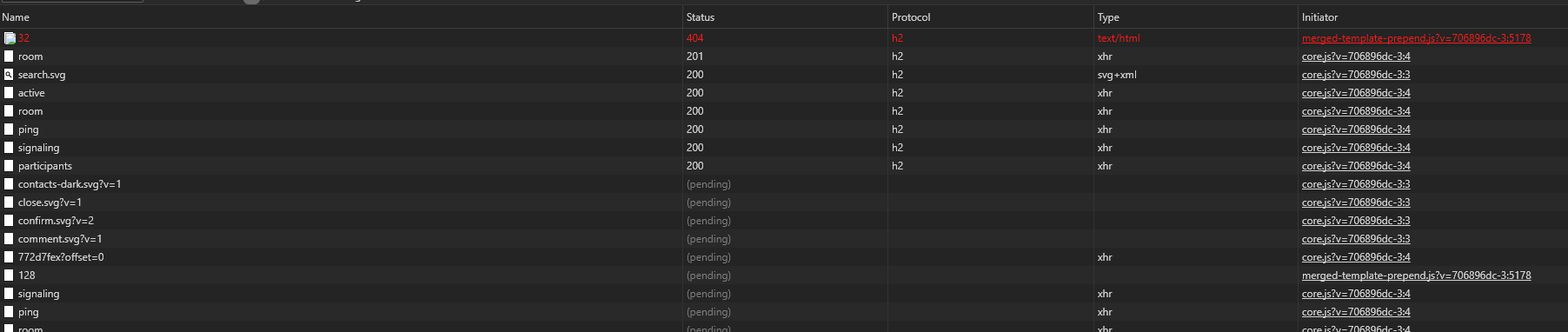
If I check console as soon as I enter a chat, there is a growing number of pending requests always starting with .svg files. They never finish. The other calls finish after 60 seconds or more.
Check the following screenshot of my chrome console window:
 next-direction
on 15 Feb 2018
next-direction
on 15 Feb 2018
I'm having the same issue. I originally upgraded to Nextcloud 13 RC4, then to Nextcloud 13 RTM.
OS: Debian 9.3 (stretch)
Web Server: Apache 2.4 w/MPM Worker
Options: SSL HTTP2
 shadoxx
on 20 Feb 2018
shadoxx
on 20 Feb 2018
Works for me on NGINX 1.13.9 and http/2 enabled.
NC 13
Ubuntu 16.04LTS
PHP 7.2
MariaDB
Redis
 ghost
on 8 Mar 2018
ghost
on 8 Mar 2018
@riegercloud Hey Carsten, we identified, that the problem only exists with Apache. Have you tested it with your Apache deployments?
Schnookeuz
on 8 Mar 2018
Yes, i did.
Talk videos didn't work on Apache 2.4.29, PHP7.2.
Do you know restrictictions/limitations regarding TALK and in particular PHP7.2?
Does Talk fully support php7.2?
ghost
on 9 Mar 2018
The php version should not be a problem. I'm developing locally against 7.2 too.
nickvergessen
on 9 Mar 2018
I use apache and http2 and it works beautifully.
 mario
on 17 Mar 2018
mario
on 17 Mar 2018
I use apache, https and http2 and it does not work at all. I got exactly the same behavior as @Schnookeuz.
Server is running on Debian Stretch. Details of my config is available on issue #765.
 b3
on 4 Apr 2018
b3
on 4 Apr 2018
it seems i'm suffering the same problem:
running NC 13.0.1 and Talk 3.1.0 on an older server (Ubuntu 14.04 / Apache 2.2) without http2 everything works fine, but on an newer one (Ubuntu 16.04 / Apache 2.4) with https2 Talk seems a kind of getting constipated after entering a room...
instead of showing the own avatar, the circles keep spinning forever [red], and also opening the dropdown to add some participants takes ages [yellow]. what i've also noticed is that some other icons seems to be different/wrong/missing compared to the working instance [green]:
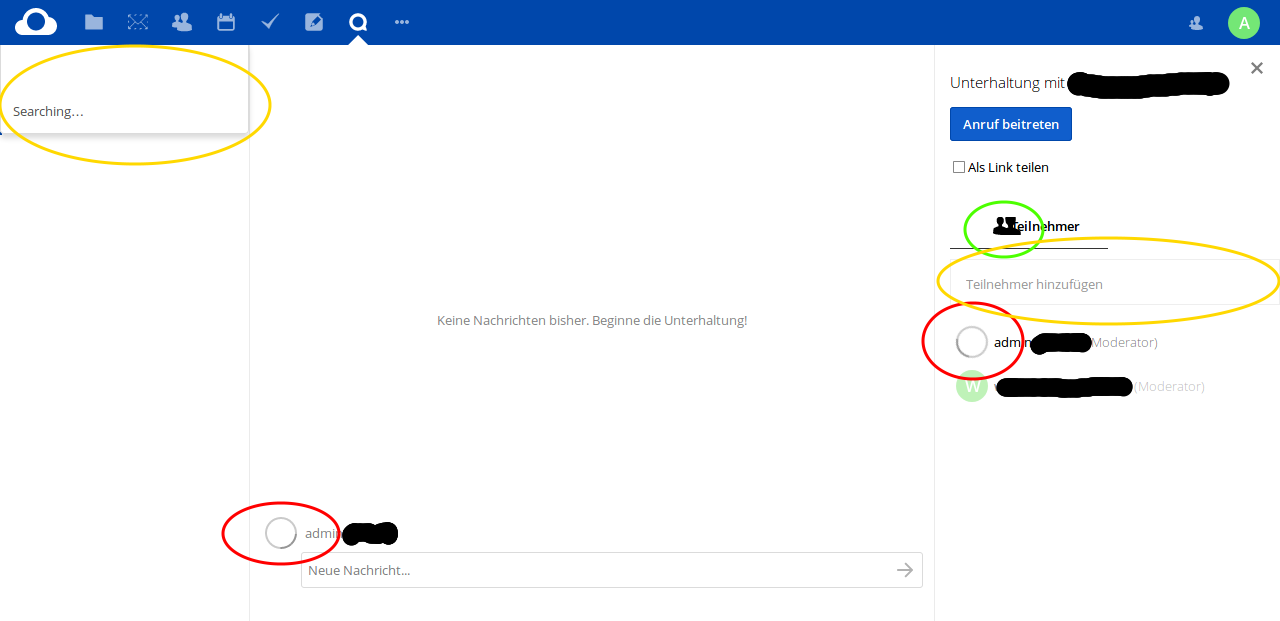
every other action like enabling "share as a link" or the notification in the desktop-client takes very long (approx. minutes) if it "works" at all.
maybe i'm wrong, but it also seems to me, that the cpu-usage of my browser (Firefox 59.0.1) also went up a little bit as long as i "use" Talk.
 DJCrashdummy
on 11 Apr 2018
DJCrashdummy
on 11 Apr 2018
Hey guys, sorry for the delay.
After weeks of trying i found the error for me:
As described in @riegercloud blog (https://www.c-rieger.de/fast-track/), I removed php7.0 and installed php-fpm 7.0 instead and see there: It works!
Until today i don't know what the difference between php & php-fpm is and why Talk with HTTP/2 is only working with this. Maybe @riegercloud can describe it?
EDIT:
And this mpm_event thing i installed also.
Schnookeuz
on 12 Apr 2018
@Schnookeuz thanks for the hint, but i'm not really sure:
i already used php-fpm 7.0 - according to my hoster, BUT after changing to php-fpm 7.1 or php-fpm 7.2 some symptoms seems to get better (like avatars appear instead of the spinning cycle; lock-icon isn't missing anymore), but each essential function like de-/activating "share via link", setting a password and entering/leaving a call still takes around 20-30 seconds...
so Talk 3.1.0 on my newer server (Ubuntu 16.04 / Apache 2.4 / with http2) still runs by far not as smooth as on my older server (Ubuntu 14.04, Apache 2.2, no http2)! :disappointed:
DJCrashdummy
on 12 Apr 2018
Any news or requirement on this one? I think I've got the same issue on Apache + php7 (I do not have php-fpm) + NC13.0.1 and http2 activated.
 biva
on 25 Apr 2018
biva
on 25 Apr 2018
Til today, i don't know the difference, but i think you need php-fpm and the mpm thingy to get http2 working on Apache. Follow @riegercloud's guide as mentioned in my last comment.
Schnookeuz
on 25 Apr 2018
This is most definitely working.
mario
on 25 Apr 2018
I believe I've narrowed down the issue to the worker that Apache 2.4 is configured to use. As @Schnookeuz pointed out, using the mpm_event worker in combination with php-fpm is the recommended way of running Nextcloud Talk.
I have just switched my worker in Apache from mpm_prefork to mpm_event, reconfigured everything, and now HTTP 2.0 is working wonderfully with Talk.
On Debian/Ubuntu you can easily switch your worker by running the following commands:
a2dismod mpm_prefork
a2enmod mpm_event
systemctl restart apache2
On CentOS 7, open up /etc/httpd/conf.modules.d/00-mpm.conf. Find the LoadModule line for mod_mpm_prefork.so, comment it out, and uncomment the line:
LoadModule mpm_event_module modules/mod_mpm_event.so
After you've saved your changes, restart httpd by running systemctl restart httpd as root.
shadoxx
on 26 Apr 2018
@Schnookeuz Thank you for your support. I'm a bit affraid of breaking everything with @riegercloud procedure (https://www.c-rieger.de/fast-track/). Could you share what you did?
What I understand is necessary (I'm on Debian 9, with PHP 7.0.27-0+deb9u1 installed) is only the Install Apache2, PHP and Redis-Server part, correct?
biva
on 27 Apr 2018
I am having similar problems with HTTP2 and Talk (behind apache reverse proxy)
@shadoxx did you change to php-fpm before switching from mpm_prefork to mpm_event?
I'm guessing yes, as I can't change with the php7.0 module enabled...
Also on Debian 9 with NextCloud 13.0.2, PHP 7.0.27-0+deb9u1
 zeigerpuppy
on 22 May 2018
zeigerpuppy
on 22 May 2018
@zeigerpuppy Sorry for not being more clear! You are correct, I had previously switched to php-fpm before switching out the worker. You'll need to disable thephp7.0 standalone module and configure your Apache server to use php-fpm before you can switch out the worker module.
shadoxx
on 22 May 2018
Running NC 13.0.2 apache docker image behind an nginx proxy and I am having similar problems. I will try out using fpm docker image.
Talk app is currently more or less not usable because each user has to reload mutiple times until a connection is established.
 bephinix
on 25 May 2018
bephinix
on 25 May 2018
Closing this, see https://github.com/nextcloud/spreed/issues/602#issuecomment-384468807 for tips
nickvergessen
on 30 Jul 2018
@nickvergessen shouldn't we add this tip to the documentation? (including also a change in https://docs.nextcloud.com/server/13/admin_manual/installation/system_requirements.html#server) I'd be happy to do it, but as mentioned in https://github.com/nextcloud/spreed/issues/602#issuecomment-385073888, I'm not skilled enough, and I don't know exactly how to change from php to php-fpm. I'd be very interested in having more details about this procedure.
biva
on 30 Jul 2018
Hello @Schnookeuz and @riegercloud : the page https://www.c-rieger.de/fast-track/ does not exist anymore. Could you share it again?
Thanks!
biva
on 4 Aug 2018
Again online - but no longer maintained ;-)
ghost
on 4 Aug 2018
Thanks @riegercloud
@Schnookeuz and @shadoxx , I moved from php 7.0 to 7.2-fpm. But now apcu caching does not work anymore, the logs are:
Info | cli | Memcache \OC\Memcache\APCu not available for distributed cache
Info | cli | Memcache \OC\Memcache\APCu not available for local cache
Is it working on your config?
biva
on 6 Aug 2018
Discussed in https://github.com/nextcloud/docker/issues/336#issuecomment-410619009
biva
on 6 Aug 2018
Related issues
mario
·
3Comments
 MarcoZehe
·
4Comments
MarcoZehe
·
4Comments
 q-wertz
·
3Comments
q-wertz
·
3Comments
 cbacit
·
3Comments
cbacit
·
3Comments
 ma12-co
·
3Comments
ma12-co
·
3Comments
Most helpful comment
Running NC 13.0.2 apache docker image behind an nginx proxy and I am having similar problems. I will try out using fpm docker image.
Talk app is currently more or less not usable because each user has to reload mutiple times until a connection is established.