Spotless: (Gradle) wrong intendentions wigh googleJavaFormat 1.9
Hi! I'm using your plugin to reformat code before compilation. The issue is that in some cases it does not format indentations properly (see picture below)
Gradle: 5.4.1
Spotless version 5.6.1
Operating system - Windows 10
Full Spotless configuration block(s):
plugins {
    id "com.diffplug.spotless" version "5.6.1"
}
spotless {
    java {
        googleJavaFormat("1.9")
        removeUnusedImports()
        importOrder('java', 'javax', '')
        indentWithTabs(2)
        indentWithSpaces(4)
        endWithNewline()
    }
}
compileJava {
    dependsOn spotlessJavaApply
}
Error 1: should be 8 spaces, but we're seeing 16 instead (sorry, can't show you the real code)
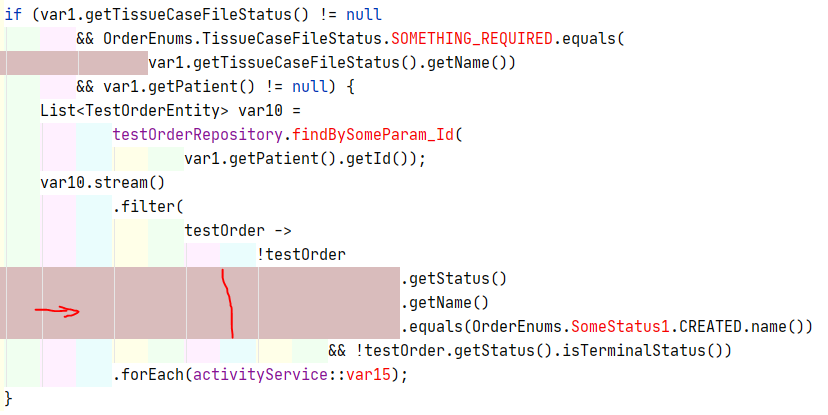
Error 2: unnecessary line breaking after annotation param, even if it doesn't require a lot of space to put at least one parameter on the first line.

No errors in gradlew spotless[Apply/Check] --stacktrace
 Ksenia989
All 4 comments
I believe that everything you're seeing are intended side-effects of google-java-format. It looks like you're replacing every 2 spaces with tabs, is that right? If so, I don't believe there's an easy way to fix this...
You could report it to the google-java-format team, but I'd be surprised if they agreed to change the indentation, because they like to follow the Google Java Style Guide and something called The Rectangle Rule, and I don't yet have any reason to believe that what you're seeing violates either of those.
If you need more flexibility, try Eclipse JDT. But if that doesn't do what you want, you may have better luck with Prettier (but note that it requires Node.js to be installed on your computer to work).
Let us know if you need any further help with this. :)
 jbduncan
on 13 Oct 2020
jbduncan
on 13 Oct 2020
Here's another option: we recently introduced spotless:(off|on) tags, which you can use to highlight bits of code that Spotless shouldn't touch. You can then manually format those bits of code to your liking.
jbduncan
on 13 Oct 2020
Thanks a lot! I'll try the Eclipse JDT. Prettier plugin for java is for maven, I'm using gradle anyway.
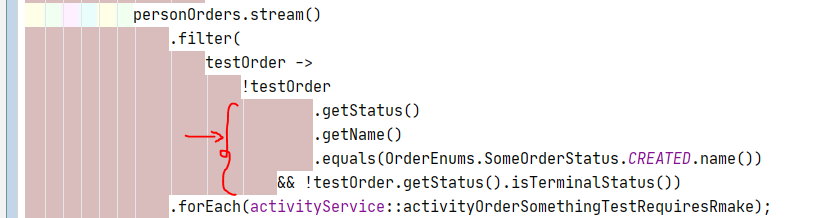
You asked about spaces and tabs: it works proportionally the same (just 8 instead of 4) spaces without my indentWithTabs(2) and
indentWithSpaces(4) setting:
Ksenia989
on 14 Oct 2020
Prettier plugin for java is for maven, I'm using gradle anyway.
Oh, really? I thought I linked you to our docs for using Prettier through our Gradle plugin, but if I linked the Maven plugin docs instead, then I'm very sorry! Is this link any better? https://github.com/diffplug/spotless/tree/main/plugin-gradle#prettier
And thanks for the screenshot, it clarifies things for me. I can confirm that that's definitely the expected behaviour of google-java-format.
I'm going to close this issue then under the assumption that everything's fine, but feel free to reopen if you need any further help.
jbduncan
on 14 Oct 2020
Related issues
 Puneetha17
·
6Comments
Puneetha17
·
6Comments
 netvl
·
6Comments
netvl
·
6Comments
 atrujillofalcon
·
5Comments
atrujillofalcon
·
5Comments
 I-Vargas
·
3Comments
I-Vargas
·
3Comments
 ZacSweers
·
3Comments
ZacSweers
·
3Comments