Spotipy: Offset field not working for user_playlist_tracks(), wrong response back
I'm getting an odd issue where I'm not retrieving the response that I'm expecting when calling user_playlist_tracks() to retrieve tracks from a playlist. I still retrieve the songs, but the paging object I receive back is incorrect, which is also preventing the 'limit' and 'offset' field from being set correctly, since they are now located in the 'track' object that gets returned.
According to the spotify docs: https://developer.spotify.com/documentation/web-api/reference/playlists/get-playlists-tracks/
I should be receiving a paging object like such:
{
  "href": "",
  "items": [ ],
  "limit": 0,
  "next": "",
  "offset": 0,
  "previous": "",
  "total" 0
}
Instead, I am receiving this:
{
  "collaborative": False,
  "description": "",
  "external_urls": {},
  "followers": {},
  "href": "",
  "id": "",
  "images": [],
  "name": "",
  "owner": {},
  "primary_color": null,
  "public": False
  "snapshot_id": "",
  "tracks": {},
  "type": "",
  "uri": "",
  "len": 0
}
Where the tracks object contains the paging object that I am actually expecting according to the Spotify docs above.
I am aware that this used to work properly since I have previously implemented code to retrieve all the tracks from my playlists, but for some reason, the response I'm getting back now with identical code is different. I'm not sure if this is something that has changed on Spotipy's end or the Spotify API.
 AndrewKassab
All 22 comments
Hi, I am correctly receiving something like:
{
  "href": "",
  "items": [ ],
  "limit": 0,
  "next": "",
  "offset": 0,
  "previous": "",
  "total" 0
}
Are you using any fields filter? Closing for now but feel free to re-open with your code.
 stephanebruckert
on 12 Jan 2020
stephanebruckert
on 12 Jan 2020
I just found what happened.
It looks like you've used user_playlist (not user_playlist_tracks) without playlist_id. When no playlist id is passed, it used to return your "starred playlist" by default. If that endpoint still responds successfully, most fields are empty because these starred playlists have been removed and have become "liked songs".
Anyway, you should now use playlist(playlist_id) or playlist_tracks(playlist_id)
stephanebruckert
on 16 Jan 2020
Still having the same issue. This is my code:
track_ids = set()

for playlist_id in source_playlist_ids:
    response = sp.playlist_tracks(playlist_id, fields='tracks')
    playlist_tracks = response['tracks']['items']
    while len(playlist_tracks) < response['tracks']['total']:
        response = sp.playlist_tracks(playlist_id,
                                           offset=len(playlist_tracks), fields='tracks')
        playlist_tracks.extend(response['tracks']['items'])
    for item in playlist_tracks:
        track_ids.add(item['track']['id'])
For the given playlist I am testing, response['tracks']['total'] is 699. Every iteration of the while loop is increasing the offset field by another 100, but the offset field never gets set in the playlist_tracks() call. I've followed your advice and used playlist_tracks instead of user_playlist_tracks, but now I just get a response like such.
{
    "tracks": { }
}
On one hand I got rid of the irrelevant fields, but on the other hand I still can't get the offset field within the tracks object to get set to anything but 0, and continuously receive the first 100 songs over and over.
Any idea why?? @stephanebruckert
AndrewKassab
on 12 Feb 2020
Hey @AndrewKassab. In your code you should have used items instead of tracks (see doc). I just added an example that uses playlist_tracks https://github.com/plamere/spotipy/blob/master/examples/playlist_tracks.py
stephanebruckert
on 13 Feb 2020
@stephanebruckert
I've followed your advice and made the change, but now all I receive is an empty dictionary / object. I copied your example exactly and received the same response from the playlist_tracks call.
I can't get items because items is inside tracks, and playlist_tracks is returning the parent object containing tracks, and not the tracks object itself....
Is this working on your end? Because I'm very confused. A previous app that I had coded, to use the exact same code to receive all songs from a playlist, stopped working as well with no changes from me and I have no clue why.
AndrewKassab
on 13 Feb 2020
Yeah it works for me. For playlist_tracks there is no "tracks" field in the response.
get-playlist has "items" in "tracks" but get-playlist-tracks only has "items".
stephanebruckert
on 13 Feb 2020
So https://github.com/plamere/spotipy/blob/master/examples/playlist_tracks.py does not work for you? What result do you get?
Please also make sure that you are using the latest version:
pip install spotipy --upgrade
@stephanebruckert
It does work in your code. Even after the first call to playlist_tracks(playlist_id, fields='items.track.id, total'), when debugging the response is just an empty dictionary.
Could this be a scope or setup issue? Check if you get the chance here
https://github.com/AndrewKassab/Playlist-Sync/blob/master/sync_playlist.py
AndrewKassab
on 13 Feb 2020
Just pushed the new code with new fields parameter set
AndrewKassab
on 13 Feb 2020
You are still looking for the tracks field that does not exist. Please start from the example and adapt it to your needs
stephanebruckert
on 13 Feb 2020
Sorry. Check now.
@stephanebruckert
AndrewKassab
on 13 Feb 2020
When debugging at line 31. Response is empty. Dictionary with length 0
AndrewKassab
on 13 Feb 2020
Yeah. As explained in https://github.com/plamere/spotipy/issues/396#issuecomment-585469276, tracks does not exist for the endpoint you are using.
stephanebruckert
on 13 Feb 2020
I'm confused. Like I said I am now calling response = sp.playlist_tracks(playlist_id, fields='items.track.id, total')
And when debugging after this call, response is set to an empty dictionary.
AndrewKassab
on 13 Feb 2020
Ok I see,
source_playlist_ids = ['3nWTj1ZAdLJXNiaLdMUOwj?si=0THwLcT5SDujFJhKt5aYIw']
Your playlist ID here should be 3nWTj1ZAdLJXNiaLdMUOwj
stephanebruckert
on 13 Feb 2020
@stephanebruckert
nice! You're a legend haha. Thanks a ton
AndrewKassab
on 13 Feb 2020
Any explanation as to why it still returned the playlist, but not in the same format?
AndrewKassab
on 13 Feb 2020
You mean an empty {}? Not sure, this has probably more to do with https://github.com/spotify/web-api/. This library is just stupidly returning what Spotify returns
stephanebruckert
on 13 Feb 2020
I mean when I was calling with fields='tracks', I was receiving an object containing tracks:
{
    "tracks": { all tracks content here }
}
Weird, but anyways I can finally say this is solved
AndrewKassab
on 13 Feb 2020
Is it possible you were calling sp.playlist, not sp.playlist_tracks?
stephanebruckert
on 13 Feb 2020
See here:
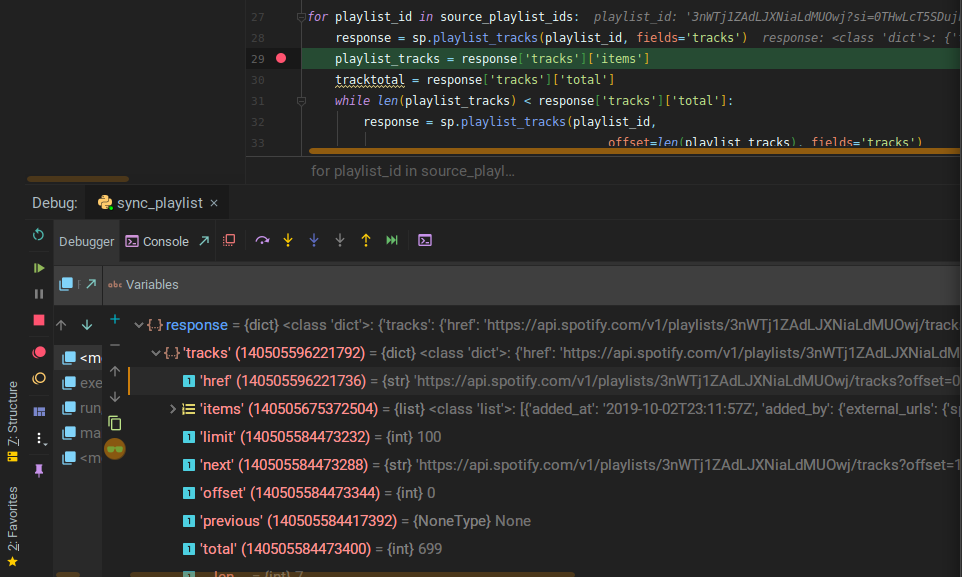
Using playlist_tracks on line 28, and debug output below does give me the tracks object
AndrewKassab
on 13 Feb 2020
I agree it's a bit weird. Unfortunately I can't test it because 3nWTj1ZAdLJXNiaLdMUOwj might be private? If you make it public or create a new public one with the same problem, I can check.
stephanebruckert
on 13 Feb 2020
Related issues
 danielgwilson
·
4Comments
danielgwilson
·
4Comments
 Jeoffreybauvin
·
4Comments
Jeoffreybauvin
·
4Comments
 Kurchunk
·
3Comments
Kurchunk
·
3Comments
 JessicaMartini212887
·
5Comments
JessicaMartini212887
·
5Comments
 DylanMeeus
·
4Comments
DylanMeeus
·
4Comments
Most helpful comment
@stephanebruckert
nice! You're a legend haha. Thanks a ton